Last updated: 9 October 2026. MoreLess
The steps below were recorded on 5 October 2026 on an IQ Option Practice account registered in Brazil; the country guides linked below were recorded on 8 and 9 October 2026. The country tables come from IQ Option’s official withdrawals page for accounts in 48 countries (4 to 8 October 2026). The accounts held no real money, so IQ Option showed the withdrawal page but no form, and we withdrew nothing.
Withdrawing from IQ Option takes five steps: open the withdrawal page, choose where the money goes, check the conditions, enter the amount and the details the method asks for, and follow the request until the money arrives. What changes from country to country is the list of methods, the minimum and the fee cap. The first withdrawal of each calendar month is free; later ones cost 2%, up to a cap. This guide shows each step with an annotated screenshot, then the fees, the minimums, the processing times, the verification rule and what to do if a withdrawal is late. Each country in the list below has its own guide, with its own banks, wallets and amounts.
Quick answer
- Fee: one free withdrawal per calendar month, whatever the method; after that 2%, at most $30, €30, £25 or the local cap (R$ 125 in Brazil, ₦47,620 in Nigeria, 620 MXN in Mexico).
- Minimum: $2 for cards, Skrill, Volet.com and WebMoney in 47 of the 48 countries we checked (Nigeria $10); $10 for Neteller; $12 for crypto; $10 to $36 for banks and local wallets, depending on the country.
- Time: IQ Option asks you to allow up to 3 business days; banks, e-wallets and crypto are listed at 1–24 hours, some banks and NAGAD at 1–3 or 1–8 business days; a card can take up to 21 calendar days at your bank.
- Where the money goes: the help centre says it depends on how you deposited: an e-wallet deposit can only go back to the same e-wallet, and a card gets back only what you paid in with it.
- Verification: required before your first withdrawal, according to IQ Option’s help centre.
- Empty balance: the withdrawal page then shows “You cannot withdraw funds because your balance is 0” instead of a form.
Withdrawal guides by country
Your country: . Open the withdrawal guide for your country.
The banks, e-wallets, minimums and fee caps differ by country, because IQ Option shows each account the withdrawal methods of the country it is registered in. Each guide below was recorded on a Practice account registered in that country.
- Brazil
18 banks, cards, Skrill - Nigeria
5 banks, OPay, cards - Malaysia
6 banks, cards, e-wallets - Thailand
9 banks, cards, e-wallets - Philippines
GCash, Maya, 8 banks - South Africa
6 banks, cards, e-wallets - Colombia
Nequi, Bre-B, 5 banks - Vietnam
7 banks, cards, e-wallets - United Arab Emirates
Cards, e-wallets, crypto (no banks) - Mexico
SPEI, 8 banks, cards - Peru
11 banks, cards, e-wallets - Chile
6 banks, cards, e-wallets - Argentina
Cards, e-wallets, crypto (no banks) - Sri Lanka
Cards, e-wallets, crypto (no banks) - Bangladesh
NAGAD, cards, e-wallets, crypto - Kenya
Mpesa, cards, e-wallets, crypto - Singapore
Cards, Volet.com, WebMoney, crypto (no banks) - Venezuela
Cards, Volet.com, WebMoney, crypto (no banks) - Ecuador
6 banks, cards, e-wallets, crypto - Cambodia
Cards, e-wallets, crypto (no banks) - Morocco
Cards, e-wallets, crypto (no banks) - Dominican Republic
Cards, e-wallets, crypto (no banks) - Jamaica
Cards, e-wallets, crypto (no banks) - Egypt
Cards, e-wallets, crypto (no banks) - Serbia
Cards, e-wallets (no banks, no crypto) - Bolivia
Cards, e-wallets, crypto (no banks) - Panama
Cards, e-wallets, crypto (no banks) - Laos
2 Thai banks, cards, e-wallets, crypto - Nicaragua
Cards, e-wallets, crypto (no banks) - Ghana
Mobile money, cards, e-wallets, crypto - Hong Kong
Cards, e-wallets, crypto (no banks) - New Zealand
Cards, e-wallets, crypto (no banks) - Costa Rica
Cards, e-wallets, crypto (no banks) - North Macedonia
Cards, e-wallets (no banks, no crypto) - Trinidad and Tobago
Cards, e-wallets, crypto (no banks) - Uruguay
Cards, e-wallets, crypto (no banks) - Kazakhstan
Cards, e-wallets, crypto (no banks) - Papua New Guinea
Cards, e-wallets, crypto (no banks) - Paraguay
Cards, e-wallets, crypto (no banks) - Guatemala
Cards, e-wallets, crypto (no banks) - Andorra
Cards, e-wallets (no banks, no crypto) - Monaco
Cards, e-wallets (no banks, no crypto) - Bhutan
Cards, e-wallets, crypto (no banks) - Bosnia and Herzegovina
Cards, e-wallets, crypto (no banks) - Montenegro
Cards, e-wallets, crypto (no banks) - Brunei
Cards, e-wallets, crypto (no banks) - Belize
Cards, Volet.com, WebMoney, crypto (no banks) - Algeria
Cards, e-wallets (crypto left out)
 Brazil
 Nigeria
 Malaysia
 Thailand
 Philippines
 South Africa
 Colombia
 Vietnam
 United Arab Emirates
 Mexico
 Peru
Peru Chile
Chile Argentina
 Sri Lanka
 Bangladesh
 Kenya
Kenya Singapore
 Venezuela
 Ecuador
 Cambodia
 Morocco
 Dominican Republic
 Jamaica
 Egypt
Egypt Serbia
 Bolivia
 Panama
 Laos
Laos Nicaragua
 Ghana
Ghana Hong Kong
 New Zealand
 Costa Rica
 North Macedonia
 Trinidad and Tobago
 Uruguay
 Kazakhstan
 Papua New Guinea
 Paraguay
 Guatemala
 Andorra
 Monaco
 Bhutan
 Bosnia and Herzegovina
 Montenegro
 Brunei
 Belize
 Algeria
Is your country not listed? The steps below are the same everywhere; only the list of methods and the amounts change.
How to withdraw from IQ Option, step by step
We followed the steps on a Practice account registered in Brazil that had never made a deposit. The numbers in each screenshot show where to look, in order. With R$ 0.00 in the real account, the page stopped at a message instead of a form, so the details of Step 4 come from IQ Option’s help centre. Where a step is not shown on screen, we say so.
Step 1: Open the withdrawal page
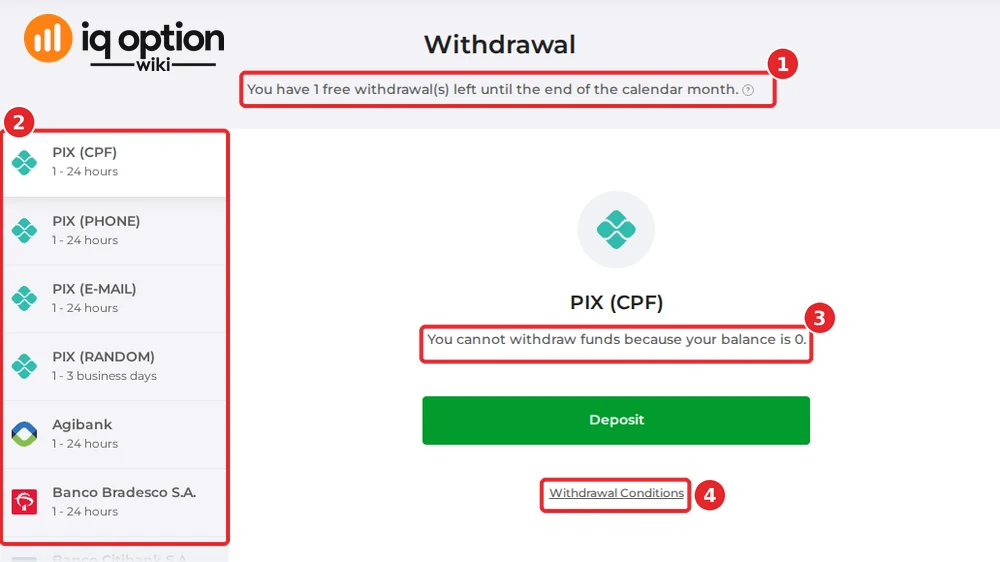
Log in, open your profile menu at the top right and choose Withdraw Funds, or go straight to iqoption.com/en/withdrawal. The page is called Withdrawal. Under the heading it counts your free withdrawals: “You have 1 free withdrawal(s) left until the end of the calendar month” (1). The left column (2) lists the methods open to your account, with the time each one takes. The right panel (3) shows the method you selected: with no money in the real account, it says “You cannot withdraw funds because your balance is 0” and offers a Deposit button. Withdrawal Conditions (4) opens IQ Option’s official table.
Step 2: Choose where the money goes
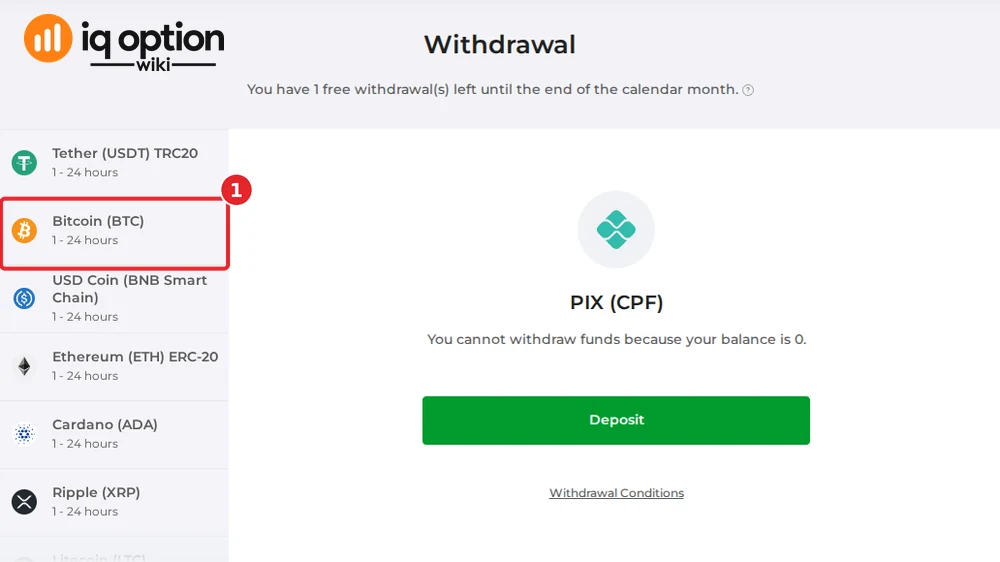
Click a method in the left column. The list depends on the country of your account: our Brazilian account saw four PIX entries, 18 banks, Nubank, PicPay, seven cryptocurrencies and three e-wallets. Our other accounts saw Nigerian, Malaysian or Thai banks and mobile wallets such as GCash, Maya, NAGAD, Mpesa and Ghana’s mobile money, and in most countries no bank at all, only cards, e-wallets and coins; see the guides above. Two rules from IQ Option’s help centre decide what you can pick:
- E-wallets: if you funded the account with an e-wallet, you can only withdraw to the same e-wallet account.
- Cards: the amount you can withdraw to a card is limited to what you deposited with that card, and the help centre sets the window at the last 180 days. Profits above that can go to an e-wallet such as Skrill, Neteller or WebMoney.
Crypto is in the list too. On our Brazilian account it had seven coins, including Bitcoin (1), although the official table lists only six and no Bitcoin. The accounts we opened in 46 other countries on 8 and 9 October 2026 listed no Visa/Mastercard entry, which the table has, and where the table has coins they listed Bitcoin next to them as well (our Algerian guide leaves the coin entries out); the table and the page do not always agree, so trust the page for your own account.
Step 3: Read the withdrawal conditions
Click Withdrawal Conditions. IQ Option’s official table lists every method for your country with the minimum amount in the currencies of the account, the commission and the processing time. The four numbers in the screenshot point to the free withdrawal (1), the minimum (2), the commission (3) and the time (4). On our Brazilian account, Agibank was listed from R$ 60, with a commission of 2%, at most R$ 125, in 1 to 24 hours.
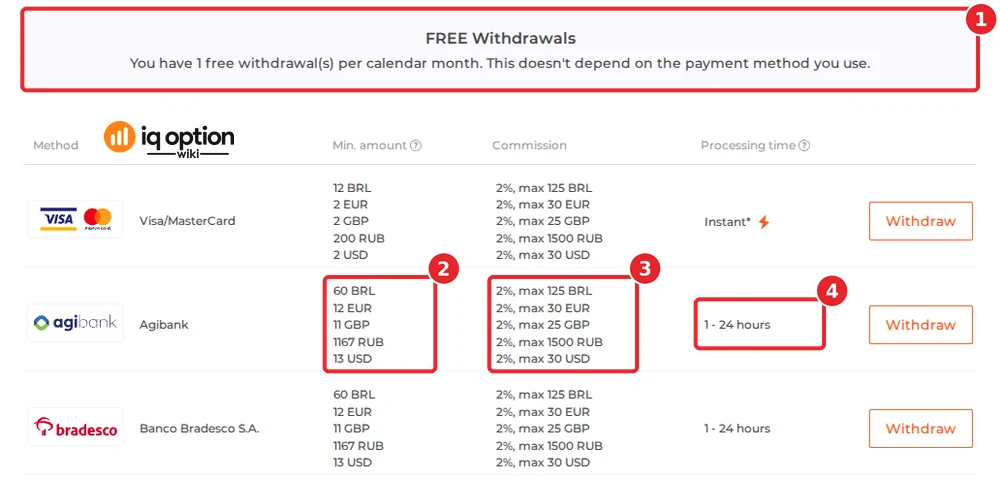
The table also carries IQ Option’s notes. Allow up to 3 business days for your request to be processed; some withdrawals take longer; a withdrawal to a card can take up to 21 calendar days at the bank that issued the card. Unless your account is fully verified, some countries may restrict certain methods.
Step 4: Enter the details and confirm
With money in the account, the right panel replaces the message with a form for the method you chose. The help centre describes it plainly: choose a withdrawal method, specify the amount and any other necessary details, and click Withdraw Funds. The number of requests is unlimited and the amount cannot exceed your balance. The details differ by method. We could not open a form on 5 October 2026, so we cannot show the fields; read each one before you confirm, and check that the commission shown is the one you expect.
Step 5: Follow the request
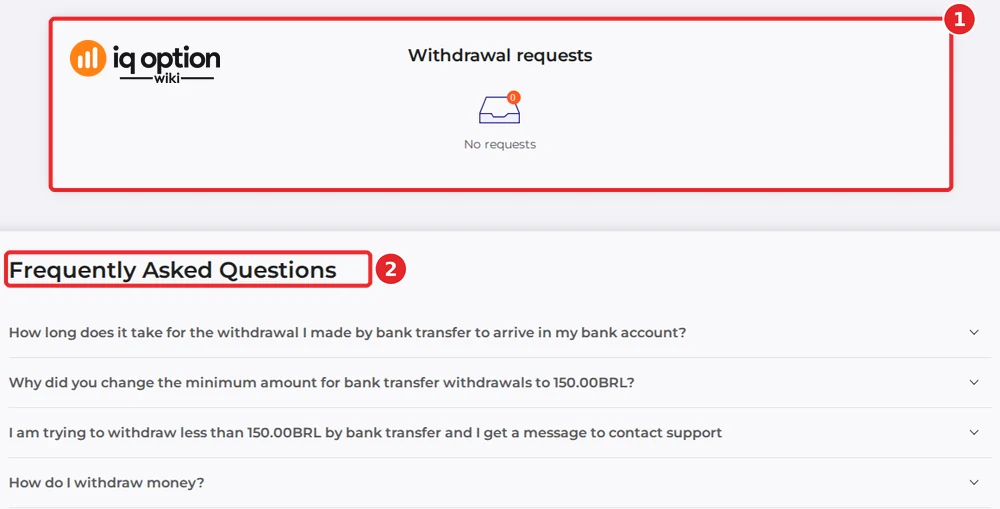
After you confirm, the request appears in the Withdrawal requests panel at the bottom of the withdrawal page (1); it was empty on our account. Under it, the page shows the Frequently Asked Questions for your country (2). The help centre names three stages: Requested, when the money is taken off your balance; In process, once IQ Option starts handling the request; and Funds sent, when the money has left IQ Option. After that, the time depends on your bank or e-wallet.
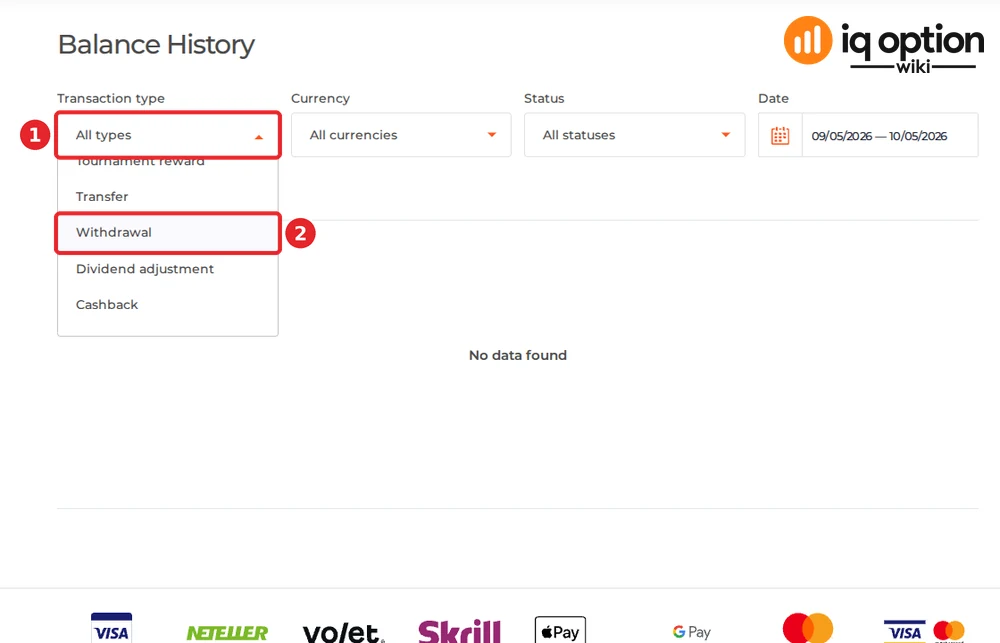
You can also open Balance History, choose Withdrawal in the Transaction type filter (1 and 2) and read the status of each request: Completed, In progress, Canceled or Failed.
The free withdrawal and the fee caps
The notice at the top of the withdrawal page, and its question mark, say it in one sentence: “You have 1 free withdrawal(s) per calendar month. This doesn’t depend on the payment method you use.” The official table then lists the commission for every other withdrawal in the month: 2% of the amount, with a cap that depends on the currency of your account. A second withdrawal of $500 costs $10; one of $5,000 costs $30, not $100. The cap in every country we checked:
| Account currency | Commission after the free withdrawal | The cap is reached at |
|---|---|---|
| US dollars | 2%, at most $30 | $1,500 |
| Euros | 2%, at most €30 | €1,500 |
| British pounds | 2%, at most £25 | £1,250 |
| Brazilian reais | 2%, at most R$ 125 | R$ 6,250 |
| Nigerian naira | 2%, at most ₦47,620 | ₦2,381,000 |
| Malaysian ringgit | 2%, at most RM 125 | RM 6,250 |
| Thai baht | 2%, at most ฿1,000 | ฿50,000 |
| Philippine pesos | 2%, at most ₱1,500 | ₱75,000 |
| Colombian pesos | 2%, at most COL$ 106,600 | COL$ 5,330,000 |
| Vietnamese dong | 2%, at most 750,000 ₫ | 37,500,000 ₫ |
| UAE dirhams | 2%, at most AED 110 | AED 5,500 |
| Mexican pesos | 2%, at most 620 MXN | 31,000 MXN |
| Peruvian soles | 2%, at most S/ 114 | S/ 5,700 |
| Chilean pesos | 2%, at most CLP 30,000 | CLP 1,500,000 |
| South African rand | 2%, at most R450 | R22,500 |
Argentine accounts can only be in dollars, euros or pounds, so the first three rows apply to them. Your bank, card issuer or wallet may add its own fee, and the EU entity of IQ Option, which serves visitors from the EEA, has its own fee page. Our fees guide covers the other costs.
Minimums and processing times by method
IQ Option’s help centre gives $2.00 as the general minimum and says the maximum depends on the method. The official tables give the exact figure for each method. Across the 48 country tables we read between 4 and 8 October 2026:
| Method | Minimum in the tables | Time shown |
|---|---|---|
| Visa/Mastercard | $2 (€2, £2) in 47 countries; ₦14,000 ($10) in Nigeria | Instant on IQ Option’s side; up to 21 calendar days at your bank |
| Skrill, Volet.com, WebMoney | $2 (€2, £2); $10 in Nigeria | 1–24 hours |
| Neteller | $10 (€10, £10) in the 41 countries that list it | 1–24 hours |
| Crypto (six coins; seven in Vietnam and Guatemala) | $12 (€10, £10) in the 44 countries whose table has coins (none in Serbia, North Macedonia, Andorra and Monaco) | 1–24 hours |
| Banks and local wallets | From $10 (Philippine banks and GCash, NAGAD in Bangladesh, Mpesa in Kenya) to $36 (Mexican banks) | 1–24 hours at most; 1–3 business days at Colombian and South African banks, First Bank (Nigeria), VP Bank (Vietnam), the two Thai banks in Laos’ table and NAGAD (Bangladesh); 1–8 business days at seven Brazilian banks; 1–24 business days at AmBank (Malaysia) |
The by-country table further down gives the local-currency figures, and each country guide lists every method. Not every method appears in every country: 35 of the 48 official tables have no bank withdrawal at all (Bangladesh, Ghana and Kenya offer a mobile wallet instead), and 13 have banks.
How long a withdrawal takes
- IQ Option’s own processing: up to 3 business days for every request, says the help centre. The notes under the official table repeat it and add that some withdrawals take longer.
- E-wallets: the help centre says the money reaches an e-wallet within about 24 hours of IQ Option completing the request.
- Banks: the help centre gives 1 to 5 calendar days for bank transfers depending on country and bank; the tables list 1 to 24 hours for most banks and business days for some.
- Cards: shown as instant, but the bank that issued the card may need up to 21 days (3 weeks). If the money has not arrived on day 21, the help centre asks for a bank statement showing the card details, sent to docs@iqoption.com from the email of your account or through the live chat.
Verification before your first withdrawal
The help centre answers “Do I need to provide any documents to make a withdrawal?” with “Yes. You need to verify your identity in order to withdraw funds.” It asks for a photo of an identity document (passport, driver’s licence, national ID card, residence permit, refugee identity certificate, refugee travel passport or voter ID). If you deposited with a bank card, it also asks for both sides of each card you used, with the CVV hidden and only the first six and last four digits visible. If you only used e-wallets, an identity document is enough. It says the documents are checked within 3 business days. The withdrawal page of our empty Brazilian account showed no verification warning, but the account had never deposited. See our account verification guide for the steps.
Withdrawal methods by country
These are the figures in IQ Option’s official tables for accounts in each country, in local currency. Open the country guide for the full method list, the screenshots and the local details.
| Country | Bank or local-method minimum | Card minimum | Fee cap after the free withdrawal | Bank time shown |
|---|---|---|---|---|
| Brazil | R$ 60 (18 banks) | R$ 12 | R$ 125 | 1–24 hours; seven banks 1–8 business days |
| Nigeria | ₦15,500 | ₦14,000 | ₦47,620 | 1–24 hours; First Bank 1–3 business days |
| Malaysia | RM 50 | RM 10–13 | RM 125 | 1–24 hours; AmBank 1–24 business days |
| Thailand | ฿350 | ฿70 | ฿1,000 | 1–24 hours |
| Philippines | ₱500 (banks), ₱580 (GCash, Maya) | ₱120 | ₱1,500 | 1–24 hours |
| South Africa | R167 | R32 | R450 | 1–3 business days |
| Colombia | COL$ 110,000 (banks, Bre-B), COL$ 50,000 (Nequi) | COL$ 10,000 | COL$ 106,600 | Banks 1–3 business days; Nequi and Bre-B 1–24 hours |
| Vietnam | 300,000 ₫ | 50,000 ₫ | 750,000 ₫ | 1–24 hours; VP Bank 1–3 business days |
| United Arab Emirates | No bank withdrawal (crypto from AED 43) | AED 8 | AED 110 | Crypto 1–24 hours |
| Mexico | 200 MXN (SPEI), 570 MXN (banks) | 40 MXN | 620 MXN | 1–24 hours |
| Peru | S/ 110 | S/ 8 | S/ 114 | 1–24 hours |
| Chile | CLP 22,100 | CLP 2,000 | CLP 30,000 | 1–24 hours |
| Argentina | No bank withdrawal (crypto from $12) | $2 | $30 | Crypto 1–24 hours |
| Sri Lanka | No bank withdrawal (crypto from $12) | $2 | $30 | Crypto 1–24 hours |
| Bangladesh | $10 (NAGAD; no banks) | $2 | $30 | NAGAD 1–3 business days |
| Kenya | $10 (Mpesa; no banks) | $2 | $30 | Mpesa 1–24 hours |
| Singapore | No bank withdrawal (crypto from S$ 15) | S$ 3 | S$ 43 | Crypto 1–24 hours |
| Venezuela | No bank withdrawal (crypto from $12) | $2 | $30 | Crypto 1–24 hours |
| Ecuador | $28 (6 banks) | $2 | $30 | 1–24 hours |
| Cambodia | No bank withdrawal (crypto from $12) | $2 | $30 | Crypto 1–24 hours |
| Morocco | No bank withdrawal (crypto from 110 MAD) | 20 MAD | 310 MAD | Crypto 1–24 hours |
| Dominican Republic | No bank withdrawal (crypto from 728 DOP) | 150 DOP | 1,700 DOP | Crypto 1–24 hours |
| Jamaica | No bank withdrawal (crypto from $12) | $2 | $30 | Crypto 1–24 hours |
| Egypt | No bank withdrawal (crypto from E£609) | E£100 | E£900 | Crypto 1–24 hours |
| Serbia | No bank withdrawal (Neteller from €10) | €2 | €30 | E-wallets 1–24 hours |
| Bolivia | No bank withdrawal (crypto from €10) | €3 | €30 | Crypto 1–24 hours |
| Panama | No bank withdrawal (crypto from $12) | $2 | $30 | Crypto 1–24 hours |
| Laos | $16 (2 Thai banks) | $2 | $30 | Banks 1–3 business days |
| Nicaragua | No bank withdrawal (crypto from $12) | $2 | $30 | Crypto 1–24 hours |
| Ghana | $12 (mobile money; no banks) | $2 | $30 | Mobile money 1–24 hours |
| Hong Kong | No bank withdrawal (crypto from HK$ 91) | HK$ 16 | HK$ 240 | Crypto 1–24 hours |
| New Zealand | No bank withdrawal (crypto from $12) | $2 | $30 | Crypto 1–24 hours |
| Costa Rica | No bank withdrawal (crypto from ₡ 5,739) | ₡ 900 | ₡ 16,500 | Crypto 1–24 hours |
| North Macedonia | No bank withdrawal (Neteller from €10) | €2 | €30 | E-wallets 1–24 hours |
| Trinidad and Tobago | No bank withdrawal (crypto from $12) | $2 | $30 | Crypto 1–24 hours |
| Uruguay | No bank withdrawal (crypto from $12) | $2 | $30 | Crypto 1–24 hours |
| Kazakhstan | No bank withdrawal (crypto from $12) | $2 | $30 | Crypto 1–24 hours |
| Papua New Guinea | No bank withdrawal (crypto from $12) | $2 | $30 | Crypto 1–24 hours |
| Paraguay | No bank withdrawal (crypto from $12) | $2 | $30 | Crypto 1–24 hours |
| Guatemala | No bank withdrawal (crypto from $12) | $2 | $30 | Crypto 1–24 hours |
| Andorra | No bank withdrawal (Neteller from €10) | €2 | €30 | E-wallets 1–24 hours |
| Monaco | No bank withdrawal (Neteller from €10) | €2 | €30 | E-wallets 1–24 hours |
| Bhutan | No bank withdrawal (crypto from $12) | $2 | $30 | Crypto 1–24 hours |
| Bosnia and Herzegovina | No bank withdrawal (crypto from €10) | €3 | €30 | Crypto 1–24 hours |
| Montenegro | No bank withdrawal (crypto from €10) | €3 | €30 | Crypto 1–24 hours |
| Brunei | No bank withdrawal (crypto from $12) | $2 | $30 | Crypto 1–24 hours |
| Belize | No bank withdrawal (crypto from $12) | $2 | $30 | Crypto 1–24 hours |
| Algeria | No bank withdrawal (Neteller from $10) | $2 | $30 | E-wallets 1–24 hours |
If your withdrawal has not arrived
- Check the status. Requested and In process mean IQ Option is still handling the request, which it asks you to allow up to 3 business days. Funds sent means IQ Option has paid out; the rest is up to your bank or wallet.
- Check the method’s time. A card can take up to 21 calendar days, and some banks are listed in business days.
- Check the amount. A request under the method’s minimum does not go through, and the amount cannot exceed your balance.
- Check the verification. The help centre says you must verify your identity to withdraw.
- Contact support. Use the chat inside the platform (Chats & Support in the left sidebar) or write to support@iqoption.com. IQ Option’s contact page lists no phone number. See our support guide.
Before you deposit: test a withdrawal early
Withdrawal rules decide how money can come back, so read them before you fund the account: the method you deposit with limits where you can withdraw to, and verification takes up to 3 business days. See how to deposit on IQ Option, choose the guide for your country, and try a small withdrawal first. For crypto, read does IQ Option accept crypto.
📚 Continue learning
Frequently Asked Questions
Q: How do I withdraw money from IQ Option?
A: Open the withdrawal page (profile menu, then Withdraw Funds), choose a method, enter the amount and the details the form asks for, and click Withdraw Funds. The request appears in the Withdrawal requests panel on the same page.
Q: Is there a fee to withdraw from IQ Option?
A: One withdrawal per calendar month is free, whatever the method. After that, IQ Option charges 2%, at most $30, €30 or £25, or the local cap in the table above (R$ 125 in Brazil, ₦47,620 in Nigeria).
Q: What is the minimum withdrawal on IQ Option?
A: The help centre says $2.00. In the official tables it was $2 for cards, Skrill, Volet.com and WebMoney in 47 of 48 countries, $10 for Neteller, $12 for crypto and $10 to $36 for banks and local wallets.
Q: How long does a withdrawal take?
A: IQ Option asks you to allow up to 3 business days. After that, e-wallets, crypto and most banks are listed at 1 to 24 hours, and a card can take up to 21 calendar days at your bank.
Q: Can I withdraw without verification?
A: No, according to IQ Option’s help centre: you must verify your identity first. It asks for a photo of an identity document, and for both sides of your card if you deposited by card.
Q: Can I withdraw to a different method than I deposited with?
A: Only partly. The help centre says an e-wallet deposit can only be withdrawn to the same e-wallet, and that a card gets back what you deposited with it, up to the last 180 days. Profits above that can go to an e-wallet such as Skrill, Neteller or WebMoney.
Q: Why does the withdrawal page say my balance is 0?
A: The page opens only for a real balance. With R$ 0.00 in the real account it shows “You cannot withdraw funds because your balance is 0” and a Deposit button. The Practice account’s virtual money cannot be withdrawn.
Q: Can I withdraw Bitcoin?
A: The withdrawal pages of our Brazilian account and of our accounts in the other countries whose table has coins listed Bitcoin (BTC) next to the other coins, while the official tables list only the others. We could not open a form with an empty balance, so check the list on your own withdrawal page. See does IQ Option accept crypto.
Q: How many withdrawals can I make?
A: The help centre says the number of withdrawal requests is unlimited, as long as each one stays within your balance. Only the first one each calendar month is free.
Q: Where can I see my withdrawal?
A: In the Withdrawal requests panel at the bottom of the withdrawal page, and in Balance History with the Transaction type set to Withdrawal.