Last updated: 5 October 2026. MoreLess
Every step below was recorded on the IQ Option platform on 4 and 5 October 2026, on Practice accounts registered in Brazil and Mexico. We stopped before the final payment button, so no money was sent.
Depositing on IQ Option takes six steps, and they were the same for every method we tried: open the cashier, pick the real account, choose a method, set your account currency, enter the amount and fill in the payment details. What changes from country to country is the list of methods and the minimum amount. This guide shows each step with an annotated screenshot, then card and crypto deposits, fees and what to do if a deposit does not arrive. Each country in the list below has its own guide, recorded on an account registered in that country, with its own screenshots, methods and limits.
Quick answer
- Minimum: $10, €10 or £10; R$55 in Brazil (Volet.com R$60); 175 MXN in Mexico.
- Fee: 0% from IQ Option on every method on its deposits page.
- Time: Mastercard and e-wallets instant; SPEI 2–60 minutes; PIX 1–6 hours; crypto 5–60 minutes.
- Currency: chosen before your first deposit and fixed after it.
- Bonus: a welcome-bonus code is pre-applied; remove it if you do not want one.
- Your own name only: PIX, PicPay and SPEI accept payments only from your own CPF or CURP.
Deposit guides by country
Your country: . Open the deposit guide for your country.
The methods, minimums and screenshots differ by country, because IQ Option shows each account the methods of the country it is registered in. Each guide below was recorded on a Practice account registered in that country.
- Brazil
PIX, PicPay, Boleto, cards - Mexico
SPEI, OXXO, cards - Peru
Yape, Plin, BCP - Chile
WebPay, Mach, Khipu - Colombia
Nequi, PSE, Efecty - Argentina
Mercado Pago QR, MODO, Rapi Pago - Thailand
Kasikorn, SCB, Krungthai QR - Vietnam
Vietcombank QR, BIDV, VietQR - Nigeria
Bank transfer, OPay, PalmPay - Philippines
GCash, Maya, QRPH - South Africa
FNB, ABSA, Standard Bank - Malaysia
Maybank, CIMB, DuitNow QR - United Arab Emirates
Card, Apple Pay, USDT - Sri Lanka
Cards, Skrill, USDT - Bangladesh
NAGAD, Mastercard, USDT - Kenya
Cards, Skrill, Neteller, USDT - Singapore
Cards, Maybank, USDT - Venezuela
Cards, USDT - Ecuador
Red Activa, Mi Comisariato, cards - Morocco
Cards, Skrill, Neteller, USDT - Cambodia
Cards, Skrill, Thai banks, USDT - Dominican Republic
Mastercard, Visa, Skrill, USDT - Jamaica
Visa, Mastercard, Skrill, USDT - Egypt
Instapay, Vodafone, Mastercard, USDT - Serbia
Visa, Mastercard, Skrill, Neteller - Bolivia
Visa, Mastercard, Skrill, USDT - Panama
Visa, Mastercard, Skrill, USDT - Laos
Mastercard, Apple Pay, Thai banks, USDT - Nicaragua
Visa, Mastercard, Neteller, Skrill, USDT - Ghana
Visa, Mastercard, Mobile Money, Skrill, USDT - Hong Kong
Visa, Mastercard, USDT - New Zealand
Mastercard, Apple Pay, Neteller, USDT - Costa Rica
Banco Nacional, Visa, Skrill, USDT - North Macedonia
Visa, Mastercard, Skrill, Neteller - Trinidad and Tobago
Visa, Mastercard, Skrill, USDT - Uruguay
Mastercard, Visa, Neteller, Skrill, USDT - Algeria
Visa, Mastercard, Skrill, Neteller - Kazakhstan
Visa, Mastercard, Skrill, USDT - Papua New Guinea
Visa, Mastercard, USDT - Paraguay
Visa, Mastercard, Skrill, Neteller, USDT - Guatemala
Visa, Mastercard, Skrill, Neteller, Apple Pay - Andorra
Visa, Mastercard, Skrill, Neteller - Monaco
Visa, Mastercard, Skrill, Neteller - Bhutan
Visa, Mastercard, USDT - Bosnia and Herzegovina
Visa, Mastercard, Skrill, Neteller, USDT - Montenegro
Visa, Mastercard, Skrill, Neteller, USDT - Brunei
Visa, Mastercard, Skrill, Neteller, USDT - Belize
Visa, Mastercard, Ethereum
 Brazil
 Mexico
 Peru
Peru Chile
Chile Colombia
 Argentina
 Thailand
 Vietnam
 Nigeria
 Philippines
 South Africa
 Malaysia
 United Arab Emirates
 Sri Lanka
 Bangladesh
 Kenya
Kenya Singapore
 Venezuela
 Ecuador
 Morocco
 Cambodia
 Dominican Republic
 Jamaica
 Egypt
Egypt Serbia
 Bolivia
 Panama
 Laos
Laos Nicaragua
 Ghana
Ghana Hong Kong
 New Zealand
 Costa Rica
 North Macedonia
 Trinidad and Tobago
 Uruguay
 Algeria
 Kazakhstan
 Papua New Guinea
 Paraguay
 Guatemala
 Andorra
 Monaco
 Bhutan
 Bosnia and Herzegovina
 Montenegro
 Brunei
 Belize
Is your country not listed? The six steps below are the same everywhere; only the list of methods in Step 3 changes.
How to deposit on IQ Option, step by step
We followed the steps on a Practice account registered in Brazil and chose PIX. The numbers in each screenshot show where to click, in order.
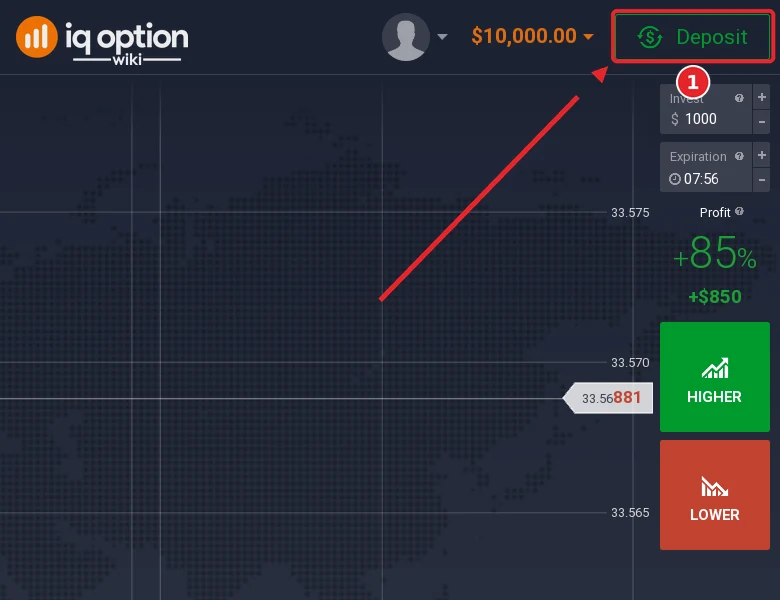
Step 1: Click Deposit
In the traderoom, click the green Deposit button at the top right, next to your balance (1).
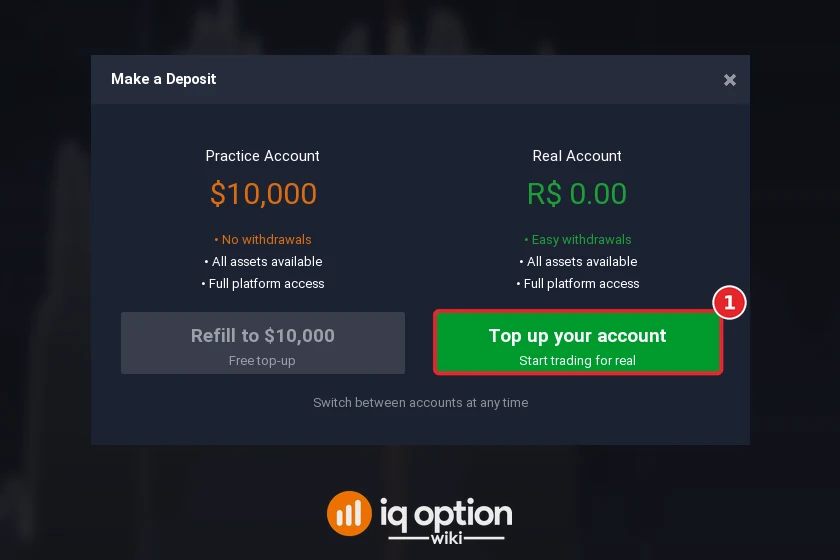
Step 2: Choose “Top up your account”
A window asks which balance you want to fund. Refill to $10,000 only refills the free Practice account with virtual money, which cannot be withdrawn. To deposit real money, click Top up your account (1). You can switch between the two accounts at any time.
Step 3: Choose a payment method
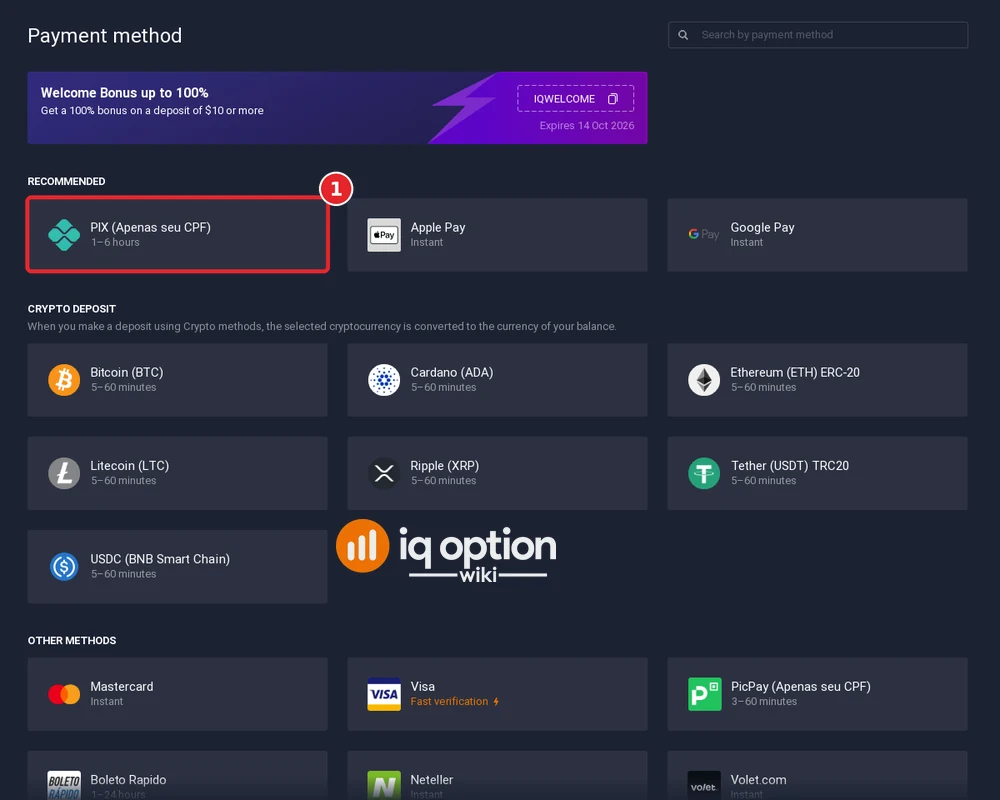
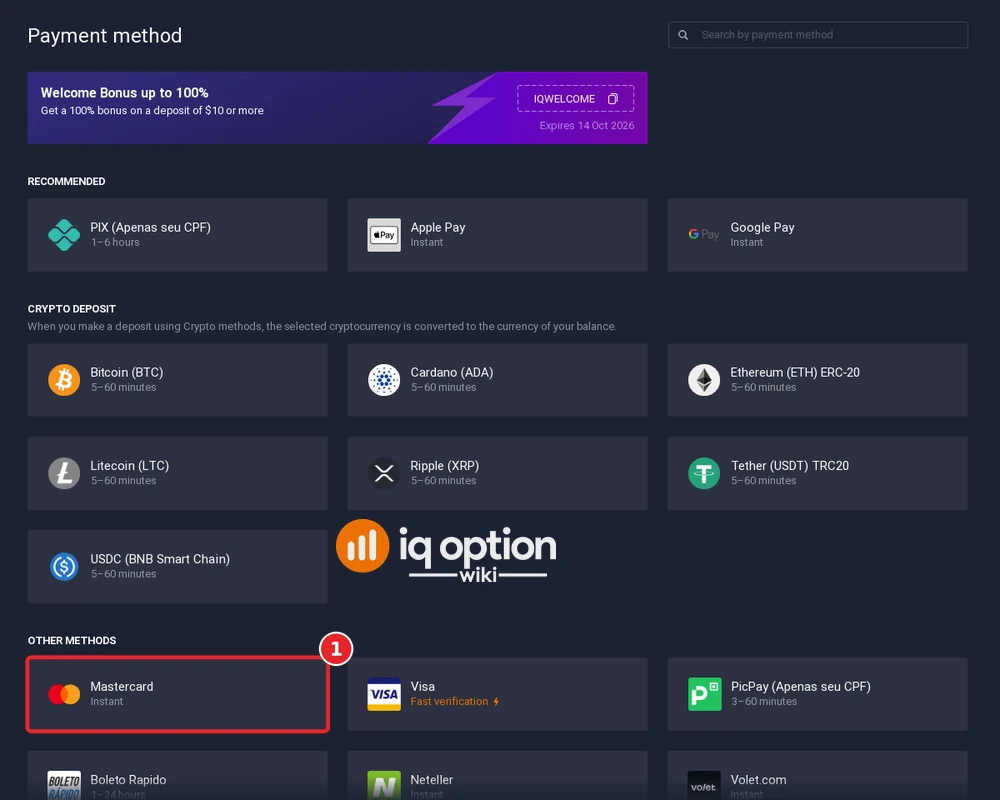
The cashier lists the methods available for the country your account is registered in. Our Brazilian account showed PIX, Apple Pay and Google Pay at the top, then seven cryptocurrencies, then cards, PicPay, Boleto Rapido and e-wallets. Click the method you want, here PIX (1). A welcome-bonus banner sits above the list.
Step 4: Choose your account currency
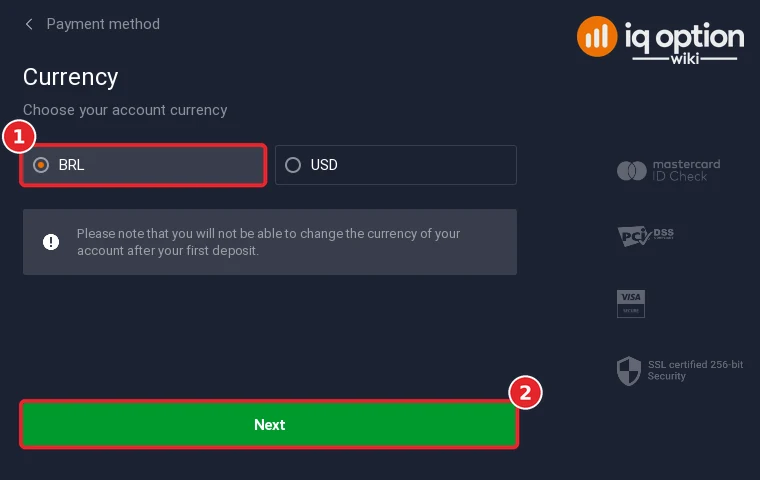
Before your first deposit the cashier asks for the currency of your real account. Select it (1) and click Next (2). Our Brazilian account could choose BRL or USD; our Mexican account could choose MXN, EUR, GBP or USD. IQ Option warns that you cannot change the currency after your first deposit, so pick the currency of the account you will deposit from and withdraw to.
Step 5: Enter the amount and check the bonus
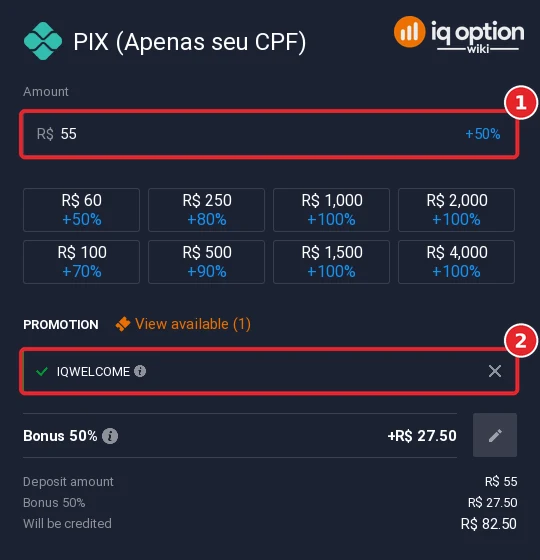
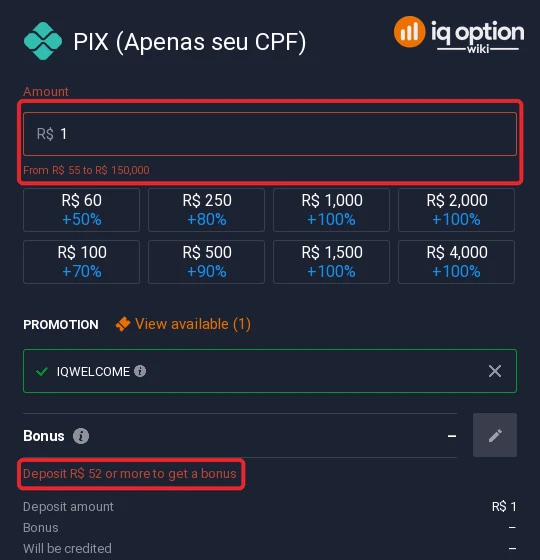
Type the amount (1) or click one of the quick amounts. The field starts at the minimum and marks anything outside the allowed range in red: for PIX on our Brazilian account that was R$55 to R$150,000.
A welcome-bonus code, IQWELCOME, was already applied (2). On R$55 it added 50% (R$27.50), and the quick amounts showed up to +100% from R$1,000. If you do not want a bonus, remove the code with the × before you pay, and read the bonus terms behind the (i) icon first.
Step 6: Enter your payment details and confirm
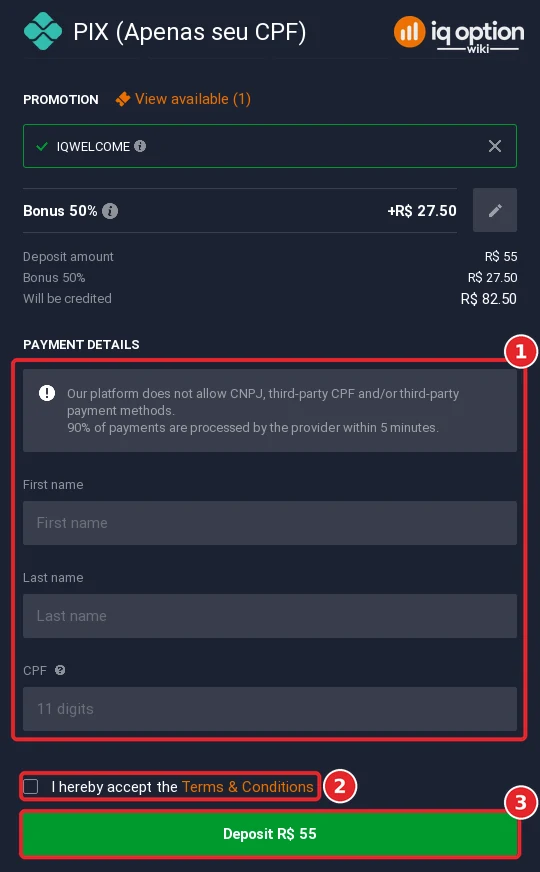
Fill in the details the method asks for (1). For PIX that is your first name, last name and CPF. The form states that IQ Option does not accept CNPJ (company) accounts, a third party’s CPF or third-party payment methods, so pay from an account in your own name. Tick the box to accept the terms (2) and click Deposit (3).
We stopped at this screen and did not pay. According to the form, the provider processes 90% of PIX payments within 5 minutes; the method list shows 1 to 6 hours.
Deposit methods by country
The methods depend on the country your account is registered in, not on the language of the site. Brazilian accounts pay mainly by PIX, PicPay or Boleto Rapido, and Mexican accounts by SPEI or in cash at OXXO and other shops; see the Brazil guide and the Mexico guide. For other countries, see the country guides. The cashier always shows the methods available to you, and IQ Option’s deposits page lists the minimum per method and currency.
Depositing with a bank card
Card deposits use the same six steps. We tried Mastercard on our Brazilian account:
- In the cashier, choose Mastercard or Visa (1).
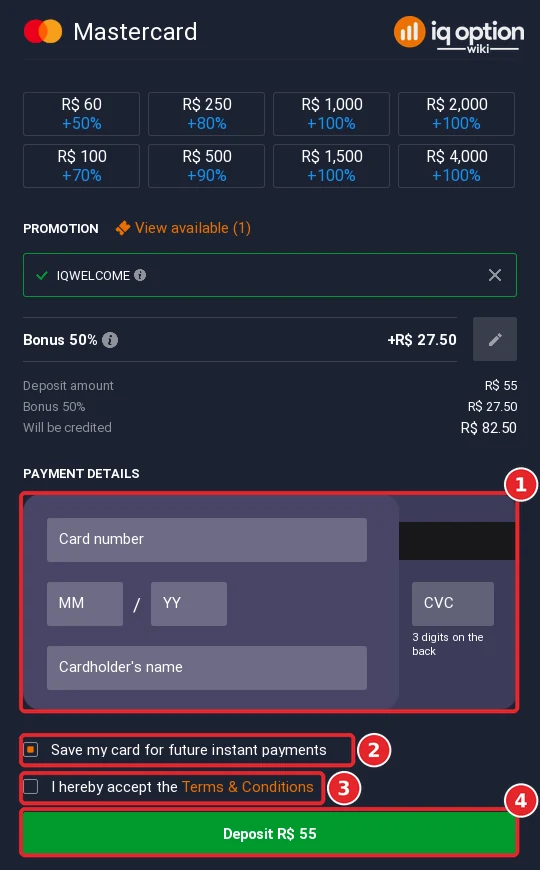
- Choose your account currency, click Next and enter the amount. The card form accepted R$55 to R$58,571.
- Type the card number, the expiry date (MM/YY), the cardholder’s name and the CVC, the three digits on the back of the card (1).
- Save my card for future instant payments was ticked by default (2). Untick it if you do not want the card stored.
- Accept the terms (3) and click Deposit (4).
Your bank may then ask you to confirm the payment in its app or by SMS (3-D Secure). Use a card in your own name.
Depositing with crypto
Both accounts offered seven coins: Bitcoin, Ethereum (ERC-20), Litecoin, XRP, Cardano, Tether (USDT, TRC20) and USDC (BNB Smart Chain), each listed at 5 to 60 minutes. The cashier converts the coins to the currency of your balance, so you do not hold crypto on IQ Option. We opened Bitcoin on our Brazilian account:
- Choose the coin in the cashier and set your account currency, as in Steps 3 and 4.
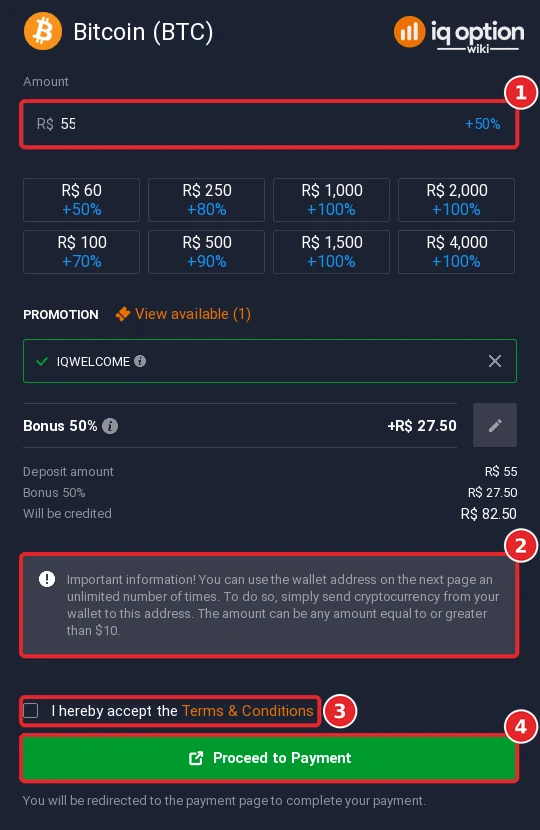
- Enter the amount (1). Bitcoin accepted R$55 to R$1,000,000, and the welcome-bonus code was applied here too.
- Read the note (2): the wallet address on the next page can be used an unlimited number of times, for any amount from $10.
- Tick the terms (3) and click Proceed to Payment (4). The next page shows the wallet address. Send the coins on the network named in the method, for example TRC20 for Tether.
See does IQ Option accept crypto for more on crypto deposits and withdrawals.
Fees, minimums and processing times
| What | What we found on 4 October 2026 |
|---|---|
| Deposit fee | 0% on every method on IQ Option’s deposits page. Your bank, card issuer or wallet may still charge its own fee or a currency conversion. |
| Minimum deposit | $10, €10 or £10; R$55 in Brazil (Volet.com R$60); 175 MXN in Mexico. See our minimum deposit guide. |
| Maximum per deposit | Shown in the amount field: R$150,000 by PIX, R$58,571 by card and R$1,000,000 by Bitcoin on our Brazilian account; 50,000 MXN by SPEI. |
| Processing time | Mastercard and e-wallets instant (Visa showed “Fast verification”); SPEI 2–60 minutes; PIX 1–6 hours; crypto 5–60 minutes; other Mexican methods from 1 hour to 2 business days. |
| Account currency | Chosen before the first deposit and fixed after it. |
If your deposit has not arrived
- Check the time for your method. PIX can take up to 6 hours, and some Mexican methods up to 2 business days (Scotiabank CASH).
- Check the payer. PIX, PicPay and SPEI accept payments only from your own CPF or CURP. A payment from someone else’s account is not accepted.
- Contact support. Use the chat inside the platform (Chats & Support in the left sidebar) or email support@iqoption.com. IQ Option’s contact page lists no phone number. See our support guide.
Before you deposit: withdrawals
On the global platform, one withdrawal per calendar month is free; after that IQ Option charges 2%, at most $30, €30, £25, 620 MXN or R$125. Read how to withdraw from IQ Option (and the Brazil guide) before you fund the account, and test with a small amount first.
📚 Continue learning
Frequently Asked Questions
Q: What is the minimum deposit on IQ Option?
A: IQ Option’s deposits page lists $10, €10 or £10. On 4 October 2026 it was R$55 for a Brazilian account (R$60 by Volet.com) and 175 MXN for a Mexican account. The amount field in the cashier shows the minimum for your method.
Q: Does IQ Option charge a deposit fee?
A: No. Every method on IQ Option’s deposits page showed 0% commission. Your bank or payment provider may charge its own fees.
Q: Can I deposit with PIX?
A: Yes, on an account registered in Brazil. PIX was the first recommended method in the cashier (1–6 hours) and accepted R$55 to R$150,000 from an account in your own CPF.
Q: Can I deposit with crypto?
A: Yes. Both of our accounts offered seven coins, listed at 5 to 60 minutes, and the cashier converts them to your account currency. The Bitcoin form accepted R$55 to R$1,000,000 and said the wallet address can be reused for any amount from $10.
Q: Can I use someone else’s card or bank account?
A: No. The PIX form states that third-party CPF and third-party payment methods are not allowed, and the SPEI form rejects payments without your own CURP. Pay from an account or card in your own name.
Q: Can I change my account currency later?
A: No. The cashier asks for the currency before your first deposit and warns that it cannot be changed after that.
Q: Do I have to take the welcome bonus?
A: No. The code IQWELCOME was pre-applied on both of our accounts; remove it with the × in the amount step if you do not want it, and read the bonus terms behind the (i) icon if you do.
Q: How long does a deposit take?
A: In the cashiers we checked, Mastercard and e-wallets were instant, SPEI took 2–60 minutes, PIX 1–6 hours and crypto 5–60 minutes; other Mexican methods ranged from 1 hour to 2 business days.
Q: Can I practise without depositing?
A: Yes. The Practice account comes with $10,000 of virtual money and can be refilled for free; it cannot be withdrawn.