Last updated: 5 October 2026. MoreLess
Every screenshot below was recorded that day on an IQ Option Practice account registered in Brazil, with $1 test options on Practice money only. The times on the screen are the platform’s own clock (UTC-3). Expiry lists, payouts and trading hours depend on the asset, your country and the time of day, so read them as a record of what we saw on 5 October.
The expiry time of an IQ Option option is the moment the option is checked and closed. You choose it in the Expiration field of the trading panel before you buy. Blitz options offer a short list of fixed durations, Binary options offer clock times, and Digital options offer the next 1-, 5- and 15-minute expiries. No expiry is best for everyone. The profit is printed at the top of each list: one figure for the Blitz lists we opened, and two figures for the Binary list (91% and 93% on EUR/USD). Choose the expiry that matches your plan, and check the profit and the break-even win rate before you buy.
Quick answer
- Where: the Expiration field in the right-hand trading panel, under Invest. Click it to open the list.
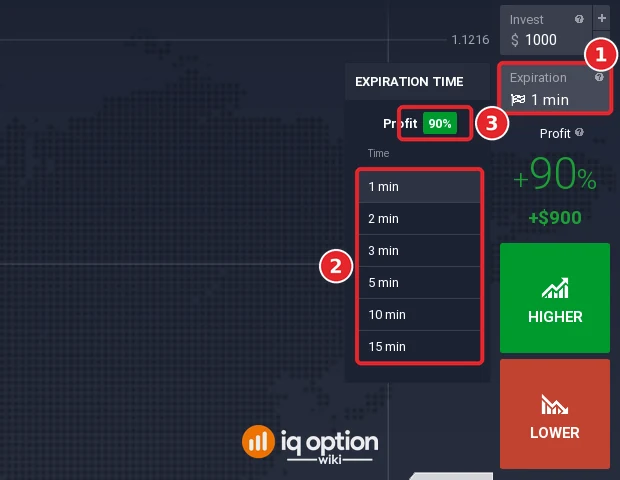
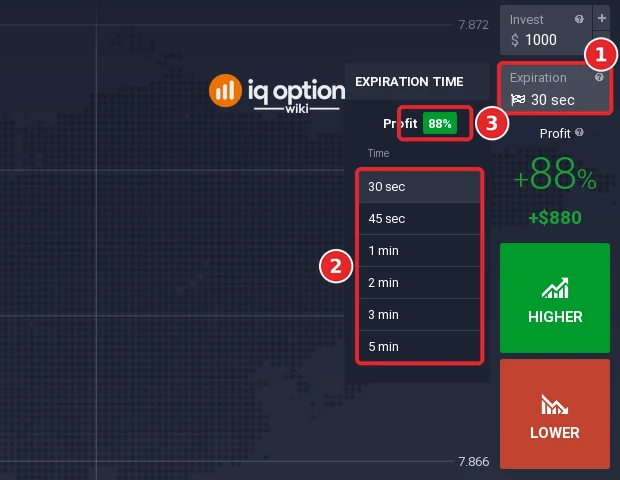
- Blitz: a short list of durations that depends on the asset. EUR/USD offered 1, 2, 3, 5, 10 and 15 minutes at 90%; USD/HKD (OTC) offered 30 seconds to 5 minutes at 88%.
- Binary: clock times. On EUR/USD each of the next ten minutes paid 91%, then every 15 minutes paid 93%, then End of the Day, Week and Month.
- Digital: the next 1-, 5- and 15-minute expiries. IQ Option’s blog says the profit depends on the strike you choose.
- Purchase time: the white dotted line is the buying deadline and the red line is the expiry. In our test buying closed 30 seconds before the expiry.
- Break-even: at a 90% profit you must win more than 52.6% of trades, at 93% more than 51.8%, before any other cost.
Expiry choices on the platform (5 October 2026)
These are the Expiration lists we opened on the Practice account. The lists change with the asset and with the time of day.
| Instrument and asset | Expiration menu | Profit shown |
|---|---|---|
| Blitz EUR/USD | 1, 2, 3, 5, 10, 15 min | 90% |
| Blitz USD/HKD (OTC) | 30 s, 45 s, 1, 2, 3, 5 min | 88% |
| Binary EUR/USD | Each of the next 10 minutes, then every 15 minutes, then End of the Day, Week and Month | 91% for the minutes, 93% for the 15-minute column |
| Digital EUR/USD | The next 1M, 1M, 5M and 15M expiries | 91% at the strike selected |
IQ Option’s blog gives the general ranges: Binary options from 1 minute to 1 month and Digital options of 1, 5 or 15 minutes. It says Blitz expirations start at 30 seconds, or at 5 seconds for VIP clients. The EUR/USD Blitz list on our account started at 1 minute.
Trade expiry for options
The steps follow one trade from the choice of expiry to the result. The numbers in each screenshot match the numbers in the text.
Time feature
The Expiration field is in the right-hand trading panel, under Invest (1). Click it to open the Expiration time menu (2). The profit for that list is shown at the top of the menu (3) and again in the Profit box below the field. On a Blitz option the menu is a short list of durations. This one is EUR/USD Blitz.
The list belongs to the asset. USD/HKD (OTC) offered shorter durations, starting at 30 seconds, at a profit of 88%.
OTC means over-the-counter. IQ Option’s Help says it is a trading method available when markets are closed, with quotes generated on the broker’s server, and that every Friday at 21:00 and every Monday at 00:00 GMT it switches between market trading and OTC trading. This fits what we saw on Monday 5 October: when we first opened the menu of EUR/USD (OTC) Blitz at 12:31 (15:31 GMT) it said “No available expirations”. If you see that message, the asset is not open for trading at that moment: pick the regular asset or another one.
Best expiry time for binary options
Open Binary options and the menu changes: it lists clock times instead of durations, each with a Remaining countdown. The Expiration field shows the one selected (1). On EUR/USD the left column listed one expiry for each of the next ten minutes under Profit 91% (2). The right column listed 15-minute marks under Profit 93%, followed by End of the Day, End of the Week and End of the Month (3).
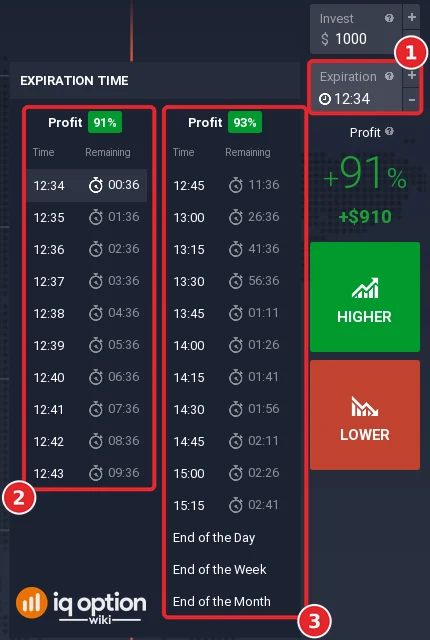
There is no best expiry in this list. The two profit figures show that the payout is not the same for every expiry in the Binary menu: on EUR/USD the longer expiries paid two points more at that moment. An earlier version of this guide said that trades of 1 to 5 minutes usually pay more than longer ones. The menu did not show that on 5 October, so we removed the claim. Choose the expiry from your own plan, then read the profit before you buy.
The payout also decides how often you must win. For an option that pays a percentage of the stake when you are right and loses the stake when you are wrong, the break-even win rate is 100% ÷ (1 + payout), before any other cost:
| Profit shown | Win rate needed to break even |
|---|---|
| 88% | 53.2% |
| 90% | 52.6% |
| 91% | 52.4% |
| 93% | 51.8% |
| 95% | 51.3% |
The first four figures are the ones we saw above. 95% is the highest Blitz profit that IQ Option’s blog mentions. At 91%, a $1 option returns $0.91 when it wins and loses $1 when it does not, so a trader who wins 52 of 100 such options ends slightly behind: 52 × $0.91 = $47.32 against 48 × $1 = $48.00. A short test on a Practice account says little about the win rate you would have on real money.
Trade expiry for digital options
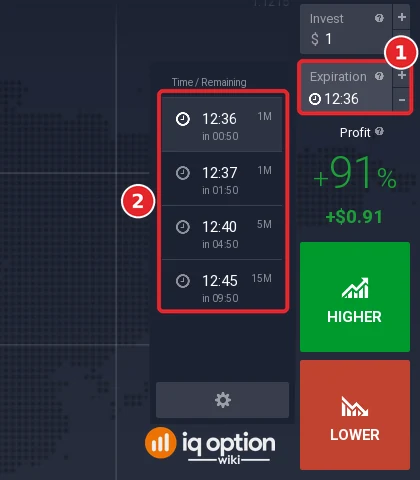
The Digital menu lists the next expiries with a tag. On EUR/USD at 12:35 it showed 12:36 (1M), 12:37 (1M), 12:40 (5M) and 12:45 (15M), each with the time remaining (2). IQ Option’s blog gives the same durations: 1, 5 or 15 minutes. The Expiration field (1) shows the selected one.
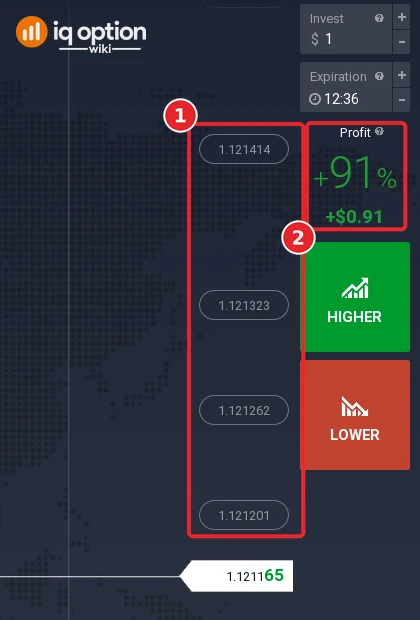
A Digital option also has a strike price: you predict the direction and how far the price moves from the strike. After you press Show All under the chart, the strike levels appear on the right as boxes (1); Hide All removes them. IQ Option’s blog says the profit changes with the strike you choose, and the lower the chance that the price reaches a level, the higher the potential profit. The Profit box (2) showed +91% for the level selected when we looked.
Trade open countdown
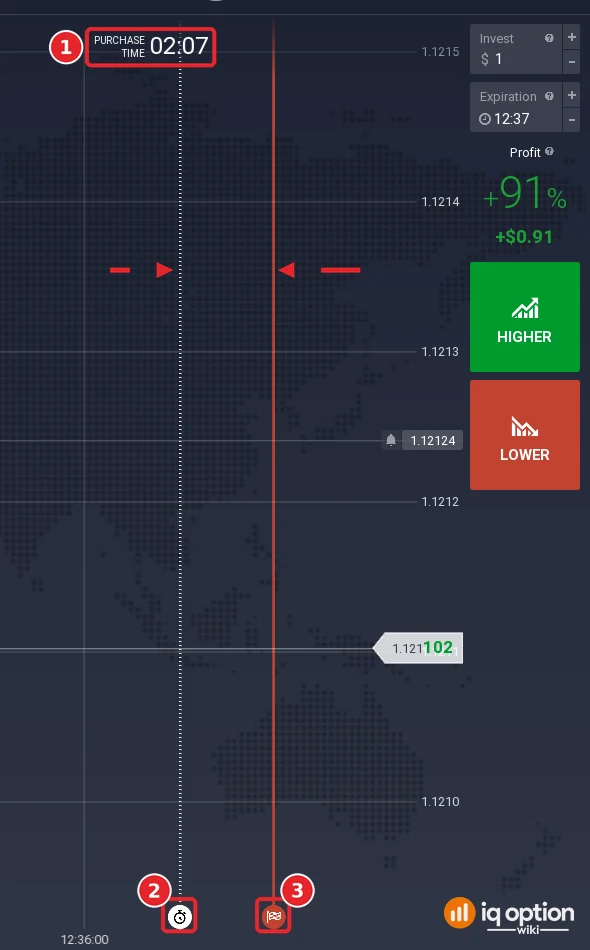
After you pick an expiry, the chart shows two vertical lines. IQ Option’s Help describes them: the time of purchase is the white dotted line, and the expiration time is the solid red line. If you have not opened a trade yet, both lines move to the right together, which marks the buying deadline for the selected expiry. The Purchase time countdown at the top of the chart (1) shows how long you can still buy. The stopwatch icon (2) sits at the foot of the white dotted line and the flag icon (3) at the foot of the red line. In our test the platform clock read 12:34:23 and the countdown read 02:07 for a 12:37 expiry, so buying closed at 12:36:30, 30 seconds before the expiry.
Trade expiry
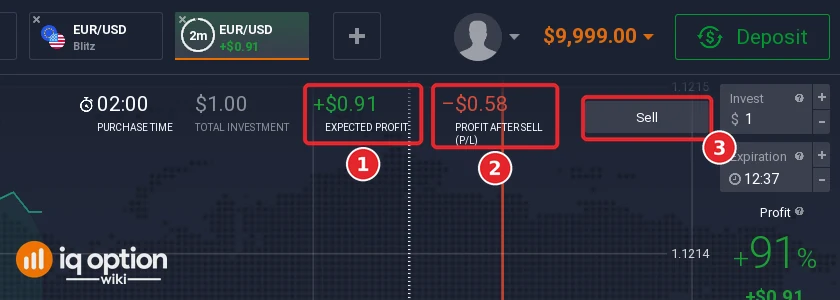
The red line is the expiry. When the trade reaches it, IQ Option closes the option automatically and you make a profit or a loss. IQ Option’s blog notes that there is no stop loss on instruments with an expiration time. After you buy, a bar above the chart tracks the trade. This one is a $1 Binary option on EUR/USD expiring at 12:37. Expected profit (1) is the possible outcome if the price stays where it is until the expiry, and Profit after sell (2) is what you would get if you press Sell (3) now. IQ Option’s Help says both figures change with the market, the time left and the current price. Here the expected profit was +$0.91 and the profit after sell was -$0.58. Selling closes the option and it cannot be reopened; see selling options before expiration.
Candle/bar time interval
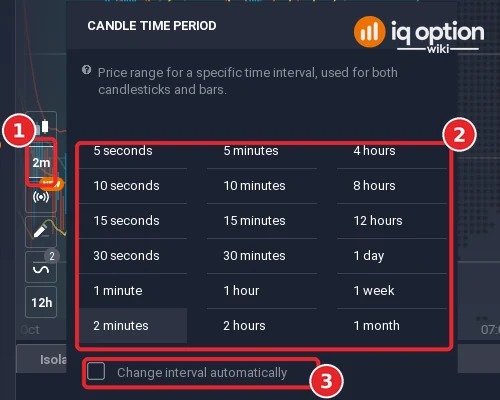
The candle size of the chart is a separate setting from the expiry. Click the time button in the chart’s tool column (1) to open Candle time period (2). It lists 5, 10, 15 and 30 seconds, 1, 2, 5, 10, 15 and 30 minutes, 1, 2, 4, 8 and 12 hours, 1 day, 1 week and 1 month. The menu says it is the price range for a specific time interval, used for both candlesticks and bars. The checkbox Change interval automatically (3) was unticked in our test. See time frames on IQ Option for the second menu, the Timeframe that sets how much history the chart shows.
What the Info panel adds: profit and trading hours
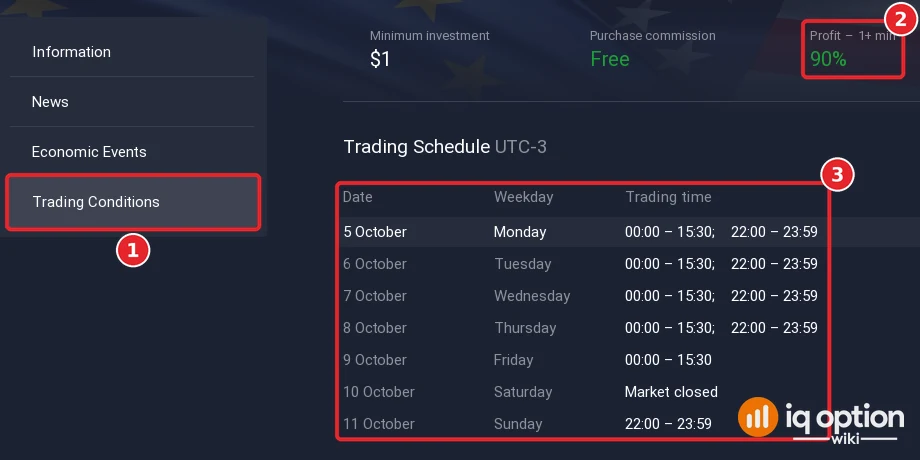
Click Info under the asset name, then Trading Conditions (1). For EUR/USD the page listed a minimum investment of $1, a purchase commission of Free and a profit of 90% for 1+ min (2). Its Trading Schedule (3) is in UTC-3: Monday to Thursday 00:00 to 15:30 and 22:00 to 23:59, Friday 00:00 to 15:30, Saturday market closed, Sunday 22:00 to 23:59. The schedule of USD/HKD (OTC) showed 00:00 to 22:00 and 22:30 to 23:59 on every day from 5 to 11 October.
Tips for trading options and binary options
- Read the profit for the expiry you pick. The asset list showed 93% for EUR/USD Binary, but the one-minute expiries paid 91%.
- Treat the live figures as moving numbers. Expected profit and Profit after sell change with the price and the time left.
- Check the clock. The times in the menus use the platform’s time zone, UTC-3 on our account. See the best time to trade guide for the setting.
- Practise first. A Practice account uses virtual money. A losing option loses the whole stake.
Which time frame is best for binary options?
The candle size and the expiry are two choices, and they do not have to match. IQ Option’s blog says there is no universal best timeframe for day trading: a timeframe is the length of each candle or bar, and a shorter one gives more candles and more signals. The same article calls the 5-minute or 15-minute chart the usual choice for day traders, with the 1-hour chart for context, and says the 1-minute chart is usually too noisy for beginners. Those are the blog’s views on day trading in general. We have no test showing which candle size or expiry works better for binary options, so the earlier advice here to use 5-minute candles and trades of 5 minutes or more has been removed. Try your own pairing on a Practice account.
Pros and Cons
Pros:
- An option closes by itself at the expiry, and there is no stop loss to manage.
- The Expiration menu shows the profit before you buy.
- The lists run from seconds or minutes (Blitz, Digital) to End of the Month (Binary).
- You can sell before the expiry and the Sell button shows the profit after sell first.
Cons:
- The profit is a fixed percentage, so you must win more than half of your trades to break even, and a losing option loses the whole stake.
- The lists change with the asset and the time. EUR/USD (OTC) had no expirations on a Monday afternoon.
- No expiry is best for everyone, and Practice results do not predict real ones.
- On Digital options the profit depends on the strike, which makes the outcome harder to judge.
What is the best strategy in binary option?
A strategy is a set of rules that decides when and which option you open. There is no best one: it has to fit your time, your risk and the asset. Whatever you use, derive the expiry from the strategy and test it on a Practice account first. Each script in our IQ Option scripts library states the rule it marks, so you can test an expiry against the same setup. IQ Option’s blog on digital options discusses indicator ideas with CCI, Bollinger Bands, the Fisher Transform and the Stochastic Oscillator. Options are risky, so do your own research before you trade real money.
Continue Learning
Short Q&A
Q: What is the best expiry time for binary options?
A: There is none for everyone. On 5 October the Binary menu of EUR/USD showed one-minute expiries at 91% and 15-minute ones at 93%. Pick the expiry that fits your plan, then check the profit and the break-even win rate.
Q: Which time frame is best for binary options?
A: IQ Option’s blog says there is no universal best timeframe for day trading and calls the 5-minute or 15-minute chart usual, with the 1-hour chart for context. We did not test which candle size suits binary options.
Q: How long can an IQ Option option last?
A: The Binary menu runs to End of the Month, and IQ Option’s blog gives 1 minute to 1 month for Binary and 1, 5 or 15 minutes for Digital. The Blitz lists we opened ran from 30 seconds (OTC) or 1 minute to 5 or 15 minutes.
Q: Does the profit change with the expiry?
A: On Blitz each list we opened had one profit figure. The Binary list had two (91% and 93% on EUR/USD), and on Digital options IQ Option’s blog says the profit changes with the strike price.
Q: What is the purchase time?
A: It is the white dotted line on the chart. IQ Option’s Help calls it the time of purchase, and the red line is the expiration time. In our test buying closed 30 seconds before the expiry.
Q: What does “No available expirations” mean?
A: The asset cannot be traded at that moment. We saw it on EUR/USD (OTC) Blitz at 12:31 on Monday 5 October, after the Monday 00:00 GMT switch from OTC to market trading that IQ Option’s Help describes.
Q: Can I close an option before it expires?
A: Yes, with the Sell button. The bar above the chart shows the Profit after sell, and IQ Option’s blog says a sold option cannot be reopened.
Q: What do I need to know when trading digital options?
A: You predict the direction and how far the price moves from the strike price. Press Show All to see the strike levels, and remember that the profit changes with the strike. Do your own research before you trade real money.