Last updated: 5 October 2026. MoreLess
The reasons below come from IQ Option’s General Terms and Conditions (the version updated on 21 July 2025), which we read on 5 October 2026. The screenshots were recorded the same day on an IQ Option Practice account registered in Brazil. We pressed neither Close account nor Request, so nothing on that account was closed or deleted.
An IQ Option account is blocked when IQ Option applies a clause of its General Terms and Conditions, and only IQ Option can lift the block. The clause that lets it end the agreement and block an account without notice is 15.4.B. It lists fifteen grounds, among them a second account, a payment from someone else, missing verification documents after 14 days, a restricted country, VPN use and a chargeback. To find out which one applies to you, read the emails IQ Option sent and write to support@iqoption.com. IQ Option Wiki is an independent website: we cannot unblock, close or reopen any account.
Quick answer
- Who decides: IQ Option. IQ Option Wiki cannot unblock, close or reopen an account.
- Where to ask: support@iqoption.com from your registered address, or Chats & Support, then Support, in the traderoom. IQ Option’s blog says support runs 24/7 and has no phone line.
- What the terms list: clause 15.4.B names 15 grounds for blocking without notice, among them a second account, a third party’s payment, no verification documents within 14 days, a restricted country, VPN use and a chargeback.
- What can be lost: after a termination under clause 15.4.B, IQ Option owes no profits and decides at its sole discretion whether deposited funds are paid back.
- If you disagree: complaintsglobal@iqoption.com; IQ Option says it answers within a reasonable time, given as within 3 months.
- Your own option: Settings, then Account settings: Close account (temporary) or Request deletion.
How to Restore a Blocked Account
There is no button that lifts a block. The route is to find out why the account was blocked, then answer IQ Option. Follow the steps in this order.
Step 1: Check your email
IQ Option sends important updates, security alerts and account information to the email address on your account (IQ Option’s blog, updated 9 March 2026). Look in your inbox and your spam folder for messages from IQ Option, and use that address for everything that follows. If a message asks for documents or information, answer it with exactly what was asked.
Step 2: Rule out a login problem
Some messages look like a block but are not. IQ Option’s Help says that “login limit exceeded” means you typed the wrong password several times in a row: wait, then try again, or use Forgot password? on the login page. If you signed up with Google or Facebook, you need to create a password on the web version before you can log in to the desktop app. Our password recovery guide shows the form.
Step 3: Contact IQ Option support
IQ Option’s blog (updated 8 June 2026) names three ways to reach support: live chat, email and social media. It says support is available 24/7 and that IQ Option has no phone line. Use the first route that works for you.
If you can still open the traderoom: click Chats & Support in the left sidebar (1), then choose Support (2).
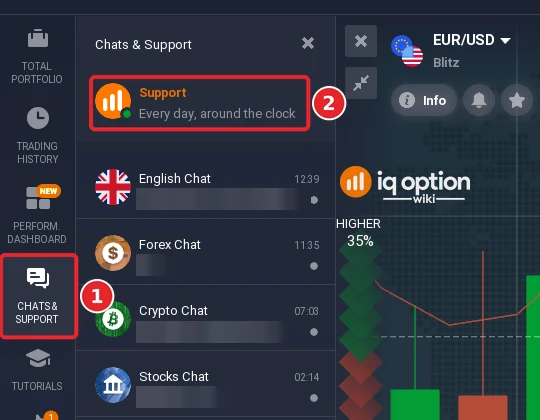
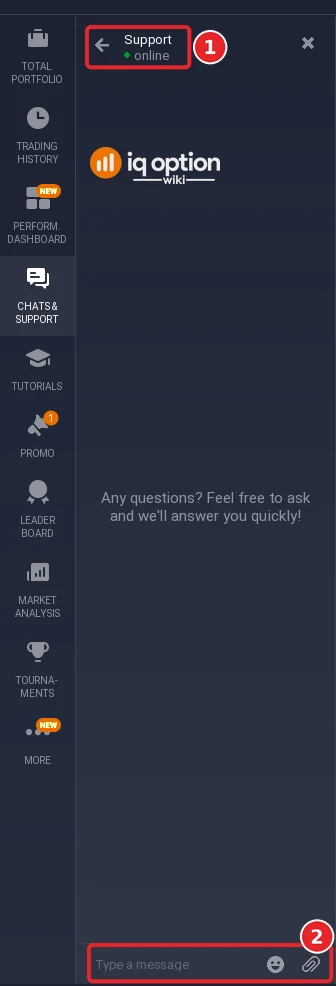
The chat opens inside the platform. Its header reads Support and online (1), and the message field is at the bottom (2). Type your message there. We did not send one. While we were logged in, IQ Option’s contact page said: “Our specialists are always ready to help. The average response time is from 3 to 5 minutes.”
The red Support button at the bottom left of the traderoom (1) opens the same chat, and the footer shows the email address (2).
If you cannot log in: write to support@iqoption.com from the email address you registered with. IQ Option’s blog recommends email when “your account is blocked” or the case needs a deeper investigation, and says support usually replies within 24 hours. Say which email the account uses, what message you see, and what you did just before it appeared (a deposit, a withdrawal, a new device or a new country). IQ Option’s contact page lists no phone number.
Step 4: Provide the documents IQ Option asks for
For an account that someone else used, the terms say IQ Option may block it at once and may ask for “any information and/or documents deemed necessary” before it unblocks it (clause 7.2.e). For verification, IQ Option’s Help lists what it accepts:
- Proof of identity: passport (photo page only), national ID card, driver’s licence or residence permit.
- Proof of address: a utility bill (gas, water, electricity or phone), a bank statement or letter, a tax bill, or an official certificate of residence from the local town hall.
- Card deposits: IQ Option’s blog asks for a photo of the card with only the first 6 and last 4 digits visible.
The information must match your documents. The Verification page shows the steps and your progress.
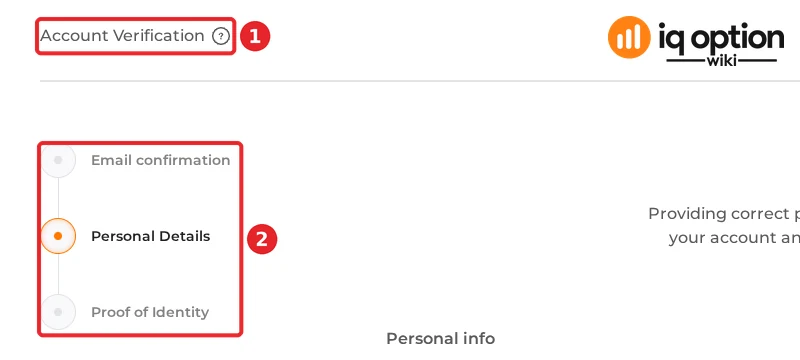
Send documents only to IQ Option, through its own platform or the email address above. IQ Option Wiki never asks for documents. Read our account verification guide for the full process.
Step 5: Wait, and use the complaints address if you disagree
IQ Option publishes no time limit for resolving a block. Its Help says some verification checks take “at least 48 hours”. If you disagree with a decision, the terms give an address for complaints, complaintsglobal@iqoption.com. IQ Option says it will acknowledge the complaint, investigate it and answer within a reasonable time, which the clause gives as within 3 months (clause 7.1.c).
6 Common Reasons Your IQ Option Account May Be Blocked
Each reason below names the clause of the General Terms and Conditions that IQ Option can point to. The terms say IQ Option may act “without prior notice” under clause 15.4.B, so a block can arrive without a warning.
1. Using Someone Else’s Payment Method
The terms say that IQ Option “prohibits third-party or anonymous payments” and that “only funds sent from an account held in the Client’s name” are acceptable (clause 7.2.p). If IQ Option finds a third-party deposit, it may block the account, return the remaining funds to the third-party source by the same method, and withhold any profit made with those funds. Clause 15.4.B.xiv adds that IQ Option may terminate if your funds or payment accounts were used to fund a third party’s account and it reasonably suspects that this circumvents the terms. In practice that means your own card, your own bank account and your own e-wallet. The country guides list which methods accept only your own name, for example PIX and SPEI.
2. Incomplete Account Verification
Clause 15.4.B.x lets IQ Option terminate the agreement if you do not provide your KYC documents within 14 days of accepting the terms, which makes the account “an unverified Account”. IQ Option’s Help adds that trading, deposits or withdrawals may be limited until the account is verified, depending on your region, and that extra checks “can take some time (at least 48 hours)”. Do not wait until your first withdrawal to verify.
3. Providing False or Inaccurate Information
IQ Option’s Help says that traders “are required to use only real personal data”. The terms ask you to notify IQ Option of changes to your contact details within 7 calendar days (clause 7.2.j) and let IQ Option terminate the agreement if you breach your obligations or warranties (clause 15.4.B.iii) or if it has reason to believe you are under the age of majority where you live (clause 15.4.B.iv). A nickname instead of a real name is a common cause of a failed verification: Help says you then have to change your registration data and ask support for each step. Once an account is verified you cannot change your name yourself.
4. Operating Multiple Accounts
Clause 7.2.k says the client “shall register only 1 (one) Account”. If you own several, IQ Option may cancel their transactions and results, block all of them, and terminate the agreement. The benefits clause adds that it is prohibited to abuse privileges such as VIP status and tournaments, and gives “creating multiple trading accounts to claim these Benefits” as an example.
5. Suspicious or Abusive Activity
Several grounds sit under this heading:
- Fair usage: actions that “appear designed primarily to exploit” IQ Option’s services, promotions, bonus schemes or payment systems, “including, but not limited to, frequent deposits followed by withdrawals with minimal or no trading activity” (clause 3.17). The remedies include fees, restricted bonuses, rejected withdrawals, account suspension and voided profits (clause 15.4.B.vi.f).
- Chargeback: starting a chargeback on funds held in your account (clause 15.4.B.xii).
- Abusive software: high-frequency trading software used to manipulate or abuse IQ Option’s systems (clause 15.4.B.xiii).
- Fraud and unfair advantage: fraud, market manipulation or an unfair advantage over other clients or over IQ Option (clauses 15.4.B.vi and vii), and the separate Fraud clause on false trading results.
- Unauthorised access: if someone else used your account, IQ Option may block it immediately, delay or cancel withdrawals, and ask for documents before it unblocks (clause 7.2.e). Two-step authentication, which IQ Option’s Help recommends, is switched on in Settings.
- Abuse of staff: two warnings for verbal abuse against IQ Option employees (clause 15.4.B.ix).
6. Trading from a Restricted Country
Clause 15.4.B.v lets IQ Option terminate if it has reasonable grounds to believe that you are a citizen of the USA or its territories, North Korea, Palestine or the Vatican, or a resident of any of these: the USA and its territories, Canada, Afghanistan, Australia, Belarus, Belgium, Bouvet Island, Comoros, Cuba, the Democratic Republic of the Congo, Eritrea, Ethiopia, Gibraltar, Guam, Haiti, Iran, Israel, Japan, Libya, Mali, Myanmar, North Korea, Palestine, South Sudan, Sudan, Syria, the Russian Federation, the United Kingdom, Ukraine, the Vatican, any country of the European Economic Area, and “other non-serviced countries”. Residents of the EEA are served by a separate site, eu.iqoption.com, not by iqoption.com.
Clause 15.4.B.xi also names the use of different IP addresses from different countries, a VPN or a VPS while you trade as a ground to terminate, “whether the Client has provided notice” of it or not, and clause 7.2.f says frequent logins from different IP addresses or through a VPN are an indication that this clause has been breached. We do not suggest using a VPN or registering under another country.
All the grounds in clause 15.4.B
IQ Option may terminate the agreement immediately, close all open positions and block the account without prior notice in these cases (General Terms and Conditions, 21 July 2025).
| Clause | Ground |
|---|---|
| 15.4.B.i | Death or legal incompetence of the client |
| 15.4.B.ii | Bankruptcy or winding up measures against the client |
| 15.4.B.iii | The client violates, or IQ Option has reasonable grounds to believe the client violated, the terms or the client’s warranties |
| 15.4.B.iv | The client has not reached the age of majority where he or she lives |
| 15.4.B.v | Citizenship or residence in a restricted country (see above) |
| 15.4.B.vi | Fraud, an unfair advantage over other clients or IQ Option, market or system manipulation, bad faith, or a Fair Usage Violation |
| 15.4.B.vii | Malicious conduct, gross negligence or fraud |
| 15.4.B.viii | Termination is required by law |
| 15.4.B.ix | Two warnings for verbal abuse against IQ Option employees |
| 15.4.B.x | No KYC documents within 14 days of accepting the terms |
| 15.4.B.xi | Different IP addresses from different countries, a VPN or a VPS while trading |
| 15.4.B.xii | A chargeback on funds held in the account |
| 15.4.B.xiii | High-frequency trading software used to manipulate or abuse the platform |
| 15.4.B.xiv | The client’s funds or payment accounts used to fund a third-party account to get around the terms |
| 15.4.B.xv | A criminal conviction, caution or charge |
Clause 15.5 states what follows: after a termination under 15.4.B IQ Option has “no liability towards the Client and no obligation to pay any of the profits generated by trading”, and it is “up to the Company’s sole discretion to decide if any deposited funds will be paid to the Client”. If the agreement ends by 15 days’ written notice from either side (clause 15.4.A), IQ Option must pay the remaining balance or let you withdraw it (clause 15.6).
Why Did IQ Option Close My Position?
A closed position is not the same as a blocked account. These are the causes the documents name:
- Your own take profit or stop loss. A position closes when the price reaches the level you set. See auto closing on IQ Option.
- The option expired. The solid red line on the chart is the expiration time; when the trade reaches it, it closes automatically (IQ Option’s Help).
- A margin close-out. IQ Option’s margin terms say it closes open positions at the market price, without prior notice, if the account equity falls below 50% of the maintenance margin requirement. With cross margin it starts with the position that has the largest unrealised loss; with isolated margin only that position is liquidated and its loss is limited to the margin allocated to it (margin terms, 21 July 2025, clauses 2 and 3).
- The contract reached its closing time. IQ Option may close a transaction without notice when the underlying asset or contract settles on an expiry date set by the market (General Terms, clause 7.2.o).
- Account termination. A termination under clause 15.4.B closes all open positions.
Check your trade history to see which one applies, then ask support if the entry does not explain it.
Does IQ Option Allow Trading Bots?
An earlier version of this guide said that IQ Option “discontinued support for trading automation tools in 2017” and bans external bots. We could not confirm that and removed it. This is what we found on 5 October 2026:
- The General Terms contain no sentence that bans trading robots as such. We searched the text for “robot”, “automated”, “algorithm” and “script” and found none in that sense.
- They do name software that abuses the platform: high-frequency trading software designed “to abuse the Company’s systems and/or trading platform” (clause 15.4.B.xiii) and fraud “associated with the use of software for false trading results” (the Fraud clause). Either can lead to a block.
- IQ Option’s blog (updated 14 September 2026) says the platform “allows traders to automate parts of their strategy” with built-in tools, indicators and rule-based systems, and adds that “there are also third-party IQ Option trading bots”. It does not say which third-party bots IQ Option accepts.
If you plan to automate, ask support in writing which tools are allowed on your account before you risk a block, and test on a Practice account.
How to Prevent Account Blocks
| Do | Do not |
|---|---|
| Verify your account soon after registering; the terms set 14 days for KYC documents | Wait until your first withdrawal to send documents |
| Pay only from your own card, bank account or e-wallet | Use a relative’s or a friend’s payment details |
| Use your real name, date of birth and address, and tell IQ Option about changes within 7 days | Register with a nickname or invented details |
| Keep one account | Open extra accounts for bonuses, tournaments or VIP status |
| Log in from the country where you live | Log in through a VPN or from several countries |
| Trade for real: deposits followed by withdrawals with almost no trading can be a Fair Usage Violation | Cycle money through the account to use promotions |
| Switch on two-step authentication in Settings and tell IQ Option at once if someone else used your account | Share your login or leave the account open on other people’s devices |
Close or delete your account yourself
A block is IQ Option’s decision. Closing or deleting an account is something you can start yourself, from the traderoom.
- Click the gear at the bottom right of the traderoom to open Settings.
- Choose Account settings (1).
- Read the options. Close account (2) is a temporary closing: once it is closed you cannot log in or make transactions, and you can reopen the account by contacting support. Request (3) asks IQ Option to delete the account and all personal data; the platform calls this permanent and tells you to close open positions and pending orders first. Show, under Access my data, lets you view the personal data you gave IQ Option, by category.
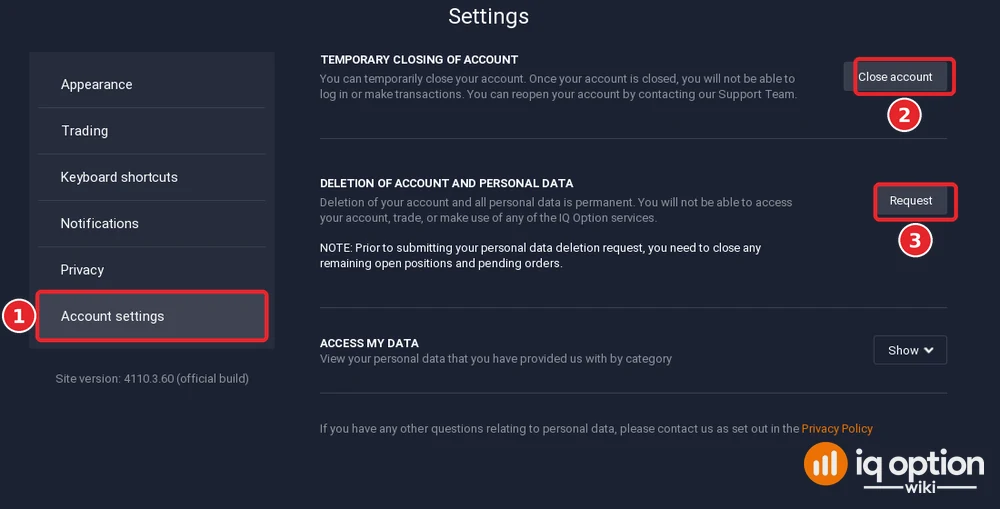
IQ Option’s Help says the Close Account button is at the very bottom of the page. In the traderoom on 5 October it was the first item of Account settings. Because we pressed neither button, we did not see a confirmation step. An account closed this way was closed at your request: it is not a block.
Frequently Asked Questions
Q: Why is my IQ Option account blocked?
A: Only IQ Option can tell you. Its terms list the grounds in clause 15.4.B: among them a second account, a third party’s payment, no verification documents within 14 days, a restricted country, VPN use or a chargeback. Read IQ Option’s emails and write to support@iqoption.com.
Q: How long does it take to unblock an account?
A: IQ Option publishes no time. Its blog says email support usually replies within 24 hours, and its Help says some verification checks take at least 48 hours. A reply is not a resolution.
Q: Can I withdraw my money if my account is terminated?
A: Not automatically. After a termination under clause 15.4.B IQ Option owes no profits and decides at its sole discretion whether deposited funds are paid back (clause 15.5). After a termination by 15 days’ notice, it must pay the remaining balance or let you withdraw it (clause 15.6).
Q: Can I have more than one IQ Option account?
A: No. The terms say to register only one account, and multiple accounts can be blocked and their results cancelled (clause 7.2.k).
Q: Can I deposit with another person’s card?
A: No. IQ Option prohibits third-party and anonymous payments, and it may block the account and withhold profits made with those funds (clause 7.2.p).
Q: Can I use trading bots on IQ Option?
A: The terms do not ban bots as such, but they ban software used to manipulate or abuse the platform and software used for false trading results. IQ Option’s blog says the platform can automate parts of a strategy and mentions third-party bots. Ask support which tools are allowed on your account.
Q: Is IQ Option available in my country?
A: Clause 15.4.B.v lists the restricted citizens and residents, including the USA, Canada, Australia, Japan, Israel, the United Kingdom, the Russian Federation, Ukraine, Belarus, Belgium and any country of the European Economic Area. See how to register for the sign-up steps.
Q: Can I close or delete my IQ Option account myself?
A: Yes. Settings, then Account settings, offers Close account (temporary; contact support to reopen) and Request (deletion of the account and personal data, which the platform calls permanent). Close open positions and pending orders before you request deletion.
Q: Does IQ Option charge a fee on an account I do not use?
A: Yes. If you place no orders for 90 consecutive calendar days, IQ Option may charge an inactive account fee of EUR 10 a month from the balance, never more than the balance (IQ Option’s trading specifications page and Help, 5 October 2026).