Last updated: 8 October 2026. MoreLess
We opened IQ Option’s Account Verification page on two accounts, one registered in Brazil and one in Nigeria, and read IQ Option’s help page, Payment Policy and General Terms the same week. We did not upload anything: the page asks for personal details before it shows the document step, and we do not type invented personal data into it, so the document requirements below come from IQ Option’s own pages, not from a screen of ours.
IQ Option’s Account Verification page has three steps: Email confirmation, Personal Details and Proof of Identity. You give your name, date of birth and citizenship exactly as on your ID, then upload a photo of an identity document. IQ Option’s help page says it verifies documents within 3 business days after you upload them, and that extra checks can take at least 48 hours. A bank card used for a deposit and a proof of address can also be requested. The same form appeared on our Brazilian and our Nigerian account.
Quick answer
- Three steps on the page: Email confirmation, Personal Details, Proof of Identity (iqoption.com/en/verification/info).
- Personal Details: first and last name exactly as on your ID, date of birth, citizenship and U.S. tax-resident box; the same form on our Brazilian and Nigerian accounts.
- Documents: a valid ID; for card deposits both sides of the card with the CVV hidden; a proof of address if requested. The set depends on your area.
- Time: verified within 3 business days after upload (help page), extra checks at least 48 hours; the Payment Policy allows 10 business days, up to 30.
- Not tested: the Proof of Identity step: we uploaded nothing and typed no personal data.
How to verify your IQ Option account, step by step
Step 1: Open the Account Verification page
The page is at iqoption.com/en/verification/info while you are logged in. IQ Option’s account menu also has a “Personal Data Verification” entry and an “Add personal info” link. At the top left the page says “Account Verification”, and at the top right it shows the date you registered and your profile ID (hidden in our images).
Step 2: Confirm your email
The first of the three steps on the left is “Email confirmation”. IQ Option sends a “Confirm your email” message with a green button and an activation code to the address you registered with; see how to register an account for the message. We did not confirm the address on our test accounts.
Step 3: Fill in Personal Details
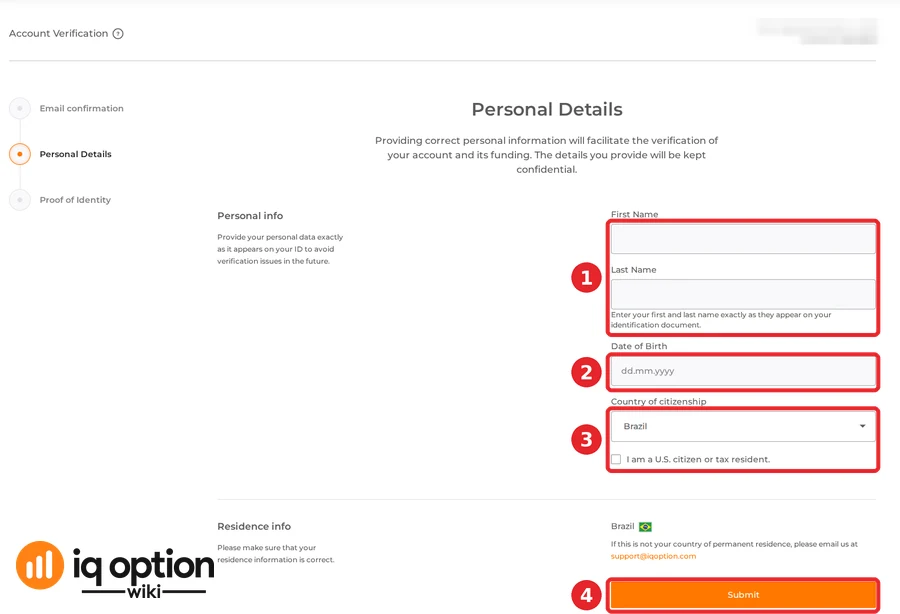
The page “Personal Details” says: “Providing correct personal information will facilitate the verification of your account and its funding. The details you provide will be kept confidential.” It asks for:
- (1) First name and last name, “exactly as it appears on your ID to avoid verification issues in the future”;
- (2) date of birth, in the format dd.mm.yyyy;
- (3) country of citizenship, and a checkbox “I am a U.S. citizen or tax resident”;
- your country of residence, shown below with its flag. If it is not your country of permanent residence, the page says to email support@iqoption.com;
- (4) Submit.
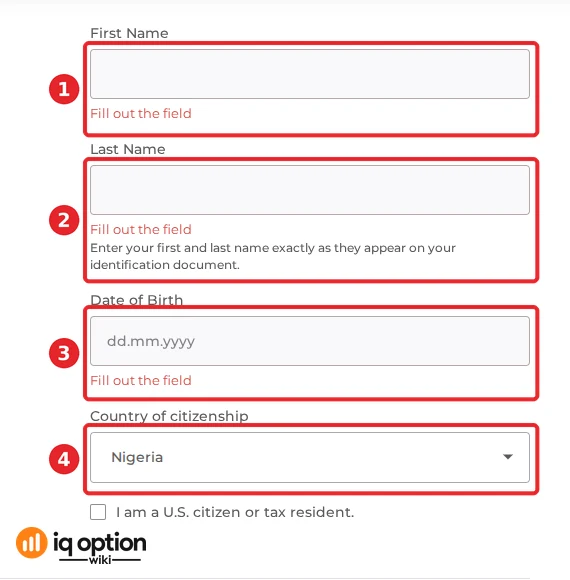
We pressed Submit with every field empty on the Nigerian account: IQ Option marks the first name, the last name and the date of birth “Fill out the field” (1 to 3), and the citizenship (4) was already set to Nigeria, as it was set to Brazil on the other account. The form is the same in both countries.
Step 4: Proof of Identity
The third step is “Proof of Identity”. We could not open it without submitting personal details, so we cannot show it. IQ Option’s help page says what it accepts: see “Which documents IQ Option asks for” below. When it asks, upload the documents on IQ Option’s own page only.
Which documents IQ Option asks for
IQ Option’s help page “Verification” (iqoption.com/en/faq/verification) says you may be asked for different documents “depending on the specific rules in your area”. It lists:
| Document | What IQ Option’s pages say |
|---|---|
| Proof of identity | Valid: passport (photo page only), national ID card, driver’s license or residence permit. The help page on withdrawals also lists a refugee identity certificate, a refugee travel passport and a voter ID. It must contain your full name, photo, date of birth, expiration date and official document number, and be valid. |
| Proof of address | Valid and recent: a utility bill (gas, water, electricity or phone), a bank statement or letter mentioning your current account with the bank (photo or scan of the original letter, or a PDF statement), a tax bill, or an official certificate of residence from the local town hall. It must show your full name, residential address and the date it was issued, on the company’s headed paper or with its logo or seal. |
| Bank card | If you deposited by card: a copy of both sides of the card (every card you used). Hide the CVV number and keep only the first 6 and the last 4 digits visible. The card must be signed. (Help page on withdrawals.) |
| E-wallet | If you deposited with an e-wallet, a scan of your ID only. (Help page on withdrawals.) |
The information you give “must match the information in your documents”.
Why a document is declined
IQ Option’s help page lists these reasons, and says you can read the reason on the verification page:
- some information on the document is covered, or you did not upload the back when there is information on both sides;
- the document has expired;
- the details in the document and in your account do not match;
- the document type or the file format is not accepted;
- the quality is not good enough: glare or reflections, fingers over the details, only part of the document in the photo, a blurry image, a copy instead of the original, or a scan (IQ Option says a camera photo is better than a scan).
How long verification takes, and when you are asked
- Review time. The help page on withdrawals says: “All the documents will be verified within 3 business days after you upload them on the platform.” The “Verification” page adds that extra checks can take “at least 48 hours”. IQ Option’s Payment Policy sets the identification process at 10 business days from its request, and “in some cases” up to 30 working days (clause 2.e).
- Before a withdrawal. The help page says: “You need to verify your identity in order to withdraw funds.”
- Limits until then. “Trading, deposits or withdrawals may be limited until the account is verified, depending on your region.” IQ Option’s deposits page also says that unless your account is fully verified, some countries may have restrictions on certain deposit methods.
- After your first deposit. The General Terms say you provide KYC documents within 7 days from the moment of depositing funds (clause 7.3.k).
- Offers. IQ Option’s Promotional Codes Policy says offers are activated only for clients who have verified their account, unless the offer says otherwise (clause 2.5). See the welcome bonus guide.
Keep your data safe
- Upload documents only on IQ Option’s own verification page, after logging in at iqoption.com. No promoter, chat message or “helper” needs your passport or your card.
- Cover the CVV, as IQ Option asks, and keep only the first 6 and last 4 card digits visible.
- Use the same name and details as on your document. After verification you cannot change them yourself: you must email support@iqoption.com.
If verification fails or stalls
- Read the reason on the verification page, fix that one thing and upload again.
- If the country of residence shown is wrong, email support@iqoption.com, as the page says.
- If days pass without an answer, ask in IQ Option’s chat: see how to contact IQ Option support.
Related guides
- How to register a Practice account.
- IQ Option real account.
- How to deposit.
- How to withdraw.
- How to contact IQ Option support.
Frequently Asked Questions
Q: How long does IQ Option verification take?
A: IQ Option’s help page says documents are verified within 3 business days after you upload them, and that extra checks can take at least 48 hours. Its Payment Policy allows 10 business days for identification, and up to 30 working days in some cases.
Q: What documents do I need?
A: A valid proof of identity (passport photo page, national ID card, driver’s license or residence permit, and on its withdrawals page also a refugee identity certificate, a refugee travel passport or a voter ID). If you deposited by card, a copy of both sides of it; a proof of address may also be requested. The exact set depends on your area.
Q: Do I have to verify before I can withdraw?
A: Yes. IQ Option’s help page says you need to verify your identity in order to withdraw funds.
Q: What is the maximum file size and which formats are accepted?
A: IQ Option’s current help page does not state a size, and says only that a file in a format it cannot accept is declined. Check the requirements on the verification page when you upload.
Q: Can I change my name or country after verification?
A: Not yourself. IQ Option’s pages say to email support@iqoption.com.
Q: Is verification the same in Brazil and Nigeria?
A: The Personal Details form was the same on our Brazilian and Nigerian accounts, with citizenship and residence already set to the account’s country. We could not see the document step, and IQ Option says the documents requested depend on your area.
Q: Why was my document declined?
A: IQ Option’s help page lists covered information, expired documents, a mismatch with your account details, a missing back side, an unaccepted type or format, and poor quality (glare, blur, a partial photo, a copy or a scan). The reason is shown on the verification page.
Q: Do I need to verify to use a Practice account?
A: No. Our Practice accounts opened the platform without it: see how to register a Practice account.