Last updated: 8 October 2026. MoreLess
Every screenshot below was recorded that day on a new IQ Option account that we registered from a Brazilian connection, with a temporary test mailbox. The account stayed on its Practice balance: we deposited nothing, uploaded no document and typed no personal data.
To open a Practice account on IQ Option, go to iqoption.com, click Sign Up, choose “Proceed with email”, check the country of residence, type an email address and a password and click “Create an account”. The platform then opens on a Practice balance of $10,000.00 in virtual money. No deposit and no document are asked for at this stage. It took us a few minutes, most of it waiting for the platform to load.
Quick answer
- Where: iqoption.com, Sign Up at the top right, then “Proceed with email” (Google and Facebook are also offered).
- You need: a country of residence (already filled in for our connection), an email address you can open and a password.
- You get: a Practice balance of $10,000.00 in virtual money. We saw no payment and no document request at sign-up.
- Then: IQ Option emails a confirmation button and code; the verification page lists email confirmation as the first step.
- Not tested: Google and Facebook sign-up, and the “Try free demo” button.
How to register an IQ Option Practice account, step by step
Step 1: Open iqoption.com and click Sign Up
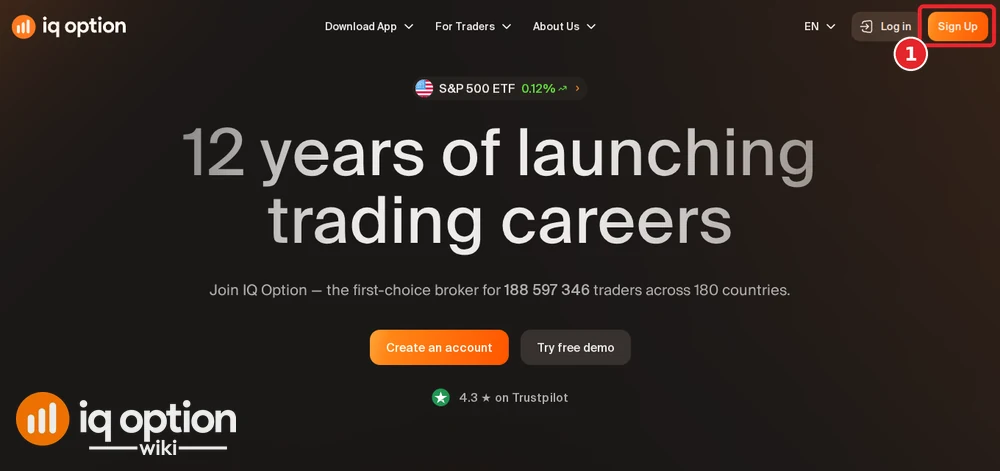
Open iqoption.com/en. Click Sign Up at the top right (1). The page also has “Create an account” and “Try free demo” buttons in the middle; we used Sign Up and did not test the other two.
Step 2: Choose how to register
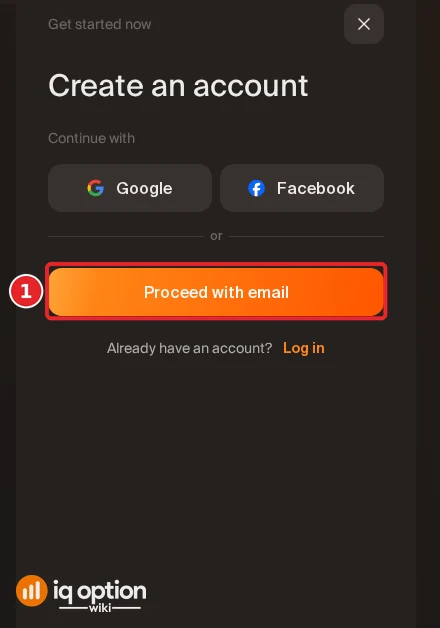
A “Create an account” panel opens with three ways to continue: Google, Facebook, or “Proceed with email” (1). We used email, which is the way this guide follows. At the bottom the panel says that by creating an account you agree to IQ Option’s Terms & Conditions and Privacy Policy.
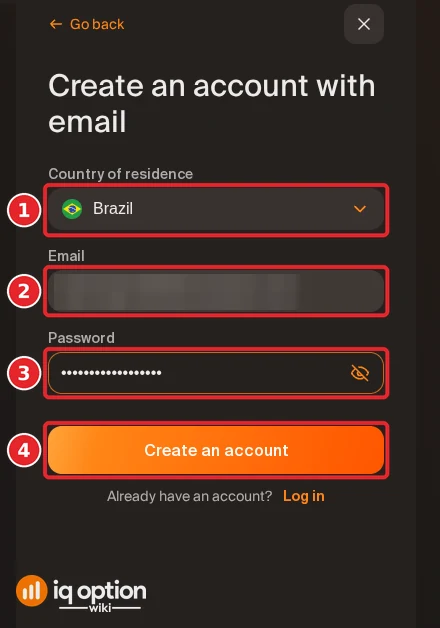
Step 3: Fill in the form and create the account
- Country of residence (1). It was already filled in with Brazil, the country of the server we connected through. Check it: the payment methods you see and the IQ Option company that serves you depend on it, and once the account exists you cannot change it yourself (see “If something goes wrong” below).
- Email (2). Use an address you can open: IQ Option sends a confirmation message to it. The image hides ours.
- Password (3). The eye icon at the right of the field shows or hides what you typed.
- Create an account (4). Click it. A loading screen (“You are connecting to IQ Option. A high-speed connection is recommended for optimal performance.”) follows, and then the platform opens.
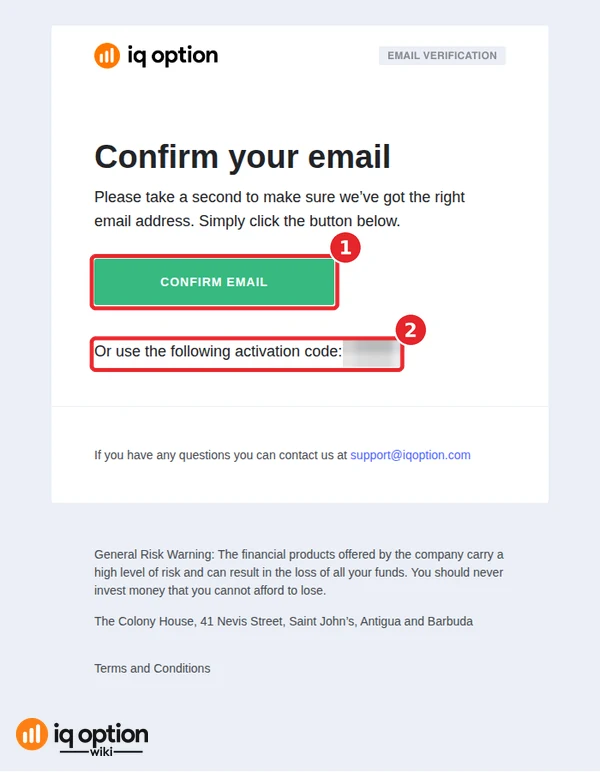
Step 4: Confirm your email
The first message from IQ Option arrived in our test mailbox right after we clicked Create an account. It is titled “Confirm your email” and has a green CONFIRM EMAIL button (1) and an activation code (2) (“Or use the following activation code”; ours is blurred). A second message, “Your Demo Account Is Live”, followed about five minutes later. We did not click the button, and the Practice account worked without it: we opened the platform and IQ Option’s verification page. IQ Option’s verification page lists “Email confirmation” as its first step, so confirm the address before you deposit or ask for a withdrawal. See how account verification works.
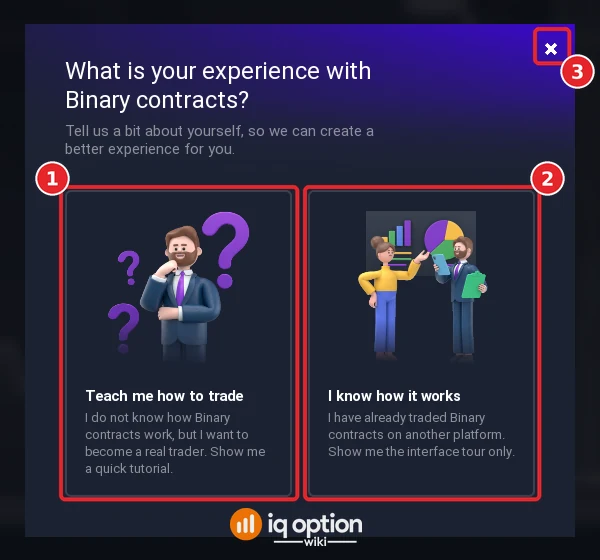
Step 5: Answer or close the first question
The first time the platform opens, a window asks “What is your experience with Binary contracts?”. You can choose “Teach me how to trade” (1), which offers a quick tutorial, or “I know how it works” (2), which shows the interface tour only, or close the window with the × (3).
Several small tips follow. The first says “If you need help: you can always find all the tutorials here” (Got it). The next says “Practice account is on: click here if you wish to change your account type from Practice to Real” (1). It points at the balance at the top right (2). A Tutorials panel and a last tip, “Try it with no risk: open a practice trade and try trading without risking your real money. Just guess where the chart will go in the next minute”, complete the introduction. Click Got it on each.
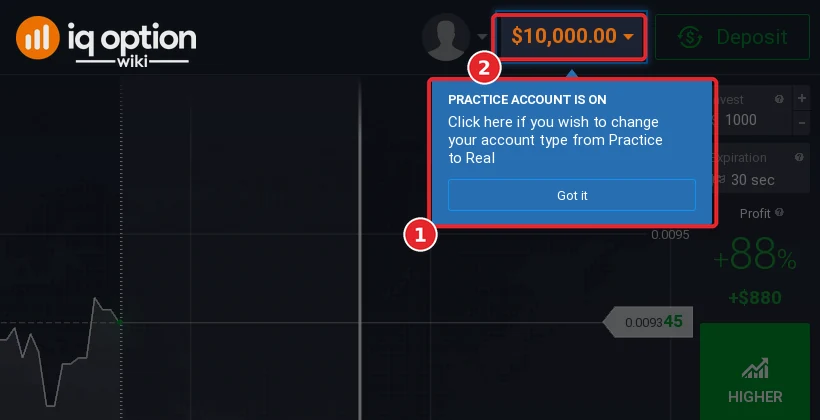
Step 7: Check that you are on the Practice account
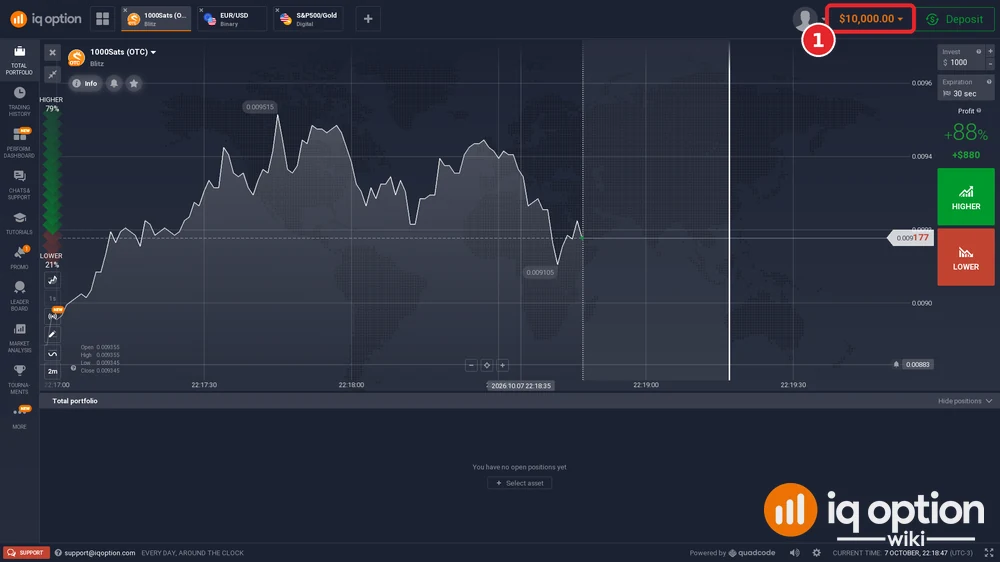
The balance at the top right (1) read $10,000.00 on our new account, and the Deposit button next to it is green. The chart opened on 1000Sats (OTC), a Blitz asset, with a profit of +88% shown for a $1,000 trade. A Practice trade is placed with the HIGHER and LOWER buttons on the right: we did not place one on this account.
What the Practice account gives you
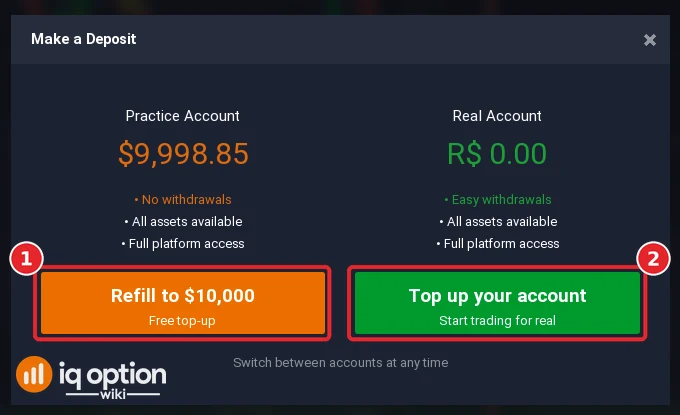
The “Make a Deposit” window shows both balances side by side (recorded on our older Brazilian account, whose Practice balance was $9,998.85). Under the Practice balance it lists “No withdrawals”, “All assets available” and “Full platform access”. The orange button, “Refill to $10,000” (1), is labelled “Free top-up”; the green one, “Top up your account” (2), is the route to a real deposit and starts a payment, so only click it if you mean to deposit. The real balance of that account read R$ 0.00 and its list says “Easy withdrawals”.
- Virtual money. IQ Option’s Practice Account Terms say virtual funds have no value and cannot be withdrawn or transferred (clause 2.1).
- Who can open one. The same terms say the Demo Account is for clients over 18 who live in a country where IQ Option provides its services and are not a US Reportable Person (clause 2.1, points a to d). By registering, you confirm that you meet them.
- Practice trades are not market trades. Demo positions are “not executed in the market” and are kept open for a maximum of one month (clause 2.5); more virtual funds can be requested at any time (clause 2.7).
- Assets. On 4 October 2026 the web asset menu of a Practice account registered in Brazil listed 520 option assets and 697 margin instruments; the list depends on the account.
- Switching. The balance menu at the top right lists the Practice and the real balance and lets you switch between them: see how the real account works.
Which countries can register
IQ Option’s sign-up form asks for your country of residence in a searchable field, and the account is set up for that country. The global site serves some countries and IQ Option’s EU company others: from our own UK connection on 8 October 2026, iqoption.com redirected to eu.iqoption.com with a notice that it is “a domain operated by IQBroker Europe Ltd (formerly IQOption Europe Ltd) and regulated by the Cyprus Securities and Exchange Commission (CySEC)”. The EU site has its own pages and rules; this guide covers the global site.
The authority on who may register on the global site is IQ Option’s General Terms and Conditions (updated 21 July 2025). In clause 7.3.d the client confirms not to be a resident of the USA and its territories, Canada, Afghanistan, Australia, Belarus, Belgium, Bouvet Island, Comoros, Cuba, the Democratic Republic of the Congo, Eritrea, Ethiopia, Gibraltar, Guam, Haiti, Iran, Israel, Japan, Libya, Mali, Myanmar, North Korea, Palestine, South Sudan, Sudan, Syria, the Russian Federation, the United Kingdom, Ukraine, Vatican, “any country of the European Economic Area and/or other non-serviced countries”, nor a citizen of the USA and its territories, North Korea, Palestine or the Vatican. Registering also confirms that you are over 18 and meet the other conditions of the Demo Account terms (see above).
IQ Option’s own pages also carry a notice for Brazil: it is “not authorized by the Securities and Exchange Commission (CVM) to directly offer securities distribution services to investors resident, domiciled, or incorporated in the Federative Republic of Brazil”. We registered from Brazil for this recording only to see the Brazilian version of the form and cashier. See is IQ Option legit? for what regulators have said. We have step-by-step deposit guides, recorded on accounts of each country, for these countries:
- Brazil: PIX, PicPay, Boleto, cards
- Mexico: SPEI, OXXO, cards
- Peru: Yape, Plin, BCP
- Chile: WebPay, Mach, Khipu
- Colombia: Nequi, PSE, Efecty
- Argentina: Mercado Pago QR, MODO, Rapi Pago
- Thailand: Kasikorn, SCB, Krungthai QR
- Vietnam: Vietcombank QR, BIDV, VietQR
- Nigeria: Bank transfer, OPay, PalmPay
- Philippines: GCash, Maya, QRPH
- South Africa: FNB, ABSA, Standard Bank
- Malaysia: Maybank, CIMB, DuitNow QR
- United Arab Emirates: Card, Apple Pay, USDT
- Sri Lanka: Cards, Skrill, USDT
- Bangladesh: NAGAD, Mastercard, USDT
- Kenya: Cards, Skrill, Neteller, USDT
If something goes wrong
- The confirmation email does not arrive. We did not need a second message, so we cannot describe a resend button. Check the spam folder and that the address on the form was typed correctly. IQ Option’s chat and support@iqoption.com are the places to ask (see how to contact IQ Option support).
- The country of residence is wrong. IQ Option’s verification page says that if the country shown is not your country of permanent residence, you should email support@iqoption.com.
- You cannot log in later. See how to recover your password; we tested that flow on this same account.
Related guides
- IQ Option real account: the second balance, the account currency and the “Add personal info” form.
- Account verification.
- Password recovery.
- How to deposit and the minimum deposit by country.
- The welcome bonus.
Frequently Asked Questions
Q: Is the IQ Option Practice account free?
A: Registering asked for no payment, and the platform opened on a Practice balance of $10,000.00 in virtual money.
Q: Do I need to deposit money to register?
A: No. The form asked for a country, an email address and a password only. A deposit is a separate step in the cashier.
Q: Do I have to confirm my email?
A: IQ Option sends a “Confirm your email” message with a button and an activation code. We did not confirm, and the Practice account still opened. Its verification page lists email confirmation as the first step, so confirm before you deposit or withdraw.
Q: Which countries are excluded?
A: IQ Option’s General Terms, clause 7.3.d, list the countries whose residents may not use the global site, including the USA, Canada, Australia, Japan, Israel, the United Kingdom, the Russian Federation, Belgium and “any country of the European Economic Area and/or other non-serviced countries”. The list is in the paragraph above. Check the current terms on iqoption.com before you register.
Q: Can I register with Google or Facebook?
A: The Create an account panel offers both buttons next to “Proceed with email”. We used email and did not test the other two.
Q: Can I change my country of residence later?
A: Not on your own: IQ Option’s verification page says to email support@iqoption.com if the country shown is not your country of permanent residence.
Q: How do I get more Practice money?
A: The “Make a Deposit” window has a “Refill to $10,000” button labelled “Free top-up” for the Practice balance.
Q: Can I withdraw Practice money?
A: No. The “Make a Deposit” window lists “No withdrawals” for the Practice account, and IQ Option’s Practice Account Terms say virtual funds cannot be withdrawn or transferred.
Q: I forgot my password. What now?
A: Use “Forgot password?” on the login page. We walked through it in our password recovery guide.