Last updated: 8 October 2026. MoreLess
Every screenshot below was recorded that day (UTC+8) on an IQ Option Practice account registered in Hong Kong. The VPN server we used sits in Hong Kong according to a location lookup, and IQ Option’s sign-up form read Hong Kong as the country of residence. We stopped every payment before its last button, so no money was sent.
A Hong Kong account is held in Hong Kong dollars unless you pick something else, and the cashier is the shortest we have seen: one card method, Visa / Mastercard, and seven cryptocurrencies. There is no wallet, no Apple Pay or Google Pay, no bank transfer and no local payment system. The currency step offers HKD, EUR, GBP, USD and CNY, with HKD first. The sections below follow a card deposit of HK$100, then Tether, the limits we read, the withdrawal table and what Hong Kong’s Securities and Futures Commission says about marketing financial services from abroad. The screenshots use IQ Option’s English interface.
 A Hong Kong account is held in Hong Kong dollars unless you pick something else, and the cashier is the shortest we have seen: one card method, Visa / Mastercard, and seven cryptocurrencies. There is no wallet, no Apple Pay or Google Pay, no bank transfer and no local payment system. The currency step offers HKD, EUR, GBP, USD and CNY, with HKD first. The sections below follow a card deposit of HK$100, then Tether, the limits we read, the withdrawal table and what Hong Kong’s Securities and Futures Commission says about marketing financial services from abroad. The screenshots use IQ Option’s English interface.
Quick answer
- Minimum: HK$80 (about $10) on the cards; the deposits page also lists 10 EUR, 10 GBP and 10 USD.
- Fee: 0% from IQ Option on every method.
- In our cashier: Visa / Mastercard (instant) and seven cryptocurrencies (5 to 60 minutes). No wallet, no Apple Pay or Google Pay, no bank transfer.
- Limits we saw: Visa / Mastercard HK$80–90,170; Tether (USDT) TRC20 HK$80–7,850,000.
- Currency: HKD (pre-selected), EUR, GBP, USD or CNY, chosen before your first deposit and fixed after it.
- Withdrawals: one free per month, then 2% (at most HK$240); cards, Volet.com and WebMoney from HK$16, coins from HK$91.
- Local rules: IQ Option is not on the SFC’s Alert List, but the SFC restricts marketing of leveraged forex to the Hong Kong public; read the note before you deposit.
How to deposit on IQ Option in Hong Kong, step by step
We paid with Visa / Mastercard, the only method under “Recommended”. The red numbers on the screenshots give the order of the clicks.
Step 1: Click Deposit
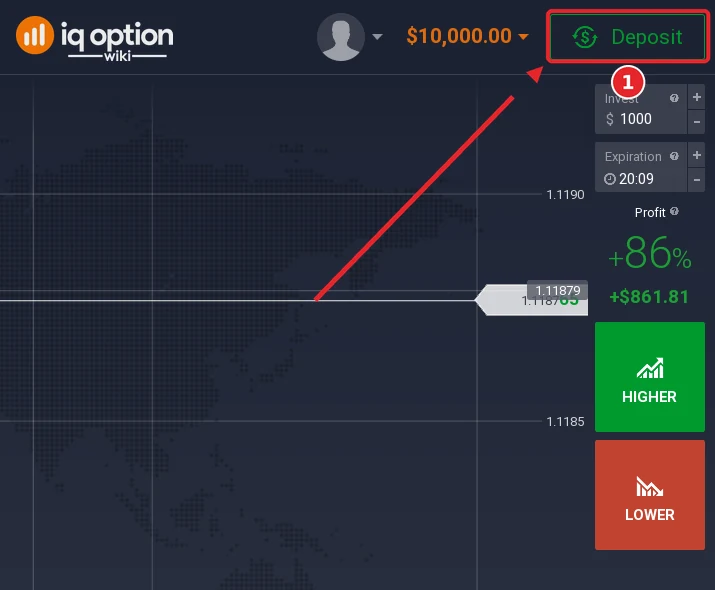
Find the green Deposit button in the top-right corner of the traderoom (1) and click it. The $10,000 next to it is Practice money; real funds start at zero.
Step 2: Choose “Top up your account”
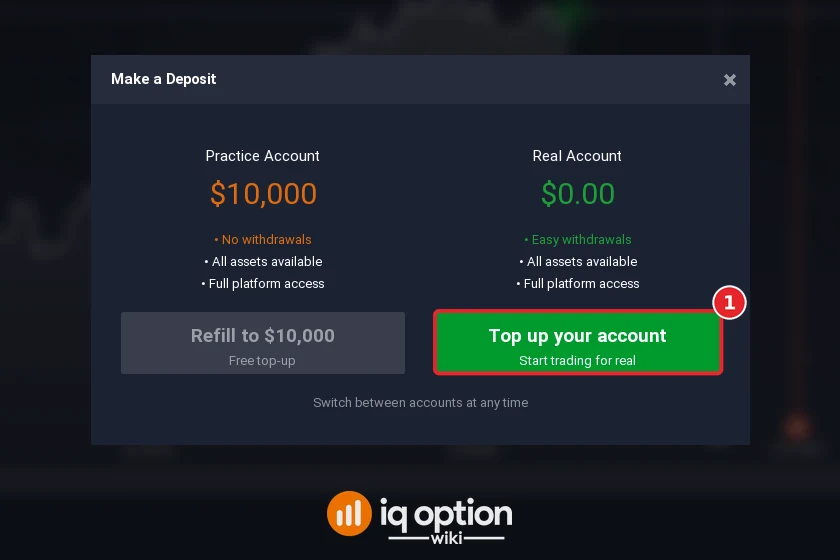
The Make a Deposit window shows a practice side and a real side. The grey Refill to $10,000 button only resets the virtual balance. For real money press Top up your account (1).
Step 3: Choose Visa / Mastercard
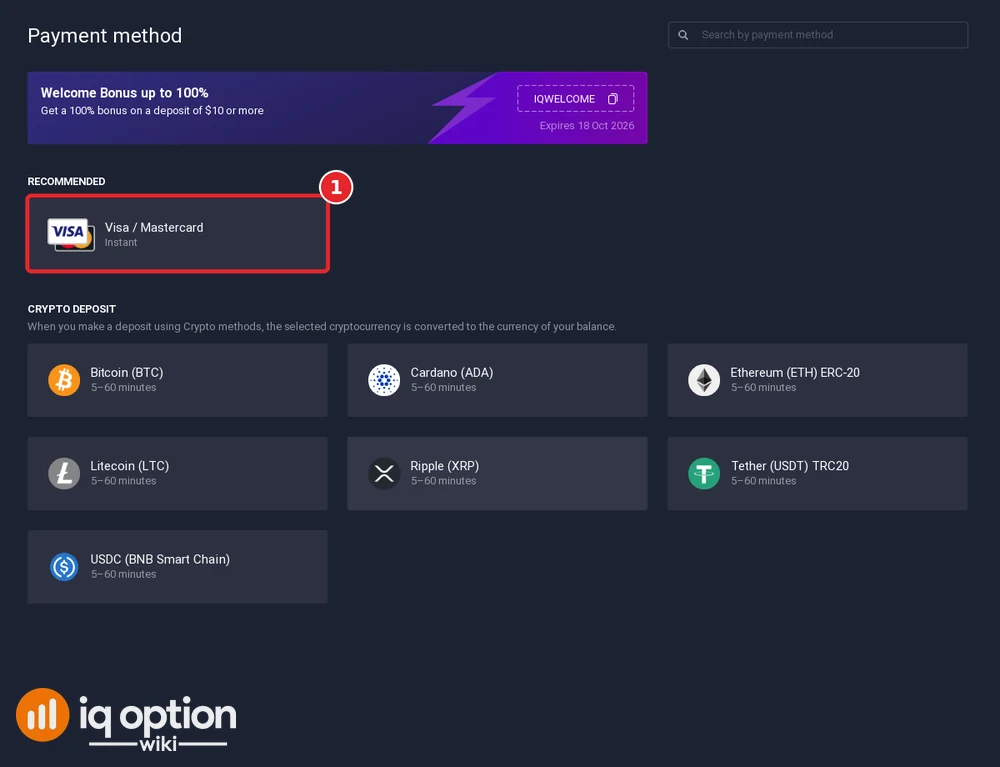
The page starts with a welcome-bonus banner (code IQWELCOME, until 18 Oct 2026). “Recommended” contains a single tile, Visa / Mastercard (1), marked instant. The seven coins follow under “Crypto deposit” at 5 to 60 minutes each, and the list ends there.
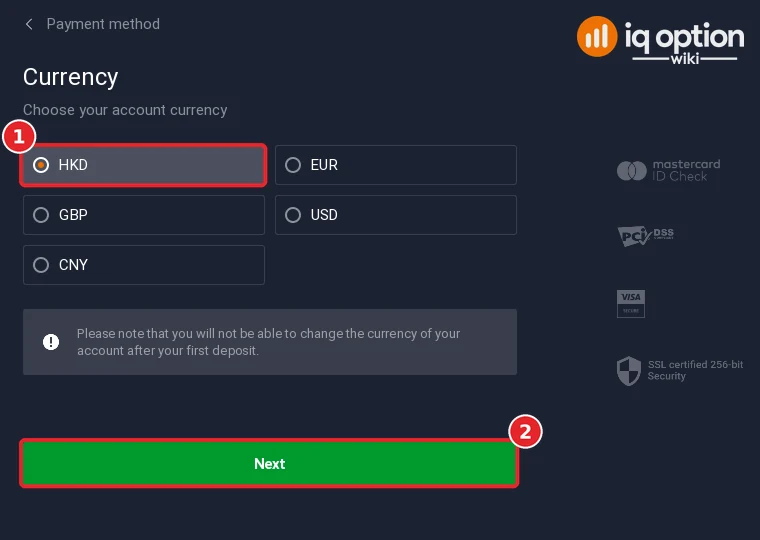
Step 4: Choose HKD as the account currency
HKD was selected on arrival (1), next to EUR, GBP, USD and CNY. Press Next (2). The grey notice means it: the account currency cannot be changed after your first deposit.
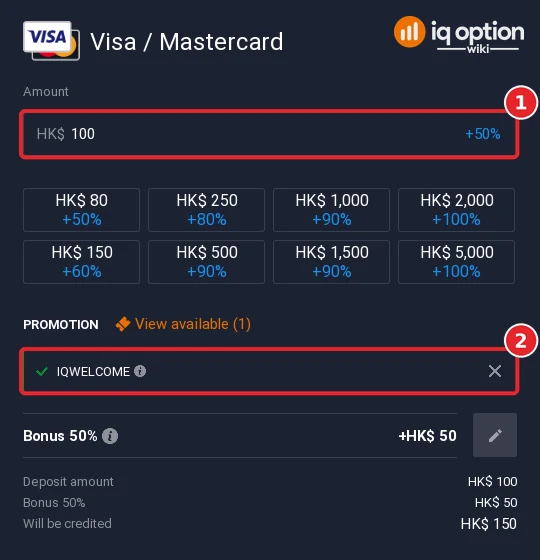
Step 5: Enter the amount and check the bonus
Type an amount (1) or use a quick button, from HK$80 to HK$5,000. The IQWELCOME code was already applied (2). HK$100 gave “Bonus 50%”, +HK$50, and HK$150 credited; the buttons promised +60% on HK$150, +80% on HK$250, +90% from HK$500 to HK$1,500 and +100% from HK$2,000. The × next to the code removes the bonus.
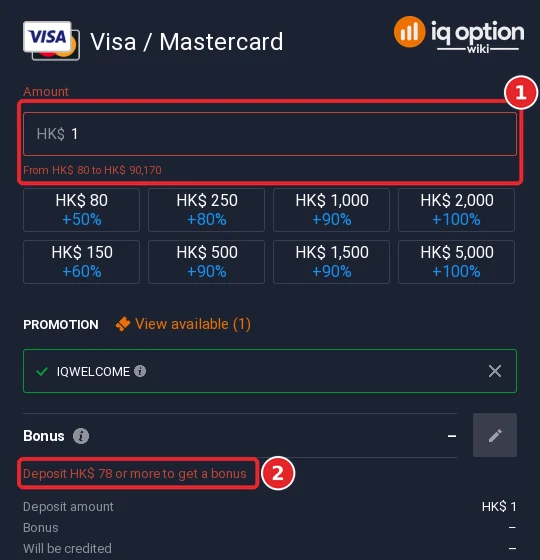
A single Hong Kong dollar turns the field red. The card’s limits appear below it as “From HK$ 80 to HK$ 90,170” (1), and the bonus box says “Deposit HK$ 78 or more to get a bonus” (2).
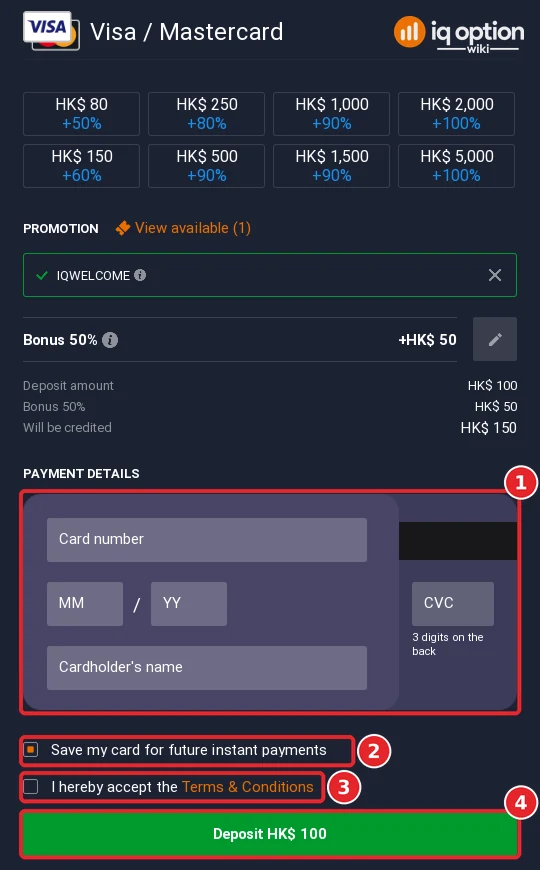
Step 6: Enter your card details and confirm
The card block (1) asks for the card number, expiry month and year, the CVC and the cardholder’s name. “Save my card for future instant payments” is ticked by default (2). Once the terms box (3) is ticked, the green Deposit HK$ 100 button (4) takes the payment. We did not press it.
All deposit methods in Hong Kong
The table sets our cashier beside IQ Option’s public deposits page, both read on 8 October 2026. The page lists two methods, Visa / Mastercard and Volet.com, each from 80 HKD (10 EUR, 10 GBP, 10 USD, 71 CNY, 700 RUB), with 0% commission and instant processing.
| Method | Time shown | Limits and notes |
|---|---|---|
| Visa / Mastercard | Instant | HK$80 to HK$90,170 |
| Volet.com | Instant on the deposits page | 80 HKD on the page; missing from our cashier |
| 7 cryptocurrencies | 5 to 60 minutes | Tether (USDT) TRC20: HK$80 to HK$7,850,000 |
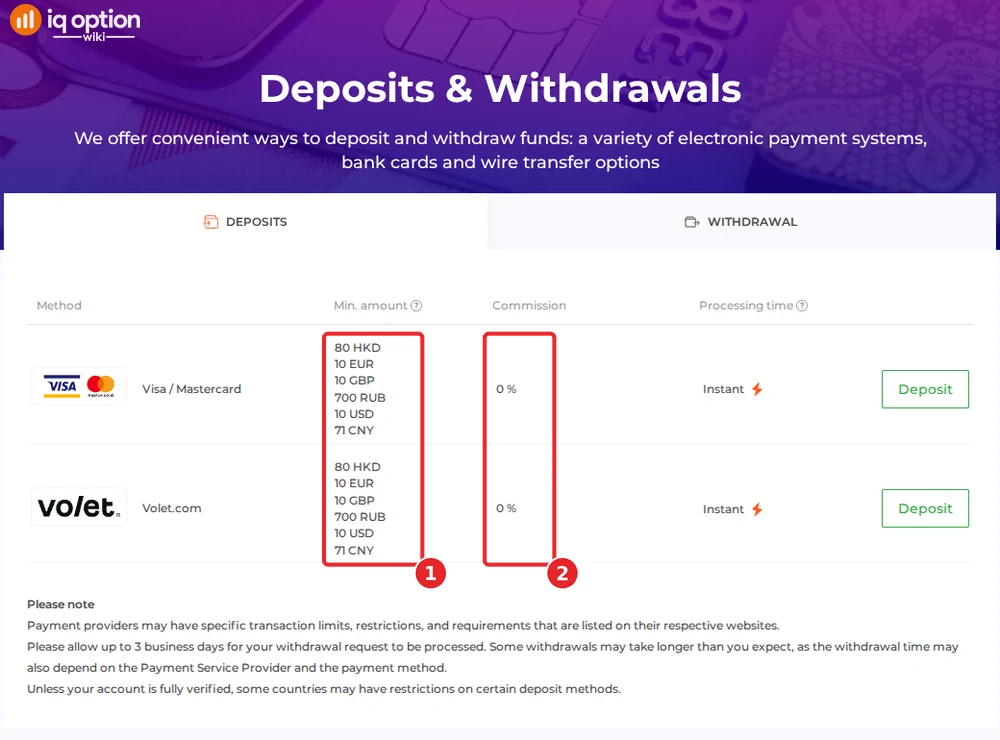
Volet.com shows only on the page and the coins only in the cashier. The page also notes that some countries restrict particular deposit methods until an account is fully verified.
Depositing with Tether (USDT) and other crypto
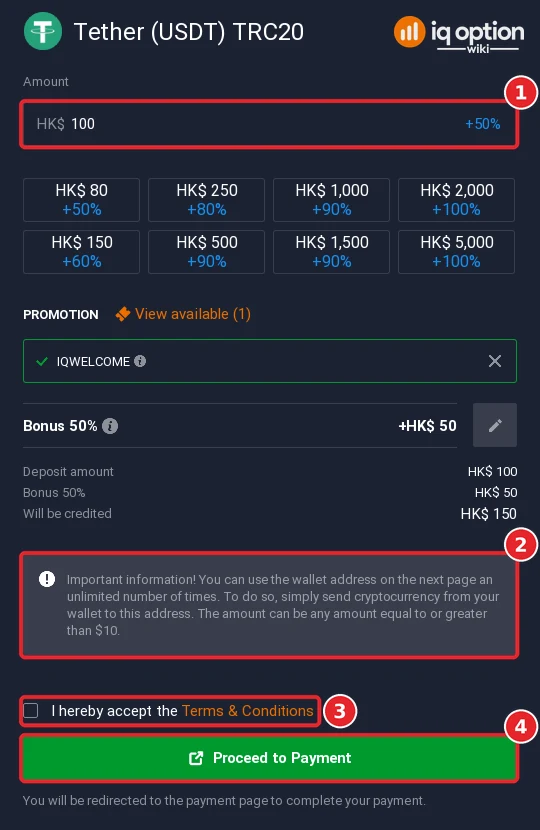
Under “Crypto deposit” the cashier lists Bitcoin, Cardano, Ethereum (ERC-20), Litecoin, Ripple (XRP), Tether (USDT) on TRC20 and USDC on BNB Smart Chain. The coin you send is converted into your account currency on arrival. The Tether form accepted HK$80 to HK$7,850,000. Type the amount (1) and read the grey note (2): the wallet address on the next page can be reused for any amount, although the note still speaks of dollars (“equal to or greater than $10”) on a Hong Kong dollar account. Tick the terms (3) and press Proceed to Payment (4). Use the TRC20 network only. Related reading: does IQ Option accept crypto.
Withdrawing from IQ Option in Hong Kong
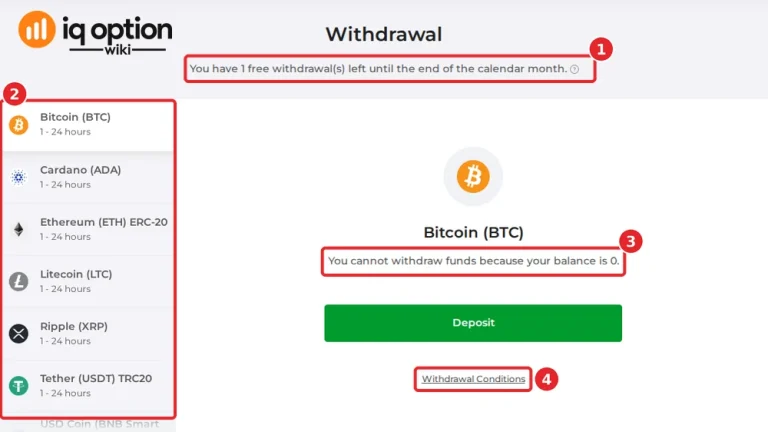
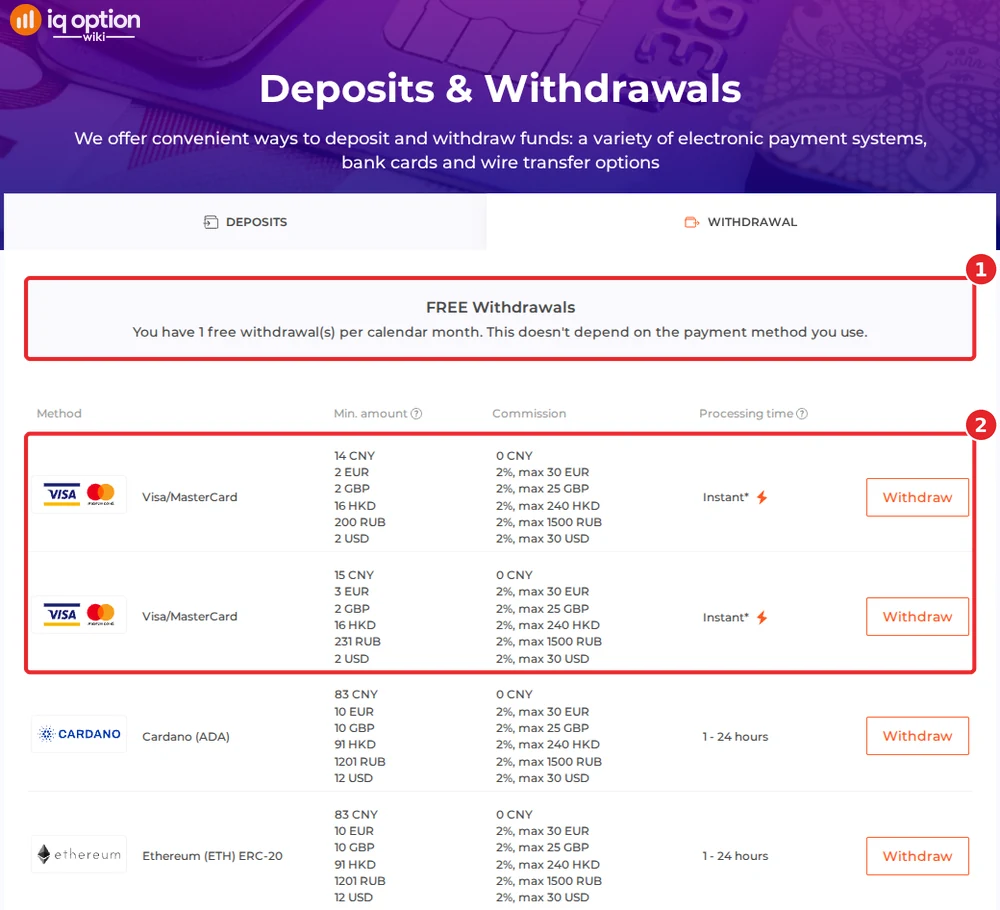
The withdrawals page gives each account one free withdrawal per calendar month, whatever the method (1). After that the fee is 2%, capped at 240 HKD (30 EUR, 25 GBP, 30 USD). Money can return to a card (2), an e-wallet, WebMoney or a coin address; bank transfers are not listed. The page shows two Visa/MasterCard entries, both from 16 HKD.
| Where the money goes | Minimum | Time shown |
|---|---|---|
| Visa / MasterCard (two entries) | HK$16 | Instant; the card issuer may take up to 21 days |
| Volet.com USD, WebMoney WMZ | HK$16 | 1 to 24 hours |
| 6 cryptocurrencies | HK$91 | 1 to 24 hours |
A footnote under the table gives card issuers up to 21 calendar days, and any request may take up to 3 business days. The coin rows are Cardano, Ethereum, Litecoin, Ripple, Tether (TRC20) and USD Coin (BNB Smart Chain); the official table has no Bitcoin row, no Skrill and no Neteller, and we did not look at the withdrawal list inside the account, so check yours there. Detailed instructions: withdrawing from IQ Option. Our Hong Kong withdrawal guide shows what the withdrawal page of a Hong Kong account lists.
Check the rules in Hong Kong first
IQ Option let us register from Hong Kong, but that is no Hong Kong licence. The Securities and Futures Commission (SFC) keeps an Alert List of entities that it says are unlicensed in Hong Kong and believed to be targeting Hong Kong investors; it includes binary-options sites such as Banc De Binary and GG Binary Option, and the page calls itself “not a comprehensive list”. IQ Option does not appear in it: we searched the whole list on 8 October 2026. The SFC’s licensing page says a corporation that actively markets to the public, from Hong Kong or from abroad, a service that would be a regulated activity if provided in Hong Kong needs a licence, and “Type 3 Leveraged foreign exchange trading” is on its list of regulated activities. Whether that reaches a website that explains how to deposit with a foreign broker is not stated, and we found no case against a publisher or affiliate and no Hong Kong block of IQ Option. This is not legal advice: work out your own position before you deposit and never risk more than you can afford to lose. Regulators that have commented on IQ Option are listed in our legitimacy check.
If your deposit has not arrived
- Look at the time shown. Cards are instant and coins take 5 to 60 minutes.
- Match the network. Coins sent over a chain other than the one on the form can be lost; Tether uses TRC20.
- Try your card issuer. Some banks refuse online payments to overseas merchants. Ask yours to approve this one, or deposit in crypto.
- Ask support. Chats & Support is in the sidebar and the email address is support@iqoption.com; the support guide explains both.
Deposit guides for other countries
Every country has its own cashier. More walkthroughs from this series:
- Thailand: Kasikorn, SCB, Krungthai QR
- Vietnam: Vietcombank QR, BIDV, VietQR
- Philippines: GCash, Maya, QRPH
- Malaysia: Maybank, CIMB, DuitNow QR
- Singapore: Cards, Maybank, USDT
- Cambodia: Cards, Skrill, Thai banks, USDT
- Laos: Mastercard, Apple Pay, Thai banks, USDT
- Brunei: Visa, Mastercard, Skrill, Neteller, USDT
Every country guide is in the grid on the IQ Option deposit guide.
Whatever is the same in all countries is in the general deposit guide.
Frequently Asked Questions
Q: What is the minimum deposit on IQ Option in Hong Kong?
A: 80 HKD for Visa / Mastercard and Volet.com on the deposits page of 8 October 2026 (the page also lists 10 EUR, 10 GBP, 10 USD, 71 CNY and 700 RUB). The card form showed HK$80 to HK$90,170.
Q: Can I deposit in Hong Kong dollars?
A: Yes. HKD is the first currency on the list, with EUR, GBP, USD and CNY. The choice is locked after your first deposit.
Q: Can I use FPS, a bank transfer, PayMe or Alipay HK?
A: None of them appeared in our cashier or on the deposits page. We saw Visa / Mastercard, Volet.com (page only) and seven coins.
Q: Does IQ Option charge a deposit fee in Hong Kong?
A: The deposits page lists 0% commission. Your card issuer may still add charges of its own.
Q: How do I withdraw from IQ Option in Hong Kong?
A: To a card, Volet.com USD, WebMoney WMZ or a crypto address. Cards, Volet.com and WebMoney start at HK$16, the six coins at HK$91. The first withdrawal each month is free; later ones cost 2%, up to 240 HKD.
Q: Do I have to accept the welcome bonus?
A: No. The code arrives applied, and the × beside it in the amount step takes it off.
Q: Is IQ Option licensed in Hong Kong?
A: Registering from Hong Kong worked, which does not make it a Hong Kong licensee, and it is not on the SFC’s Alert List. Read the note above.