Last updated: 8 October 2026. MoreLess
The screenshots below were recorded on 8 October (UTC), which is already 9 October on the clock of a New Zealand screen, on an IQ Option Practice account registered in New Zealand. The VPN server was in Auckland by a location lookup, and IQ Option’s sign-up form read New Zealand as the country of residence. Every payment stopped before its last button, so no money was sent.
A New Zealand account gets a mostly international cashier. Mastercard, Apple Pay and Google Pay head the list, seven cryptocurrencies follow, and Visa and Neteller close it under “Other methods”. We saw no New Zealand bank transfer and no Skrill, and there is no NZD account: the currency step offers US dollars, euros and pounds. This guide follows a $10 Mastercard deposit, then Neteller and Tether, the limits, the withdrawal rules and a warning by New Zealand’s Financial Markets Authority that names IQ Option.
 A New Zealand account gets a mostly international cashier. Mastercard, Apple Pay and Google Pay head the list, seven cryptocurrencies follow, and Visa and Neteller close it under “Other methods”. We saw no New Zealand bank transfer and no Skrill, and there is no NZD account: the currency step offers US dollars, euros and pounds. This guide follows a $10 Mastercard deposit, then Neteller and Tether, the limits, the withdrawal rules and a warning by New Zealand’s Financial Markets Authority that names IQ Option.
Quick answer
- Minimum: $10 (or €10, £10) on every method.
- Fee: 0% from IQ Option on every method.
- In our cashier: Mastercard, Apple Pay and Google Pay (instant), seven cryptocurrencies (5 to 60 minutes), Visa and Neteller. No New Zealand bank method, no Skrill.
- Limits we saw: Mastercard $10–11,050; Neteller and Tether (USDT) TRC20 $10–1,000,000.
- Currency: USD, EUR or GBP, chosen before your first deposit and fixed after it. There is no NZD account.
- Withdrawals: one free per month, then 2% (at most $30); cards, Volet.com and WebMoney from $2, Neteller from $10, coins from $12.
- Local rules: New Zealand’s FMA has warned that IQ Option is not registered there; read the note before you deposit.
How to deposit on IQ Option in New Zealand, step by step
We paid with Mastercard, the first tile in the cashier. The red numbers on the screenshots show the order of the clicks.
Step 1: Click Deposit
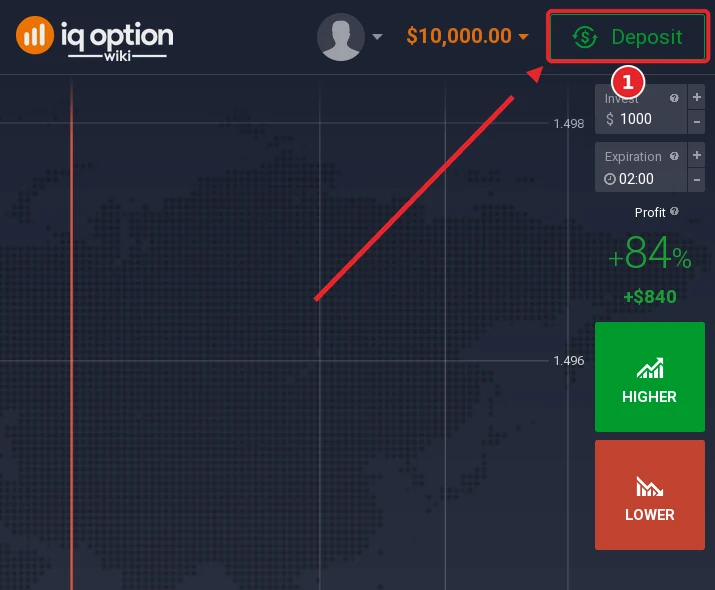
Click the green Deposit button at the top right of the traderoom (1). The $10,000 beside it belongs to the Practice account.
Step 2: Choose “Top up your account”
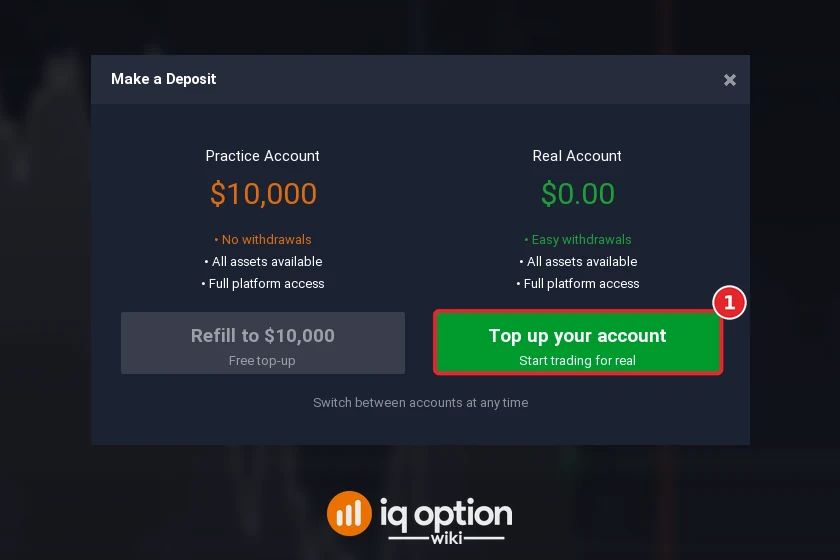
The Make a Deposit window offers a practice refill and a real top-up. Refill to $10,000 only resets virtual money. Choose Top up your account (1) to fund the real account, which starts at $0.00.
Step 3: Choose Mastercard
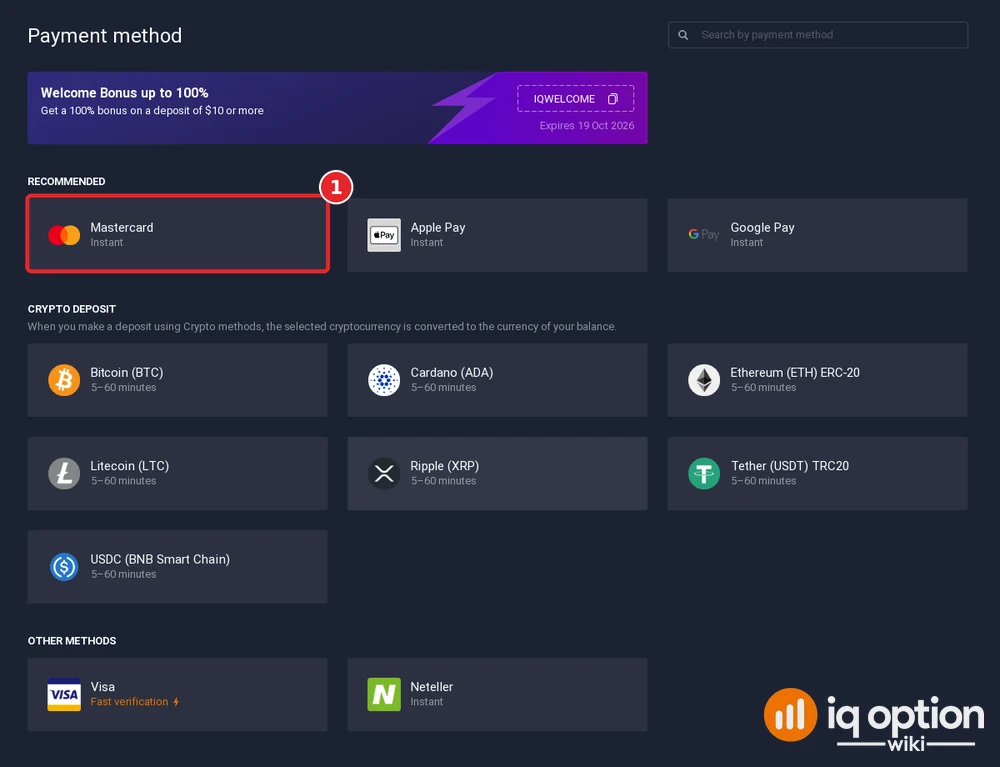
The welcome-bonus banner (code IQWELCOME) showed “Expires 19 Oct 2026” on our screen; the same banner read 18 Oct on accounts from other countries. “Recommended” lists Mastercard, Apple Pay and Google Pay, each instant. Click Mastercard (1). Further down are seven coins at 5 to 60 minutes, then “Other methods”: Visa, tagged “Fast verification”, and Neteller.
Step 4: Choose USD as the account currency
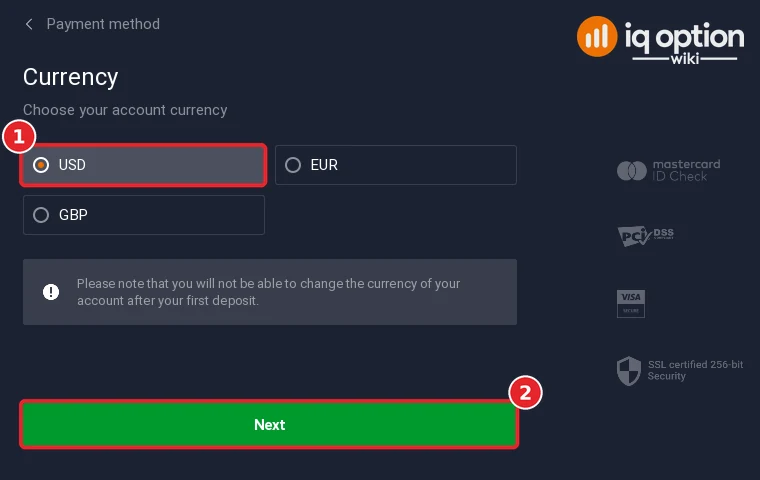
Pick USD (1); EUR and GBP are the other options, and none of them was ticked before we clicked. Press Next (2). IQ Option warns that the account currency cannot be changed after the first deposit.
Step 5: Type the amount and look at the bonus
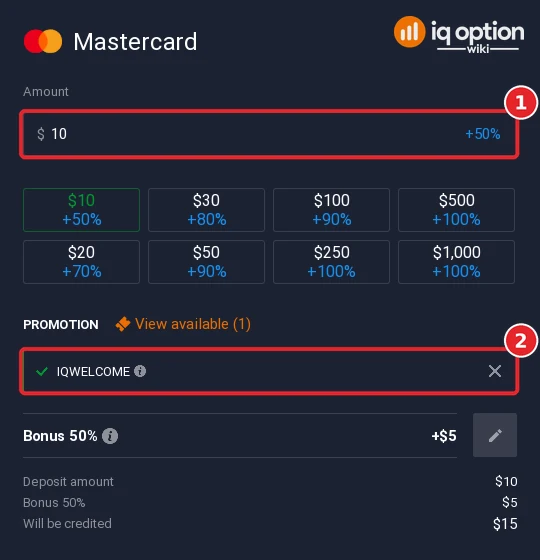
Enter an amount (1) or tap a quick button between $10 and $1,000. The IQWELCOME code was in place already (2). Ten dollars produced “Bonus 50%”, +$5 and $15 credited; the buttons advertised +70% on $20, +80% on $30, +90% on $50 and $100, and +100% from $250. The × next to the code takes the bonus off.
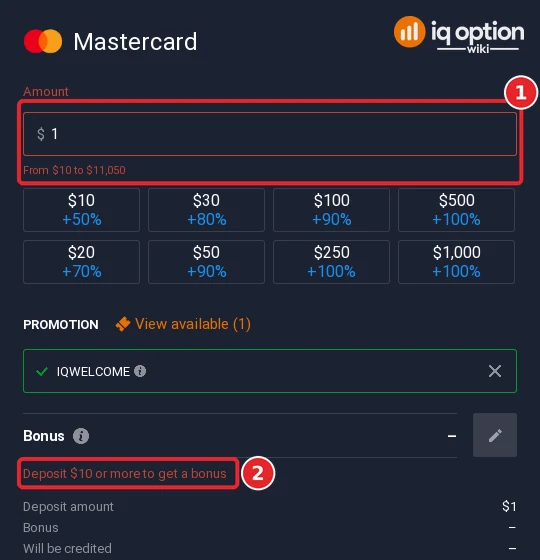
Type a single dollar and the field turns red. The Mastercard range appears underneath, “From $10 to $11,050” (1), with the line “Deposit $10 or more to get a bonus” (2) lower down.
Step 6: Fill in the card form and confirm
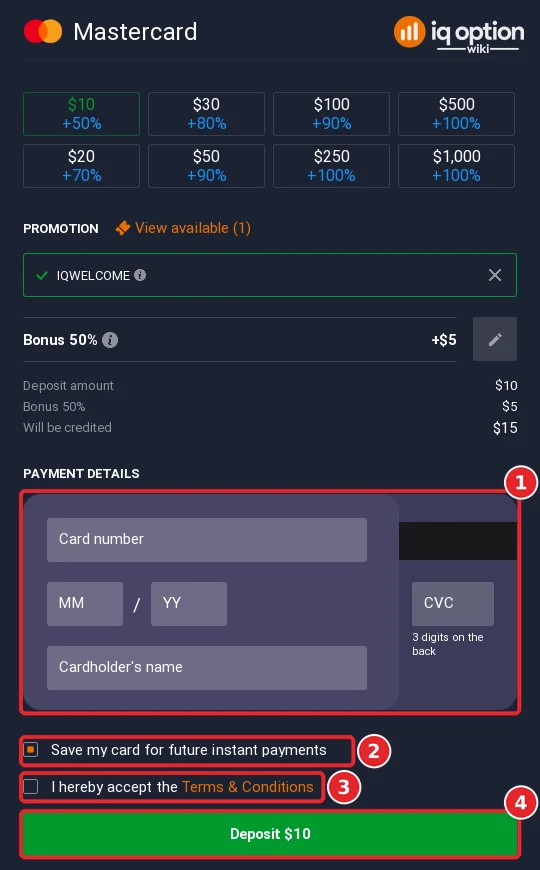
The card block (1) asks for the number, month and year, CVC and the cardholder’s name. The box for saving the card is ticked already (2). After you tick the terms (3), the green Deposit $10 button (4) sends the payment. We stopped in front of it.
All deposit methods in New Zealand
The table puts our cashier next to IQ Option’s public deposits page, both read on 8 October 2026. The page names six methods, all from 10 USD (10 EUR, 10 GBP, 700 RUB) with 0% commission and instant processing.
| Method | Time shown | Limits and notes |
|---|---|---|
| Mastercard | Instant | $10 to $11,050 |
| Visa | Instant | 10 USD on the page; tagged “Fast verification”; form not opened |
| Apple Pay, Google Pay | Instant | 10 USD on the page; forms not opened |
| Neteller | Instant | $10 to $1,000,000 |
| Volet.com | Instant on the deposits page | 10 USD on the page; not in our cashier |
| 7 cryptocurrencies | 5 to 60 minutes | Tether (USDT) TRC20: $10 to $1,000,000 |
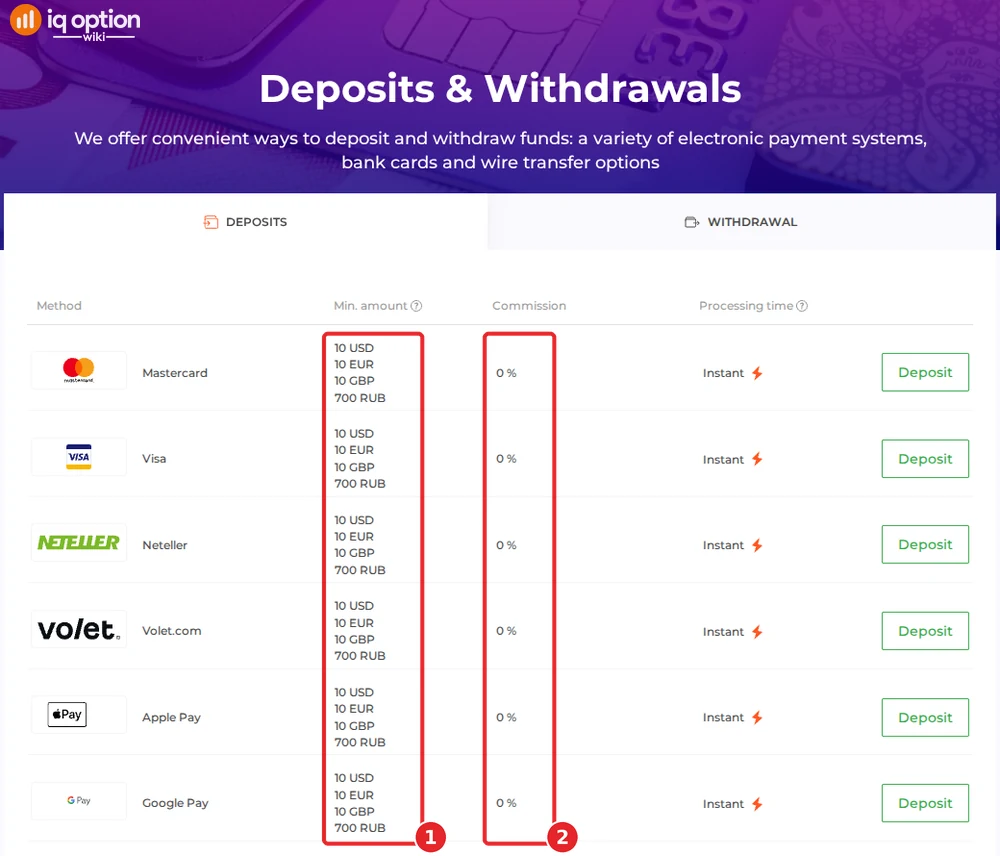
Volet.com is on the page only and the coins in the cashier only. A footnote adds that some countries restrict certain deposit methods until an account is fully verified.
Depositing with Neteller
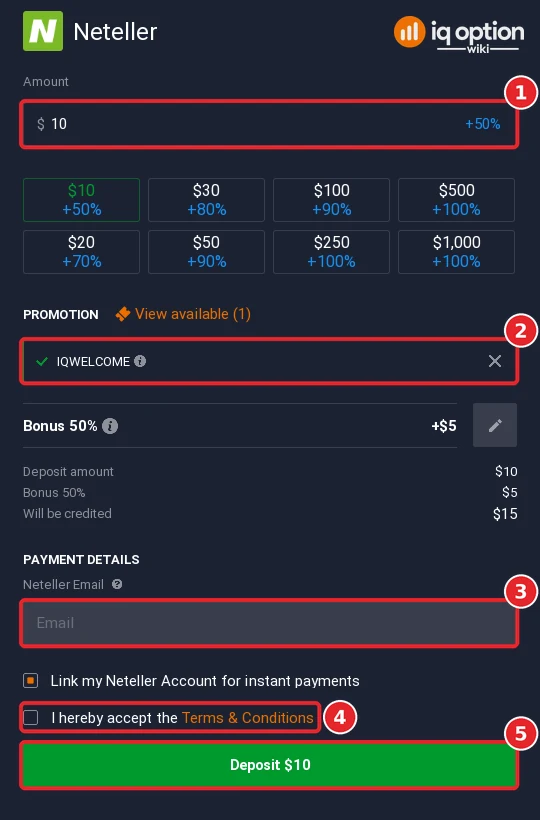
Neteller took $10 to $1,000,000. After the amount (1) and the bonus code (2), the form wants the email address of your Neteller account (3); “Link my Neteller Account for instant payments” is ticked by default. Tick the terms (4) and press Deposit $10 (5). We typed no address and did not press it.
Depositing with Tether (USDT) and other crypto
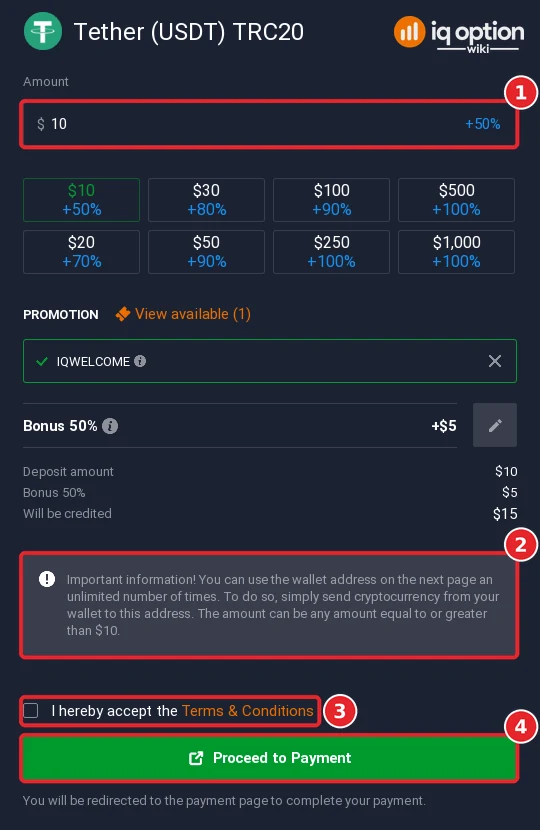
The crypto block lists Bitcoin, Cardano, Ethereum (ERC-20), Litecoin, Ripple (XRP), Tether (USDT) on TRC20 and USDC on BNB Smart Chain; IQ Option converts the coin into your account currency when it arrives. Tether showed $10 to $1,000,000. Enter the amount (1), read the grey note (2) that the wallet address on the next page can be used again for any amount from $10, tick the terms (3) and press Proceed to Payment (4). Send on TRC20 only. Related reading: does IQ Option accept crypto.
Withdrawing from IQ Option in New Zealand
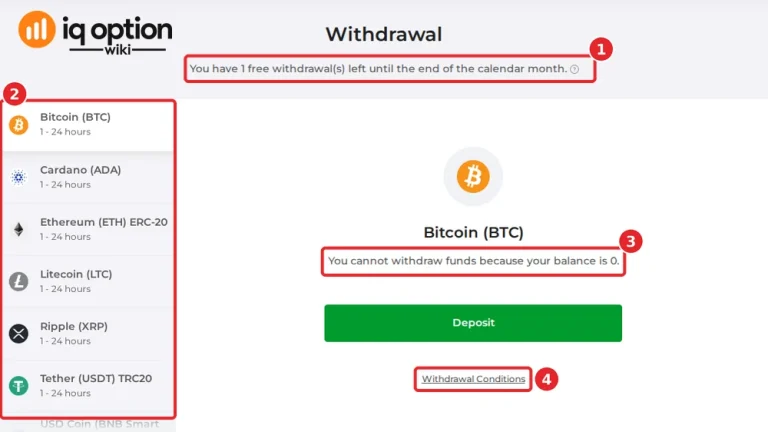
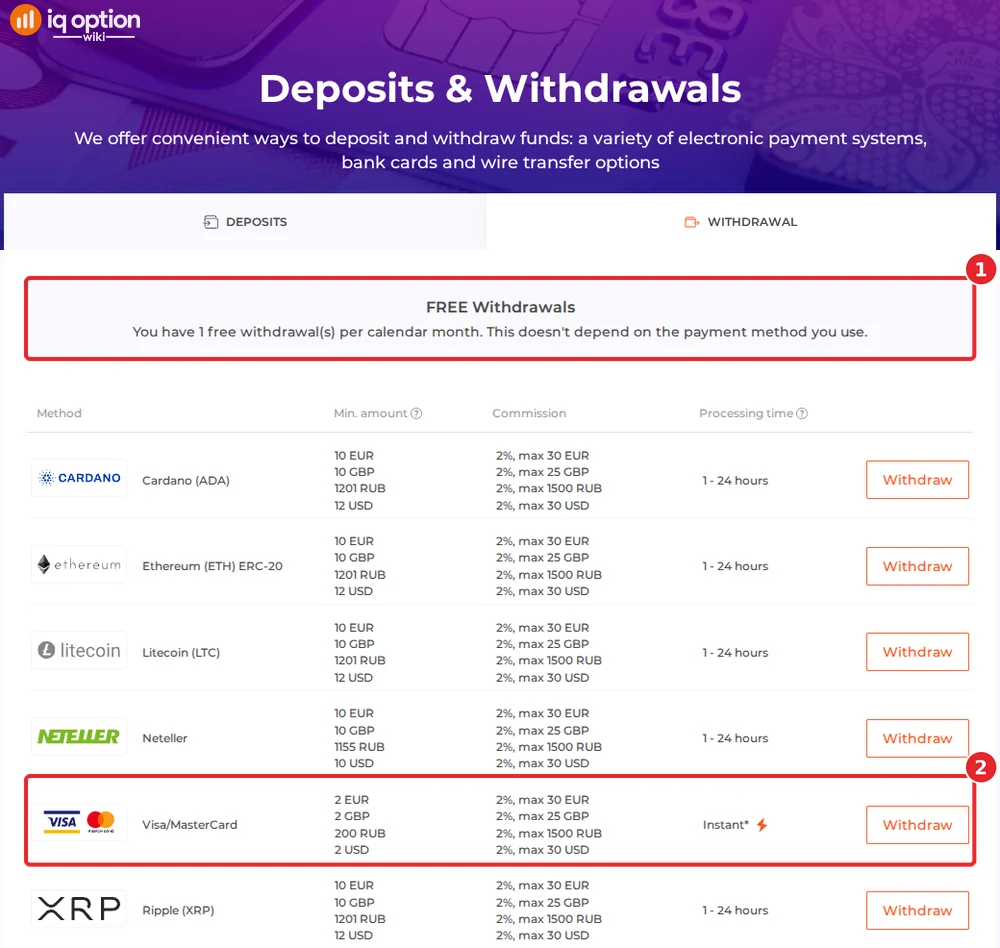
The withdrawals page gives you one free withdrawal per calendar month, whatever the method (1). Each further one costs 2%, capped at 30 USD. There is no bank transfer: money goes to a card (2), Neteller, Volet.com, WebMoney or a coin address.
| Where the money goes | Minimum | Time shown |
|---|---|---|
| Visa / MasterCard | $2 | Instant, though the card issuer may take up to 21 days |
| Volet.com USD, WebMoney WMZ | $2 | 1 to 24 hours |
| Neteller | $10 | 1 to 24 hours |
| 6 cryptocurrencies | $12 | 1 to 24 hours |
The footnote under the table lets card issuers take up to 21 calendar days, and a request can need up to 3 business days. The six coins are Cardano, Ethereum, Litecoin, Ripple, Tether (TRC20) and USD Coin (BNB Smart Chain); the official table has no Bitcoin and no Skrill, and we did not open the withdrawal list inside the account, so check yours. The full routine is in withdrawing from IQ Option. Our New Zealand withdrawal guide shows what the withdrawal page of a New Zealand account lists.
Check the rules in New Zealand first
IQ Option let us register from New Zealand, but that does not make it a registered firm there. On 19 August 2020 the Financial Markets Authority (FMA) published a warning about RB Options, a website it said “has the hallmarks of a scam”. The FMA wrote that the site was “currently promoting IQ Option” and that it was “concerned they are associated”, listed warnings about IQ Option issued by the securities regulators of Brazil (CVM, 8 May 2020) and British Columbia (2 March 2016), and recommended “exercising caution before dealing with these entities as they are not registered companies or financial service providers in New Zealand”. The live FMA page did not open for us, so we read the archived copy of 17 February 2025. The warning is a caution, not a ban: we found no New Zealand block of IQ Option and no action against people who write about it. This is not legal advice: work out your own position before you deposit and never risk more than you can afford to lose. Regulators that have commented on IQ Option are listed in our legitimacy check.
If your deposit has not arrived
- Look at the time shown. Cards and Neteller are instant, coins need 5 to 60 minutes.
- Match the network. A coin sent on a different chain from the one on the form can be lost; Tether runs on TRC20.
- Check with your bank. A card payment to an overseas merchant may be declined or held; ask the bank to allow it, or use Neteller.
- Ask support. Chats & Support is in the sidebar and the email address is support@iqoption.com; the support guide explains both.
Deposit guides for other countries
Each country has its own cashier. More walkthroughs from this series:
- Papua New Guinea: Visa, Mastercard, USDT
- Brazil: PIX, PicPay, Boleto, cards
- Mexico: SPEI, OXXO, cards
- Peru: Yape, Plin, BCP
- Chile: WebPay, Mach, Khipu
- Colombia: Nequi, PSE, Efecty
- Argentina: Mercado Pago QR, MODO, Rapi Pago
- Thailand: Kasikorn, SCB, Krungthai QR
Every country guide is in the grid on the IQ Option deposit guide.
Whatever is the same in every country is in the general deposit guide.
Frequently Asked Questions
Q: What is the minimum deposit on IQ Option in New Zealand?
A: 10 USD for Mastercard, Visa, Neteller, Volet.com, Apple Pay and Google Pay on the deposits page of 8 October 2026 (10 EUR, 10 GBP and 700 RUB are listed too).
Q: Can I deposit in New Zealand dollars?
A: No. The currency step offered USD, EUR and GBP, and the choice is fixed after the first deposit.
Q: Is there a New Zealand bank-transfer option?
A: Neither the cashier nor the deposits page showed one. We saw Mastercard, Visa, Apple Pay, Google Pay, Neteller, Volet.com (page only) and seven coins.
Q: Does IQ Option charge a deposit fee in New Zealand?
A: The deposits page shows 0% commission. A bank or card issuer may add charges of its own, for example for a foreign-currency payment.
Q: How do I withdraw from IQ Option in New Zealand?
A: To a card, Neteller, Volet.com USD, WebMoney WMZ or a crypto address. Cards, Volet.com and WebMoney start at $2, Neteller at $10 and the coins at $12. The first withdrawal each month is free; later ones cost 2%, up to 30 USD.
Q: Do I have to accept the welcome bonus?
A: No. The code is applied for you, and the × next to it in the amount step removes it.
Q: Is IQ Option registered in New Zealand?
A: The FMA’s warning of 19 August 2020 says it is not a registered company or financial service provider in New Zealand, and we found no later FMA statement. Read the note above.