Last updated: 8 October 2026. MoreLess
We recorded every screenshot on this page that day, on an IQ Option Practice account registered in Uruguay, with the traderoom clock at UTC-3. The VPN server is listed by its provider as Montevideo and marked “virtual”; a location lookup put it in São Paulo, yet IQ Option’s sign-up form accepted Uruguay as the country of residence. Each payment flow ended before the last button, so no money was sent.
The Uruguayan cashier is wide: Mastercard, Visa and Apple Pay head the list, Google Pay, Neteller and Skrill sit under “Other methods”, and seven cryptocurrencies fill the middle. Two details separate it from most other countries in this series. First, our account saw no welcome-bonus banner and no pre-applied code: the promotion box was an empty field marked “View available (0)”. Second, Visa is tagged “Fast verification” and its form stays greyed out until you verify your identity. There is no Uruguayan bank or wallet method and no peso account; the currency choices are US dollars, euros and pounds. Below we deposit $10 with Mastercard and then look at the other methods, the limits, the withdrawal table and what the central bank has said about unregistered platforms. A Spanish version of this page shows the same screens in IQ Option’s Spanish interface.
 The Uruguayan cashier is wide: Mastercard, Visa and Apple Pay head the list, Google Pay, Neteller and Skrill sit under “Other methods”, and seven cryptocurrencies fill the middle. Two details separate it from most other countries in this series. First, our account saw no welcome-bonus banner and no pre-applied code: the promotion box was an empty field marked “View available (0)”. Second, Visa is tagged “Fast verification” and its form stays greyed out until you verify your identity. There is no Uruguayan bank or wallet method and no peso account; the currency choices are US dollars, euros and pounds. Below we deposit $10 with Mastercard and then look at the other methods, the limits, the withdrawal table and what the central bank has said about unregistered platforms. A Spanish version of this page shows the same screens in IQ Option’s Spanish interface.
Quick answer
- Minimum: $10 (or €10, £10) on every method.
- Fee: 0% from IQ Option on every method.
- In our cashier: Mastercard, Visa, Apple Pay, Google Pay, Neteller and Skrill (instant), seven cryptocurrencies (5 to 60 minutes). No Uruguayan bank or wallet.
- Limits we saw: Mastercard $10–11,050; Neteller, Skrill and Tether (USDT) TRC20 $10–1,000,000. Visa needs identity verification first.
- Currency: USD, EUR or GBP (none pre-selected), chosen before your first deposit and fixed after it. There is no peso account.
- Bonus: none on our account: no banner, no code applied.
- Withdrawals: one free per month, then 2% (at most $30); cards, Skrill, Volet.com and WebMoney from $2, Neteller from $10, coins from $12.
- Local rules: the central bank warns about named unregistered CFD platforms and does not name IQ Option; read the note before you deposit.
How to deposit on IQ Option in Uruguay, step by step
Mastercard, the first tile of the cashier, carries our walkthrough. Numbered red boxes mark the clicks in order.
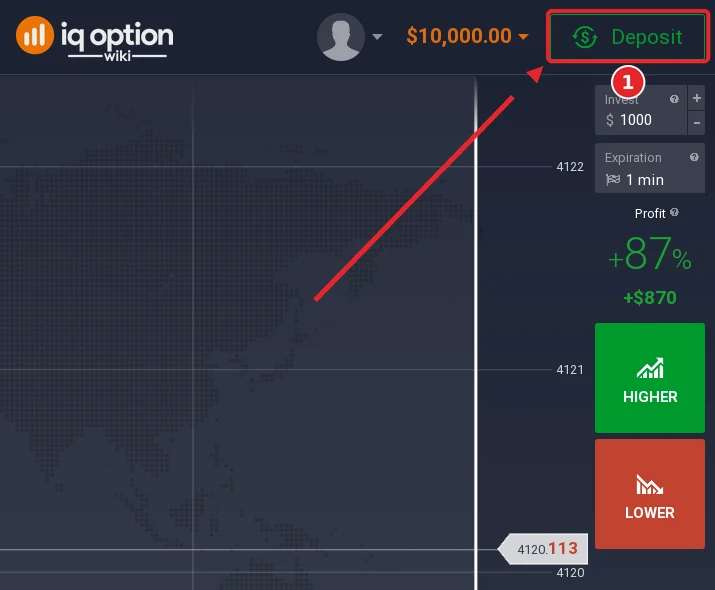
Step 1: Press Deposit
Look for the green Deposit button at the top right of the traderoom, next to the balance (1). The $10,000 shown there is virtual Practice money.
Step 2: Pick “Top up your account”
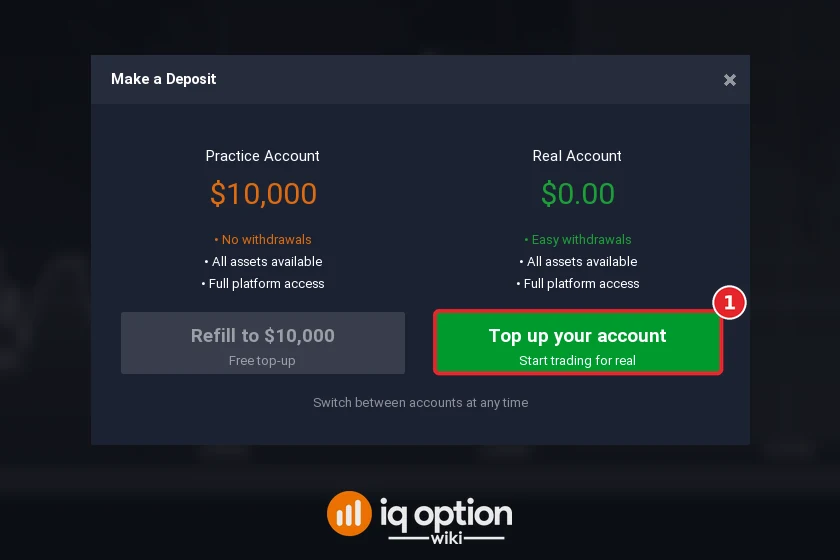
The Make a Deposit window offers two accounts. The grey Refill to $10,000 only restores play money; real deposits start with Top up your account (1), beside the real balance of $0.00.
Step 3: Select Mastercard
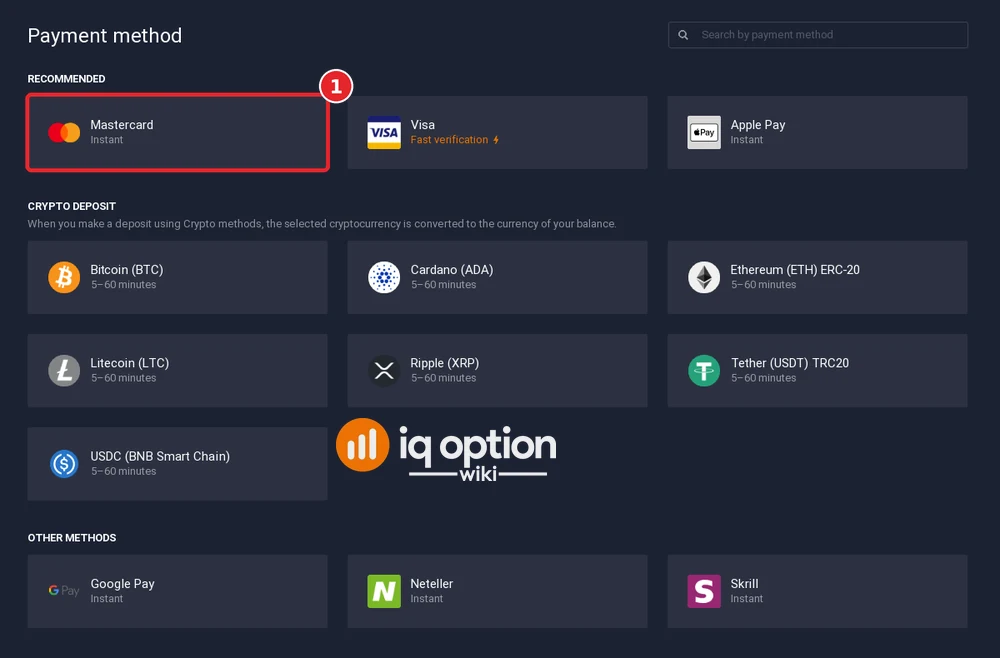
Unusually, the payment-method page has no bonus banner. “Recommended” lists Mastercard, Visa (“Fast verification”) and Apple Pay; the crypto block is in the middle, and Google Pay, Neteller and Skrill come last. Choose Mastercard (1).
Step 4: Pick the account currency
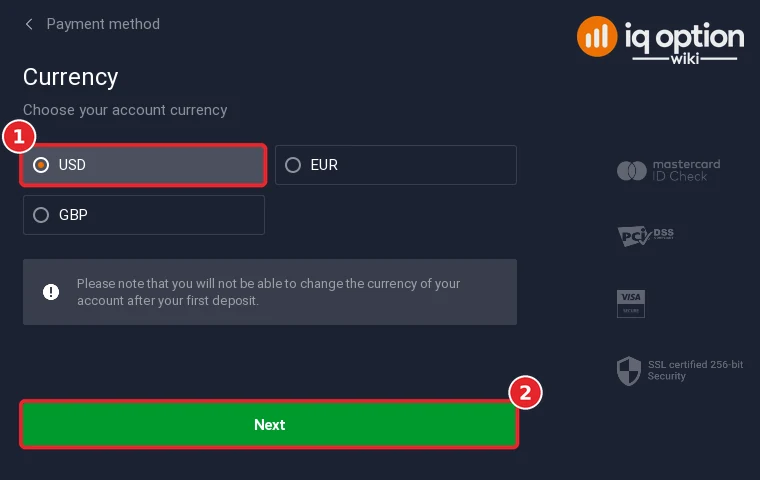
Nothing was ticked when this step opened. We clicked USD (1); EUR and GBP are the other two, and the peso is not offered. Continue with Next (2). IQ Option warns that the currency of the account cannot be changed after the first deposit.
Step 5: Type the amount
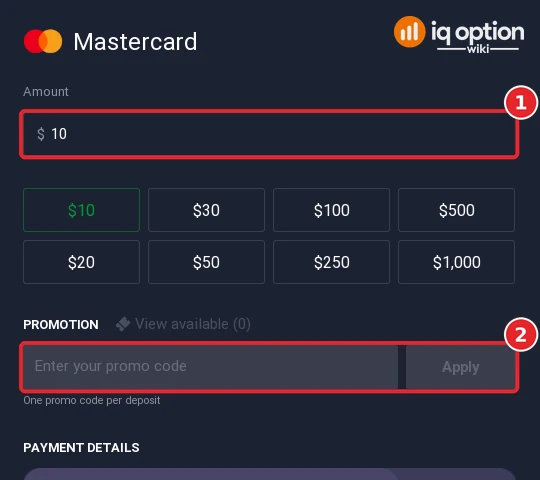
Enter the amount (1) or press one of the preset buttons, which run from $10 to $1,000 and carry no bonus percentages here. Below them the promotion box (2) is empty, with a field for a promo code and an Apply button; the heading reads “View available (0)”, so there was nothing to apply.
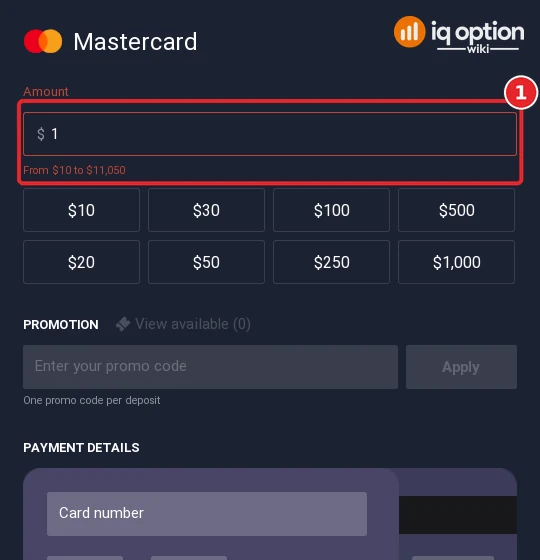
With $1 typed the field goes red, and the card limits appear in red underneath: “From $10 to $11,050” (1).
Step 6: Fill in the card form
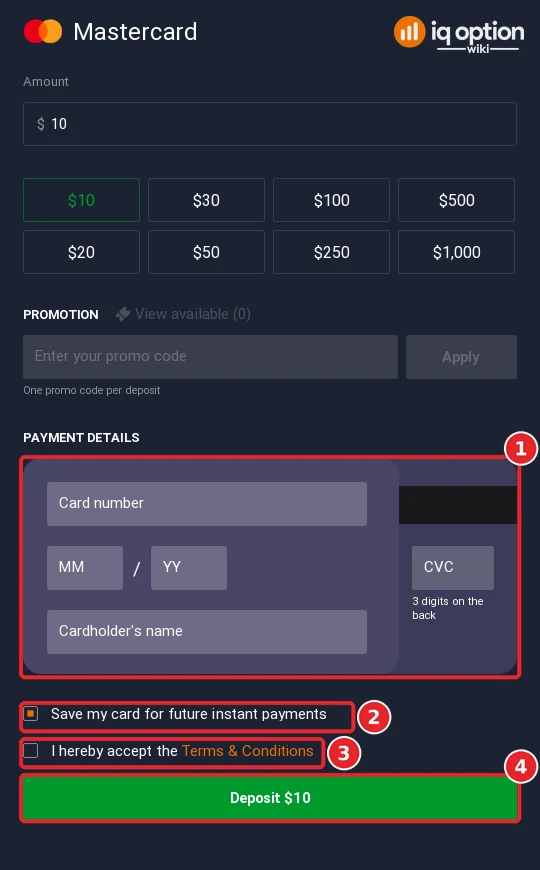
The card block (1) holds the number, the expiry month and year, the CVC and the cardholder’s name. A box that saves the card for later instant payments is ticked by default (2). Once the terms box (3) is ticked, the green Deposit $10 button (4) pays. We never pressed it.
Every deposit method in Uruguay
The table combines our cashier with IQ Option’s public deposits page, both read on 8 October 2026. The page lists seven methods, each with the same terms: 10 USD (10 EUR, 10 GBP, 700 RUB), 0% commission, instant processing.
| Method | Time shown | Limits and notes |
|---|---|---|
| Mastercard | Instant | $10 to $11,050 |
| Visa | Instant | Form greyed out until your identity is verified; no range shown |
| Apple Pay, Google Pay | Instant | 10 USD on the page; forms not opened |
| Neteller | Instant | $10 to $1,000,000; asks for the Neteller email |
| Skrill | Instant | $10 to $1,000,000 |
| Volet.com | Instant on the deposits page | 10 USD on the page; absent from our cashier |
| 7 cryptocurrencies | 5 to 60 minutes | Tether (USDT) TRC20: $10 to $1,000,000 |
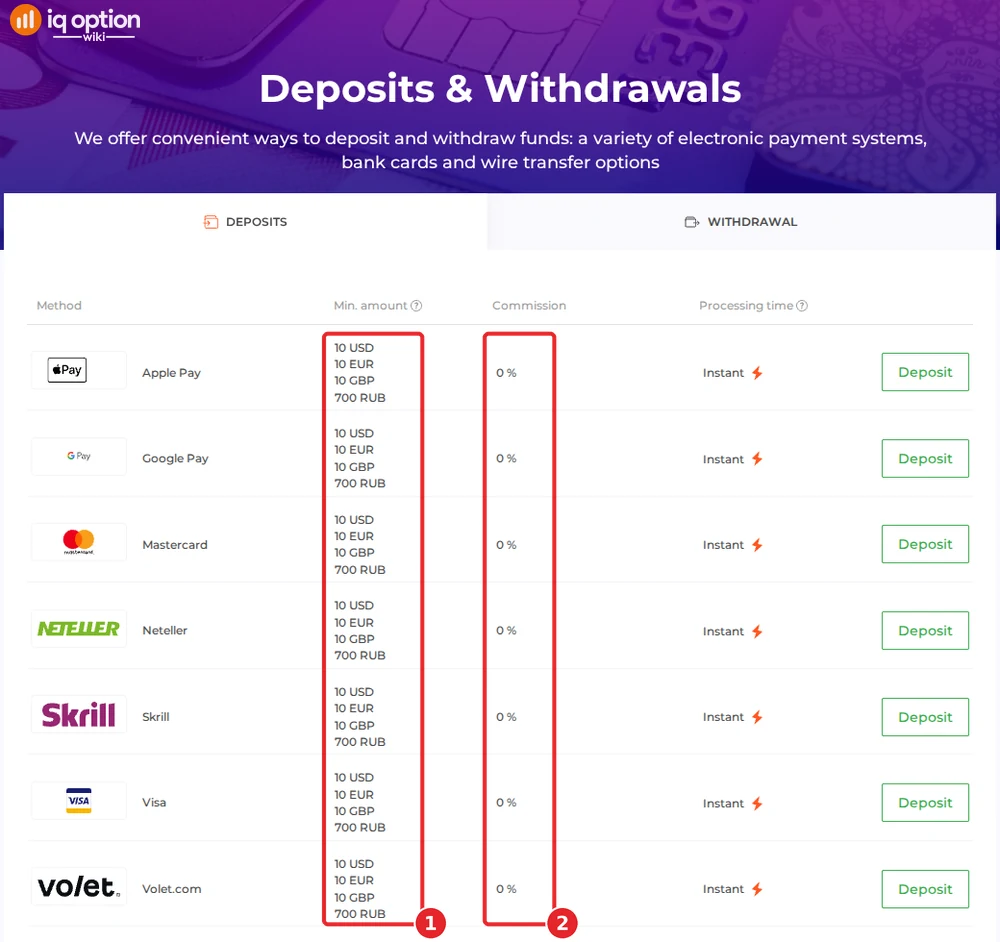
Volet.com appears only on the page, the coins only in the cashier. A note under the table says some countries restrict certain deposit methods until an account is fully verified.
Visa asks for identity verification first
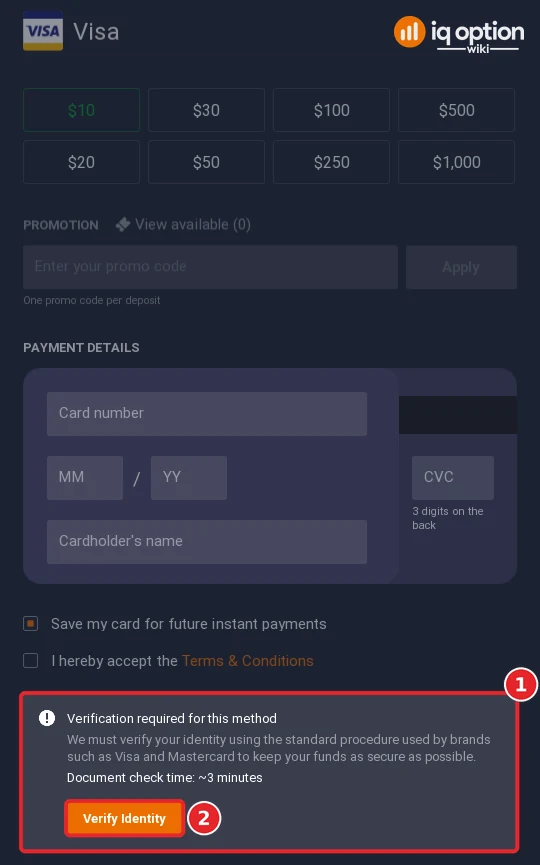
Choosing Visa leads to the same currency step and then to a greyed-out card form. Under it a notice (1) states “Verification required for this method”: IQ Option says it must verify your identity with the standard procedure used by brands such as Visa and Mastercard, and that the document check takes about 3 minutes. An orange Verify Identity button (2) starts it. We did not press it and uploaded nothing. Mastercard showed no such notice.
Depositing with Neteller
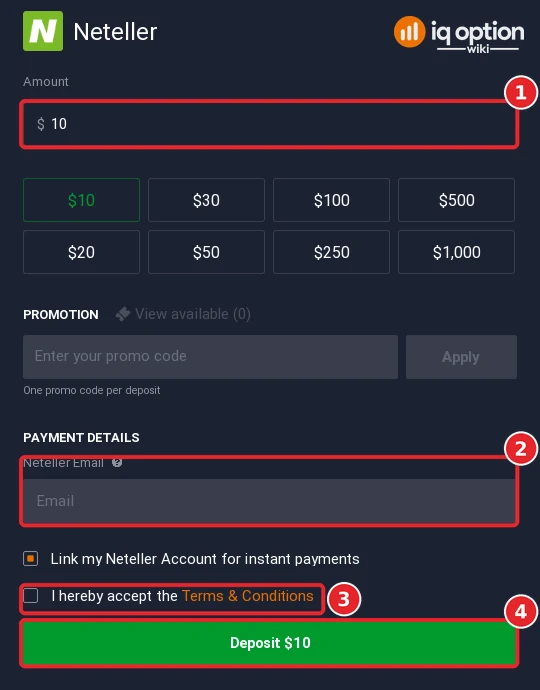
Neteller accepted $10 to $1,000,000. After the amount (1) the form wants the email address of your Neteller account (2), and “Link my Neteller Account for instant payments” comes ticked. Accept the terms (3) and Deposit $10 (4) pays. We typed no address and did not press the button.
Depositing with Skrill
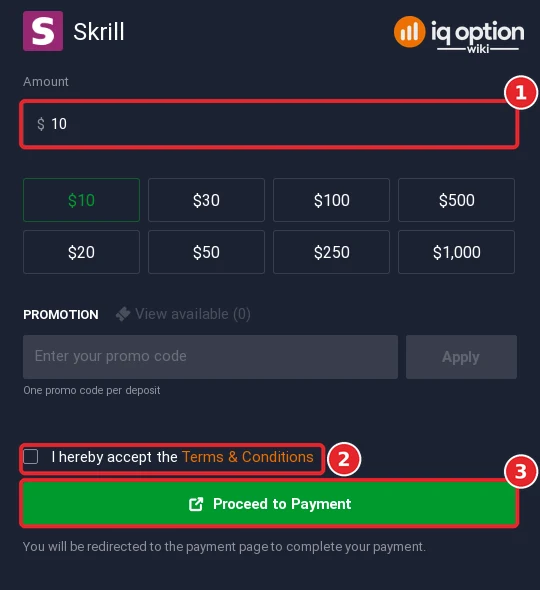
Skrill showed the same range, “From $10 to $1,000,000”. Enter the amount (1), tick the terms (2) and press Proceed to Payment (3) to be sent to Skrill’s own page. We stopped before that click.
Depositing with Tether (USDT) and other coins
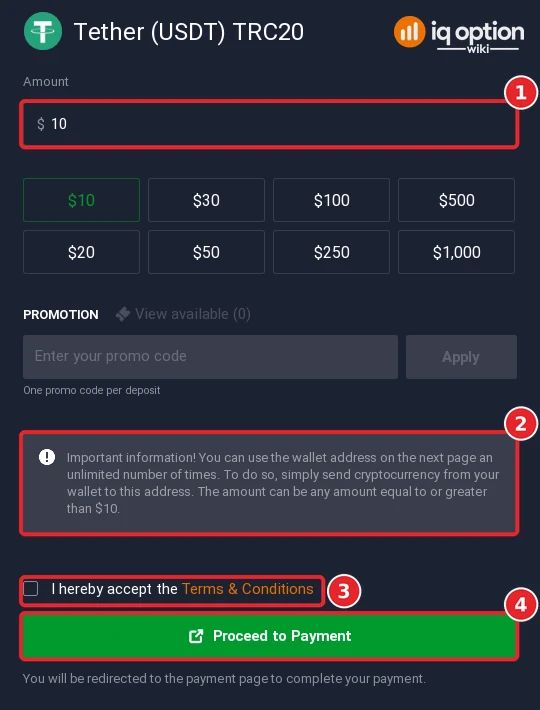
The coin list is Bitcoin, Cardano, Ethereum (ERC-20), Litecoin, Ripple (XRP), Tether (USDT) on TRC20 and USDC on BNB Smart Chain. IQ Option converts the coin you send into your account currency. For Tether, enter the amount (1) and read the grey note (2): the wallet address on the next page can be reused for any amount of $10 or more. Tick the terms (3), press Proceed to Payment (4) and send over TRC20 only. Related reading: does IQ Option accept crypto.
Withdrawing from IQ Option in Uruguay
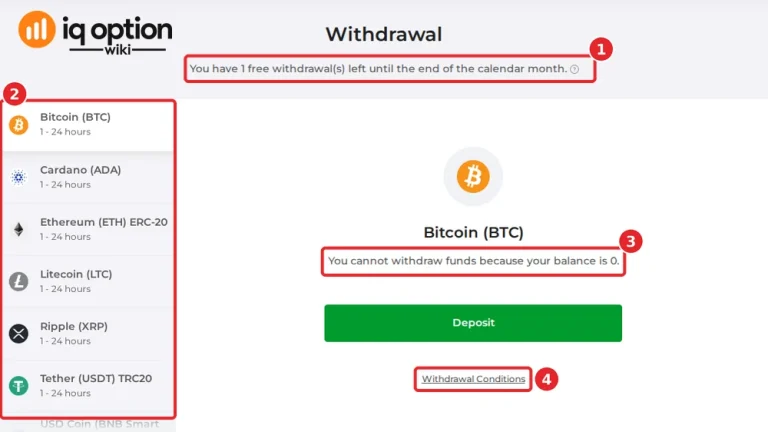
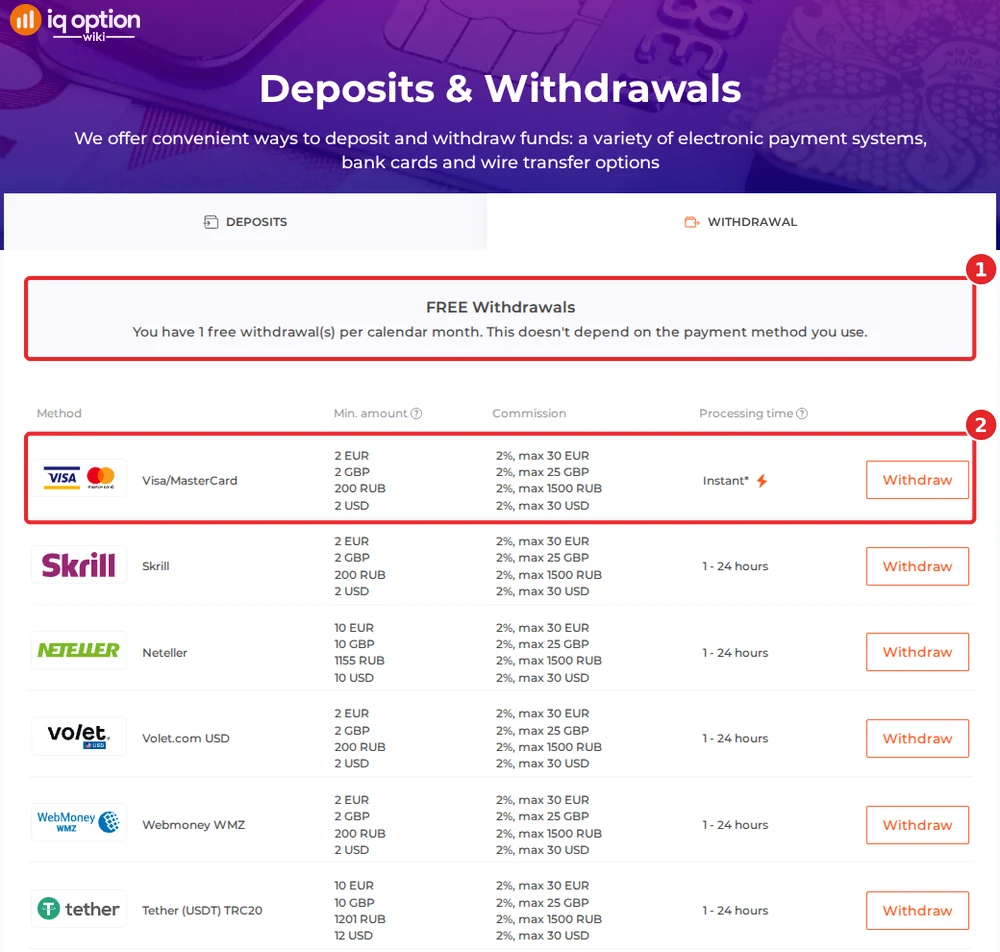
On the withdrawals page each calendar month’s first withdrawal is free, whichever method you use (1); further ones cost 2%, up to 30 USD. The list starts with Visa/MasterCard (2). There is no bank transfer, so payouts go to a card, an e-wallet, WebMoney or a coin address.
| Where the money goes | Minimum | Time shown |
|---|---|---|
| Visa / MasterCard | $2 | Instant; the issuing bank can take up to 21 days |
| Skrill, Volet.com USD, WebMoney WMZ | $2 | 1 to 24 hours |
| Neteller | $10 | 1 to 24 hours |
| 6 cryptocurrencies | $12 | 1 to 24 hours |
The footnote allows card issuers up to 21 calendar days and says any request can take up to 3 business days. The coins listed are Tether (TRC20), USD Coin (BNB Smart Chain), Ethereum, Ripple, Cardano and Litecoin, without Bitcoin. We did not open the withdrawal list inside the account, so check yours. Instructions: how to withdraw from IQ Option. Our Uruguay withdrawal guide shows what the withdrawal page of a Uruguayan account lists.
Check the rules in Uruguay first
IQ Option let us register from Uruguay, but that is no Uruguayan authorisation. The Superintendencia de Servicios Financieros of the Banco Central del Uruguay (BCU) warns the public about trading platforms it has not registered. In its communication 2026/080 of 10 April 2026 it named two platforms offering contracts for difference (FXNOVUS and MODMOUNT) and said that neither they nor their companies are registered with the BCU or authorised by the Superintendency. Its warnings page repeats the pattern, for example on 23 June 2026 with a list of firms flagged for “actividad no registrada”; we searched it on 8 October 2026 and IQ Option is not there. (Both BCU pages failed our certificate check on 8 October 2026, so your browser may show a security warning.) Separately, Decree 366/2017 bans unauthorised online games of chance and bets and lets the authorities order such sites blocked; it concerns gambling, and we found nothing that classes CFD or binary-option trading as gambling. We found no block of IQ Option and no action against people who write about it. We cannot give legal advice: decide for yourself, with advice if you need it, and keep to money you can afford to lose. For what other regulators have said about IQ Option, see our legitimacy check.
If your deposit has not arrived
- Is it still inside the time shown? Cards, wallets and Skrill are instant; coins can need up to an hour.
- Did you finish the identity check? A Visa deposit cannot start before it.
- Was the network right? A coin sent on another chain than the form’s may be lost; Tether runs on TRC20.
- Did your bank refuse it? Some banks decline card payments abroad. Call the issuer or use an e-wallet.
- Still nothing? Write through Chats & Support or to support@iqoption.com; our support guide shows how.
Deposit guides for other countries
The methods change with the country of registration. Other guides in this series:
- Brazil: PIX, PicPay, Boleto, cards
- Mexico: SPEI, OXXO, cards
- Peru: Yape, Plin, BCP
- Chile: WebPay, Mach, Khipu
- Colombia: Nequi, PSE, Efecty
- Argentina: Mercado Pago QR, MODO, Rapi Pago
- Venezuela: Cards, USDT
- Ecuador: Red Activa, Mi Comisariato, cards
- Dominican Republic: Mastercard, Visa, Skrill, USDT
- Jamaica: Visa, Mastercard, Skrill, USDT
- Bolivia: Visa, Mastercard, Skrill, USDT
- Panama: Visa, Mastercard, Skrill, USDT
Every country guide is in the grid on the IQ Option deposit guide.
The general steps are in the general deposit guide.
Frequently Asked Questions
Q: What is the minimum deposit on IQ Option in Uruguay?
A: 10 USD on every method of the deposits page of 8 October 2026 (the page also lists 10 EUR, 10 GBP and 700 RUB). Mastercard accepted $10 to $11,050.
Q: Is there a welcome bonus in Uruguay?
A: Not on our account. The page had no bonus banner, no code was applied, the preset buttons carried no percentages and the promotion box said “View available (0)”. Offers can change, so check yours in step 5.
Q: Can I deposit in Uruguayan pesos?
A: No. The currency step offers USD, EUR and GBP, and the choice is locked after your first deposit.
Q: Why can’t I use Visa straight away?
A: The Visa form showed “Verification required for this method”. IQ Option wants your identity verified first, with a document check of about 3 minutes. Mastercard did not ask.
Q: Is there a Uruguayan bank or wallet method?
A: We found none in the cashier or on the deposits page. The methods are cards, Apple Pay, Google Pay, Neteller, Skrill, Volet.com (page only) and seven coins.
Q: Does IQ Option charge a deposit fee in Uruguay?
A: Its page says 0% commission, though your bank may charge a foreign-payment fee.
Q: How do I withdraw from IQ Option in Uruguay?
A: To a card, Skrill, Neteller, Volet.com USD, WebMoney WMZ or a crypto address. The smallest payout is $2 for cards, Skrill, Volet.com and WebMoney, $10 for Neteller and $12 for the coins. One withdrawal per month is free; others cost 2%, capped at 30 USD.
Q: Is IQ Option registered in Uruguay?
A: We found no registration and no BCU warning naming IQ Option. Read the note above.