Last updated: 8 October 2026. MoreLess
We recorded the screenshots on this page in one session in the evening of 8 October (UTC), on an IQ Option Practice account registered in Brunei; the traderoom clock, set to UTC+8, had already reached 9 October. The provider lists our VPN server as Bandar Seri Begawan and flags it “virtual”; a location lookup placed it in Singapore, but the sign-up form still read the country of residence as Brunei Darussalam. Each payment flow ended before its last button, so no money was sent.
In the Brunei cashier, three methods are recommended (Neteller, Skrill, Visa / Mastercard) and each is instant; seven cryptocurrencies are listed below them. Apple Pay, Google Pay and local bank methods are not offered, and the account currency is chosen from USD, EUR and GBP, so there is no Brunei dollar account. We walk through a $10 card deposit, show Skrill, Neteller and Tether, give the limits and the withdrawal rules, and report what the central bank’s alert list says.
 In the Brunei cashier, three methods are recommended (Neteller, Skrill, Visa / Mastercard) and each is instant; seven cryptocurrencies are listed below them. Apple Pay, Google Pay and local bank methods are not offered, and the account currency is chosen from USD, EUR and GBP, so there is no Brunei dollar account. We walk through a $10 card deposit, show Skrill, Neteller and Tether, give the limits and the withdrawal rules, and report what the central bank’s alert list says.
Quick answer
- Minimum: $10 (or €10, £10) on every method.
- Fee: 0% from IQ Option on every method.
- In our cashier: Neteller, Skrill and Visa / Mastercard (instant) and seven cryptocurrencies (5 to 60 minutes). No Apple Pay, Google Pay or Brunei bank or wallet.
- Limits we saw: Visa / Mastercard $10–11,050; Skrill, Neteller and Tether (USDT) TRC20 $10–1,000,000.
- Currency: USD, EUR or GBP (none pre-selected), chosen before your first deposit and fixed after it. There is no Brunei dollar account.
- Bonus: the method page showed an IQWELCOME banner and the promotion box said “View available (1)”; we applied nothing.
- Withdrawals: one free per month, then 2% (at most $30); cards, Skrill, Volet.com and WebMoney from $2, Neteller from $10, coins from $12.
- Local rules: the central bank keeps an Alert List of unlicensed names; IQ Option is not on it. Read the note before you deposit.
How to deposit on IQ Option in Brunei, step by step
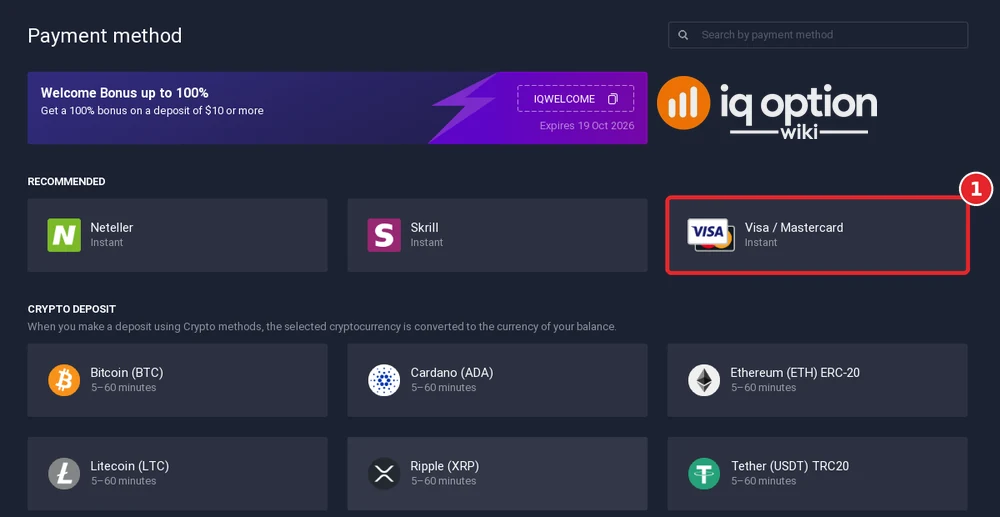
Visa / Mastercard is the third tile, and we used it. The red numbers show the order of the clicks.
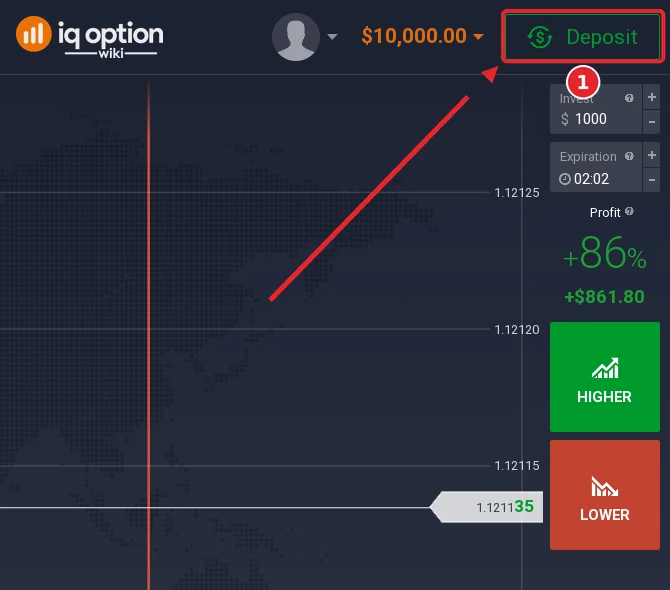
In the traderoom, the green Deposit button (1) sits in the top-right corner, next to the balance. The $10,000 it shows is virtual Practice money.
Step 2: Choose “Top up your account”
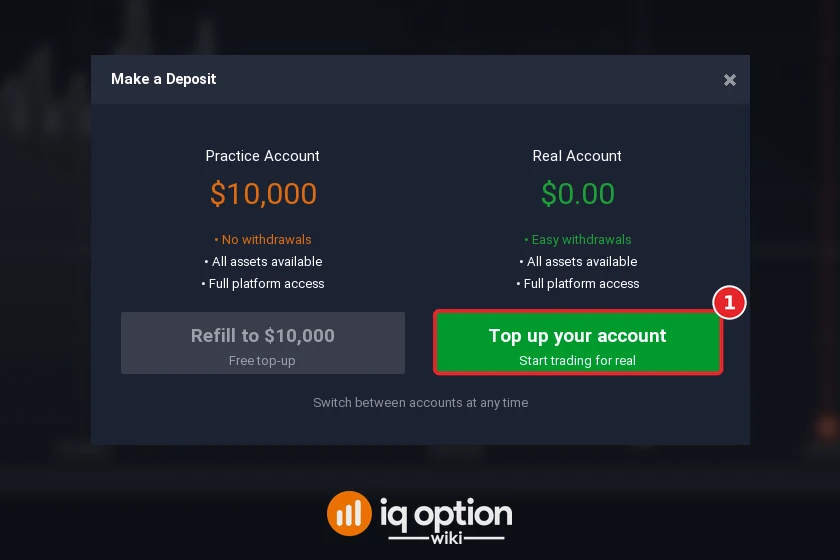
Ignore the grey Refill to $10,000 button, which only refills play money. The green Top up your account button (1) starts a real deposit, and the real balance stands at $0.00.
Step 3: Choose Visa / Mastercard
The page opens with an IQWELCOME banner; on our account it gave 19 Oct 2026 as the end date. “Recommended” lists Neteller, Skrill and Visa / Mastercard (1). The “Crypto deposit” block follows, with seven coins at 5 to 60 minutes.
Step 4: Pick the account currency
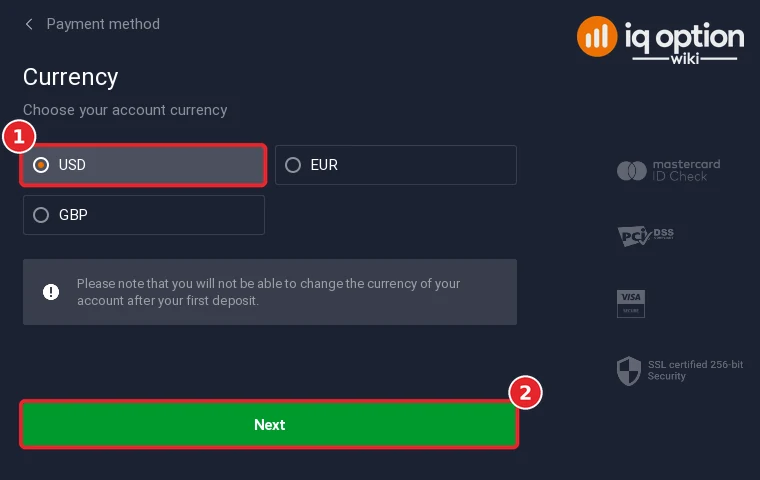
No currency was ticked when the step opened. We clicked USD (1) and then Next (2). IQ Option notes that you cannot change the currency after your first deposit.
Step 5: Enter the amount
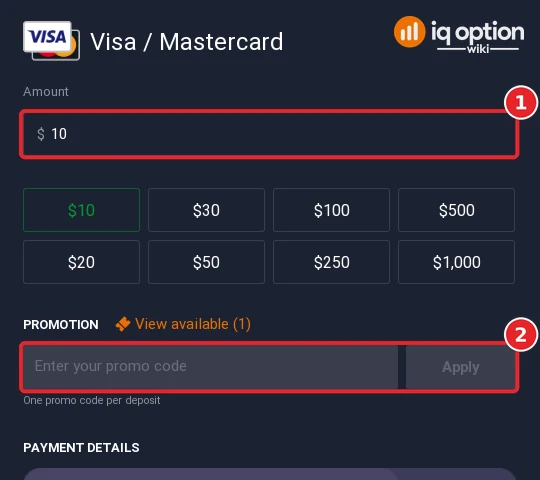
Type the amount (1) or press a preset from $10 to $1,000. The promotion box (2) beneath is a blank code field with an Apply button; its heading read “View available (1)”. No offer was opened and no code was entered.
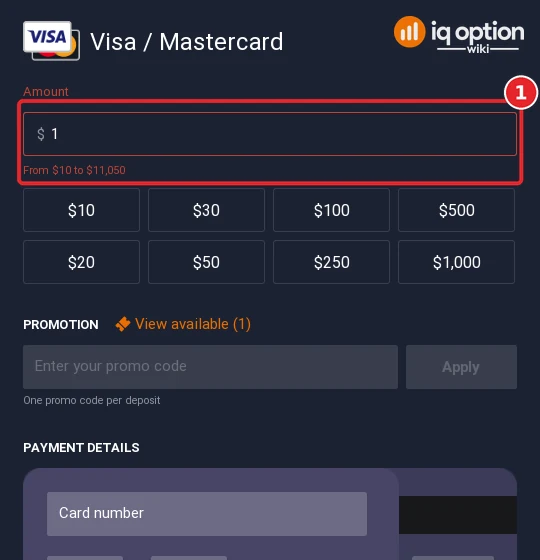
A single dollar turns the field red and shows the card range, “From $10 to $11,050” (1).
Step 6: Fill in the card form
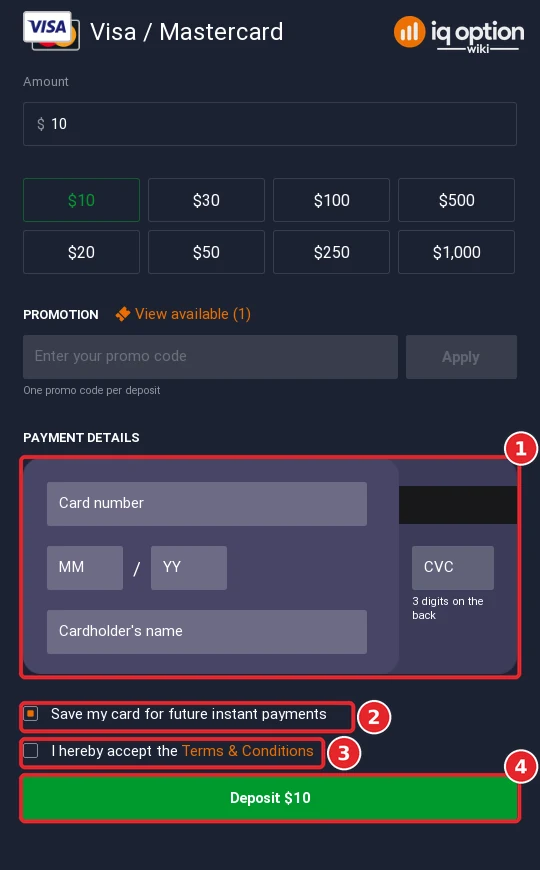
The card block (1) takes the number, the expiry month and year, the CVC and the cardholder’s name. A box that keeps the card for later instant payments is ticked by default (2). Once the terms are ticked (3), the green Deposit $10 button (4) completes the payment; ours stayed unpressed.
All deposit methods in Brunei
On 8 October 2026 the public deposits page showed four methods for our Brunei account. All start at 10 USD (10 EUR, 10 GBP, 700 RUB), carry 0% commission and are instant; the table puts them next to the cashier.
| Method | Time shown | Limits and notes |
|---|---|---|
| Visa / Mastercard | Instant | $10 to $11,050 |
| Skrill | Instant | $10 to $1,000,000 |
| Neteller | Instant | $10 to $1,000,000; asks for the Neteller email |
| Volet.com | Instant on the deposits page | 10 USD on the page; not in our cashier |
| 7 cryptocurrencies | 5 to 60 minutes | Tether (USDT) TRC20: $10 to $1,000,000 |
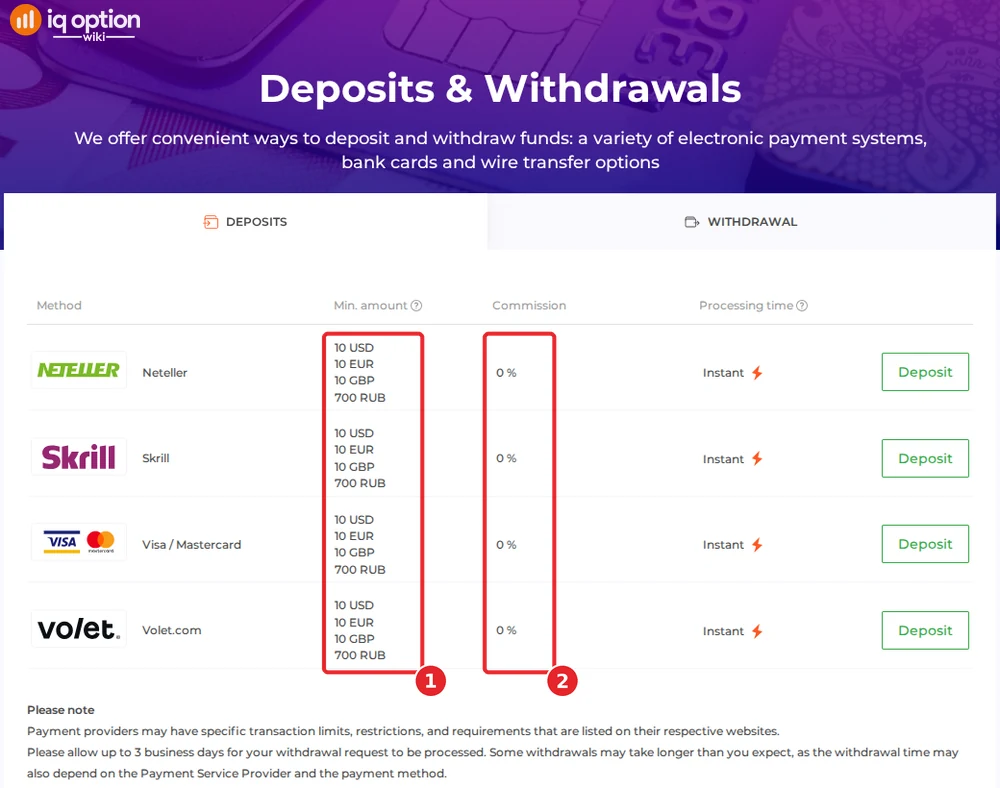
Only the page lists Volet.com, and only the cashier lists the coins. A footnote reminds readers that, for accounts that are not fully verified, some countries limit certain deposit methods.
Depositing with Skrill
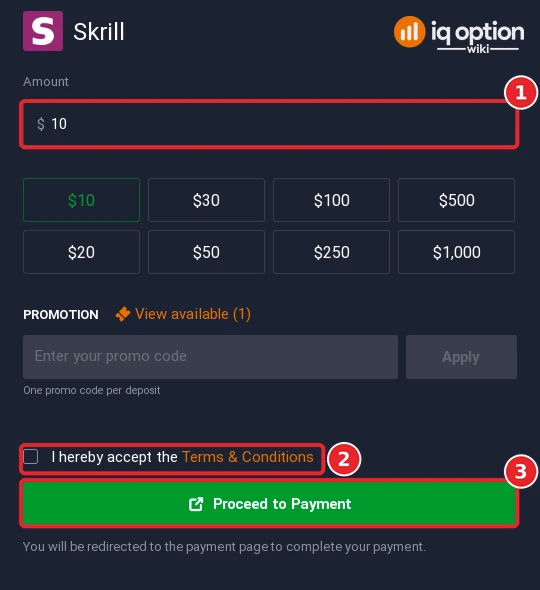
Skrill showed “From $10 to $1,000,000”. Enter the amount (1), tick the terms (2) and press Proceed to Payment (3) to be sent on to Skrill’s own page. We did not press it.
Depositing with Neteller
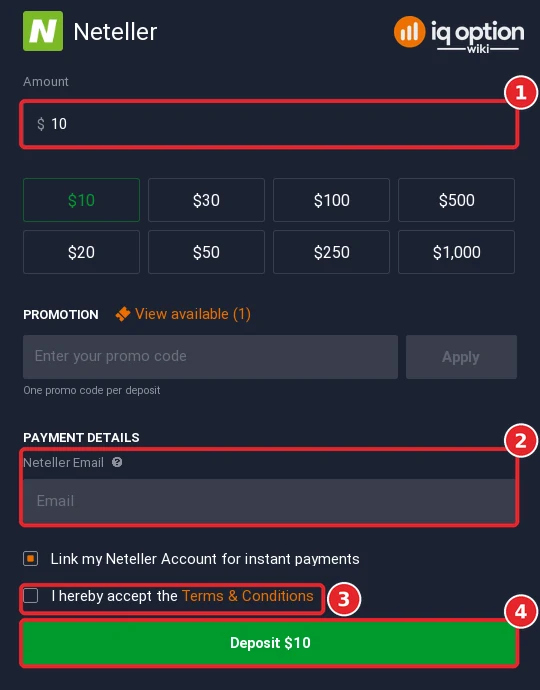
The same $10 to $1,000,000 applied to Neteller. Below the amount (1) sits a field for the email address of your Neteller account (2), together with a ticked option to link that account for instant payments. After the terms (3), Deposit $10 (4) pays. We entered no address.
Depositing with Tether (USDT) and other coins
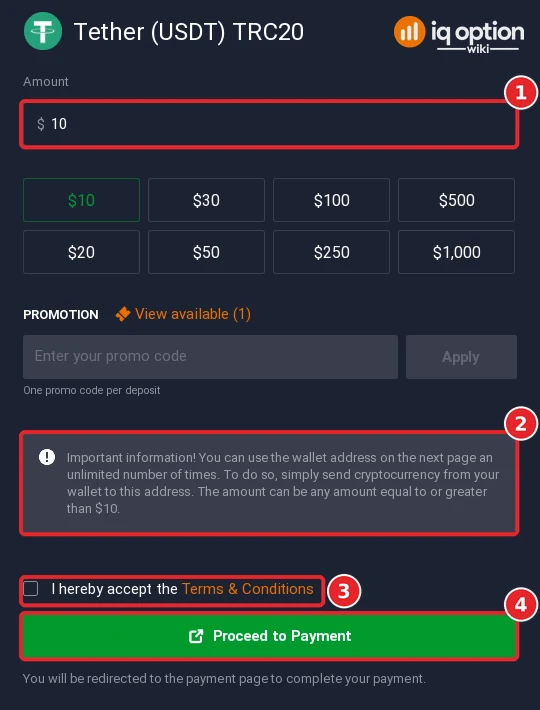
Seven coins can be sent: Bitcoin, Cardano, Ethereum (ERC-20), Litecoin, Ripple (XRP), Tether (USDT) on TRC20 and USDC on BNB Smart Chain, which IQ Option converts into the currency of your account. The Tether form accepted $10 to $1,000,000. After the amount (1), a grey note (2) explains that the wallet address on the following page can be used repeatedly for any sum of at least $10. Accept the terms (3) and press Proceed to Payment (4); use the TRC20 network only. Background: does IQ Option accept crypto.
Withdrawing from IQ Option in Brunei
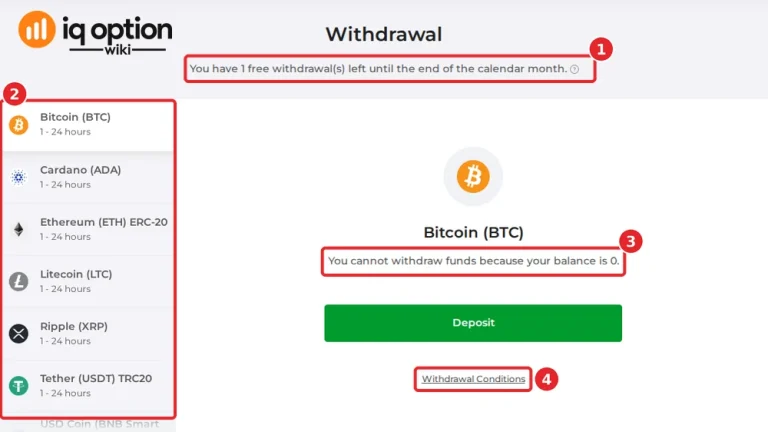
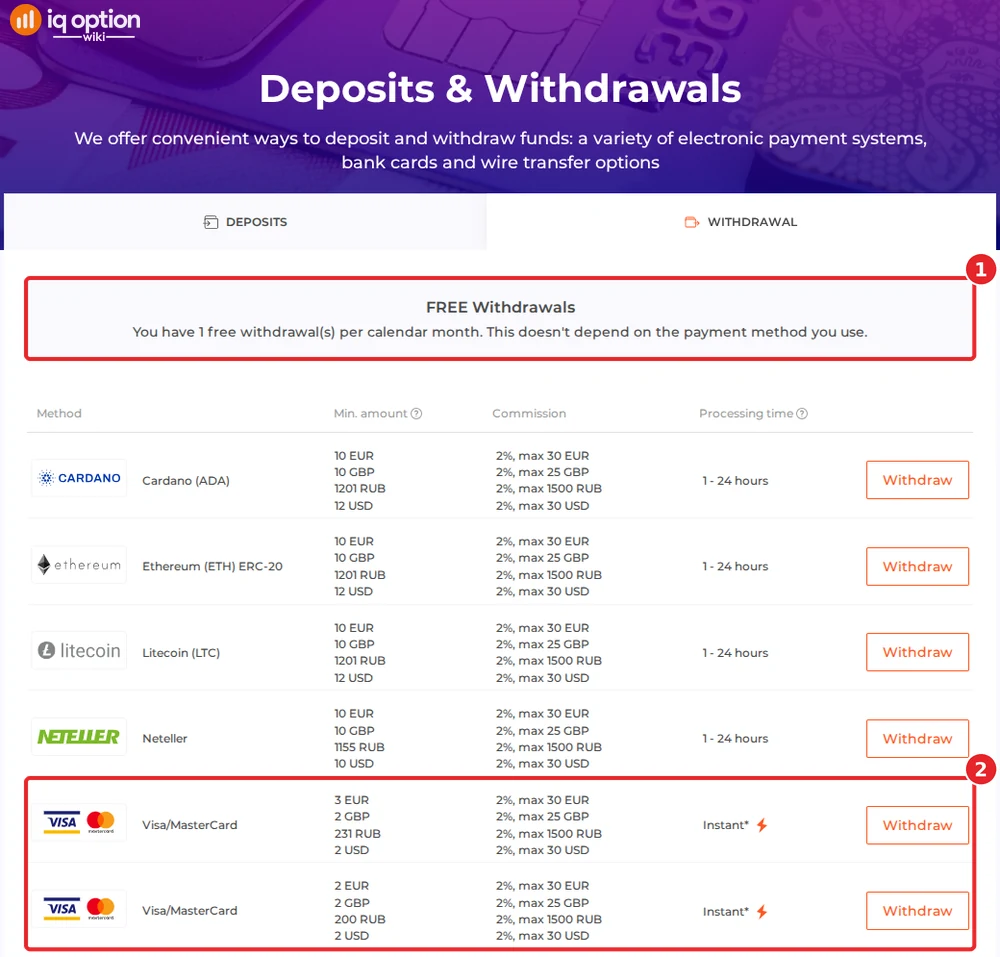
Each calendar month’s first withdrawal is free on the withdrawals page, whichever method you use (1); each later one costs 2%, up to 30 USD. The list comprises Cardano, Ethereum and Litecoin, Neteller, two Visa/MasterCard entries (2), Ripple, Skrill, Tether, USD Coin, Volet.com USD and WebMoney WMZ; wire transfers are not offered.
| Where the money goes | Minimum | Time shown |
|---|---|---|
| Visa / MasterCard (two rows) | $2 (first row 3 EUR) | Instant; the issuing bank can take up to 21 days |
| Skrill, Volet.com USD, WebMoney WMZ | $2 | 1 to 24 hours |
| Neteller | $10 | 1 to 24 hours |
| 6 cryptocurrencies | $12 | 1 to 24 hours |
A footnote warns that card issuers may need up to 21 calendar days, and that any request can take up to 3 business days. Six coins can be withdrawn (Cardano, Ethereum, Litecoin, Ripple, Tether on TRC20, USD Coin on BNB Smart Chain), Bitcoin cannot. We did not look at the withdrawal list inside an account, so check yours. Step by step: how to withdraw from IQ Option. Our Brunei withdrawal guide shows what the withdrawal page of a Bruneian account lists.
Check the rules in Brunei first
Registration from Brunei went through, but that is not a Brunei licence. The Brunei Darussalam Central Bank (BDCB) keeps an Alert List of companies and individuals who “may be or may have been wrongly perceived as being licensed, authorised or regulated by BDCB”. On the investment category the page says that offering investment advice, investment products or “a platform or avenue for investment services” may be a regulated activity under the Securities Markets Order, 2013, and that carrying out investment activities without a licence may be a breach of that Order. It speaks of those who carry out such activities; it does not mention their clients or people who write about platforms. A notice of 8 October 2026 calls it a list of persons “currently not licensed, authorised or regulated by BDCB” and announced the addition of a group of companies called WCEI. In February 2020, under its earlier name, the Autoriti Monetari Brunei Darussalam, the bank added a name, “LiteFinance Brunei”, that matches a forex broker brand; its press release of 9 March 2020 does not say what that entity offers. We searched the current Alert List on 8 October 2026 and found neither that name nor IQ Option. These are warning lists, not bans: we found no block of the site, no case against people who write about IQ Option and no source that classes trading platforms as gambling. We cannot give legal advice: form your own view, seek advice where needed, and use only money you can afford to lose. Other regulators’ statements about IQ Option are collected in our legitimacy check.
If your deposit has not arrived
- Look at the stated time. Cards, Skrill and Neteller should be instant; a coin may need up to an hour.
- Check the Neteller email. It has to be the address of your own Neteller account.
- Check the network. A coin sent over another chain than the form’s can be lost; Tether runs on TRC20.
- Ask your bank. Card payments abroad are sometimes declined; the issuer can allow them.
- Contact support. Chats & Support in the sidebar and support@iqoption.com both reach IQ Option; the support guide shows how.
Deposit guides for other countries
IQ Option shows the methods of the country where the account was registered. More guides in this series:
- Thailand: Kasikorn, SCB, Krungthai QR
- Vietnam: Vietcombank QR, BIDV, VietQR
- Philippines: GCash, Maya, QRPH
- Malaysia: Maybank, CIMB, DuitNow QR
- Singapore: Cards, Maybank, USDT
- Cambodia: Cards, Skrill, Thai banks, USDT
- Laos: Mastercard, Apple Pay, Thai banks, USDT
- Hong Kong: Visa, Mastercard, USDT
Every country guide is in the grid on the IQ Option deposit guide.
For the steps that are identical everywhere, use the general deposit guide.
Frequently Asked Questions
Q: What is the minimum deposit on IQ Option in Brunei?
A: The deposits page of 8 October 2026 gives 10 USD (or 10 EUR, 10 GBP) for all four methods, and the card form took payments from $10 to $11,050.
Q: Can I deposit in Brunei dollars?
A: No. The currency step offered USD, EUR and GBP, and the choice is locked after the first deposit.
Q: Is there a Brunei bank or wallet method?
A: Neither the cashier nor the deposits page offered one; the options were Neteller, Skrill, Visa / Mastercard, Volet.com (page only) and seven coins.
Q: Is there a welcome bonus in Brunei?
A: The method page showed an IQWELCOME banner, with 19 Oct 2026 as the end date on our account, and the promotion box said “View available (1)”. We applied nothing, so check step 5.
Q: Is there a deposit fee in Brunei?
A: IQ Option lists 0% commission; your bank may still charge for a payment abroad.
Q: How do I withdraw from IQ Option in Brunei?
A: Back to a card, Neteller, Skrill, Volet.com USD, WebMoney WMZ or a coin address. Minimum payouts are $2 (cards, Skrill, Volet.com, WebMoney), $10 (Neteller) and $12 (coins). The month’s first withdrawal is free; the others cost 2%, with a 30 USD ceiling.
Q: Is IQ Option licensed in Brunei?
A: We found no Brunei licence and no BDCB notice that names IQ Option. Read the note above.