Last updated: 8 October 2026. MoreLess
Every screenshot below was recorded that day (UTC-5) on an IQ Option Practice account registered in Panama. The VPN server we used is listed by its provider as Panama City and marked “virtual”, so its true location may differ; IQ Option’s sign-up form nevertheless showed Panama as the country of residence. Each flow stopped before the last payment button, so no money was sent.
A Panamanian account gets an international cashier. Visa / Mastercard, Skrill and Neteller sit at the top and seven cryptocurrencies follow. We saw no local bank, no Apple Pay or Google Pay, and no account in any currency other than US dollars, euros or pounds; the dollar was already selected. This guide follows a $10 card deposit from the first click, then shows Skrill and Tether, the limits we read, the withdrawal rules and what Panama’s securities regulator has published. The same screenshots exist in Spanish for the Spanish version of this page.
 A Panamanian account gets an international cashier. Visa / Mastercard, Skrill and Neteller sit at the top and seven cryptocurrencies follow. We saw no local bank, no Apple Pay or Google Pay, and no account in any currency other than US dollars, euros or pounds; the dollar was already selected. This guide follows a $10 card deposit from the first click, then shows Skrill and Tether, the limits we read, the withdrawal rules and what Panama’s securities regulator has published. The same screenshots exist in Spanish for the Spanish version of this page.
Quick answer
- Minimum: $10 (or €10, £10) on every method.
- Fee: 0% from IQ Option on every method.
- In our cashier: Visa / Mastercard, Skrill and Neteller (instant) and seven cryptocurrencies (5 to 60 minutes). No Panamanian bank or wallet, no Apple Pay or Google Pay.
- Limits we saw: Visa / Mastercard $10–11,050; Skrill and Tether (USDT) TRC20 $10–1,000,000.
- Currency: USD (pre-selected), EUR or GBP, chosen before your first deposit and fixed after it.
- Withdrawals: one free per month, then 2% (at most $30); cards, Skrill, Volet.com and WebMoney from $2, Neteller from $10, coins from $12.
- Local rules: the SMV publishes alerts about named unlicensed firms and none names IQ Option; read the note before you deposit.
How to deposit on IQ Option in Panama, step by step
We paid with Visa / Mastercard, the first tile in the cashier. Each red number in a screenshot marks the click described next to it.
Step 1: Click Deposit
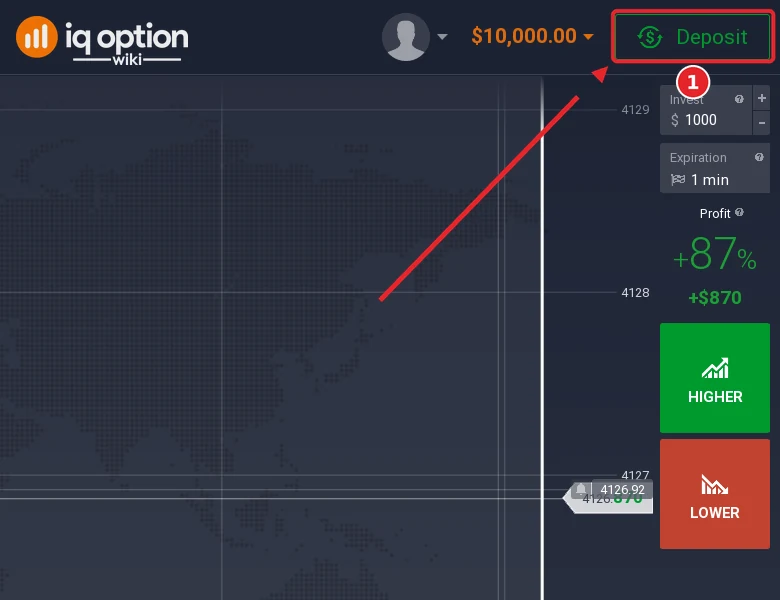
In the traderoom, press the green Deposit button at the top right (1). The $10,000 beside it is Practice money; the real balance starts at zero.
Step 2: Choose “Top up your account”
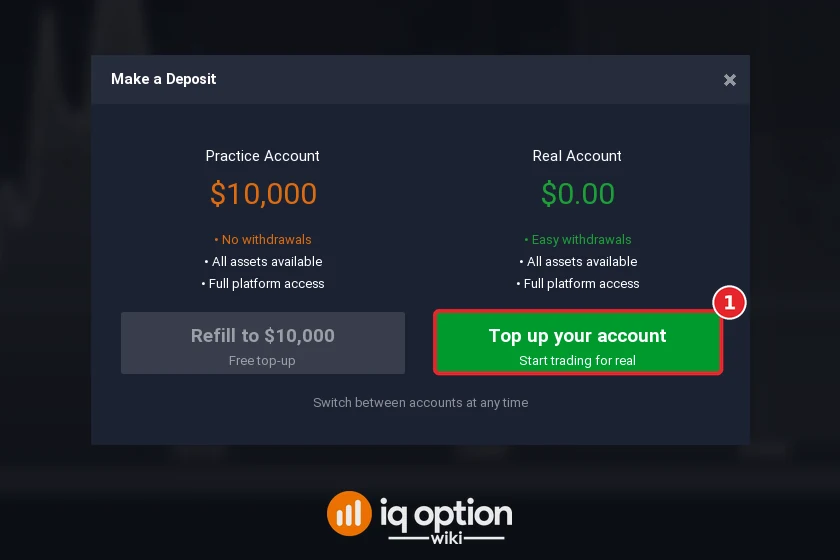
The Make a Deposit window has two sides. Refill to $10,000 on the left only refills the virtual balance. Press Top up your account (1) on the right, under “Real Account $0.00”.
Step 3: Choose Visa / Mastercard
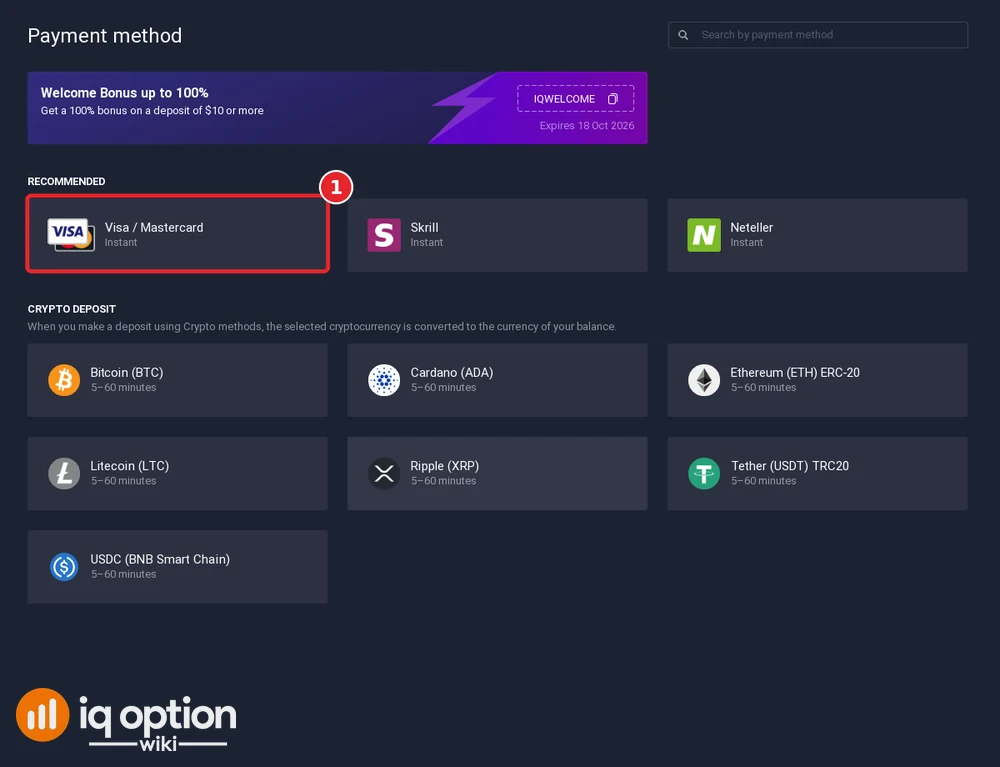
The payment-method page opens with a welcome-bonus banner for the code IQWELCOME, valid until 18 Oct 2026. “Recommended” holds Visa / Mastercard, Skrill and Neteller, all marked instant. Click Visa / Mastercard (1). The “Crypto deposit” block below lists seven coins at 5 to 60 minutes each, and that is everything: no wallet or bank method is offered.
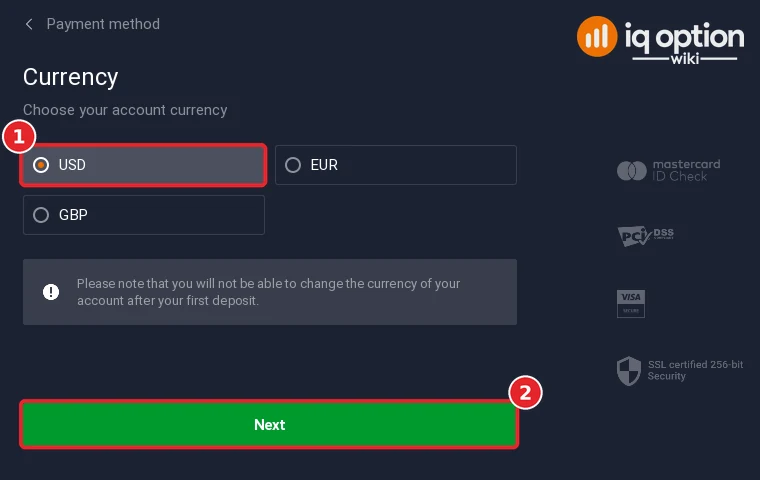
Step 4: Choose the account currency
The currency step opened with USD selected (1); EUR and GBP are the alternatives. Press Next (2). A grey notice warns that you cannot change the account currency after the first deposit.
Step 5: Enter the amount and check the bonus
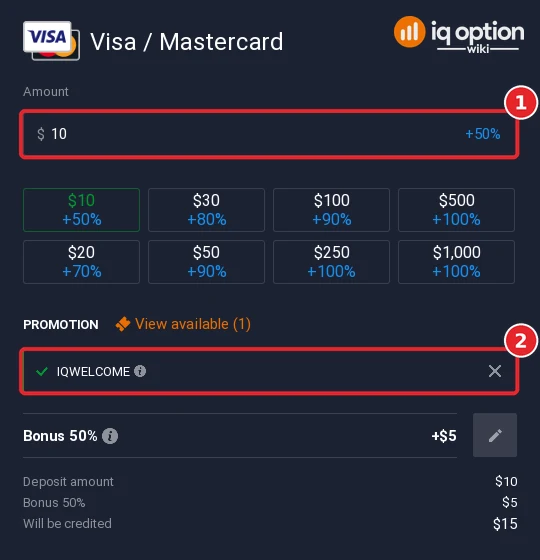
Type an amount (1) or use the preset buttons, which run from $10 to $1,000. The IQWELCOME code was applied before we touched anything (2). With $10 the form showed “Bonus 50%”, +$5, and $15 to be credited. The presets advertised +70% on $20, +80% on $30, +90% on $50 and $100, and +100% from $250. The × beside the code removes it if you prefer no bonus.
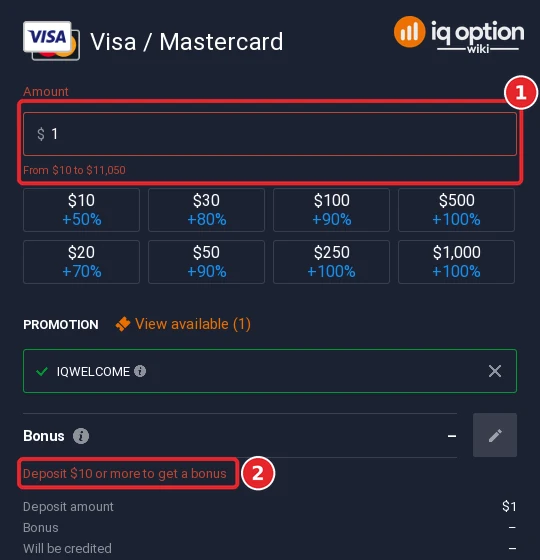
If you type a single dollar, the field turns red. The card range appears beneath it as “From $10 to $11,050” (1), and the bonus area says “Deposit $10 or more to get a bonus” (2).
Step 6: Enter your card details and confirm
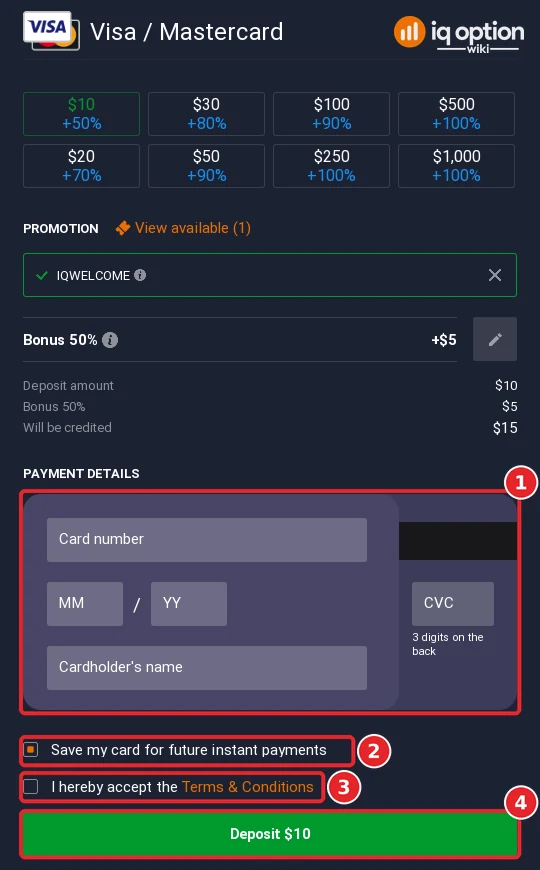
The card block (1) asks for the card number, month and year of expiry, the CVC and the cardholder’s name. “Save my card for future instant payments” is ticked by default (2). Tick the terms box (3), and the green Deposit $10 button (4) sends the payment. Our recording ended before that click.
All deposit methods in Panama
The table puts our cashier next to IQ Option’s public deposits page, both read on 8 October 2026. The page names four methods and gives each the same terms: 10 USD (or 10 EUR, 10 GBP, 700 RUB), 0% commission, instant processing.
| Method | Time shown | Limits and notes |
|---|---|---|
| Visa / Mastercard | Instant | $10 to $11,050 |
| Skrill | Instant | $10 to $1,000,000 |
| Neteller | Instant | 10 USD on the deposits page; we did not open its form |
| Volet.com | Instant on the deposits page | 10 USD on the page; missing from our cashier |
| 7 cryptocurrencies | 5 to 60 minutes | Tether (USDT) TRC20: $10 to $1,000,000 |
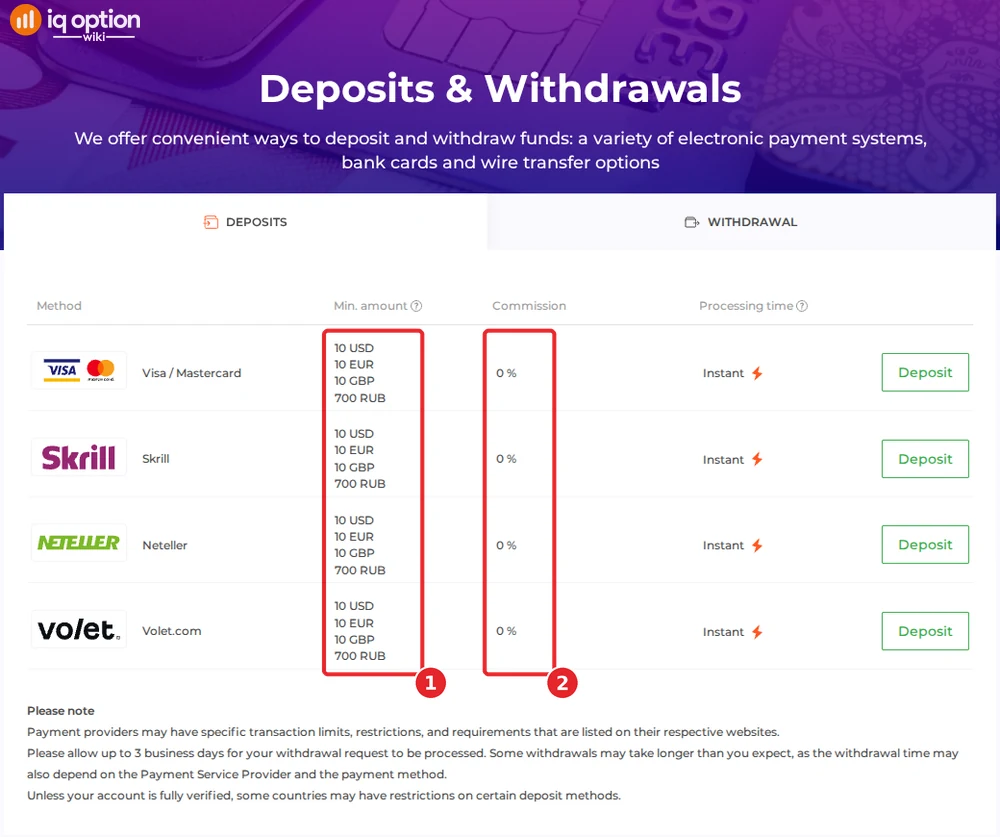
Volet.com shows up only on that page, and the coins only in the cashier. The page also notes that some countries restrict certain deposit methods until an account is fully verified.
Depositing with Skrill
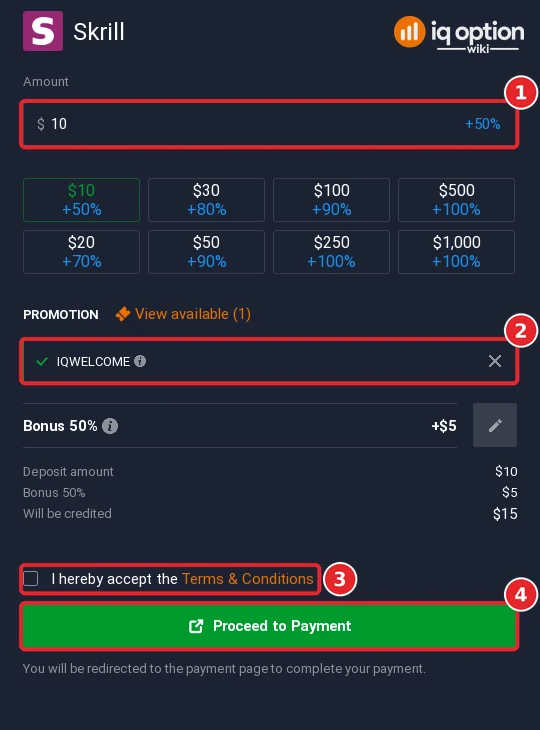
Skrill’s range line read “From $10 to $1,000,000”. Enter the amount (1), decide whether to keep the bonus code (2), tick the terms (3) and press Proceed to Payment (4); that opens Skrill’s own page, where you sign in. We did not press it.
Depositing with Tether (USDT) and other crypto
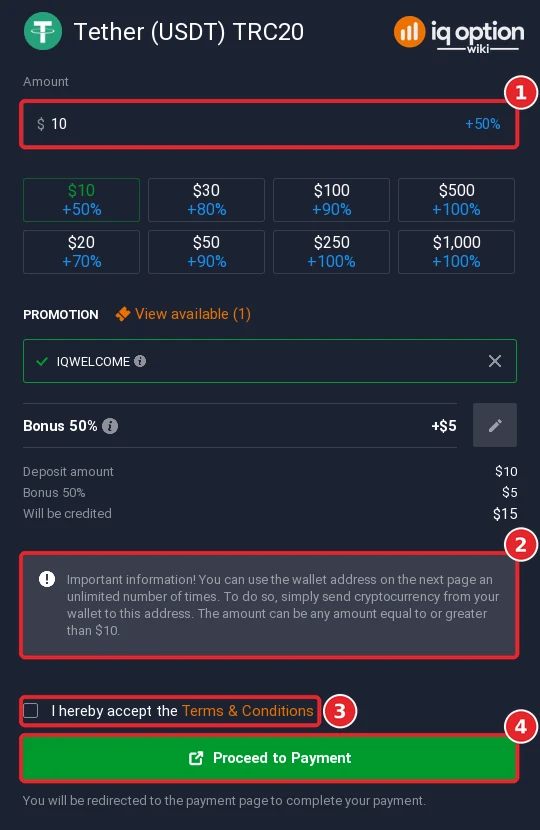
The cashier offers Bitcoin, Cardano, Ethereum (ERC-20), Litecoin, Ripple (XRP), Tether (USDT) on TRC20 and USDC on BNB Smart Chain. Whichever you pick, the coin is converted into your account currency once it arrives. Tether showed the same range as Skrill, $10 to $1,000,000. Enter the amount (1) and read the grey box (2): the wallet address on the next page can be used again and again, with any amount of $10 or more. Then tick the terms (3) and press Proceed to Payment (4). Send only on the TRC20 network. More background in does IQ Option accept crypto.
Withdrawing from IQ Option in Panama
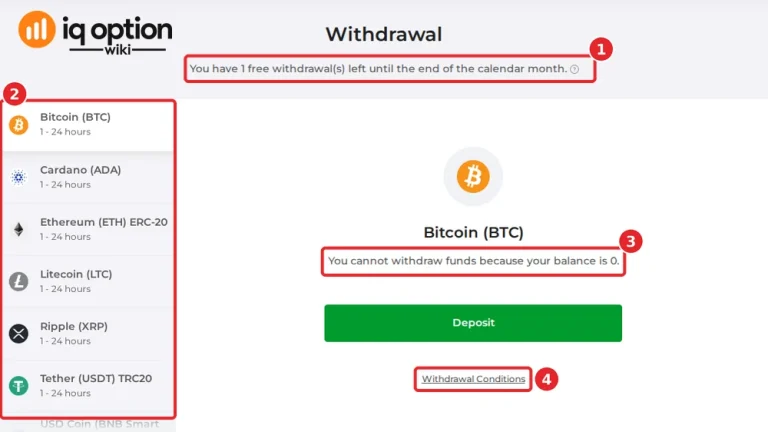
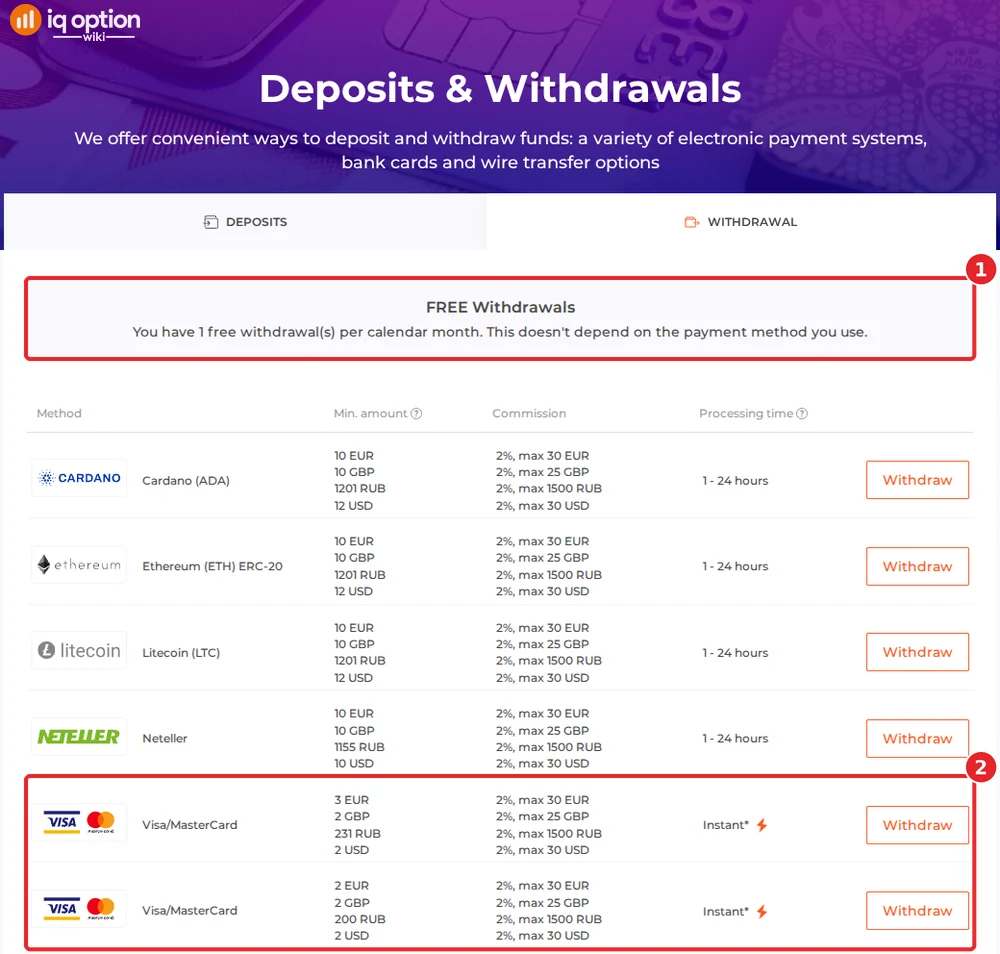
IQ Option’s withdrawals page for our account promised one free withdrawal per calendar month, whatever the method (1). After that the fee is 2% with a cap of 30 USD. There is no bank transfer, so money goes back to a card, an e-wallet, WebMoney or a coin address. Both Visa/MasterCard entries (2) start at $2.
| Where the money goes | Minimum | Time shown |
|---|---|---|
| Visa / MasterCard (two entries) | $2 | Instant, but your bank may need up to 21 days |
| Skrill, Volet.com USD, WebMoney WMZ | $2 | 1 to 24 hours |
| Neteller | $10 | 1 to 24 hours |
| 6 cryptocurrencies | $12 | 1 to 24 hours |
A footnote on that page gives card issuers up to 21 calendar days, and any request can take up to 3 business days. The six coins in the table are Cardano, Ethereum, Litecoin, Ripple, Tether (TRC20) and USD Coin (BNB Smart Chain); there is no Bitcoin row, and we did not open the withdrawal list inside the account, so look at yours. For the routine itself, see withdrawing from IQ Option. Our Panama withdrawal guide shows what the withdrawal page of a Panamanian account lists.
Check the rules in Panama first
IQ Option let us register from Panama, but that is no Panamanian licence. The Superintendencia del Mercado de Valores (SMV) keeps an investor-alert section, and its newest notices are typical. Public release no. 18 of 24 July 2026 says that the entity behind the website mrkmltd.com holds no SMV licence and may not carry on brokerage, administration or advice in securities, financial instruments, CFDs or Forex in or from Panama; release no. 21 of 25 August 2026 says much the same of ALGOBI.COM. On 8 October 2026 we searched all five pages of the SMV’s investor-alert category, and the SMV’s own site search, for IQ Option and found no notice that names it. Separately, Law 527 of 28 May 2026 (Gaceta Oficial Digital 30534-B) is a gambling law: it lets the gaming board (Junta de Control de Juegos) order internet providers to block unlicensed online casinos, sports betting and other games of chance, and its 15 articles do not mention binary options, forex or CFDs. The SMV notices are warnings about named firms. We found no statement on whether residents may use foreign brokers, no Panamanian block of the site and no action against people who write about it. This is not legal advice: check your own position before depositing and risk only what you can afford to lose. Regulators that have commented on IQ Option are listed in our legitimacy check.
If your deposit has not arrived
- Compare the stated time. Cards, Skrill and Neteller are instant; coins take 5 to 60 minutes.
- Check the network. A coin sent on a chain other than the one on the form may be lost. Tether uses TRC20.
- Check the card. Some banks stop online payments to foreign merchants; ask yours to allow the payment, or switch to an e-wallet.
- Contact support. Use Chats & Support in the sidebar or write to support@iqoption.com; the support guide covers both.
Deposit guides for other countries
Methods, limits and currencies change with the country of registration. More walkthroughs in this series:
- Brazil: PIX, PicPay, Boleto, cards
- Mexico: SPEI, OXXO, cards
- Peru: Yape, Plin, BCP
- Chile: WebPay, Mach, Khipu
- Colombia: Nequi, PSE, Efecty
- Argentina: Mercado Pago QR, MODO, Rapi Pago
- Venezuela: Cards, USDT
- Ecuador: Red Activa, Mi Comisariato, cards
- Dominican Republic: Mastercard, Visa, Skrill, USDT
- Jamaica: Visa, Mastercard, Skrill, USDT
- Bolivia: Visa, Mastercard, Skrill, USDT
- Nicaragua: Visa, Mastercard, Neteller, Skrill, USDT
Every country guide is in the grid on the IQ Option deposit guide.
The steps that are the same everywhere are in the general deposit guide.
Frequently Asked Questions
Q: What is the minimum deposit on IQ Option in Panama?
A: 10 USD on Visa / Mastercard, Skrill, Neteller and Volet.com, according to the deposits page of 8 October 2026 (the page also lists 10 EUR, 10 GBP and 700 RUB).
Q: Can I deposit in balboas?
A: No. The currency step offered USD, EUR and GBP, with USD pre-selected. The choice is locked after your first deposit.
Q: Is there a Panamanian bank or wallet method?
A: Not in our cashier and not on the deposits page. The options are Visa / Mastercard, Skrill, Neteller, Volet.com (page only) and seven coins. We saw no Apple Pay or Google Pay.
Q: Does IQ Option charge a deposit fee in Panama?
A: The deposits page shows 0% commission. Your bank or card issuer may still charge its own fees.
Q: How do I withdraw from IQ Option in Panama?
A: To a card, Skrill, Neteller, Volet.com USD, WebMoney WMZ or a crypto address. Cards, Skrill, Volet.com and WebMoney start at $2, Neteller at $10 and the coins at $12. One withdrawal a month is free; later ones cost 2%, capped at 30 USD.
Q: Do I have to take the welcome bonus?
A: No. The code arrives applied, and the × beside it in the amount step cancels it.
Q: Is IQ Option licensed in Panama?
A: Registering is possible, but that does not make it a Panamanian licensee. We found no SMV notice naming IQ Option; read the note above.