Last updated: 8 October 2026. MoreLess
Every screenshot below was recorded on 5 October 2026 on an IQ Option Practice account registered in Brazil. We placed no real-money trade and opened no position for this guide. The leverage values are what the asset list and the order panel showed that day, and IQ Option can change them. The quotes come from IQ Option’s own help notes in the order panel and from its published Margin Trading terms, Help and Trading Specifications pages, saved on 5 October 2026.
Leverage on IQ Option is the multiplier of a margin (CFD) trade: it sets how much larger the position is than the amount you invest. Invest $1 at ×1000 and the volume of the trade is $1,000. A price move is applied to the whole volume, so the profit and the loss grow by the same factor, and IQ Option’s own note says so: the multiplier increases “both the potential profit from the investment and the level of risk”. Binary options have no leverage at all: you choose an amount and a direction, and the payout is shown before you buy.
Quick answer
- What it is: the Leverage box of the margin (CFD) order panel. The Volume of the trade is the amount you invest multiplied by the leverage: $1 at ×1000 gives a Volume of 1000.
- What it does: a price move applies to the whole volume, so profit and loss both grow by the same factor. With $100 invested, a 1% move is worth $1 at ×1, $10 at ×10 and $100 at ×100.
- It differs by asset: on 5 October 2026 the Forex list showed ×1000 on EUR/USD, ×400 on AUD/CAD and ×200 on USD/JPY; the Trading Specifications page showed 1:20 for the stocks it listed.
- Not in options: binary options have no leverage, volume, stop loss or take profit.
- Loss limits: IQ Option’s Margin Trading terms say that with isolated margin the maximum loss of a position is the margin allocated to it, which can be extended by a stop loss level or the “use balance to keep position open” option (at a loss of −95% the platform reserves an additional 20% of the original investment from the balance), and that positions are closed automatically if equity falls below 50% of the maintenance margin requirement.
What is leverage in IQ Option?
IQ Option’s Margin Trading terms define leverage as “the ratio of the funds used in a position to the Margin required”. In the order panel that ratio is a box called Leverage, and next to it the platform shows the Volume of the trade, “calculated as the investment multiplied by the leverage”. The idea is the one the Help page gives for CFD trading: a multiplier “can help you control a position exceeding the amount of money invested in it”, so by investing $100 a trader can obtain returns comparable to an investment of $1,000, and “the same applies to potential losses, as they will also be increased several times”.
The money you put in is the margin: IQ Option’s terms call it the funds deducted from your equity “as a security” for the position. The rest of the position is not your cash. You do not own the asset either: a CFD is, in the terms’ words, a contract in which you and the company exchange the difference between the price at which the position was opened and the price at which it ends. The Margin menu offers it on Forex, Stocks, Crypto, Commodities, Indices and ETFs.
How does leverage work?
The size of the position is the amount you invest times the leverage. Every percentage change in the price is a change of that percentage in the value of the whole position, and the gain or loss is counted in dollars of the position, not of your investment. With $100 invested, a 1% move in the price (before the spread and any overnight funding) is worth:
| Leverage | Volume of the position | Price rises 1% | Price falls 1% |
|---|---|---|---|
| ×1 | $100 | +$1 | −$1 |
| ×10 | $1,000 | +$10 | −$10 |
| ×100 | $10,000 | +$100 | −$100, the whole $100 you invested |
The table is arithmetic, not a forecast, and it ignores costs. Its last line is the point of the tool: at ×100 a 1% move against you uses up the whole investment, and at ×1000 a move of 0.1% does. IQ Option’s terms add that the platform watches the account’s maintenance margin in real time and closes open positions by market order if the account equity falls below 50% of the maintenance margin requirement, and that failing to meet it leads to the closure of positions “without further notice, whether at a loss or at a profit”. The last section quotes the terms.
Using leverage at IQ Option
These steps use the web traderoom on a Practice balance. The numbers in each screenshot match the numbers in the text.
Step 1: Open the Margin list and read the Leverage column
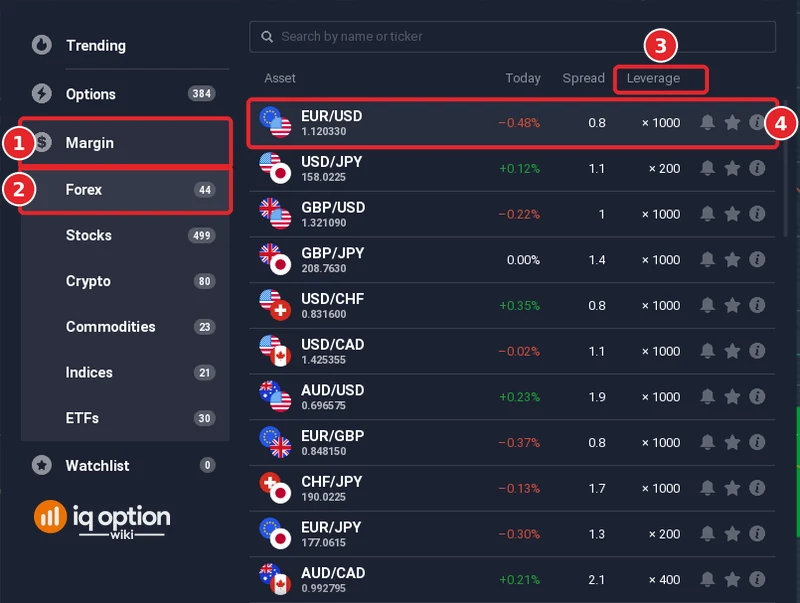
Click + in the top bar and open Margin (1), then Forex (2). Besides Forex, the Margin menu lists Stocks, Crypto, Commodities, Indices and ETFs. The list has a Leverage column (3), and the leverage is not the same for every asset. On 5 October 2026 EUR/USD (4), GBP/USD and USD/CHF showed ×1000, AUD/CAD ×400, and USD/JPY and EUR/JPY ×200.
Step 2: Read the Invest, Leverage and Volume boxes
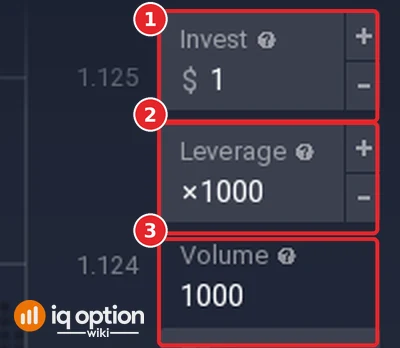
Choose the asset, and the order panel on the right shows the Invest box (1), the Leverage box (2) and the Volume (3). On EUR/USD Forex the panel showed $1, ×1000 and a Volume of 1000, which is $1 multiplied by 1000. Below them the panel has the TP and SL boxes, which showed +50.00% and −25.00%; their help note says that reaching the level closes the position automatically. The Leverage and Invest boxes have − and + buttons.
Step 3: Read the help note of the Leverage box
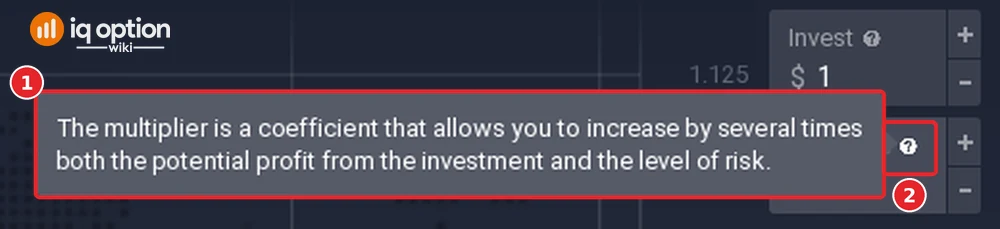
Move the pointer over the question mark next to Leverage (2) and a note (1) opens: “The multiplier is a coefficient that allows you to increase by several times both the potential profit from the investment and the level of risk.”
What is multiplier in IQ Option?
Multiplier and leverage are two names for the same number. The order panel labels the box Leverage, and its note calls it “the multiplier”; IQ Option’s Help page about CFD trading says “you can use a multiplier”. Both mean the factor by which the Invest amount is multiplied to give the Volume.
Does binary option have leverage?
No. A binary option has an Invest amount, a direction, an expiry and a payout percentage that is shown before you buy; there is no Leverage box, no Volume, and no stop loss or take profit. What you can lose is the amount you invested. Digital options add a strike price, and IQ Option’s blog says that a digital loss can exceed the amount invested, which we did not check. See binary options and digital options compared.
How far can leverage go, and what happens when the price moves against you?
The highest leverage depends on the asset, and IQ Option states in its terms that it may set and change the margin requirements at its own discretion. Two sources show the limits we saw:
| Where | What it showed on 5 October 2026 |
|---|---|
| Margin, Forex list (Brazil account) | ×1000 on EUR/USD, GBP/USD, GBP/JPY, USD/CHF, USD/CAD, AUD/USD, EUR/GBP and CHF/JPY; ×400 on AUD/CAD; ×200 on USD/JPY and EUR/JPY |
| Trading Specifications page, Stocks (CFD) table | Max leverage 1:20 and minimum margin requirement 5% on the stocks listed, and a note that overnight funding may be charged for holding open positions |
| Margin Trading terms | Initial and maintenance margin are set by IQ Option; positions are closed automatically if the equity falls below 50% of the maintenance margin requirement |
Two margin modes decide what a loss can reach. With isolated margin, which the terms link to Simple Mode, each position has its own margin and “the maximum loss for any isolated position is limited to the margin allocated to that position”. That margin “can be extended” when a stop loss level needs more margin than the amount you invested, or when you use the “use balance to keep position open” option. With cross margin, which the terms link to Advanced Mode, the whole account balance supports all open positions, and in a margin call all positions may be liquidated. These terms are those of the company that serves the global platform, and the limits for another country or company may differ, so check the Trading Specifications page and the order panel on your own account.
Step 4: Read IQ Option’s note on a large loss
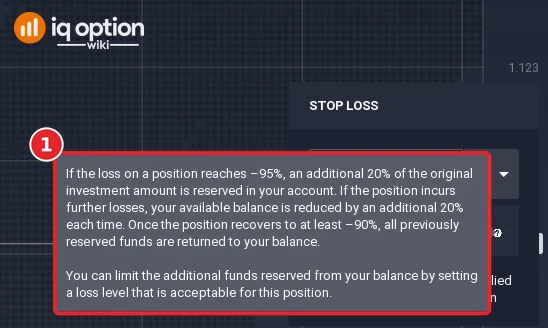
Click SL in the order panel and the STOP LOSS window opens, with a checkbox called “Use Balance to Keep Position Open”. Its help icon shows the platform’s own note: “If the loss on a position reaches −95%, an additional 20% of the original investment amount is reserved in your account. If the position incurs further losses, your available balance is reduced by an additional 20% each time. Once the position recovers to at least −90%, all previously reserved funds are returned to your balance. You can limit the additional funds reserved from your balance by setting a loss level that is acceptable for this position.” So an isolated position can draw on the rest of your balance when you allow it, which is how a loss can grow beyond the amount you invested. We did not tick the box and did not test a large loss.
Pros and Cons of leverage
| Pros | Cons |
|---|---|
| A small amount of cash controls a larger position, so a small price move is worth more. | The same factor applies to losses: a move against you of 1 ÷ leverage uses up the whole investment. |
| The Leverage box is visible before you open a trade, with the Volume under it. | The position is closed automatically when the margin rules say so, whether at a loss or at a profit. |
| Margin trades can have a stop loss and a take profit. | Overnight funding may be charged for holding positions, and the spread, the gap between the Buy and Sell price, is a cost of every trade. |
Common mistakes
- Reading ×1000 as a promise. It is the highest value the list showed for that pair on that day, not a result and not a recommendation.
- Counting profit on the investment instead of the volume. A 1% move on a $1,000 volume is $10, whatever you invested.
- Applying margin ideas to options. Binary options have no leverage, volume or stop loss.
- Trusting an old screenshot. The values change; read the Leverage column and the order panel on your own account.
Related guides
- What is a CFD and how to calculate profit in CFD trading
- Trade forex on IQ Option and stock CFDs on IQ Option
- Binary options and digital options compared
- IQ Option fees and commissions
- All indicator guides and all strategy guides
Frequently Asked Questions
Q: Can I use leverage with binary or digital options on IQ Option?
A: No. The Leverage box belongs to margin (CFD) trades. A binary option has an amount, a direction, an expiry and a payout that is shown before you buy.
Q: Where do I choose the leverage?
A: In the order panel on the right, in the Leverage box between Invest and Volume. The Margin lists also show the leverage of every asset in a Leverage column.
Q: Is it possible to trade without leverage?
A: The Leverage box has − and + buttons, so the value can be changed. We did not test the lowest value on each asset, so check the box on the asset you want to trade.
Q: Can I lose more than I invested?
A: IQ Option’s Margin Trading terms say that with isolated margin the maximum loss of a position is limited to the margin allocated to it, and that this margin can be extended when a stop loss level needs more margin or when you use the “use balance to keep position open” option. The help note of that option says that at a loss of −95% an additional 20% of the original investment is reserved from your balance, and again for each further loss. With cross margin the whole account balance supports all positions. Read the mode in your settings before you trade.
Q: What leverage does IQ Option offer?
A: It depends on the asset. The Forex list showed ×1000, ×400 and ×200 on 5 October 2026, and the Trading Specifications page showed 1:20 for the stocks it listed. IQ Option can change these values.
Q: How do I manage the risks of leverage?
A: A lower leverage makes each percent of price movement worth less, and a stop loss closes a position at a level you set. Neither removes the risk, and the platform can still close a position when the margin rules require it. Practise on the Practice balance first, which starts at $10,000.