Last updated: 8 October 2026. MoreLess
The screens below come from an IQ Option account registered in Brazil, recorded on 7 and 8 October 2026 (the platform’s clock was on UTC-3). We stayed on Practice money except to look at the empty real balance: we deposited nothing, uploaded no document and typed no personal data. The rules quoted come from IQ Option’s own pages and terms, which we read on 5 October 2026.
A new IQ Option account has two balances: a Practice balance in virtual money and a real balance that starts at zero. You register once, with an email address and a password, and both balances sit in the balance menu at the top of the platform. You switch between them in that menu. The real balance is in your account currency, which you choose in the cashier before your first deposit and cannot change afterwards. To trade with real money you deposit; IQ Option asks you to verify your identity, and its terms say when.
Quick answer
- Two balances: a Practice balance in virtual money and a real balance that starts at zero (R$ 0.00 on our Brazilian account), both in the balance menu at the top right.
- Switch: click the balance, then the real account row. IQ Option confirms “Your balance type has been changed to Real”.
- Currency: chosen in the cashier before the first deposit (BRL or USD on our Brazilian account). IQ Option says it cannot be changed after the first deposit.
- Personal info: first and last name exactly as on your ID, date of birth, citizenship and residence. We left the form empty.
- Rules: one account per client, documents within 7 days of the first deposit, no third-party payments (General Terms, 21 July 2025).
How a real account works on IQ Option, step by step
Step 1: Register
We found no separate sign-up for the real account: registering opens the platform on the Practice balance, and on our account, registered on 4 October and never funded, the real balance sat next to it at R$ 0.00. The sign-up form takes a country of residence, an email address and a password: see how to register a Practice account.
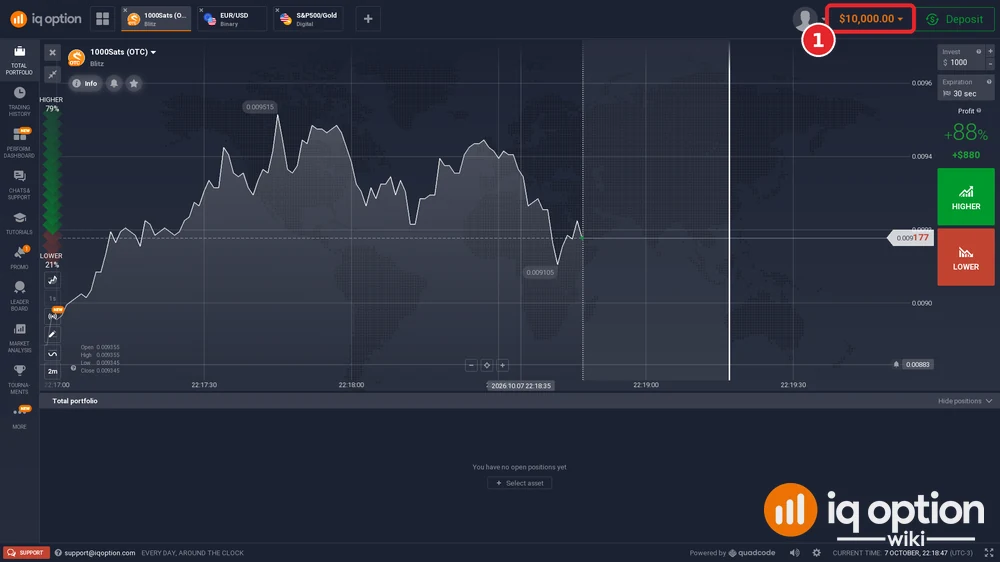
Click the balance at the top right (1). The menu lists the real account (2), with its own Deposit button, and the Practice account (3), with a Top Up button. The real balance of our account read R$ 0.00 and its Practice balance $9,998.85. The panel on the left shows “Available” and “Investment” for the balance that is active.
Step 3: Switch to the real account
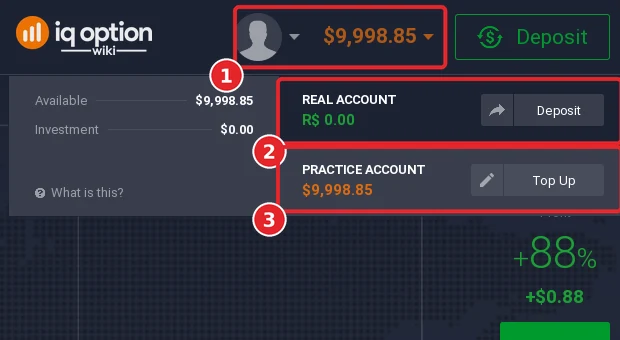
Click the real account row (2 above). A message at the bottom left says “Your balance type has been changed to Real” (2), and the balance at the top right turns green and reads R$ 0.00 (1). Nothing can be traded with it until you deposit. To go back, open the menu again and click the Practice account row; the message then says the balance type has been changed to Practice.
Step 4: Open the Deposit window
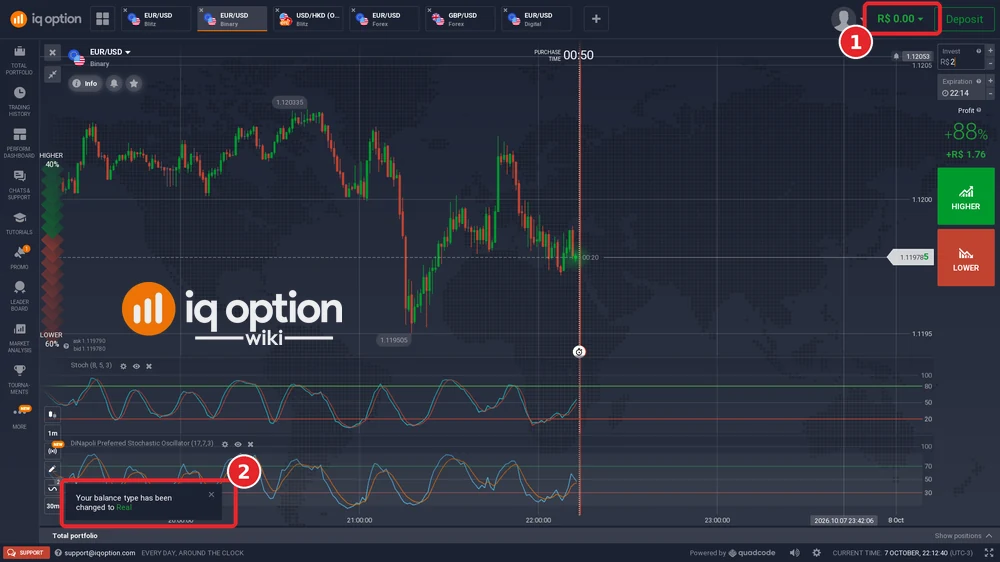
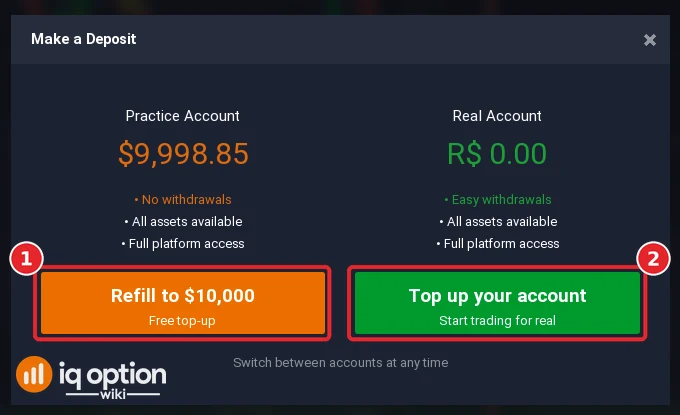
The green Deposit button at the top right opens “Make a Deposit”. It lists both accounts: the Practice account with “No withdrawals” and a free “Refill to $10,000” button, and the real account with “Easy withdrawals” and “Top up your account” (“Start trading for real”). Click “Top up your account” only if you mean to deposit: it starts the payment flow. How to deposit follows it step by step, one guide per country.
Step 5: Choose your account currency
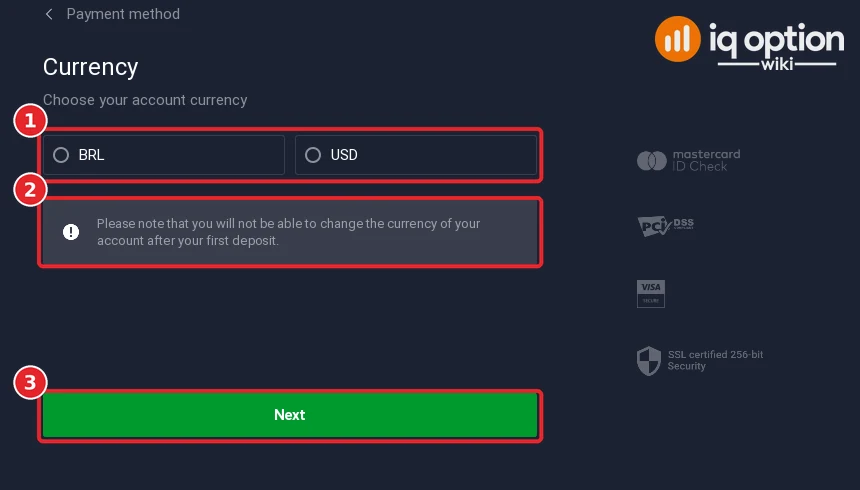
After you choose a payment method, the cashier asks “Choose your account currency” (1). On our Brazilian account the choices were BRL and USD. The notice under them (2) says: “Please note that you will not be able to change the currency of your account after your first deposit.” Click Next (3) to continue. We stopped there.
Step 6: Add your personal info
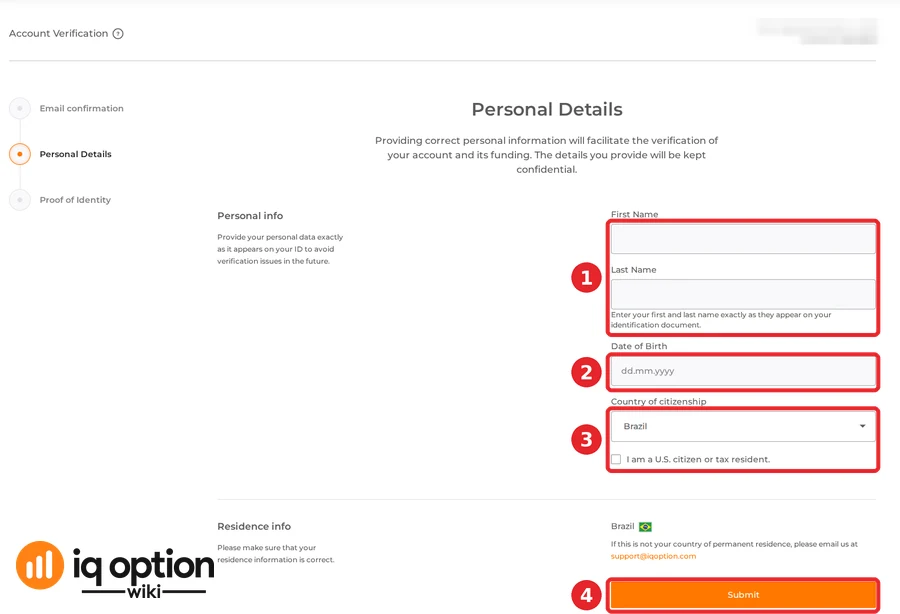
IQ Option’s “Account Verification” page, which its menu calls “Personal Data Verification”, starts with three steps: Email confirmation, Personal Details and Proof of Identity. Personal Details asks for your first and last name (1) “exactly as it appears on your ID”, your date of birth (2), your country of citizenship and whether you are a U.S. citizen or tax resident (3), and shows your country of residence. Submit (4) sends it. We left the form empty on purpose: we do not type invented personal data into it, and the page’s own text says to provide your data exactly as on your ID. If the residence country shown is wrong, the page says to email support@iqoption.com. Details of the whole process: account verification.
Step 7: Deposit, verify and withdraw
From here the path is: deposit in the cashier (see the minimum deposit by country), provide your documents when IQ Option asks, and withdraw to a method in your name (see how to withdraw). IQ Option’s terms set the timing for documents: see the rules below.
Account currency by country
The cashier asks for the currency of your real account before your first deposit. This table shows the currencies that the cashier offered to the accounts of the countries we have deposit guides for.
| Country | Currencies offered for the real account | Local currency offered? |
|---|---|---|
| Argentina | USD, EUR, GBP | No: only USD, EUR or GBP |
| Bangladesh | USD, EUR, GBP | No: only USD, EUR or GBP |
| Brazil | BRL, USD | Yes (BRL) |
| Chile | CLP, EUR, GBP, USD | Yes (CLP) |
| Colombia | COP, EUR, GBP, USD | Yes (COP) |
| Kenya | USD, EUR, GBP | No: only USD, EUR or GBP |
| Malaysia | MYR, EUR, GBP, USD | Yes (MYR) |
| Mexico | MXN, EUR, GBP, USD | Yes (MXN) |
| Nigeria | NGN, EUR, GBP, USD | Yes (NGN) |
| Peru | PEN, EUR, GBP, USD | Yes (PEN) |
| Philippines | PHP, EUR, GBP, USD | Yes (PHP) |
| South Africa | ZAR, EUR, GBP, USD | Yes (ZAR) |
| Sri Lanka | USD, EUR, GBP | No: only USD, EUR or GBP |
| Thailand | THB, EUR, GBP, USD | Yes (THB) |
| United Arab Emirates | AED, EUR, GBP, USD | Yes (AED) |
| Vietnam | VND, EUR, GBP, USD | Yes (VND) |
Twelve of the sixteen countries were offered their local currency; Argentina, Bangladesh, Kenya and Sri Lanka were offered only USD, EUR or GBP. If you pay and withdraw in your local currency, choosing it keeps your balance in that currency; otherwise your bank or payment method converts the money at its own rate.
Rules to know before you open a real account
These come from IQ Option’s General Terms and Conditions (updated 21 July 2025) and its Help pages, which we read on 5 October 2026. Check the current versions on iqoption.com before you rely on them.
- One account per client. The terms say you shall register only one account with IQ Option. If you own several, the transactions made through them can be cancelled and the accounts blocked (clause 7.2.k).
- Real personal data only. IQ Option’s Help page says all traders must use real personal data. Once the account is verified, you cannot change your first name, last name or other existing information yourself: you must email support@iqoption.com.
- Documents after your first deposit. The terms say you provide KYC documents within 7 days of depositing funds (clause 7.3.k). See how account verification works.
- Only your own money. IQ Option prohibits third-party or anonymous payments: only funds sent from an account held in your name are acceptable (clause 7.2.p).
- Logins from other countries. The terms say that frequent logins from different IP addresses in different countries, or through a VPN, can lead IQ Option to believe that the terms were breached (clause 7.2.f).
- Dormant account fee. IQ Option’s General Fees Policy lists a fee of €10 (or the equivalent in your currency) every month after at least 90 consecutive days without any account activity, as long as the account has available funds.
- Practice money is not real. Virtual funds have no value and cannot be withdrawn or transferred (practice account terms, clause 2.1).
Related guides
- How to register a Practice account.
- Account verification.
- How to deposit and the minimum deposit by country.
- How to withdraw.
- The welcome bonus and its terms.
- The VIP programme.
Frequently Asked Questions
Q: Do I need a separate registration for a real account?
A: We found none. Registering opens the platform on the Practice balance, and on our unfunded account the real balance was in the same balance menu, at zero until a deposit.
Q: How do I switch from the Practice account to the real account?
A: Click the balance at the top right and then the real account row. IQ Option shows “Your balance type has been changed to Real” and the balance turns green.
Q: Which currency will my real account use?
A: The one you choose in the cashier before your first deposit. On a Brazilian account the choices were BRL and USD; other countries were offered other currencies (see the table above). IQ Option says you cannot change it after your first deposit.
Q: Do I have to verify my account before I deposit?
A: We did not have to type anything to reach the cashier. IQ Option’s terms say you provide documents within 7 days of depositing (clause 7.3.k), and its help page says trading, deposits or withdrawals may be limited until the account is verified, depending on your region. See account verification.
Q: Can I open more than one account?
A: IQ Option’s terms say you shall register only one account, and that transactions through several accounts can be cancelled and the accounts blocked (clause 7.2.k).
Q: Can I use my Practice money in the real account?
A: No. IQ Option’s Practice Account Terms say virtual funds have no value and cannot be withdrawn or transferred (clause 2.1).
Q: Is there a minimum to open a real account?
A: Opening costs nothing. The minimum applies to a deposit and differs by country: see the minimum deposit by country.