Last updated: 8 October 2026. MoreLess
We opened IQ Option’s official download page that day from a Brazilian IQ Option account (global site) and compared it with the Download App menu we recorded on 4 October 2026. We did not install the APK on a phone, so this guide covers where to get it and what IQ Option says about it, not how the installed app behaves.
The IQ Option “X” APK is the Android installer file that IQ Option offers as a direct download on its official page, iqoption.com/en/download, next to the App Store and Google Play buttons. Use that page, or the official stores, and nothing else. IQ Option’s own pages disagree about its size (51.3 mb or 74 MB) and about the lowest Android version it needs (8.1, 7.0 or 5.1), so read the line next to the button you use.
Quick answer
- Official source: iqoption.com/en/download (the .apk button) and the Download App menu. Google Play is the other official source for Android.
- Size: 51.3 mb on the download page’s button, 74 MB in its requirements box and in the menu, 59 MB in the page footer.
- Android version: 8.1 or later on the download page; 5.1 or later (APK) and 7.0 or later (Google Play) in the menu.
- Not checked: we did not install or scan the APK, and IQ Option does not say whether the APK and Google Play builds are the same.
- Safety: never use an APK from another website, and log in only on IQ Option’s own screens.
How to get the IQ Option X APK from the official page
Step 1: Open IQ Option’s download page on your Android device
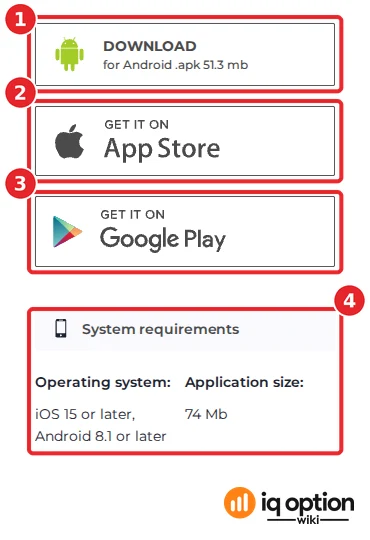
Open iqoption.com/en/download in your phone’s browser. The mobile side of the page has the Android .apk button (1), the App Store (2) and Google Play (3), and a “System requirements” box (4). On the page we recorded, the button read “DOWNLOAD for Android .apk 51.3 mb” and the box read “Operating system: iOS 15 or later, Android 8.1 or later; Application size: 74 Mb”.
Step 2: Decide between the APK and Google Play
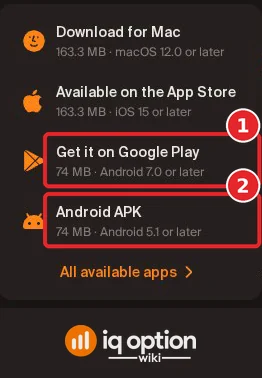
Both are IQ Option’s own downloads. The Download App menu on IQ Option’s newer pages lists them separately (recorded 4 October 2026): “Get it on Google Play” (1) and “Android APK” (2). IQ Option does not say why it offers both, or whether they are the same build. Google Play is the simpler choice if your phone has it and your country is served. The APK is the other option, for example when Google Play is not available on your phone; IQ Option’s pages do not give a reason for it.
Step 3: Compare the size and the Android version
The figures below are what IQ Option’s pages showed. They do not match, and we could not tell which is current without installing:
| IQ Option source | Android file | Size | Lowest Android |
|---|---|---|---|
| Download page, 8 October 2026 | .apk button | 51.3 mb on the button; “Application size: 74 Mb” in the requirements box | 8.1 or later |
| Download App menu, 4 October 2026 | Android APK | 74 MB | 5.1 or later |
| Download App menu, 4 October 2026 | Google Play | 74 MB | 7.0 or later |
| Footer of the pages, 8 October 2026 | “IQ Option Full version” | 59 MB | not stated |
If your phone runs an older Android than the number next to your button, ask IQ Option support in its chat before you try (see how to contact support).
Step 4: Download and install
Tap the Android .apk button. IQ Option’s page gives no installation steps for the APK. Android itself asks you to allow the browser or file manager to install apps from outside Google Play, and the wording of that prompt differs by phone and Android version. Allow it only for the file you just downloaded from iqoption.com, and switch the permission off again afterwards. We did not run this on a phone, so we have no screenshots of it.
What we can check is where the button leads. On the page, its link goes through app.appsflyer.com (an attribution service) to a file on static.cdnroute.io with the package name com.iqoption.x and the file name “IQOptionХ.apk” (the last letter of the name is a Cyrillic “Х”). The same static.cdnroute.io host serves the PDF policies that iqoption.com links to, such as its Promotional Codes Policy. This is evidence of where the link goes, not proof that the file is safe: we did not download or scan it.
Step 5: Log in
Log in with your IQ Option email and password. If you have no account, register a Practice account first; on a new account we saw $10,000.00 of Practice money on 8 October 2026. If you forgot your password, see how to recover it.
Is an APK from another website safe?
No site other than iqoption.com is an official source for the APK. An installer file can change what it does after you open it, and a modified copy of a trading app can steal a login. The checks that remain are yours: the address of the page (iqoption.com), the permissions Android lists before the install, and the publisher shown in the details. Do not install a file that a stranger, a video or a chat message sends you, and never type your IQ Option password anywhere except IQ Option’s own login screens.
What you can trade on the platform
This guide no longer gives round numbers for assets or indicators. The web asset menu of our Brazilian Practice account listed 520 option assets (Blitz 169, Binary 178, Digital 173) and 697 margin instruments (Forex 44, Stocks 499, Crypto 80, Commodities 23, Indices 21, ETFs 30) on 4 October 2026, and a Mexican Practice account listed fewer option assets earlier that day (Blitz 129, Binary 135, Digital 132). The lists depend on the account. We did not count assets in the Android app and did not count the indicators.
Related guides
- Install the IQ Option app on Windows and Mac.
- The IQ Option mobile app.
- How to register a Practice account.
- How to recover your password.
Frequently Asked Questions
Q: Where is the official IQ Option X APK?
A: On IQ Option’s download page, iqoption.com/en/download, as the “DOWNLOAD for Android .apk” button, and in the Download App menu as “Android APK”. The app is also on Google Play.
Q: How big is the APK?
A: IQ Option’s pages show 51.3 mb on the download page’s button, 74 MB in the Download App menu and in the page’s requirements box, and “Full version, 59 MB” in the page footer. We did not download the file, so we cannot say which is current.
Q: Which Android version do I need?
A: IQ Option’s pages give three answers: Android 8.1 or later on the download page, 5.1 or later for the APK in the Download App menu, and 7.0 or later for the Google Play app in that menu. Check the line next to the button you use.
Q: Is the IQ Option X APK safe to install?
A: We did not install or scan it, so we cannot vouch for it. The file on iqoption.com is the one IQ Option offers; a copy from any other website is not an official download.
Q: Does the APK need a separate account?
A: IQ Option’s pages describe none: you log in with your IQ Option account. If you have no account, register a Practice account first.
Q: Why does the APK need “unknown sources”?
A: Android treats an app that does not come from Google Play as an outside install and asks you to allow it. The prompt differs by phone and version, and IQ Option’s page does not describe it.
Q: Is there an app for iPhone?
A: IQ Option’s download page and menu list the App Store, with iOS 15 or later. See the mobile app guide.