Last updated: 8 October 2026. MoreLess
The cashier screens below were recorded on IQ Option Practice accounts registered in sixteen countries between 4 and 8 October 2026. The terms come from IQ Option’s Promotional Codes Policy, which we read on 5 October 2026. We typed amounts and read the terms, but stopped before every payment button, so no money was sent.
Yes, IQ Option has a deposit bonus. In every country we tested, the cashier showed the code IQWELCOME already applied when we reached the amount step. It adds a percentage to your deposit, and the percentage grows with the amount. There is a catch in IQ Option’s own policy: once a deposit bonus is credited, you cannot withdraw until you reach a required trading volume, or cancel the bonus. Read the terms before you pay. You can remove the code with the × before you deposit.
Quick answer
- Code: IQWELCOME, already applied in the cashier’s amount step in all sixteen countries we tested. You do not have to type it.
- Size: a percentage of your deposit that grows with the amount: +50% or +60% on the smallest quick amount, +90% to +100% on the largest. It starts from an amount that differs by country.
- The catch: after the bonus is credited you cannot withdraw until you reach the required trading volume, or cancel the bonus (Promotional Codes Policy, clause 7.1.10). On our Brazilian account the Bonus FAQ set the turnover at 40 times the bonus, to be reached in 30 days.
- What counts: only Blitz, Turbo and Digital Options trades count towards the volume, and the bonus balance cannot open CFD positions.
- Decline it: remove the code with the × in the amount step before you deposit.
How the welcome bonus appears in the cashier
We followed the PIX deposit on a Practice account registered in Brazil. The first steps (the Deposit button, Top up your account, the method list and the account currency) are the same as in the deposit guide. The bonus shows up in the amount step.
Step 1: Type an amount and find the Promotion box
Type the amount (1). Under it, the Promotion box (2) shows the code IQWELCOME with a green tick, an (i) icon and an ×. Below it, the Bonus line (3) gives the percentage and the bonus in your currency, and the summary (4) adds up the deposit amount, the bonus and what will be credited. Here R$ 55 got a 50% bonus of R$ 27.50, so R$ 82.50 would be credited.
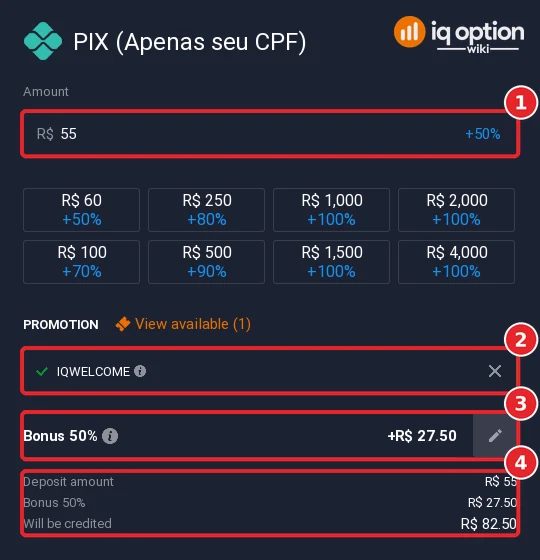
The percentage depends on the amount. The quick-amount buttons under the field show it: in Brazil R$ 60 shows +50%, R$ 250 +80% and R$ 1,000 +100%. In the sixteen countries we checked, the smallest button showed +50% or +60% and the largest +90% to +100%.
Step 2: Click the (i) next to the code
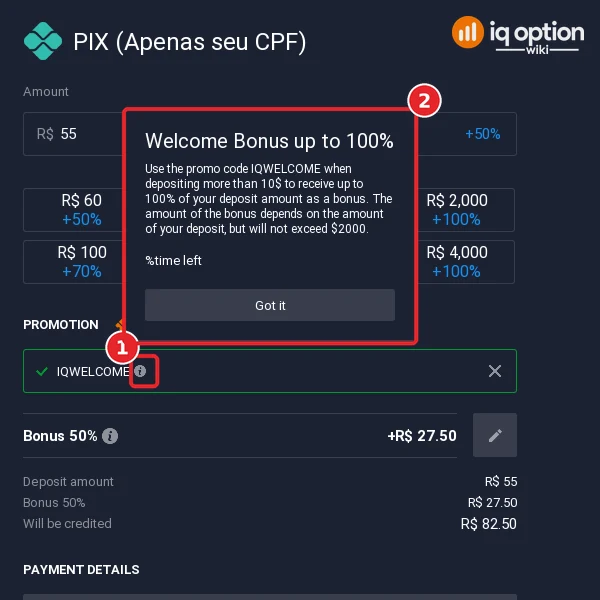
Click the (i) icon next to IQWELCOME (1). A card opens (2) with the offer in IQ Option’s words: “Use the promo code IQWELCOME when depositing more than 10$ to receive up to 100% of your deposit amount as a bonus. The amount of the bonus depends on the amount of your deposit, but will not exceed $2000.” (A line reading “%time left” is a placeholder that the platform did not fill in.) Click Got it to close it. The “more than 10$” in that text is the global wording: on our Brazilian account the Bonus line already appeared at R$ 55, and the range check in our minimum deposit guide showed the bonus starting at R$ 52, so use the figure in your own cashier.
Step 3: Read the Bonus FAQ
The (i) icon next to the “Bonus 50%” line opens a window called Bonus FAQ, a list of questions you can open one by one. We opened the ones that decide whether the bonus suits you. Everything below is what that window said on our Brazilian account on 8 October 2026 (the platform’s clock showed 7 October, UTC-3).
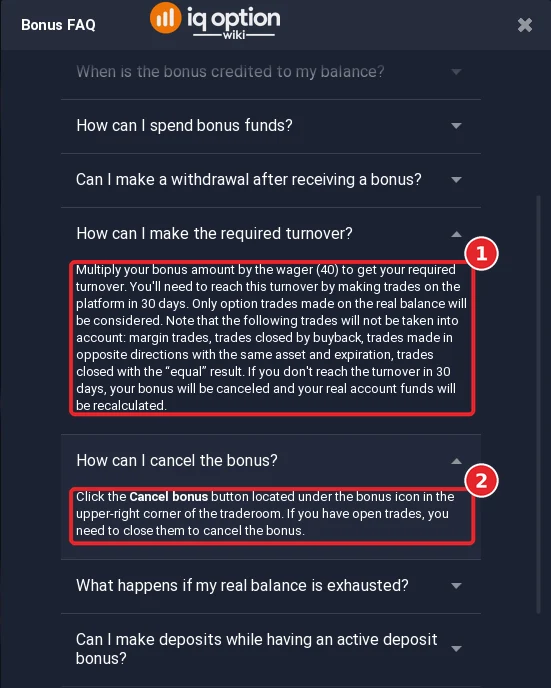
- How to receive it, and how much. “Click the Add Bonus button while making a deposit. You can make several deposits with the bonus, but the bonus will be applied only to the first deposit that is successfully processed.” The bonus “cannot exceed R$ 5,000” in Brazil. The numbers (1) and (2) below refer to the image under the list item.
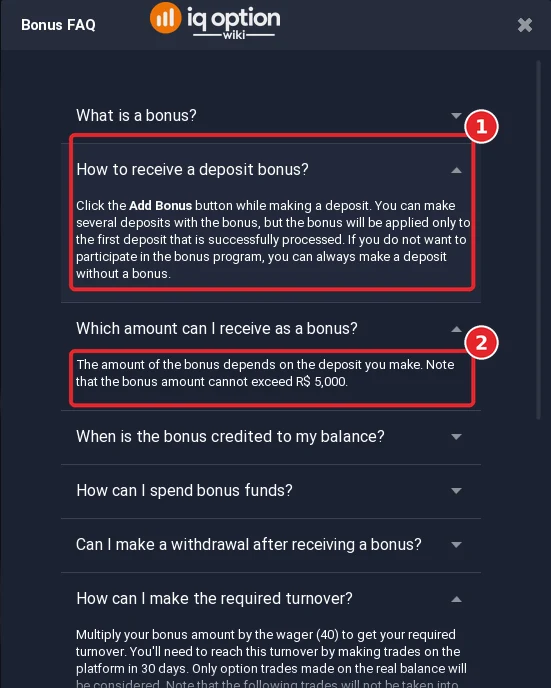
- The turnover. “Multiply your bonus amount by the wager (40) to get your required turnover. You’ll need to reach this turnover by making trades on the platform in 30 days. Only option trades made on the real balance will be considered.” Margin trades, trades closed by buyback, trades in opposite directions with the same asset and expiration, and trades closed with the “equal” result do not count. “If you don’t reach the turnover in 30 days, your bonus will be canceled and your real account funds will be recalculated” (1).
- Cancelling. “Click the Cancel bonus button located under the bonus icon in the upper-right corner of the traderoom. If you have open trades, you need to close them to cancel the bonus” (2).
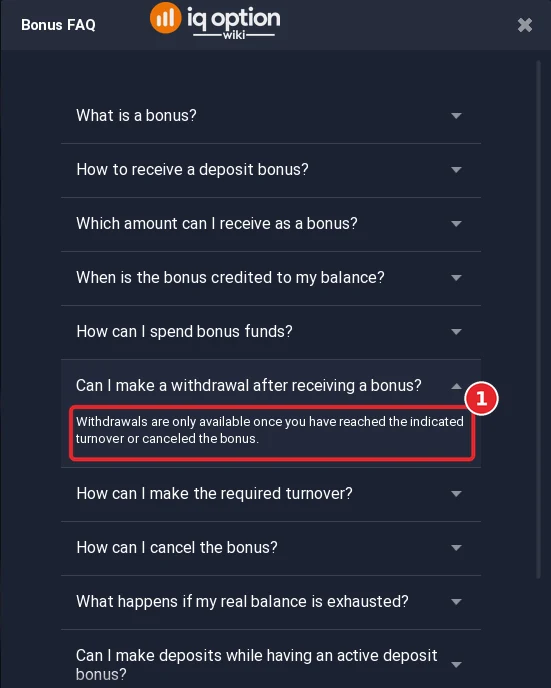
- Withdrawals. “Withdrawals are only available once you have reached the indicated turnover or canceled the bonus.”
Our own arithmetic from that rule, not a figure from IQ Option: the R$ 55 deposit in step 1 earns a R$ 27.50 bonus, and 40 times R$ 27.50 is R$ 1,100 of turnover to complete within 30 days. We did not deposit, so we have not seen a real bonus credited or a turnover counter.
Step 4: Keep the code or remove it
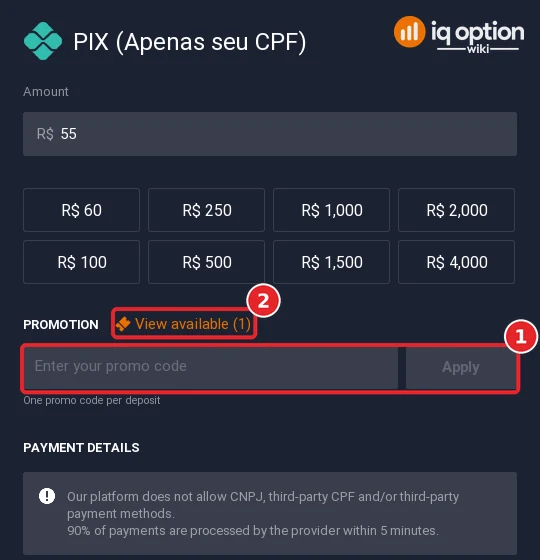
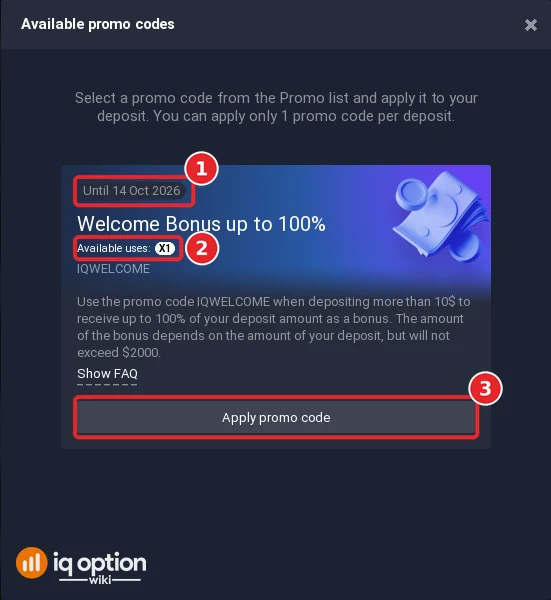
The × at the right of the code removes it. The Promotion box then shows an empty field “Enter your promo code” with an Apply button (1), the percentages vanish from the quick-amount buttons, and a “View available (1)” link (2) stays. It opens “Available promo codes”: the Welcome Bonus card with an expiry label (“Until 14 Oct 2026” on our account, recorded on 8 October), “Available uses: X1” and an “Apply promo code” button (3). The text above the card says you can apply only one promo code per deposit. The expiry and the single use belong to the offer on that account, so check yours.
IQ Option’s welcome email, which arrived in the mailbox of a new test account on 8 October, describes the same route: “Go to PROMO, pick the offer, click Deposit and choose payment, select and apply promo code, complete deposit”, and says the Bonus button then appears in the traderoom at the top right.
What IQ Option’s policy says about the deposit bonus
The rules are in IQ Option’s Promotional Codes Policy (a PDF linked from that page), section 7.1, “Deposit Bonuses”. The policy adds that individual promotions may have their own terms, and that those override the policy: read the offer details on the platform before you claim a bonus. These are the points that matter most, with the clause numbers:
| Topic | What the policy says | Clause |
|---|---|---|
| Activation | You must accept the policy, enable the Deposit Bonus button in your account (if it is not on, no bonus is credited on your next deposit) and deposit at least the minimum amount given in the offer details. | 7.1.1 |
| What the bonus is based on | It is calculated on the activation deposit only, not on your current balance and not on later deposits. | 7.1.2 |
| Expiry | Every bonus has an expiry date for completing the required trading turnover, shown in the offer details on the platform. After that date the bonus cannot be withdrawn. | 7.1.3 |
| Currency | The bonus is credited in the default currency of your account. | 7.1.4 |
| Separate balance | The bonus balance is shown apart from your real balance and cannot be used to open CFD positions. It is used only after your real balance has been used in full. | 7.1.5, 7.1.6 |
| Winnings | Wins from trades made with the bonus balance are added to the bonus balance. When you complete the required trading volume, the bonus balance moves to your real balance, up to an amount given in the offer details. With mixed balances, a win is split between the two in proportion. | 7.1.7, 7.1.8 |
| Withdrawals | After the bonus is credited you cannot make any withdrawal, whether of deposits or earnings, unless you reach the trading volume and close all open positions within the time in the offer details, or close all open positions and opt out of the bonus (cancel it). | 7.1.10 |
| What counts as trading volume | Only trades in Blitz, Turbo and Digital Options. Trades in opposite directions at the same expiry are not counted, and neither are trades that end with an equal result or are closed with the buyout option. | 7.1.11 |
| Verification | Offers are activated only for clients who have verified their account, unless the offer says otherwise. | 2.5 |
| Regions | The conditions and the availability of an offer can vary by the region of the client. | 2.7 |
The offer details on the platform, behind the (i) icon, give the figures the policy leaves open: the trading volume you must reach, the time you have and the most that can move to your real balance. Check them in your own cashier, because they can differ by country and change.
Welcome bonus by country
After typing an amount below the minimum, the cashier of each guide’s country showed the range for the method and the amount from which the bonus starts. Click a country for its step-by-step deposit guide with the screenshots.
| Country | Method we checked | Range in the cashier | Bonus starts at | Does the lowest amount get it? |
|---|---|---|---|---|
| Argentina | Mercado Pago QR | $10 to $6,300 | $10 | Yes |
| Bangladesh | NAGAD | $10 up to about $200 | $10 | Yes |
| Brazil | PIX | R$ 55 to R$ 150,000 | R$ 52 | Yes |
| Chile | WebPay | CLP 10,000 to CLP 25,000,000 | CLP 9,900 | Yes |
| Colombia | Nequi | COL$ 50,000 to COL$ 4,000,000 | COL$ 33,000 | Yes |
| Kenya | card | $10 to $11,050 | $10 | Yes |
| Malaysia | Maybank | RM 50 to RM 50,000 | RM 41 | Yes |
| Mexico | SPEI | 175 to 50,000 MXN | 180 MXN | No: the bonus starts above the minimum |
| Nigeria | bank transfer | ₦14,000 to ₦8,400,000 | ₦13,000 | Yes |
| Peru | Yape | S/ 35 to S/ 2,000 | S/ 35 | Yes |
| Philippines | GCash | ₱580 to ₱50,000 | ₱630 | No: the bonus starts above the minimum |
| South Africa | FNB | R180 to R500,000 | R170 | Yes |
| Sri Lanka | Mastercard | $10 to $11,050 | $10 | Yes |
| Thailand | Bank QR | ฿350 to ฿2,000,000 | ฿340 | Yes |
| United Arab Emirates | card | AED 37 to AED 42,271 | AED 37 | Yes |
| Vietnam | Vietcombank QR | 250,000 ₫ to 450,000,000 ₫ | 260,000 ₫ | No: the bonus starts above the minimum |
In three countries (Mexico, Philippines and Vietnam) the bonus starts above the lowest amount, so a deposit of exactly the minimum gets no bonus. In the other thirteen it starts at or below the minimum.
Should you take the bonus?
That depends on whether you plan to withdraw soon. Before you pay, check these four things in the offer details behind the (i) icon:
- the trading volume you must reach, and how long you have;
- that only Blitz, Turbo and Digital Options trades count towards it, and that CFD positions cannot use the bonus balance;
- how much of the bonus can move to your real balance;
- that you cannot withdraw while the bonus is active unless you cancel it.
If you do not want the bonus, remove the code with the × before you deposit. Nothing here is advice to take or to skip it.
Promo codes from other websites
IQ Option’s policy says it provides promo codes to clients “directly or via its partners” (clause 1.1), and that for several offers you activate the code by entering it in the promo code box when you make the deposit. It also says that, unless an offer states otherwise, promo code offers cannot be claimed at the same time (clause 2.6). Use a code only inside IQ Option’s own cashier, read its terms first, and never give your password, a verification code or a document photo to a website that promises a bonus.
Other ways to get more from IQ Option
- One free withdrawal a month. IQ Option’s withdrawals page says you have 1 free withdrawal per calendar month, whatever the method. After that it charges 2%, with a cap that depends on the country (for example R$ 125 in Brazil). See how to withdraw from IQ Option.
- No deposit fee. On IQ Option’s deposits page every method showed 0% commission in all sixteen countries we checked. See the minimum deposit by country.
- Tournaments. IQ Option runs tournaments with their own entry fees and prizes: see the tournament guide.
- VIP. IQ Option has a VIP programme with its own conditions: see the VIP guide.
Frequently Asked Questions
Q: Does IQ Option have a promo code?
A: Yes. In all sixteen countries we tested, the cashier showed the code IQWELCOME already applied at the amount step. You do not have to enter it.
Q: How much is the welcome bonus?
A: It is a percentage of your deposit, and the percentage grows with the amount. The smallest quick-amount button showed +50% or +60% and the largest +90% to +100%. The amount from which the bonus starts differs by country: see the table above.
Q: Can I withdraw while the bonus is active?
A: Not freely. IQ Option’s policy says that after a deposit bonus is credited you cannot withdraw, whether deposits or earnings, until you reach the trading volume and close your open positions within the time in the offer details, or close all open positions and cancel the bonus (clause 7.1.10).
Q: What counts towards the trading volume?
A: Only trades in Blitz, Turbo and Digital Options. Trades in opposite directions at the same expiry, trades with an equal result and trades closed with the buyout option do not count (clause 7.1.11).
Q: How much do I have to trade before I can withdraw?
A: On our Brazilian account the Bonus FAQ said to multiply the bonus amount by the wager, 40, and to reach that turnover in 30 days with option trades on the real balance. A R$ 27.50 bonus therefore means R$ 1,100 of turnover (our arithmetic). The figures can differ by country and offer, so read your own Bonus FAQ.
Q: How do I cancel the bonus?
A: The Bonus FAQ says to click the Cancel bonus button under the bonus icon at the top right of the traderoom, after closing any open trades. It also says that if you do not reach the turnover in 30 days the bonus is cancelled and your real funds are recalculated.
Q: Do I have to take the bonus?
A: No. The code is pre-applied in the cashier and can be removed with the × before you deposit.
Q: Is there a no-deposit bonus?
A: IQ Option’s policy describes a “No Deposit Bonus”, offered at its discretion to clients who can see the offer in their Promo section (clause 7.2). We did not see one on our test accounts: the Promotion box listed one offer, IQWELCOME.
Q: Do I need a verified account to get the bonus?
A: The policy says offers are activated only for clients who have verified their account, unless the offer says otherwise (clause 2.5). The cashier showed IQWELCOME on our unverified Practice accounts, but we did not deposit, so we cannot say what happens to an unverified account that deposits with the code. See how account verification works.
Q: Are promo codes from other websites real?
A: IQ Option says it provides promo codes directly or through its partners. Whatever the source, the code works only inside IQ Option’s cashier, and the offer’s own terms apply. Do not pay anyone for a code.