Last updated: 8 October 2026. MoreLess
The definitions and rules are quoted from IQ Option’s Margin Trading terms, Help page and Trading Specifications page, saved on 5 October 2026. The screenshots were recorded on 4 and 5 October 2026 on an IQ Option Practice account registered in Brazil; we placed no real-money trade, and the one position we opened for the recording was a $1 Practice position on EUR/USD.
A CFD, a contract for difference, is a contract in which you and IQ Option exchange the difference between the price of an instrument when the position opens and its price when it closes. You do not own the shares, the coins or the currency: you gain if the price moves the way your position bets and lose if it moves the other way, and you can bet on a fall as well as a rise. On IQ Option a CFD is a “Margin” asset: you choose an amount, a leverage, and Buy or Sell, and the position has no expiry.
Quick answer
- What it is: a contract in which you and IQ Option exchange the difference between the opening and the closing price of an instrument. You do not own the asset.
- On the platform: a “Margin” asset with Invest, Leverage, Buy or Sell, optional TP and SL, and no expiry.
- Profit: long = (closing ÷ opening − 1) × multiplier × investment; short = (1 − closing ÷ opening) × multiplier × investment.
- Not an option: an option has an expiry and a payout fixed before you trade; a CFD result follows the price, multiplied by the leverage.
- Costs and limits: the spread, overnight funding, and automatic close-out under the margin rules. Leverage differs by asset (×1000 on EUR/USD, ×200 on USD/JPY on 5 October 2026).
- Menu: Margin listed 697 assets on 4 and 5 October 2026: Forex 44, Stocks 499, Crypto 80, Commodities 23, Indices 21, ETFs 30.
What is a CFD?
IQ Option’s Margin Trading terms define a CFD as “a tradable contract entered into between the Client and the Company, who exchange the difference in the value of an instrument, as specified on the Trading Platform at the time of opening a transaction, and the value of that instrument at the contract’s end”. In plain words, the trader and the broker settle the price difference between the start and the end of the contract. If you bought and the price rose, the broker pays you the difference; if the price fell, you pay it. It is up to you when to close the position, unless a stop loss, a take profit or the platform’s margin rules close it first.
CFD trading example
Mario expects the shares of company A, which cost $20 each, to rise, and he opens a Buy position on 1,000 of them without leverage (×1), so the volume is $20,000. The price rises to $25 and he closes. Using IQ Option’s formula, (25 ÷ 20 − 1) × 1 × $20,000 = $5,000.00: the difference of $5 on each of the 1,000 shares. If the price had fallen to $15 instead, the result would be (15 ÷ 20 − 1) × 1 × $20,000 = −$5,000.00, and he would owe the difference. With a leverage of ×5, an investment of $4,000 gives the same $20,000 volume and the same $5,000.00 for a rise to $25, and a fall to $15 would cost −$5,000.00, which is more than the $4,000 invested; the margin rules would close the position before that, as the guide on leverage explains.
How to calculate profit with CFD trading on IQ Option
IQ Option’s Help page gives two formulas, where the multiplier is the Leverage box of the order panel. Long position (Buy): profit = (closing price ÷ opening price − 1) × multiplier × investment. Short position (Sell): profit = (1 − closing price ÷ opening price) × multiplier × investment. A negative result is a loss, and the spread and overnight funding come on top. The full worked examples, with a check against IQ Option’s own AUD/JPY example, are in how to calculate profit with CFD trading.
How a CFD differs from a binary or digital option
IQ Option started with options, and a CFD works differently. The table compares them as the platform showed them on 4 and 5 October 2026 (Practice account, global platform).
| | Binary or digital option | CFD (Margin) | |
|---|---|---|
| What you set | Invest (the stake), Expiration, then Higher or Lower. | Invest, Leverage, then Buy or Sell. TP (take profit) and SL (stop loss) are optional. |
| What a win pays | A fixed profit percentage that the panel shows before you trade: +91% on a $1,000 EUR/USD (OTC) option, shown as +$910 on a Practice account. | The price difference between opening and closing, multiplied by the leverage and the amount invested, so there is no fixed percentage. |
| What you can lose | A binary option: the stake. A digital option: IQ Option’s blog says a loss can exceed the amount invested, which we did not check. | It depends on the margin type in Settings, Trading. Simple mode (isolated margin) allocates a specific amount of funds to the trade; the terms say the maximum loss of an isolated position is the margin allocated to it, which can be extended by a stop loss level or the “use balance to keep position open” option. Advanced mode (cross margin) uses the entire balance to support all cross margin trades. |
| How long it lasts | Until the expiration time. Some options can be sold before expiration while the sell button is active. | There is no expiration. You close the position when you choose, or a take profit or stop loss closes it. Overnight funding may be charged. |
The profit of an option is fixed by its percentage and its loss by the stake, whatever the price does. The profit and loss of a CFD follow the price, multiplied by the leverage, which is why leverage and the stop loss matter so much. For options in detail see binary options and digital options compared.
How to open a CFD trade on IQ Option
These steps follow our recordings of 4 and 5 October 2026. The numbers in each screenshot match the numbers in the text. Screens can change.
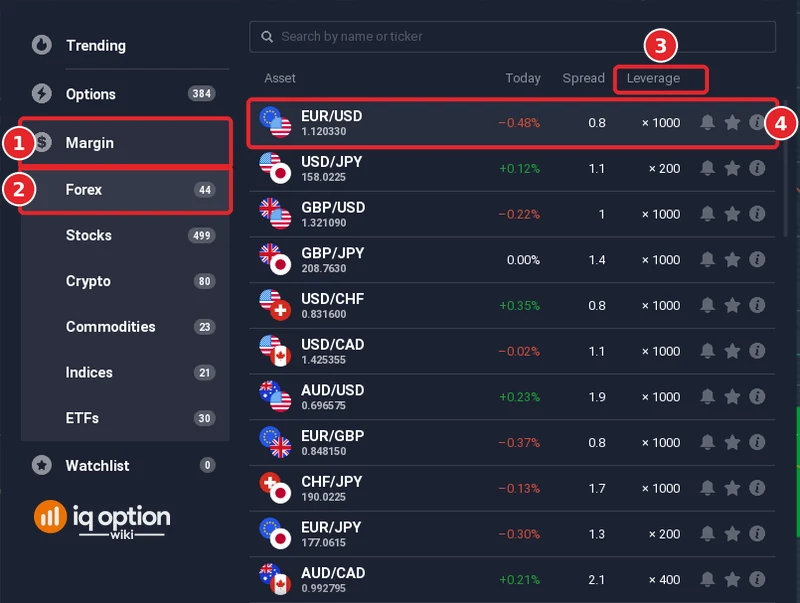
Step 1: Open the Margin list and pick an asset
Click + in the top bar and choose Margin (1), then a group such as Forex (2). The Margin menu listed Forex 44, Stocks 499, Crypto 80, Commodities 23, Indices 21 and ETFs 30, which is 697 assets. A “No expiration” selector sits under the list, because a CFD has no expiry. The list has a Leverage column (3), and leverage differs by asset: EUR/USD (4) showed ×1000 and USD/JPY ×200, and the order panel of Bitcoin in the Crypto group showed ×20 (a Volume of 20 for $1).
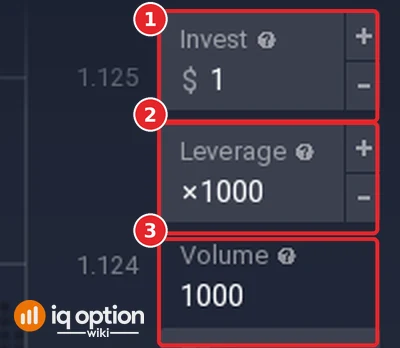
Step 2: Set the amount and the leverage
The order panel on the right shows the Invest box (1), the Leverage box (2) and the Volume (3), which is the amount invested times the leverage: $1 at ×1000 gave a Volume of 1000. Below them are the TP and SL boxes, the Price (Market), the Buy and Sell prices and the spread.
Step 3: Add a take profit and a stop loss if you want one
A take profit closes the position when the profit reaches your level, and a stop loss closes it when the loss does. The help note of both boxes says that reaching the level closes the position automatically. See auto closing on IQ Option and how to open a position automatically for pending orders.
Step 4: Click Buy or Sell
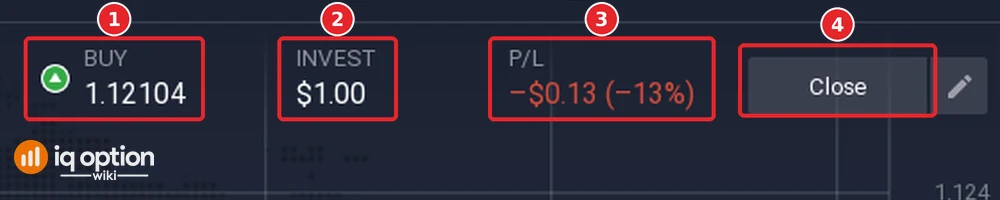
Buy if you expect the price to rise, Sell if you expect it to fall. A CFD opens at the Buy price when you buy and at the Sell price when you sell, and the difference between them is the spread. After the click a bar opens above the chart with the direction and price of the position (1), the invested amount (2), the profit or loss (3) and the Close button (4).
Step 5: Close the position
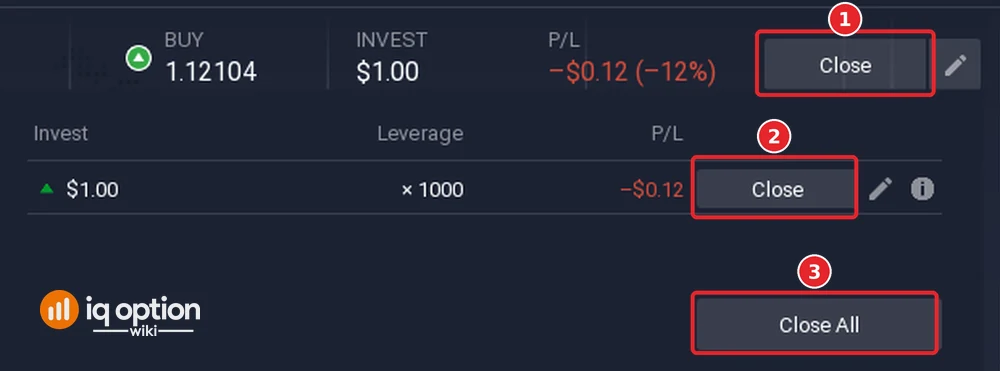
Click Close on the bar (1). A list opens with the position, and its own Close button (2) closes it; Close All (3) closes every position. The result goes to your balance, and the closed position appears in Trading History.
Step 6: Read the result
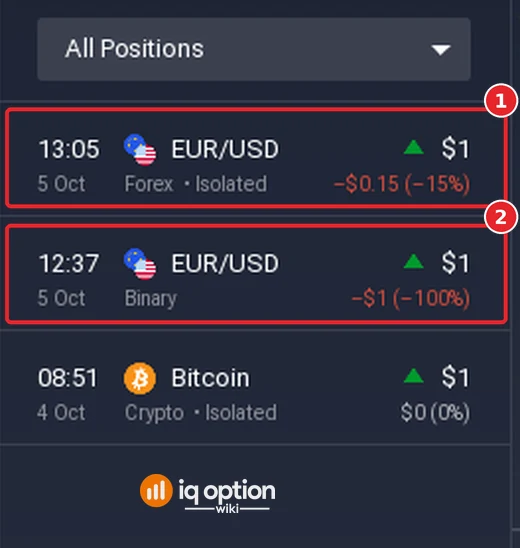
Trading History lists the closed position with its asset, its type (Forex, Isolated), the amount and the result. Our $1 position closed at −$0.15 (−15%), and the history also shows a binary option of the same day that lost its $1 (−100%).
Pros and Cons of CFD Trading
| Pros | Cons |
|---|---|
| One platform for Forex, Stocks, Crypto, Commodities, Indices and ETFs, with no expiry on the position. | Leverage multiplies losses as well as profits, and the platform closes positions when the margin rules require it. |
| You can open a Sell position and gain from a falling price. | Costs: the spread on every position and overnight funding for positions that stay open. The Trading Specifications page lists both for each instrument. |
| TP and SL can close a position at levels you set. | You do not own the asset, and what you can trade depends on the company that serves your country. |
CFD trading styles
CFD positions are held for as long as you choose, so the same instrument is used in different ways. These are definitions, not recommendations, and none has been tested here.
| Style | What it means |
|---|---|
| Day trading | Positions are opened and closed within one day. |
| Scalping | Many positions, each aiming at a small price change. |
| Swing trading | Positions held for days or weeks, so overnight funding applies. |
Related guides
- What is leverage on IQ Option and how to calculate profit in CFD trading
- Trade forex on IQ Option, stock CFDs and Bitcoin on IQ Option
- IQ Option fees and commissions
- All indicator guides and all strategy guides
Frequently Asked Questions
Q: What does CFD stand for?
A: Contract for difference. IQ Option’s terms describe it as a contract in which you and the company exchange the difference in the value of an instrument between the opening and the end of the contract.
Q: Do I own the asset when I trade a CFD?
A: No. You hold a contract on its price, so a Buy position on a stock gives you the price difference, not the share.
Q: Does a CFD have an expiry on IQ Option?
A: No. The Margin asset list shows a “No expiration” selector, and you close the position yourself, or a take profit, a stop loss or the margin rules close it.
Q: How is the profit of a CFD calculated?
A: Long: (closing price ÷ opening price − 1) × multiplier × investment. Short: (1 − closing price ÷ opening price) × multiplier × investment. See the guide linked above for worked examples.
Q: What does it cost to hold a CFD?
A: The spread on every position, and overnight funding, which the Trading Specifications page says may be charged for holding open positions.
Q: Can I practise CFD trading without risking money?
A: Yes. The Practice balance starts at $10,000 and has a Refill to $10,000 button.