Last updated: 8 October 2026. MoreLess
Every screenshot below was recorded on 5 October 2026 on an IQ Option Practice account registered in Brazil, with Practice money only. We placed a pending order on EUR/USD and cancelled it: nothing was deposited or paid, and we did not wait for the order to fill.
You can open a position on IQ Option automatically with a pending order. In the margin order panel the Price field starts on Market, which opens a position at the current price. Type a different price there and the Buy and Sell buttons become BUY AT and SELL AT: the position then opens by itself when the price reaches that level. This guide walks through it on a $1 EUR/USD order at x1000 leverage and shows how to find and cancel the order.
Quick answer
- How: in the margin order panel, change the Price field from Market to a price you choose, then click BUY AT or SELL AT.
- What IQ Option says: “The position will be automatically opened when the price reaches this level.”
- Where it waits: the Pending Isolated Margin tab of the positions panel, with its entry price, take profit and stop loss.
- Cancel: click Cancel, then Confirm in that tab. We cancelled before the price reached our level, so we did not see it fill.
- Only margin assets: the options panel (Invest, Expiration, Profit, Higher, Lower) has no Price field.
- Not the same as: the “Open positions without confirmation” settings, which only skip confirmation prompts.
What is the difference between a market order and a pending order?
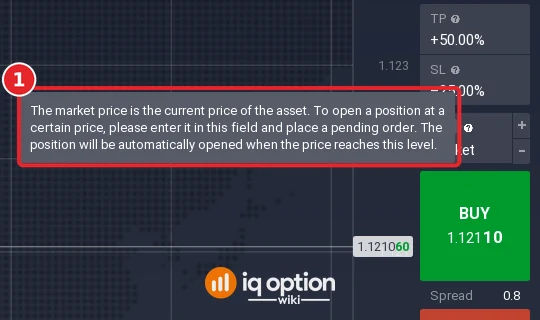
A market order opens a position now, at the price shown on the Buy or Sell button. A pending order waits. You choose the level and the direction, and IQ Option opens the position only when the price gets there. IQ Option’s own help text for the Price field says it in one sentence: “The market price is the current price of the asset. To open a position at a certain price, please enter it in this field and place a pending order. The position will be automatically opened when the price reaches this level.”
People use it when they have picked an entry level in advance, for example a price on the chart they want to buy at, and do not want to watch the screen until it arrives. It does not make the trade more likely to win, and the price may never reach your level.
How to open a position automatically on IQ Option
Choose the asset first: click +, then Margin and the asset (see how to choose an asset). We used EUR/USD from the Forex list. The EUR/USD market price was about 1.1210 when we placed the order.
Step 1: Switch the Price field to pending
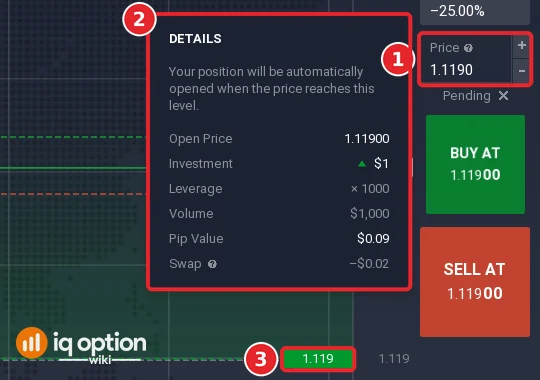
Click the Price field (1) in the order panel. A Pending label with a cross appears under it (2), and the buttons change from BUY and SELL to BUY AT (3) and SELL AT (4). The field starts at the current price; type the level you want. We typed 1.1190, below the market, and used BUY AT.
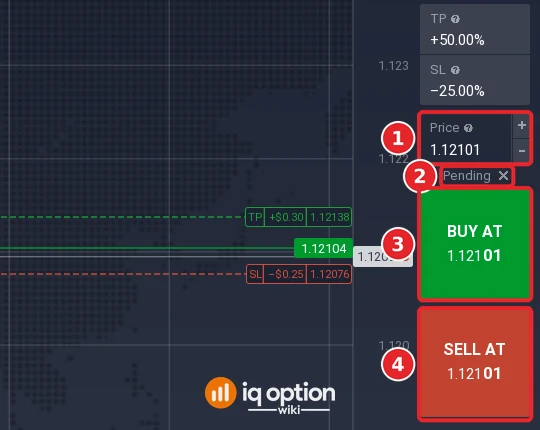
Take profit and stop loss in the panel apply to the pending order too; ours were +50.00% and -25.00%. See auto closing on IQ Option for how to set them.
Step 2: Click BUY AT or SELL AT
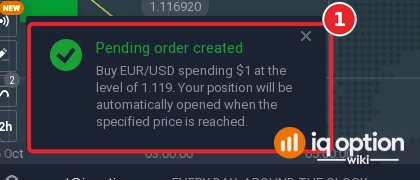
IQ Option answered with a notification (1): “Pending order created. Buy EUR/USD spending $1 at the level of 1.119. Your position will be automatically opened when the specified price is reached.”
A Details card also appeared. It showed Open Price 1.11900, Investment $1, Leverage x1000, Volume $1,000, Pip Value $0.09 and Swap -$0.02. The Price field now read 1.1190 (1), and the chart drew a green dashed line labelled 1.119 (3).
Step 3: Find the order in the positions panel
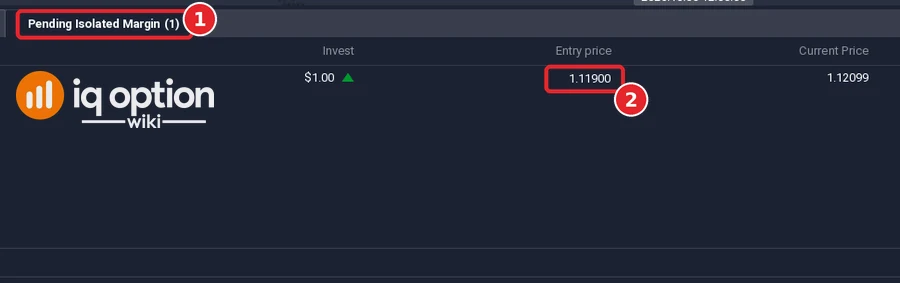
Open the Total portfolio bar at the bottom. A pending order is in the Pending Isolated Margin tab (1), not in the tab of open positions. The row lists the invested amount, the entry price (2), the current price, the Take Profit (+$0.50) and the Stop Loss (-$0.25). We placed the order while another $1 position was open, so the other tab showed a position too.
Step 4: Cancel the order if you change your mind
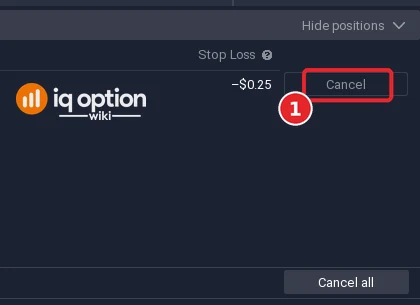
Click Cancel (1) at the end of the row. The button turns into Confirm; click it again. A Cancel all button sits at the bottom right of the panel.
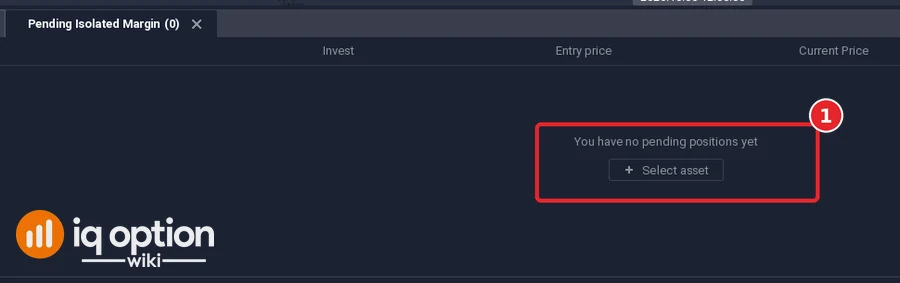
After we confirmed, the tab showed “You have no pending positions yet” (1).
We cancelled before the price reached 1.1190, so we did not see the position open and cannot show that moment. IQ Option’s text says it opens automatically at that level.
What about the “Open positions without confirmation” setting?
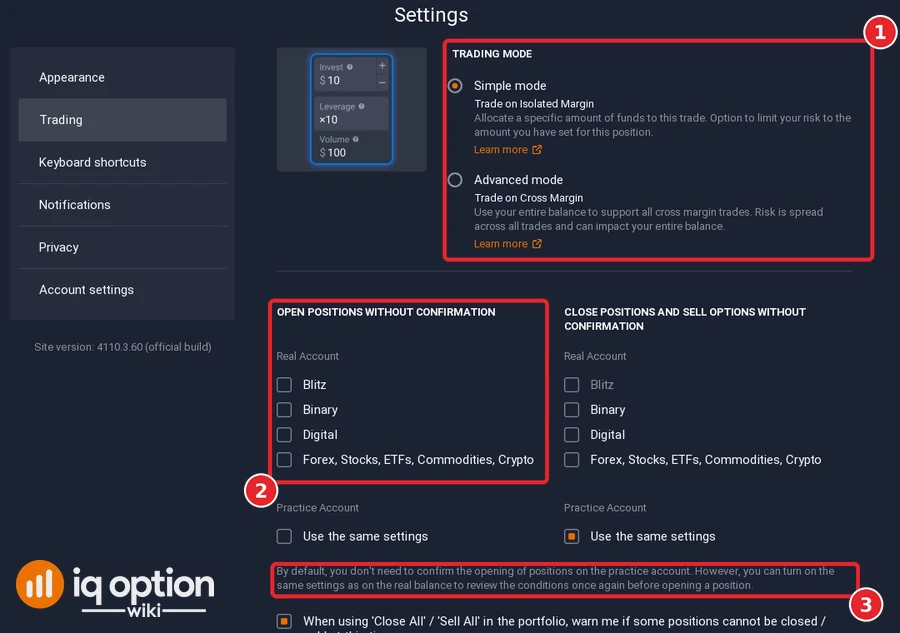
That setting is a different feature. In Settings, Trading (1), the “Open positions without confirmation” checkboxes (2) only decide whether IQ Option asks you to confirm a position you open yourself. IQ Option’s note under them says: “By default, you don’t need to confirm the opening of positions on the practice account” (3). The same page chooses the trading mode: Simple mode is “Trade on Isolated Margin” and Advanced mode is “Trade on Cross Margin”. Our trades used Simple mode.
Can I place an order while the market is closed?
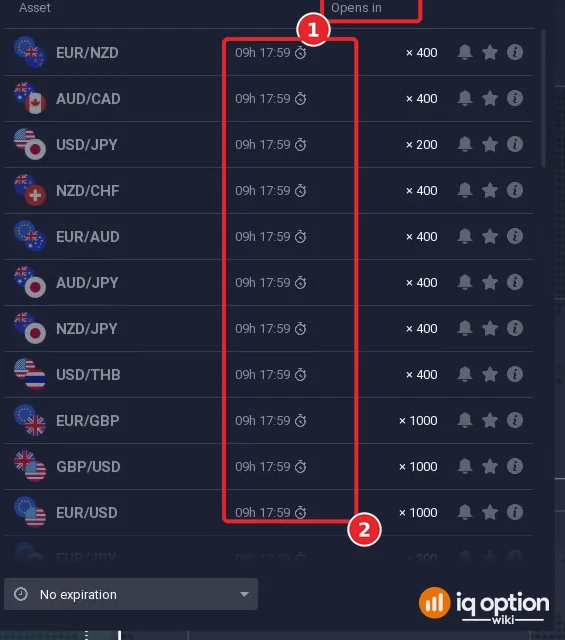
An earlier version of this article described “orders at opening” for CFDs on assets whose market is closed, such as US stocks outside exchange hours. We could not check that on the platform, so we removed the old screenshots and claims. What we did see: on Sunday 4 October 2026 the margin forex list showed an “Opens in” countdown next to every pair (1), while crypto and OTC options stayed open. For when each asset trades, see the best time to trade on IQ Option.
Pros and cons
Pros:
- The order waits at your level without you watching the chart.
- Take profit and stop loss can be set in the same panel.
- You can cancel it from the positions panel before it opens.
Cons:
- The price may never reach your level, so the position may never open.
- It exists for margin assets only; options have no Price field.
- Leverage magnifies losses as well as gains once the position opens.
Related guides
- Forex pending orders on IQ Option: the same feature in more detail.
- Auto closing with take profit and stop loss.
- What is leverage.
Frequently Asked Questions
Q: How do I open a position automatically on IQ Option?
A: Click the Price field in the margin order panel so it switches from Market to Pending, enter the price, then click BUY AT or SELL AT. IQ Option confirms with “Pending order created”.
Q: Where do I see a pending order?
A: In the Pending Isolated Margin tab of the positions panel, opened from the Total portfolio bar.
Q: How do I cancel a pending order?
A: In that tab click Cancel, then Confirm. Afterwards the tab said “You have no pending positions yet”.
Q: Does it work on options?
A: We did not find it there. The options panel showed Invest, Expiration, Profit, Higher and Lower, with no Price field.
Q: Can I change a pending order after I place it?
A: We did not test that. We did change the take profit of an open position with the pencil button; see auto closing.
Q: Is this the same as opening positions without confirmation?
A: No. Those Settings checkboxes only skip the confirmation prompt for positions you open yourself.