Last updated: 8 October 2026. MoreLess
Every screenshot below was recorded on 5 October 2026 on an IQ Option Practice account registered in Brazil, with Practice money only. We bought a $1 forex position, changed its take profit and closed it: nothing was deposited or paid. The rules about margin come from IQ Option’s Terms and Conditions for Margin Trading (updated 21 July 2025) and its Help page.
Auto close on IQ Option means the TP (take profit) and SL (stop loss) fields of the order panel for margin instruments: forex, stocks, crypto, commodities, indices and ETFs. A stop loss closes a position when the loss reaches a limit you set; a take profit closes it when the profit reaches a target. IQ Option’s Help says you can express each one as a percentage, an amount of money or an asset price. Options (Blitz, Binary and Digital) have no stop loss: they close at expiry, so auto close does not apply to them.
Quick answer
- What it is: the TP (take profit) and SL (stop loss) fields in the margin order panel. They close a position at your profit or loss limit.
- Where: margin assets only (forex, stocks, crypto, commodities, indices, ETFs). Blitz, Binary and Digital options have no stop loss and close at expiry.
- Units: Profit Percentage (%), Profit in money ($) or Asset Price (=). A percentage is measured on the amount you invest.
- Our test: $1 on EUR/USD at x1000, TP +50% and SL -25%, which the platform showed as +$0.50 and -$0.25 at 1.12160 and 1.12076.
- Change it later: the pencil button on the open position. We changed the take profit from +$0.50 to +$0.30 and it applied.
- Not a guarantee: IQ Option’s Help says slippage can occur with both orders, so the closing price can differ from your level.
What is auto close in IQ option?
IQ Option’s Help defines the two orders in plain terms. “A Stop Loss is an order that the trader sets to limit losses for a particular open position. Take Profit works in much the same way, allowing the trader to lock in a profit when a certain price level is reached.” Together they let you leave a trade without watching every tick. They are not a guarantee: the Help warns that slippage, the difference between the expected order price and the price at which the order is executed, “can arise both with Stop Loss orders and with Take Profit orders”, most likely when prices move quickly.
How position auto closing works on the IQ Option platform?
We followed the steps on a $1 EUR/USD position at x1000 leverage on the Practice balance. The numbers in each screenshot show the click order, and the same numbers are used in the text.
Step 1: Open a forex asset and read the order panel
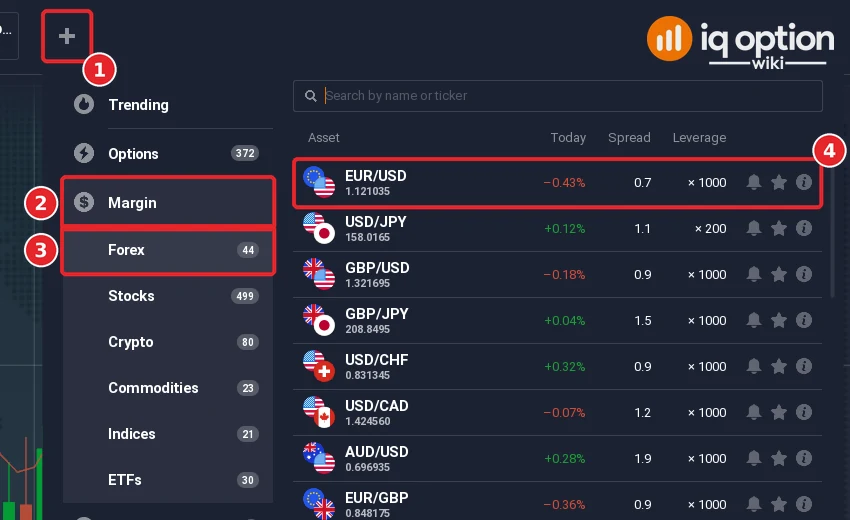
Click + in the top bar (1), choose Margin (2), then Forex (3) and the pair (4). The list we saw had 44 forex pairs. For help with other asset types, see how to choose an asset.
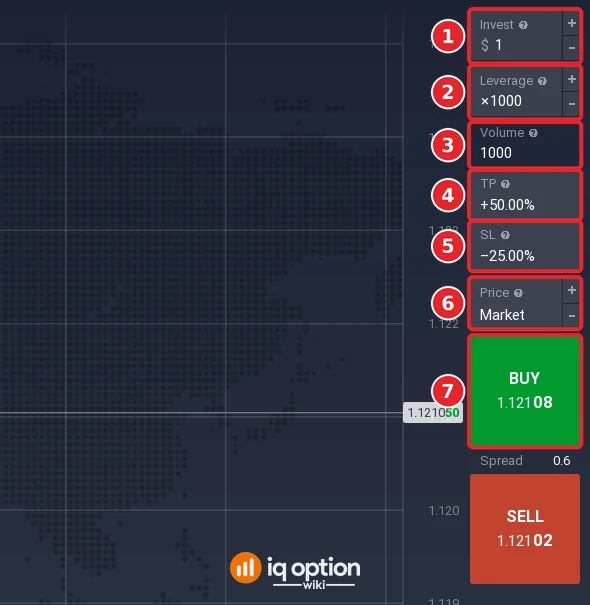
The order panel on the right has Invest (1), Leverage (2), Volume (3), TP (4), SL (5), Price (6) and the Buy button (7), with Sell below it. IQ Option’s help icons describe the first ones: Volume is “the total trade volume calculated as the investment multiplied by the leverage”, so $1 at x1000 gives a volume of 1000. TP and SL were already filled with +50.00% and -25.00% from an earlier try on the same account; yours will show your own values.
Step 2: Set the take profit
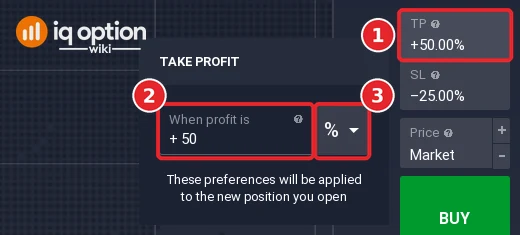
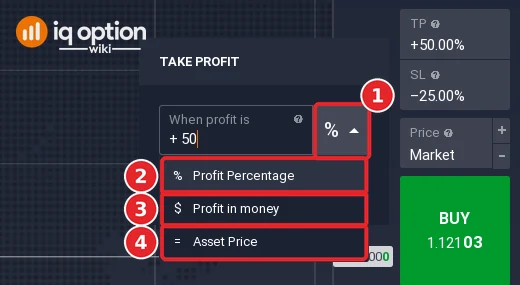
Click TP (1). A TAKE PROFIT window opens with “When profit is”, a plus sign, a value box (2) and a unit selector (3) that showed %. We typed 50 and pressed Enter. The window adds: “These preferences will be applied to the new position you open.”
Step 3: Choose the unit
Click the unit selector (1). It offers three units: Profit Percentage (2), Profit in money (3) and Asset Price (4). They match what IQ Option’s Help describes: a percentage, an amount of money or an asset price.
Step 4: Set the stop loss
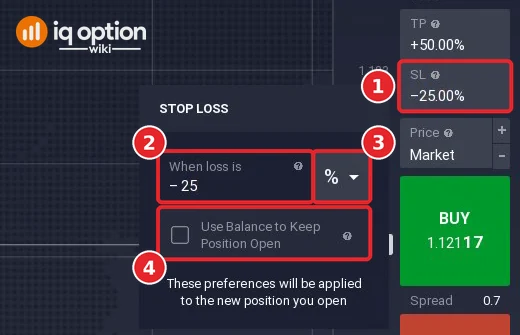
Click SL (1). The STOP LOSS window has “When loss is”, a minus sign, a value box (2), the same unit selector (3) and a checkbox, Use Balance to Keep Position Open (4). We kept 25% and left the box unticked. The box is explained in the section about a 95% loss below.
Step 5: Buy or sell, then read the open position
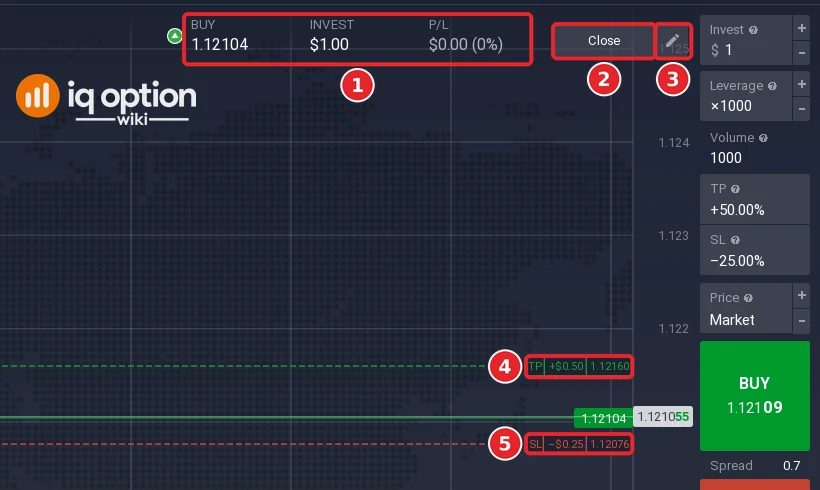
With TP +50.00% and SL -25.00% in the panel, click Buy (7 in the order-panel picture) if you expect the price to rise, or Sell if you expect it to fall. We clicked Buy. A bar appears at the top of the chart with the direction and entry price (1), here BUY 1.12104, the invested amount ($1.00) and the profit or loss. It has a Close button (2) and a pencil button (3). The chart marks the take profit (4) at 1.12160 as “+$0.50” and the stop loss (5) at 1.12076 as “-$0.25”.
Step 6: Change the limits of an open position
Click the pencil (1). A window opens with the same two fields, now in dollars: “When profit is +0.50” (2) and “When loss is -0.25” (3), the Use Balance checkbox (4), and Cancel and Apply (5). We changed the profit to 0.30 and clicked Apply.
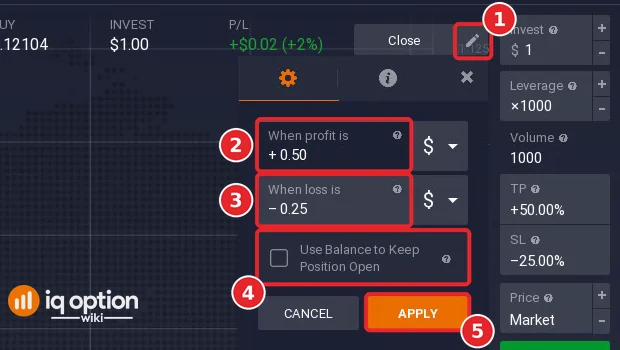
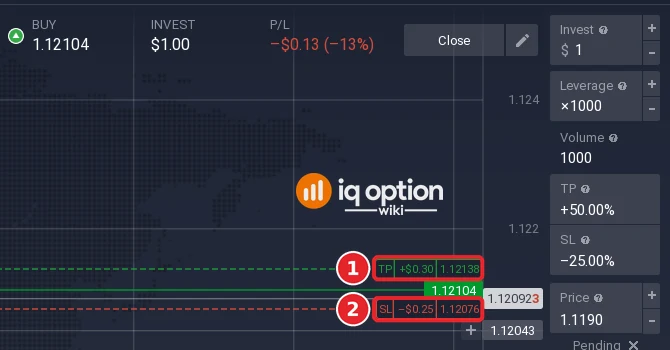
The chart then marked the take profit at “+$0.30” (1) at 1.12138, and the stop loss stayed at “-$0.25” (2). After that we tried a stop loss of 0.20 while the position was at -$0.09; the field showed a red message, “The maximum amount is -$0.26”, and the stop loss stayed at -$0.25. We did not find IQ Option’s explanation of that limit.
Step 7: Check the amounts in the positions list
Open the Total portfolio bar at the bottom. The “Isolated margin” tab lists the position with Invest $1.00, the open price, Take Profit +$0.30 (1) and Stop Loss -$0.25 (2). The tab bar also holds a “Pending Isolated Margin” tab, and a “Close All” button sits at the bottom right. A percentage is measured on the amount you invest: before the edit, +50% of $1 showed as +$0.50 and -25% as -$0.25, not a share of the volume of 1000.

Step 8: Close by hand if you want to
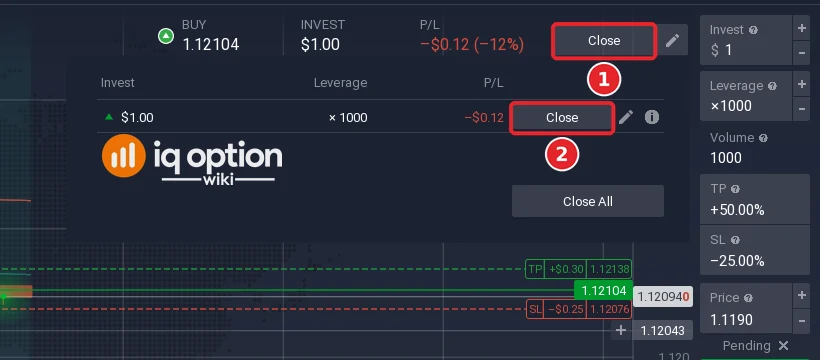
Click Close on the position bar (1). A small list shows the position with its own Close button (2) and a Close All button; click (2). A message at the bottom left said “EUR/USD -$0.15” and the Practice balance was $9,998.85, the $1 invested less $0.15.
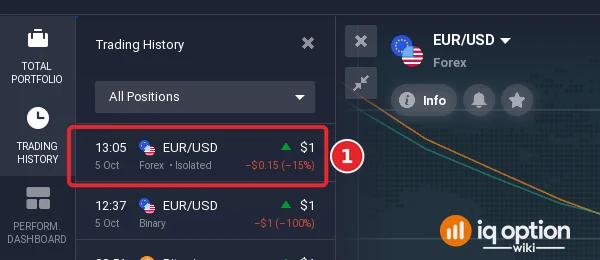
The closed position then appeared in Trading History (left sidebar) as EUR/USD, Forex, Isolated, $1, -$0.15 (-15%) (1).
Available modes of position auto closing
The selector in Step 3 offers three units. The table shows how they relate on our $1 position at x1000.
| Unit in the selector | What you enter | Example on $1 at x1000 |
|---|---|---|
| Profit Percentage (%) | A share of the invested amount | +50% showed as +$0.50, -25% as -$0.25 |
| Profit in money ($) | A profit or loss in your account currency | +0.50 and -0.25 in the edit window |
| Asset Price (=) | The price at which the position closes | The chart labels showed the levels: take profit 1.12160 and stop loss 1.12076 for an entry at 1.12104 |
IQ Option’s Help gives the profit formula for CFDs: for a long position, (closing price / opening price – 1) x multiplier x investment. With our numbers, (1.12160 / 1.12104 – 1) x 1000 x $1 is about $0.50, and (1.12076 / 1.12104 – 1) x 1000 x $1 is about -$0.25. That matches the two labels on the chart. At x1000 a price move of 0.05% is therefore enough to reach the take profit, which is why leverage magnifies losses as well as gains.
Pros and Cons
Pros:
- It closes a position at your limits without you watching the chart.
- The settings are in the order panel before you buy, and the pencil changes them afterwards.
Cons:
- It is not a guarantee: slippage can make the closing price differ from your level, and IQ Option closes positions itself if your equity falls below 50% of the maintenance margin (margin terms, clause 3).
- Leverage magnifies losses as well as gains.
- It does not exist for options: Blitz, Binary and Digital options close at expiry.
How to survive even at a 95% loss?
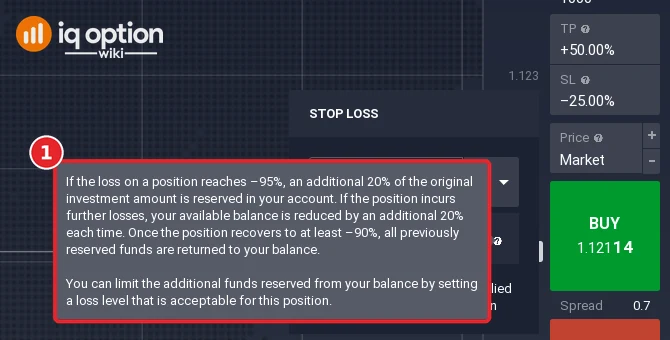
The help icon next to the Use Balance to Keep Position Open checkbox (Step 4) shows this text, which we copy as it appeared: “If the loss on a position reaches -95%, an additional 20% of the original investment amount is reserved in your account. If the position incurs further losses, your available balance is reduced by an additional 20% each time. Once the position recovers to at least -90%, all previously reserved funds are returned to your balance. You can limit the additional funds reserved from your balance by setting a loss level that is acceptable for this position.”
IQ Option’s margin terms add that, with isolated margin, each position gets a separate margin amount and its maximum loss is limited to that amount. The margin is allocated as the investment, “but can be extended” if a stop loss is set at a level that needs more margin than the investment, or if you use the “use balance to keep position open” option (clause 2). Separately, IQ Option closes open positions at the market price if the account equity falls below 50% of the maintenance margin requirement (clause 3).
So the option lets a position draw on the rest of your balance, which can keep it open and can also put more of your balance at risk. We did not tick the box and we did not test what happens at a large loss, so there is no result here beyond the text above.
Related guides
- Forex pending orders on IQ Option: open a position when the price reaches a level.
- How to open a position automatically.
- What is leverage and money management.
- Expiry times for options, which close without a stop loss.
Frequently Asked Questions
Q: Can I set auto close before I open a position on IQ Option?
A: Yes. Click TP and SL in the order panel before you press Buy or Sell. The window says the preferences “will be applied to the new position you open”.
Q: Can I change auto close after the position is open?
A: Yes. Click the pencil on the position bar, change the values and click Apply. We changed a take profit from +$0.50 to +$0.30 and the chart label moved to 1.12138.
Q: Can I set only a stop loss or only a take profit?
A: The value boxes show “Not Set” until you type a number, which suggests each one can stay empty. We did not open a position with only one of them, so check it on a Practice account.
Q: What units can I use?
A: Profit Percentage, Profit in money and Asset Price. The edit window of an open position showed dollars.
Q: Is a percentage measured on the amount I invest?
A: Yes. On 5 October 2026 a +50% take profit and a -25% stop loss on a $1 position at x1000 showed as +$0.50 and -$0.25.
Q: Does auto close work on Blitz, Binary and Digital options?
A: No. IQ Option’s blog says there is no stop loss for instruments with an expiration time: the deal closes at expiry. You can sell some options before expiry; see selling options before expiration.
Q: What happens if the price jumps past my stop loss?
A: IQ Option’s Help says slippage can occur with stop loss and take profit orders, most likely in periods of increased volatility, so the position can close at a different price than the one you set.