Last updated: 8 October 2026. MoreLess
Every screenshot below was recorded on 8 October 2026 on an IQ Option Practice account registered in Brazil, and no real-money trade was placed. The hours, leverage and costs come from IQ Option’s Trading Specifications page, which we read on 5 October 2026 and again on 8 October 2026; the schedule on that page changes every week. The Trading Conditions pages of the assets and the order panel were read on 8 October 2026. Nothing here forecasts a share price or promises a profit.
On IQ Option you trade shares and ETFs as CFDs: contracts on the price, not the shares themselves. Open + in the top bar, choose Margin, then Stocks or ETFs, pick an asset, set an amount and a leverage, optionally a take profit and a stop loss, and click Buy or Sell. A CFD has no expiry: it stays open until you close it or a take profit, a stop loss or, if the margin runs out, a liquidation ends it: IQ Option’s margin terms say that on the Isolated Margin mode “if a position reaches its margin threshold, only that specific position will be subject to liquidation”. On 8 October 2026 the Stocks group listed 499 stocks and the ETFs group 30 ETFs.
Quick answer
- Where they are: + in the top bar, then Margin, then Stocks (499 on 8 October 2026) or ETFs (30).
- What you trade: a CFD, a contract on the price: you own no shares. Buy gains when the price rises, Sell when it falls, and there is no expiry.
- The order: an amount, a leverage, an optional take profit and stop loss, then Buy or Sell.
- Costs: the spread, and a swap for positions held overnight; the Trading Conditions page of an asset says that a negative swap is debited from your account. The Trading Specifications page of 5 to 11 October 2026 showed a maximum leverage of 1:20 and a minimum margin of 5% for the stocks we read.
- Limit: leverage multiplies losses as much as gains, and single stocks can gap on earnings. No result is promised.
- You do not own anything. A CFD (contract for difference) is a contract between you and IQ Option about the difference between the price when you open the trade and the price when you close it. IQ Option’s blog puts it this way: “CFDs allow you to speculate on the price of stocks, indices, or commodities without owning the asset.” Trading individual stocks offers targeted exposure, it adds, “while equity CFDs allow flexible positioning without owning the asset”.
- You can sell as well as buy. Buy opens a position that gains when the price rises; Sell opens one that gains when it falls. In both cases the trade is a contract with IQ Option, so selling does not need shares you hold.
- Leverage. On the Trading Specifications page of 5 to 11 October 2026 the stocks we read showed a maximum leverage of 1:20 and a minimum margin requirement of 5%: you put up a part of the position’s value, and the gains and losses are those of the whole position. IQ Option’s blog calls leverage “a double-edged sword that amplifies losses just as much as gains”.
- An overnight charge. The page lists a long swap and a short swap for each stock. IQ Option’s blog says that in addition to the spread, CFDs sometimes have overnight financing charges.
Tax rules differ by country and change, and this guide gives no tax advice.
How do you trade stock CFDs on IQ Option?
These steps use the web traderoom on a Practice balance. The numbers in each screenshot match the numbers in the text.
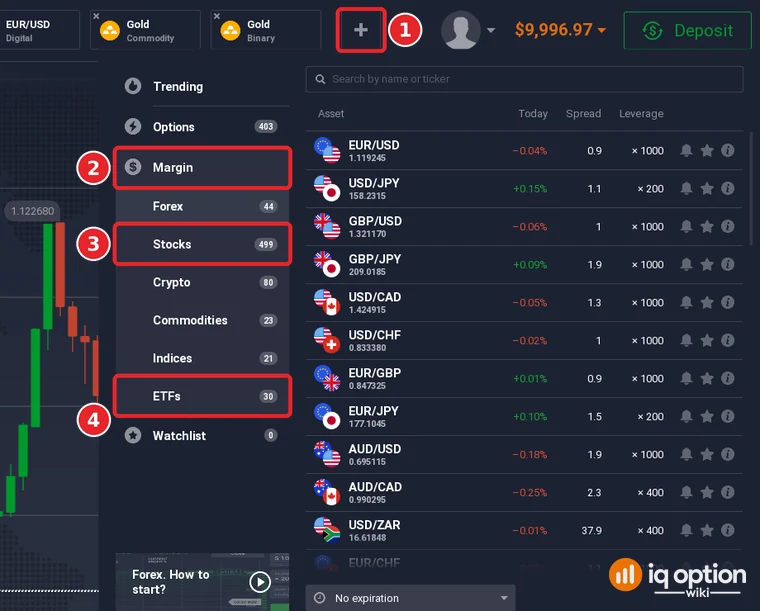
Click + in the top bar (1), open Margin (2) and choose Stocks (3); ETFs (4) is the last group of the Margin menu. On 8 October 2026 the Margin groups held Forex 44, Stocks 499, Crypto 80, Commodities 23, Indices 21 and ETFs 30. Type a name or a ticker in the Search by name or ticker box to find a company.
Step 2: Read the list
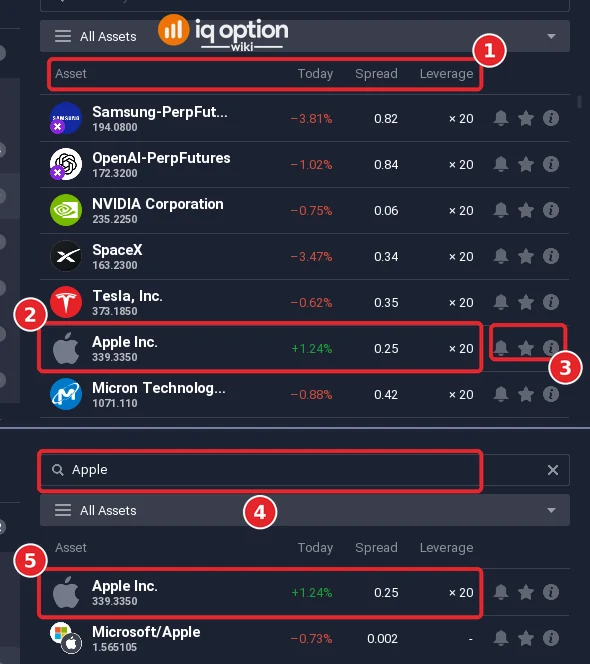
The list has the columns Asset, Today (a percentage), Spread and Leverage (1), and at the right of each row a bell, a star and an info button (3). On 8 October 2026 the first rows were Samsung-PerpFut…, OpenAI-PerpFutures, NVIDIA Corporation, SpaceX, Tesla, Inc. and Apple Inc. (2), which showed +1.24%, a spread of 0.25 and a leverage of ×20; every row we saw in this list showed ×20. Some names end in PerpFutures: the list does not explain them, and this guide covers ordinary stocks such as Apple. Type a name or a ticker in the search box (4): Apple gave two results, Apple Inc., the stock (5), and Microsoft/Apple, a pair with a spread of 0.002 and no leverage shown. The i button at the end of a row, or the Info button above the chart, opens the page of the asset; its side menu has Information, News, Earnings Calendar (for stocks) and Trading Conditions (see below).
Step 3: Set the amount and the leverage
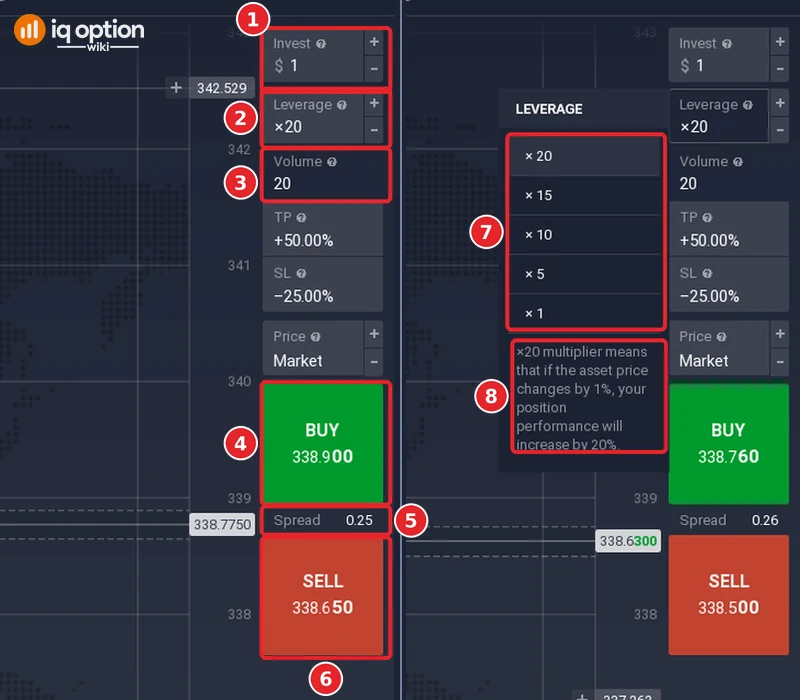
Click the row of the asset: its chart opens as a new tab at the top, and the order panel is at the right edge of the screen. It has Invest (1), $1 in our case, Leverage (2), ×20, and Volume (3), 20: with $1 at ×20 the volume was 20, the amount multiplied by the leverage. Under TP, SL and Price (Market) come the green Buy button (4) with its price, the Spread (5) and the red Sell button (6) with its price. At 13:22 (traderoom clock, UTC-3) Apple showed Buy 338.900, Sell 338.650 and a spread of 0.25. Click the Leverage field and a list opens (7) with ×20, ×15, ×10, ×5 and ×1, and a note (8): “×20 multiplier means that if the asset price changes by 1%, your position performance will increase by 20%.”
Step 4: Set a take profit and a stop loss
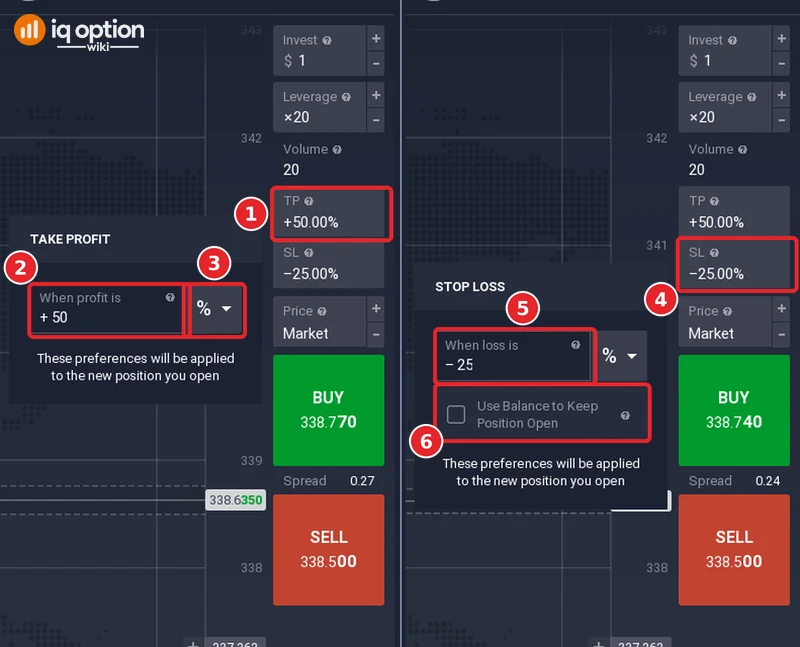
Click the TP field (1): a small window titled TAKE PROFIT opens with a value box labelled “When profit is” (2) and a unit list that starts on % (3); under them the note says “These preferences will be applied to the new position you open”. The SL field (4) opens the STOP LOSS window with “When loss is” (5), a unit list and a box, “Use Balance to Keep Position Open” (6), which was unticked. Our order panel showed +50.00% and -25.00% (values that may have been saved from earlier use, so we do not call them defaults); with $1 invested they became +$0.50 and -$0.25 in the positions list. On gold the unit list offered a percentage, an amount of money or an asset price (see our gold guide); here we saw it set to %.
Step 5: Click Buy or Sell, and close the position
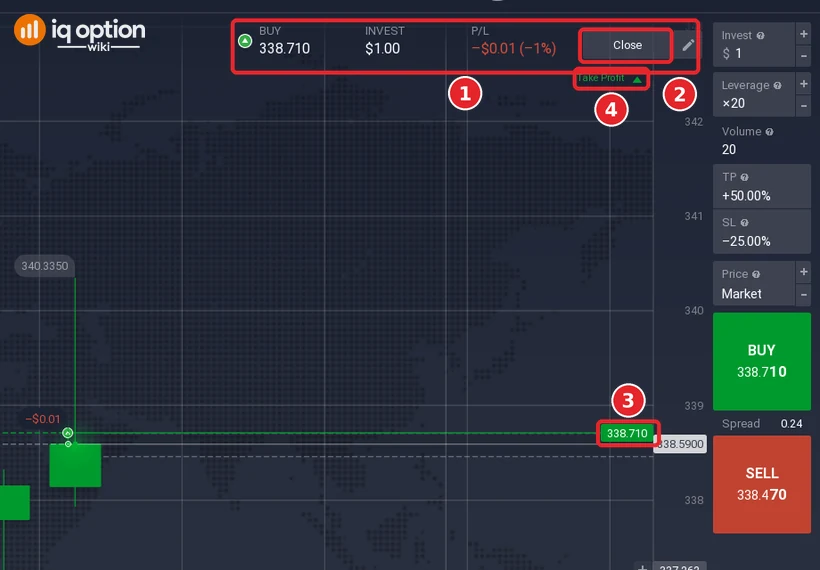
Click Buy (green) to open a position that gains when the price rises, or Sell (red) for one that gains when it falls. At 13:23:34 (traderoom clock) we clicked Buy on Apple with $1 at ×20. A bar appears at the top of the chart (1) with the direction and the price (BUY 338.710), the amount (INVEST $1.00) and the result (P/L -$0.01, -1%), and a Close button (2); the opening price is drawn as a line with its label (3), and a marker shows the Take Profit level (4); the Stop Loss marker is lower on the chart. The balance went from $9,998.87 to $9,997.87, a drop of $1, the amount invested. The P/L was already -$0.01 (-1%). Our reading is that this is the spread: a spread of 0.24 on a price of 338.7 is 0.07% of the position, which is 1.4% of the $1 invested at ×20 by our calculation, close to the -1% shown.
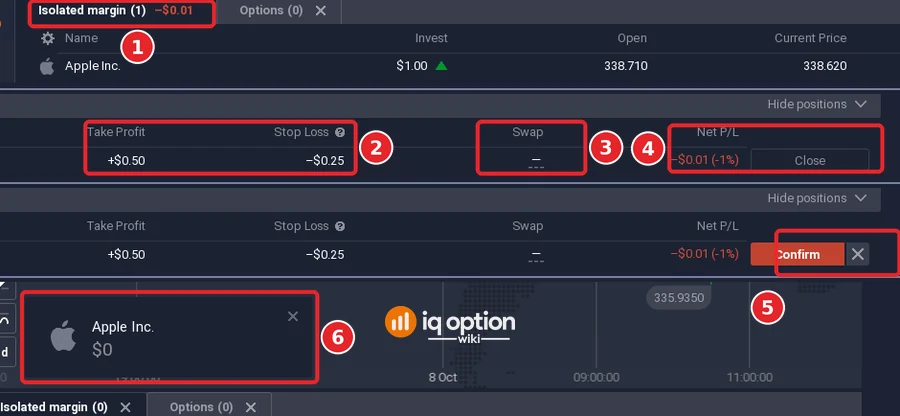
To close the position, open the positions list with Show positions at the bottom right of the chart. On the Isolated margin tab (1) the row of Apple Inc. showed Take Profit +$0.50 and Stop Loss -$0.25 (2), Swap (3, a dash; we did not hold the position overnight) and the Net P/L with a Close button (4). Click Close and the button turns into Confirm (5); click Confirm. A notification at the bottom left of the chart read Apple Inc. $0 (6), and the balance went back to $9,998.87.
What it costs: the Trading Specifications page
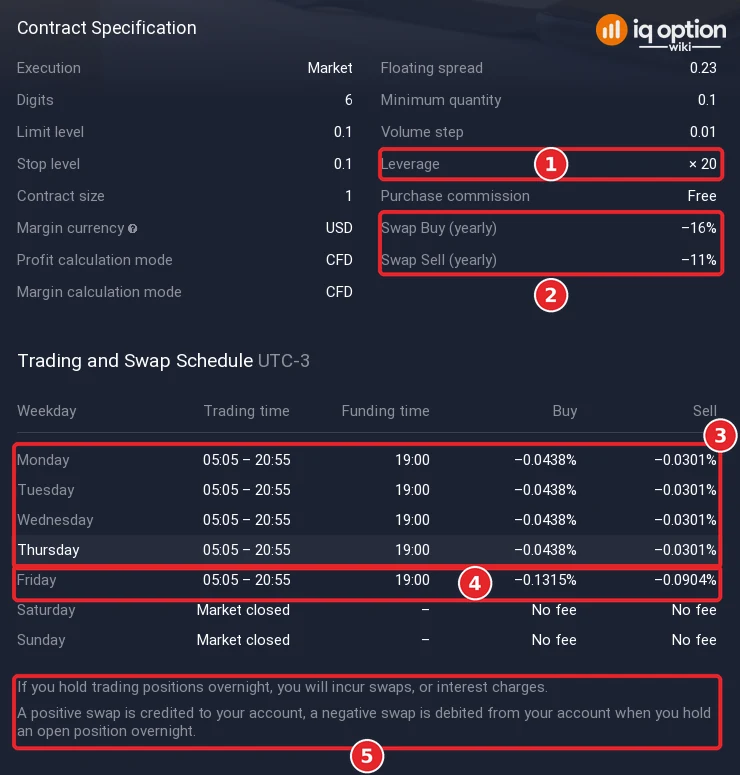
IQ Option’s Trading Specifications page lists, for each stock, its trading hours (in UTC+01), the minimum spread, the maximum leverage, the minimum margin requirement and the long and short swap. The schedule covers one week and is updated every Monday. The page we read on 5 October 2026 for 5 to 11 October 2026 showed the same leverage, margin and swap figures for every one of the first 20 stocks it listed, and on 8 October 2026 for the first 14 rows we read again (Amazon to JPMorgan): a maximum leverage of 1:20, a minimum margin requirement of 5%, a long swap of -0.0438% and a short swap of -0.0301%. The Trading Conditions page of the asset itself (the info button of the list, then Trading Conditions) says what the sign means: “A positive swap is credited to your account, a negative swap is debited from your account when you hold an open position overnight”, so the minus signs are charges. For Apple it showed a leverage of ×20 (1), Swap Buy (yearly) -16% and Swap Sell (yearly) -11% (2), and a schedule in UTC-3 with a trading time of 05:05 to 20:55 from Monday to Thursday, a funding time of 19:00 and daily swaps of -0.0438% for a long position and -0.0301% for a short one (3); on Friday (4) the swaps were about three times as large (-0.1315% and -0.0904%), and Saturday and Sunday carried no fee, the market being closed. The note under the table (5) is the sentence quoted above. The floating spread on that page read 0.23 at 13:25; in the order panel it read between 0.22 and 0.27 during the recording, so it moves from one moment to the next.
The hours and the spreads differed:
| Stock | Trading hours on the page (UTC+01) | Min spread read on 5 October 2026 | Min spread read on 8 October 2026 |
|---|---|---|---|
| Apple (AAPL) | Mon 09:05-00:00, Tue-Fri 00:00-00:55 and 09:05-00:00, Sat 00:00-00:55 | 0.018% | 0.012% |
| Microsoft (MSFT) | same as Apple | 0.015% | 0.017% |
| Coca-Cola (KO) | Mon-Fri 14:30-21:00 | 0.012% | 0.023% |
| Cisco (CSCO) | Mon-Fri 14:30-21:00 | 0.018% and 0.009% in two loads | 0.017% |
The spread is not fixed: the page showed Cisco at 0.018% in one load and at 0.009% in another on 5 October, and Apple at 0.018% on 5 October and 0.012% on 8 October. The page gives the minimum spread as a percentage; the order panel and the Trading Conditions page give the floating spread in price units. Read the spread you see in the order panel when you open the trade, and compare it with the move you expect. IQ Option’s blog says the open and the close of the market can be noisy, and it warns that single stocks can gap on earnings.
ETFs on IQ Option
An exchange-traded fund (ETF) holds a basket of securities, for example the shares of one sector, and trades on an exchange like a single share. IQ Option’s blog describes ETFs as a way to get “exposure to a basket of stocks, commodities, or entire market sectors” and says “Not all ETFs are created equal. Some are wild and chaotic (great for day trading). Others are slow and steady (better for long-term strategies).” On IQ Option you trade them the way you trade stocks, as CFDs, so you never own the fund’s shares.
Where to find them: click + in the top bar, choose Margin, then ETFs (1). On 8 October 2026 that group listed 30 ETFs; the S&P 500 ETF (2) showed a spread of 0.41 and a leverage of ×20 (3).
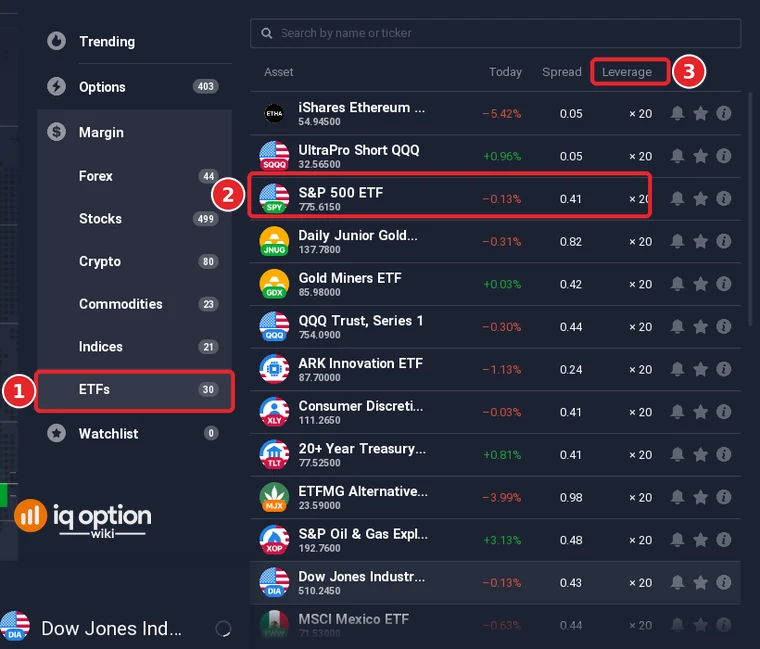
What it costs: the Trading Specifications page of 5 to 11 October 2026 showed, for the first 20 ETF rows we read (the page lists 20 and a Show More button for the other 10), a maximum leverage of 1:20, a minimum margin requirement of 5%, a long swap of -0.0214% and a short swap of -0.0033%, and trading hours of Monday to Friday 14:30 to 21:00 (UTC+01). The minimum spread differed by fund: SPY 0.003%, QQQ 0.005%, SQQQ 0.031% and XOP 0.057%. The Trading Conditions page of the S&P 500 ETF showed a leverage of ×20 (1), Swap Buy (yearly) -7.8% and Swap Sell (yearly) -1.2% (2), and a schedule of 10:30 to 17:00 in UTC-3, which is 14:30 to 21:00 in UTC+01, with daily swaps of -0.0214% and -0.0033%, about three times that on Friday (3).
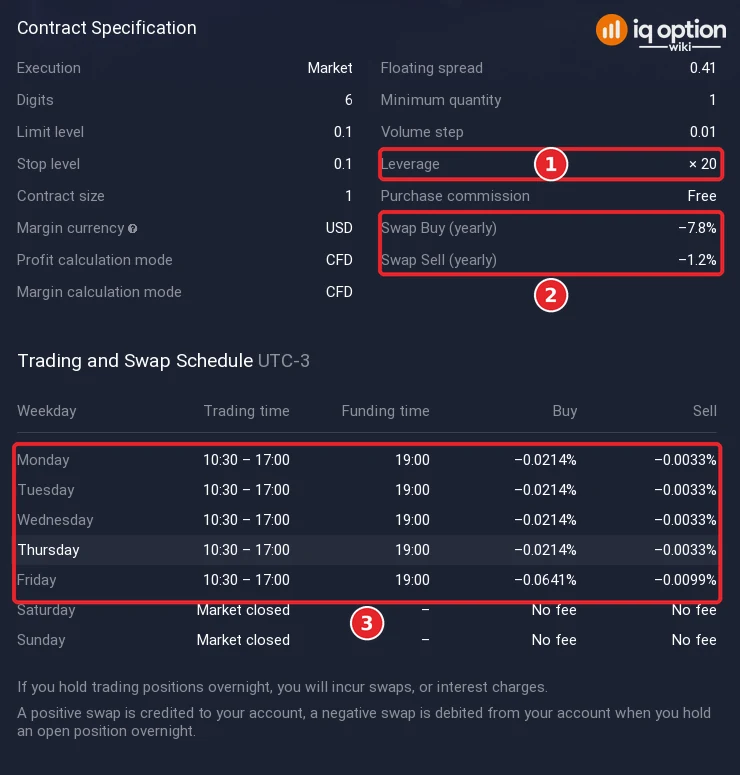
When it trades: the Trading Specifications page lists the hours of each ETF; check them before you plan a trade.
IQ Option’s blog names SQQQ, XOP and JNUG among the high-volatility ETFs for day trading on IQ Option and QQQ, SPY and URTH among the stable ones for long-term strategies. The first rows of the ETFs list on 8 October 2026 included SQQQ, SPY, JNUG, GDX, QQQ, XLY, TLT, MJX, XOP and DIA; we did not scroll to the end, so we did not check whether URTH is listed.
Can you trade options on stocks?
Yes: on 8 October 2026 the data the traderoom loads when it starts, which we read in a log, listed binary options on companies such as Apple Inc. and ASML Holding NV, next to their CFDs. An option on a share has an expiry and a fixed payout and no stop loss or take profit, so it is a different product from the CFD in this guide. See binary options and digital options.
Pros and cons of stock CFDs
| Pros | Cons |
|---|---|
| You can buy or sell without owning shares, and you can start from a small amount. | Leverage multiplies losses as much as gains: IQ Option’s blog calls it a double-edged sword. |
| Take profit and stop loss let you plan the exit in advance. | A stop loss can fill away from its level (IQ Option’s Help calls this slippage), and single stocks can gap on earnings. |
| The Practice balance lets you see the order panel with virtual money first. | The spread is paid at once, and the swap is charged for positions held overnight. |
Common mistakes
- Ignoring the market hours. The Trading Specifications page lists the trading hours of each stock; check them before you plan a trade.
- Reading the leverage as a promise. It makes a position larger, not safer.
- Holding for days without checking the swap. The overnight charge adds up.
- Trading an earnings day without a plan. Single stocks can gap.
- Forgetting that a CFD is a contract. You own no shares, only a contract with IQ Option on the price.
Related guides
- What is a CFD
- What is leverage
- How to calculate profit in a CFD
- Forex on IQ Option
- Binary options and digital options
- All indicator guides and all strategy guides
Frequently Asked Questions
Q: What is the main difference between trading shares and IQ Option CFDs?
A: With a CFD you do not own the shares: you hold a contract on the price difference between opening and closing.
Q: How many stocks and ETFs does IQ Option list?
A: On 8 October 2026 the Margin menu listed 499 stocks and 30 ETFs. The numbers change, so check the menu.
Q: What is the leverage on stock CFDs?
A: The Trading Specifications page of 5 to 11 October 2026 showed a maximum of 1:20 for the stocks we read, with a minimum margin requirement of 5%. The order panel shows the leverage you choose.
Q: Can I trade options on stocks?
A: Some companies appear in the Binary list of the Options menu. An option has an expiry and a fixed payout and no stop loss or take profit.
Q: How can I practise stock CFDs without risking money?
A: Use the Practice balance, which starts at $10,000 in virtual money. It teaches the order panel; it cannot show what real fills would have been.