Last updated: 8 October 2026. The screenshots below were recorded on 5 October 2026 from IQ Option’s public website (the Download App menu and iqoption.com/en/download), in a browser on an IQ Option Practice account registered in Brazil. We could not record IQ Option’s phone apps: our recording setup is a Linux computer, and the apps need a phone. So this guide shows where the apps are offered and what IQ Option’s own pages say about them, and it does not show or describe the app’s screens. Nothing was paid.
IQ Option offers apps for iPhone and iPad (App Store) and for Android (Google Play, or an .apk file from its own site). The download page lists iOS 15 or later and Android 8.1 or later, but IQ Option’s other pages and the store listings give different minimums and sizes, so check the figure next to the button you actually use. If your phone cannot run the app, IQ Option’s Help says you can still trade on its website.
Quick answer
- Where to get it: iqoption.com/en/download, the App Store or Google Play. The same page offers an Android .apk file (51.3 MB).
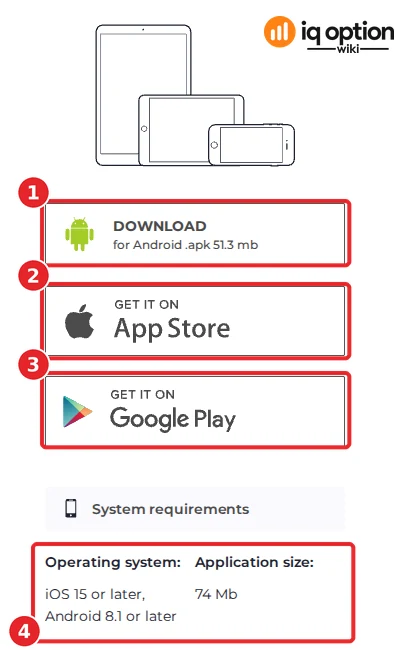
- Requirements on the download page: iOS 15 or later, Android 8.1 or later, application size 74 MB.
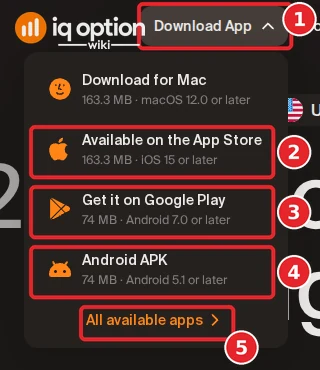
- The Download App menu says otherwise: App Store 163.3 MB (iOS 15+), Google Play 74 MB (Android 7.0+), APK 74 MB (Android 5.1+). Check the figure next to the button you use.
- Not shown here: the app’s own screens. We cannot record a phone app on our Linux recording setup, so this guide has no app screenshots and makes no claims about them.
- No app, or an old phone? IQ Option’s Help says that if the app is incompatible with your device, you can still trade on its site.
How to get the IQ Option app
The numbers in each screenshot match the numbers in the text. Download only from iqoption.com or from the official stores.
On IQ Option’s website, click Download App (1) in the top menu. The menu lists the App Store (2), Google Play (3) and an Android APK (4), each with a size and a minimum system version, and a link All available apps (5) to the download page. The menu also lists a macOS download (163.3 MB, macOS 12.0 or later).
Step 2: Open the download page for the requirements
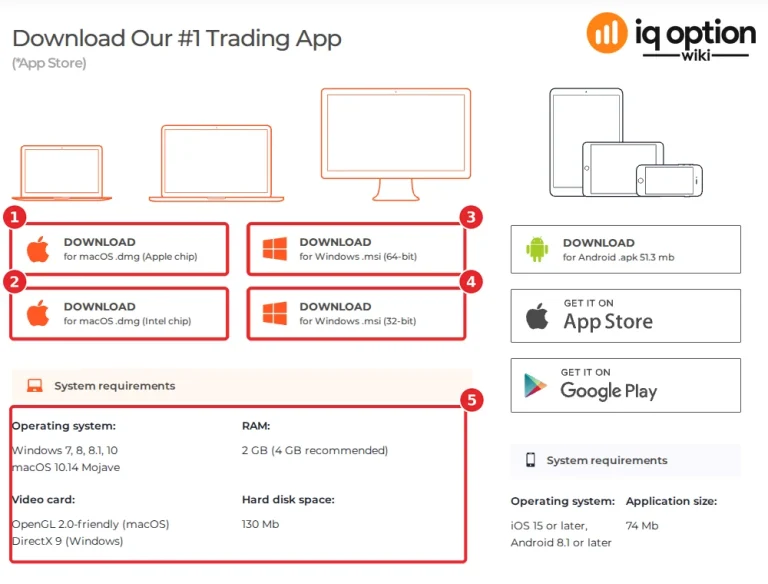
The page iqoption.com/en/download, “Download Our #1 Trading App”, has a column for phones and tablets. Its buttons are Download for Android .apk 51.3 mb (1), App Store (2) and Google Play (3). Under them, “System requirements” (4) lists the operating system, “iOS 15 or later, Android 8.1 or later”, and the application size, “74 Mb”. The page also has a footnote “(*App Store)” under its heading, which does not say what it refers to.
Step 3: Install and log in
Install the app from the store you chose, open it and log in with the email and password of your IQ Option account. We did not do this on a phone, so we have no screenshots of the app and cannot describe its screens. If you do not have an account yet, a Practice account is free; see how to register.
What the sources say, side by side
We found four places that give a size or a minimum version. They do not agree.
| Source (read 5 October 2026) | iPhone and iPad | Android |
|---|---|---|
| Download page, system requirements | iOS 15 or later; application size 74 Mb | Android 8.1 or later; .apk button reads 51.3 mb |
| Download App menu | App Store: 163.3 MB, iOS 15 or later | Google Play: 74 MB, Android 7.0 or later; Android APK: 74 MB, Android 5.1 or later |
| Store listings (UK storefront) | App Store: 179.1 MB, iOS 15.0 or later, “IQ Option – Trading Broker App” by IQOPTION EUROPE LTD | Google Play “IQ Option – Trading Platform” (com.iqoption): updated 1 October 2026, 100M+ downloads |
The sources agree on iOS 15 or later. For Android the minimum is 8.1 on the download page, 7.0 on the menu’s Google Play line and 5.1 on its APK line. Sizes differ as well, and an installed app can be larger than a download. The footer of the download page also shows “IQ Option, Full version, 59 MB”. Read the requirement next to the button you use, and check the store page for your own device.
Other things the download page says
- Android without Google Play: the page offers the .apk file. See our IQ Option APK guide before you use it.
- Computers: the page offers macOS (.dmg for Apple and Intel chips) and Windows (.msi, 64-bit and 32-bit) installers. Its requirements: Windows 7, 8, 8.1 or 10, or macOS 10.14 Mojave; 2 GB of RAM (4 GB recommended); OpenGL 2.0 on macOS or DirectX 9 on Windows; 130 Mb of disk space. The menu’s macOS line says macOS 12.0 or later, another mismatch. See installing the IQ Option app on Windows and Mac.
- Antivirus blocks the installer: the page says to update the antivirus and add the IQ Option installer to its exclusions list.
- Video driver error on Windows: update the video card drivers from the manufacturer’s site; if the error continues, the card may not support the OpenGL configuration the app needs.
- Why an app at all: IQ Option’s Help says that on computers the Windows and macOS app updates the chart faster than the website, because the browser does not use all the WebGL features of the graphics card. It also says it has apps for iOS and Android, and that if the current version of the app is incompatible with your device, you can still trade on the site.
What we removed from the earlier version
The earlier version of this guide described the phone app’s screens, said it has fewer assets, indicators and drawing tools than the desktop version, advised turning off a one-touch setting, listed digital option payouts and walked through a candle-colour and Martingale routine. We could not check any of that on a phone in October 2026, and the payout table and the profit claims had no source, so they are gone. For trading ideas, see trading candles on IQ Option, and remember that Martingale increases risk.
Related guides
- Installing the IQ Option app on Windows and Mac
- IQ Option APK
- The IQ Option interface (website version)
- Price alerts
Frequently Asked Questions
Q: Is there an IQ Option app for Android and iPhone?
A: Yes. IQ Option’s download page offers the App Store, Google Play and an Android .apk file.
Q: Which Android and iOS versions does the app need?
A: IQ Option’s pages differ. The download page lists iOS 15 or later and Android 8.1 or later. The Download App menu lists iOS 15 or later, Android 7.0 or later for Google Play and Android 5.1 or later for the APK. Check the requirement next to the button you use.
Q: How big is the app?
A: The download page says 74 Mb for the application and 51.3 mb for the .apk. The menu says 163.3 MB for the App Store and 74 MB for Google Play. The App Store listing we read showed 179.1 MB.
Q: Can I trade without installing an app?
A: Yes. IQ Option’s Help says that if the app is incompatible with your device, you can still trade on its website.
Q: Does the app have fewer assets than the website?
A: We could not check the phone app, so we cannot say. Compare the lists on your own device with a Practice account.
Q: Where should I download the app from?
A: From iqoption.com or from the App Store or Google Play. Be careful with .apk files from other sites.
Q: Can I try the app without risking money?
A: IQ Option offers a free Practice account, with virtual funds, that you can use on the website. We have not checked how it behaves in the phone app.