Last updated: 8 October 2026. MoreLess
The screenshots were recorded on 4 and 5 October 2026 on an IQ Option Practice account registered in Brazil, on the global platform. We placed no real-money trade and made no deposit. What a trader can choose, and which payouts, assets and products are offered, depends on the asset, the time and the country, so read the figures as what that account showed on those days.
To start on IQ Option you need an account and a first trade, and you can make the first trade without money: the account has a Practice balance of virtual dollars next to the Real balance. This guide follows one trade from the balance menu to the history: choose the Practice account, choose an asset in the Options menu, set the amount and the expiry, click Higher or Lower, and read the result. Each trade can lose its whole amount, so the Practice balance is where to learn the panel before you use your own money.
Quick answer
- Account: a Real account and a Practice account with virtual money. The Practice account showed $9,999.00 and a Top Up button on 5 October 2026.
- First trade: + , Options, Binary (or Blitz or Digital), an asset; Invest; an expiry; Higher or Lower; the result is credited at expiry.
- Before you buy: the panel shows the profit as a percentage and in dollars (+91% and +$0.91 for $1 on the recording).
- Risk: a lost binary option costs the whole amount, and a payout of 90% needs a win rate above 52.6% to break even.
- Support: a SUPPORT button and support@iqoption.com in the traderoom; the Contact page lists the email, with no phone number.
- Not covered: we made no deposit and no real-money trade.
Quickstart
These steps use the web traderoom. The numbers in each screenshot match the numbers in the text. If you do not have an account yet, see how to register.
Step 1: Check which account is active
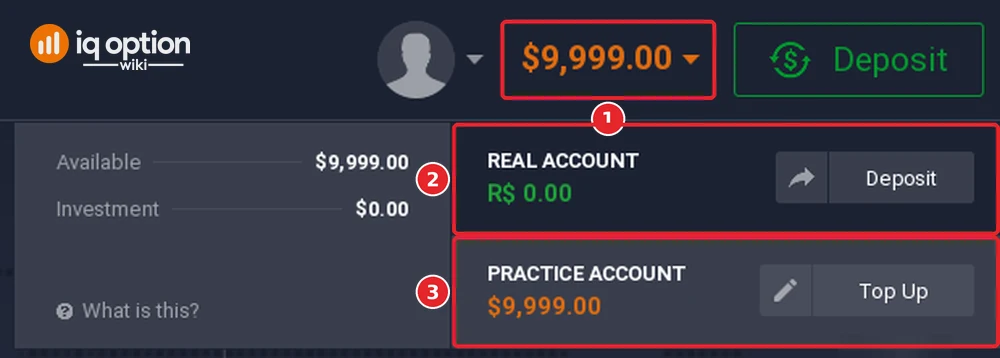
The amount in the top bar (1) is the balance of the account in use; click it to open the balance menu. It lists the Real account (2), which showed R$ 0.00 on the Brazil account and has a Deposit button, and the Practice account (3), which showed $9,999.00 and has a Top Up button. Choose the Practice account for your first trades. IQ Option’s balance menu also shows the available amount and the amount invested in open trades.
Step 2: Choose an asset
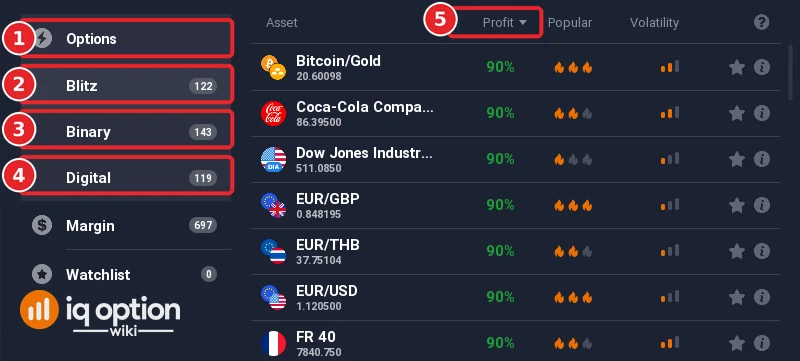
Click + in the top bar and open Options (1). It lists Blitz (2), Binary (3) and Digital (4). The list shows each asset’s payout in the Profit column (5), which is sorted from the highest payout down. On 5 October 2026 at 13:24 on the platform clock (UTC−3) the counts were Blitz 122, Binary 143 and Digital 119, and every row of the Blitz list showed 90%. The three types differ in their expiries and in how the payout is set; see what is options trading and binary options and digital options compared.
A simple trading interface on the IQ Option platform
Step 3: Set the amount and the expiry, then choose a direction
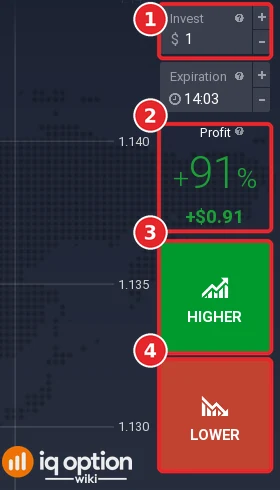
For a binary option, enter the amount in the Invest box (1). The panel shows the profit you earn if you win, as a percentage and in dollars, before you trade (2): +91% and +$0.91 for $1 on the recording. A timer shows how long you have to buy. Click Higher (3) if you expect the price to be above the entry price when the option expires, or Lower (4) if you expect it to be below. The expiry is a clock time chosen from the Expiration list, and the trade closes at the red line on the chart.
Step 4: Follow the trade and read the result
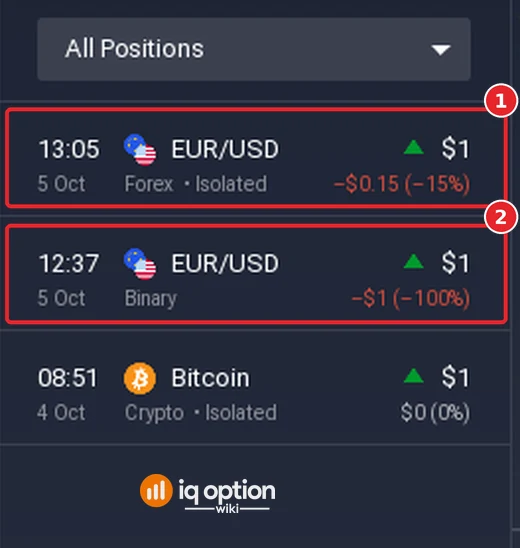
Open trades appear in the Total portfolio bar at the bottom of the screen, and closed trades are listed in Trading History in the left sidebar. When the option expires the result is credited to your balance automatically; some options can also be sold before expiration, according to IQ Option’s blog (see selling options before expiration). In the history below, the row marked (2) is a binary option of $1 that lost its stake (−$1, −100%); the row above it (1) is a margin position of $1, which closed at −$0.15 (−15%). A lost binary option costs the whole amount; a win pays the percentage that was shown.
What to check before you use real money
| Topic | What we saw | Where to read more |
|---|---|---|
| Accounts | A Real account and a Practice account, each with its own balance; the Practice account had a Top Up button. | How to open an account |
| Products | Options (Blitz, Binary, Digital) with an expiry, and Margin (CFD) assets with no expiry, 697 in the Margin menu. | What is a CFD |
| Costs | Options show their payout before you buy; margin trades pay a spread, and overnight funding may be charged. | Fees and commissions |
| Payments | The Real account has a Deposit button; the minimum depends on the method and the country. | Minimum deposit and withdrawals |
| Support | A SUPPORT button and the address support@iqoption.com with the words “every day, around the clock” in the footer of the traderoom; IQ Option’s Contact page lists the email address, and we found no phone number there. | IQ Option support |
| Availability | IQ Option says it provides its services only in the territories in which it is licensed. | Is IQ Option legit |
Pros and Cons
| Pros | Cons |
|---|---|
| A Practice balance of virtual money, so the first trades risk nothing. | Each trade can lose its whole amount, and options have no stop loss. |
| The payout of a binary option is shown before you buy. | A payout under 100% means a trader has to win more than 1 ÷ (1 + payout) of the trades: more than 52.6% at 90%. |
| Options and margin assets on one platform. | What is offered depends on the country: check the menu on your own account. |
Related guides
- Overview of the IQ Option platform and the IQ Option interface
- Choosing a trading asset and expiry times
- Get started trading in 2026 and how to start with IQ Option
- All indicator guides and all strategy guides
Frequently Asked Questions
Q: What types of assets can I trade on IQ Option?
A: The Options menu lists Blitz, Binary and Digital assets, and the Margin menu lists Forex, Stocks, Crypto, Commodities, Indices and ETFs. On 5 October 2026 the Margin menu listed 697 assets and the Options menu 384.
Q: Can I practise without risking real money?
A: Yes. The Practice account holds virtual dollars, and its row in the balance menu has a Top Up button.
Q: Is IQ Option suitable for beginners?
A: The panel shows the payout before you trade and the Practice account lets you learn it, but every trade can lose its amount. Read how the payout and the break-even rate work before you use real money.
Q: How can I deposit and withdraw funds?
A: The Real account has a Deposit button, and the methods and minimums depend on your country. See the deposit guide for your country and the withdrawal guide linked above; processing times depend on the method.
Q: Is IQ Option available in my country?
A: IQ Option says it provides its services only in the territories in which it is licensed. Check the registration page and the asset menu on your own account.