Last updated: 8 October 2026. MoreLess
The screenshots were recorded on 5 October 2026 on an IQ Option Practice account registered in Brazil. The asset counts for Sunday 4 October 2026 come from our recording of that day. Nothing was paid; profits, spreads and leverage change, so read the numbers as one snapshot.
To choose an asset on IQ Option, click + in the top bar and pick a list. Options (Blitz, Binary, Digital) show a profit percentage for a winning trade; Margin assets (Forex, Stocks, Crypto, Commodities, Indices, ETFs) show a spread and a leverage instead and have no fixed profit. You can search by name or ticker and star the assets you follow in a Watchlist. The platform lists hundreds of assets, so the menu does the sorting for you; the choice of which to trade stays with you.
Quick answer
- Where: click + in the top bar. The menu has Trending, Options, Margin and Watchlist and a search box (“Search by name or ticker”).
- Options: Blitz, Binary and Digital lists with the columns Asset, Profit, Popular and Volatility. We saw 88% to 91% at the top of the lists.
- Margin: Forex, Stocks, Crypto, Commodities, Indices and ETFs with the columns Today, Spread and Leverage and a “No expiration” selector.
- Counts change: 520 option assets on Sunday 4 October and 384 on Monday 5 October 2026; 697 margin assets on both days.
- Profit is not fixed: IQ Option may change the profit percentage at any time, so read it when you trade.
How to choose an asset on IQ Option
The numbers in each screenshot match the numbers in the text.
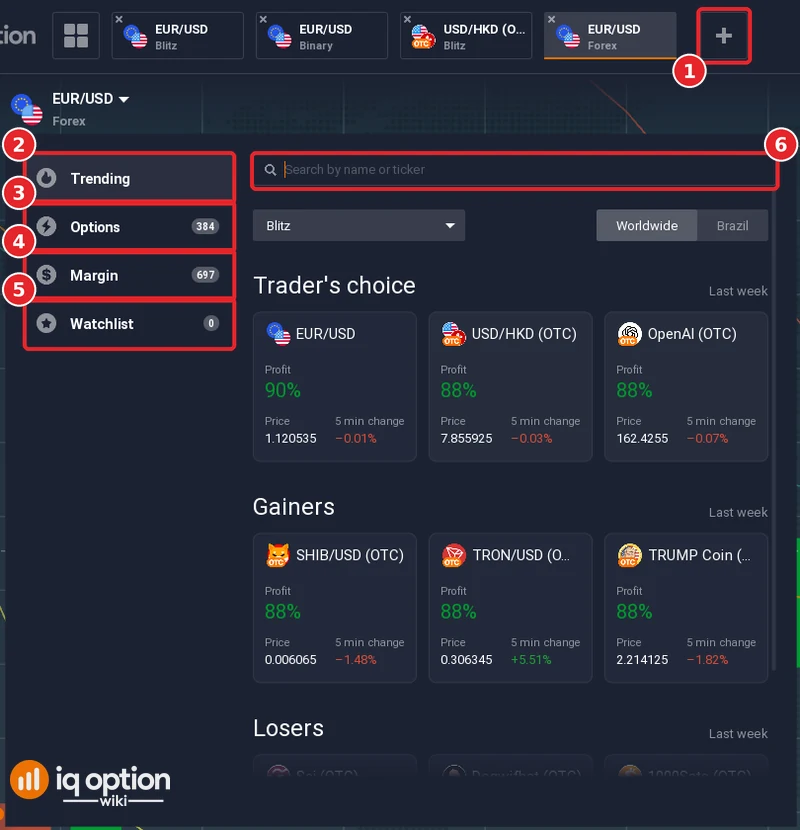
Click the + button at the right end of the tab bar at the top (1). The menu has four entries on the left: Trending (2), Options (3), Margin (4) and Watchlist (5), each with a count, and a search box (6) with the hint “Search by name or ticker”. Trending opens first. It has a drop-down for the option type (Blitz in ours), a Worldwide / Brazil switch, and three sections for the last week: “Trader’s choice”, “Gainers” and “Losers”. On 5 October “Trader’s choice” showed EUR/USD at 90% and USD/HKD (OTC) and OpenAI (OTC) at 88%, and “Gainers” showed three OTC crypto assets at 88%.
Step 2: Read the Options list
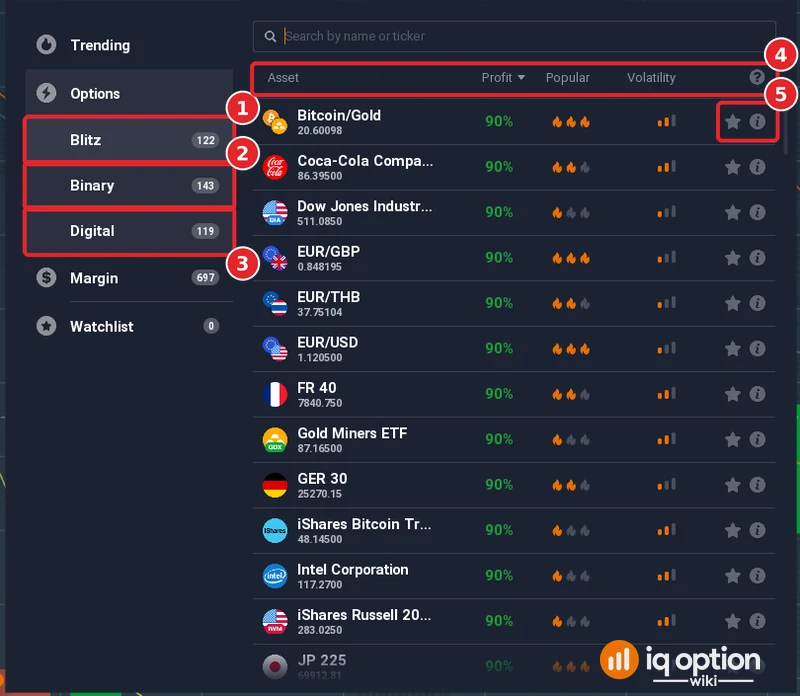
Click Options. It splits into Blitz (1), Binary (2) and Digital (3). On 5 October the counts were 122, 143 and 119. The columns (4) are Asset, Profit, Popular and Volatility; Profit was the column the list was sorted by, and the top rows of our list showed 90%. Each row has a star and an information button (5). The profit is what a winning trade returns on the amount invested; a losing trade loses the amount. IQ Option may change the percentage at any time, so read it again when you trade, and note that it can differ between option types for the same asset.
Step 3: Read the Margin list
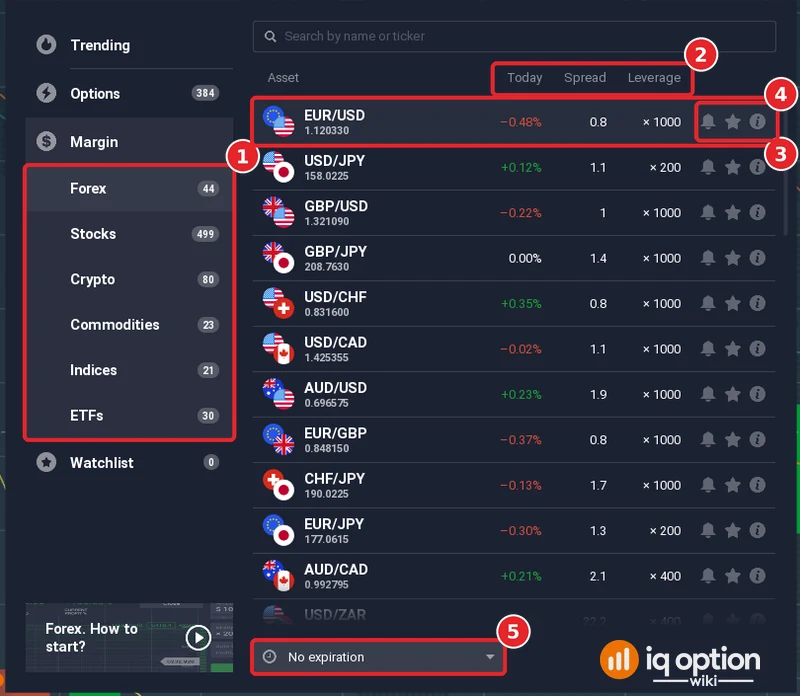
Click Margin for assets traded without an expiry. Its categories (1) were Forex 44, Stocks 499, Crypto 80, Commodities 23, Indices 21 and ETFs 30. The columns (2) are Today (the day’s change), Spread and Leverage. In the Forex list the leverage differed by pair: EUR/USD (3) showed ×1000 and a spread of 0.8, USD/JPY ×200 and EUR/JPY ×200, AUD/CAD ×400. Each row also has a bell for price alerts, a star and an information button (4). At the bottom is a “No expiration” selector (5), and a short video, “Forex. How to start?”. Leverage magnifies losses as well as gains.
Step 4: Search for an asset
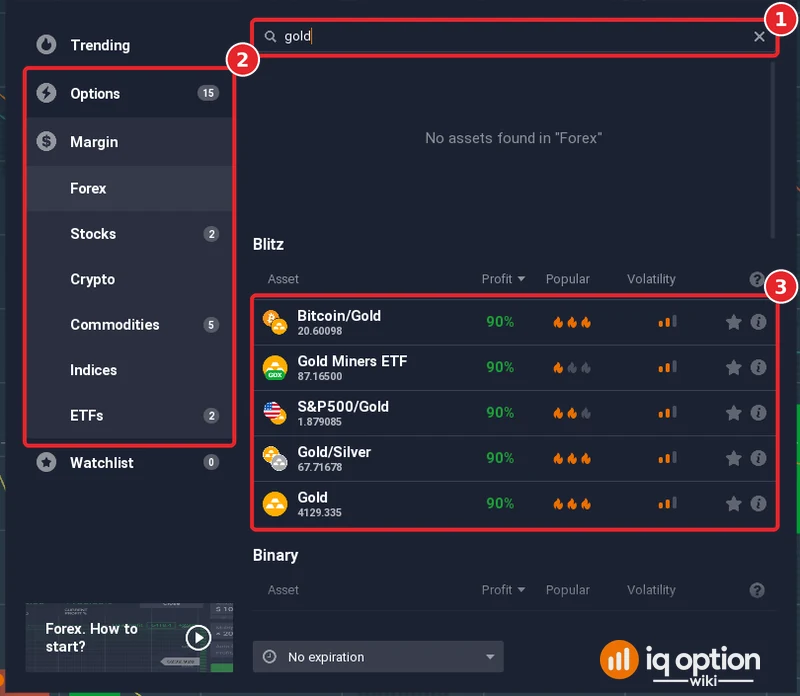
Type a name or ticker in the search box (1). We typed “gold”. The counts on the left (2) changed to the matches in each list: Options 15, Stocks 2, Commodities 5 and ETFs 2, with “No assets found in Forex”. The results (3) listed the matching Blitz assets, among them Bitcoin/Gold, Gold Miners ETF, S&P500/Gold, Gold/Silver and Gold, each at 90% that day, then the Binary list below. The Commodities results were Gold, Gold/GBP, Gold/EUR, Gold/THB and Gold/Silver, with leverage from ×30 to ×800.
Step 5: Add an asset to the Watchlist
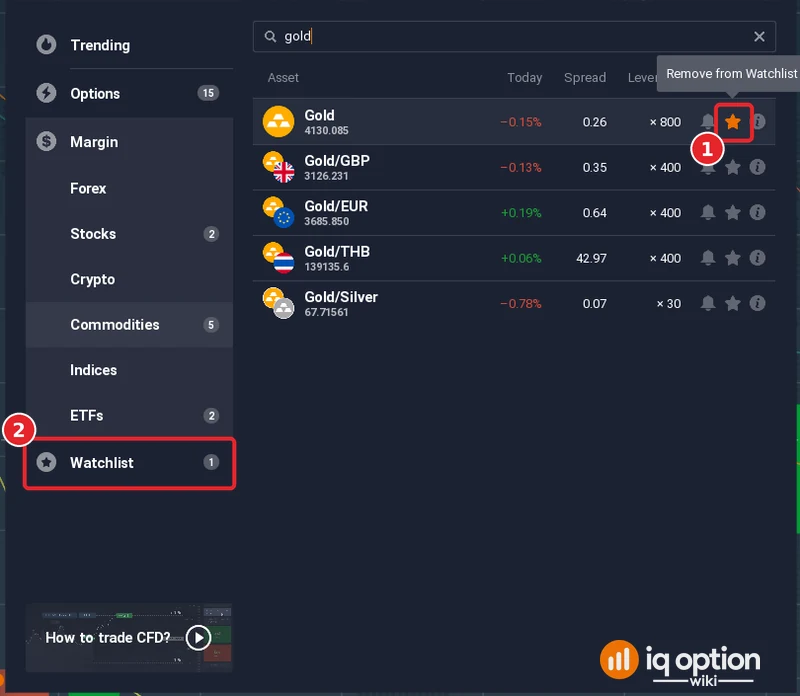
Click the star on a row (1). The tooltip then reads “Remove from Watchlist” and the Watchlist count (2) went from 0 to 1.
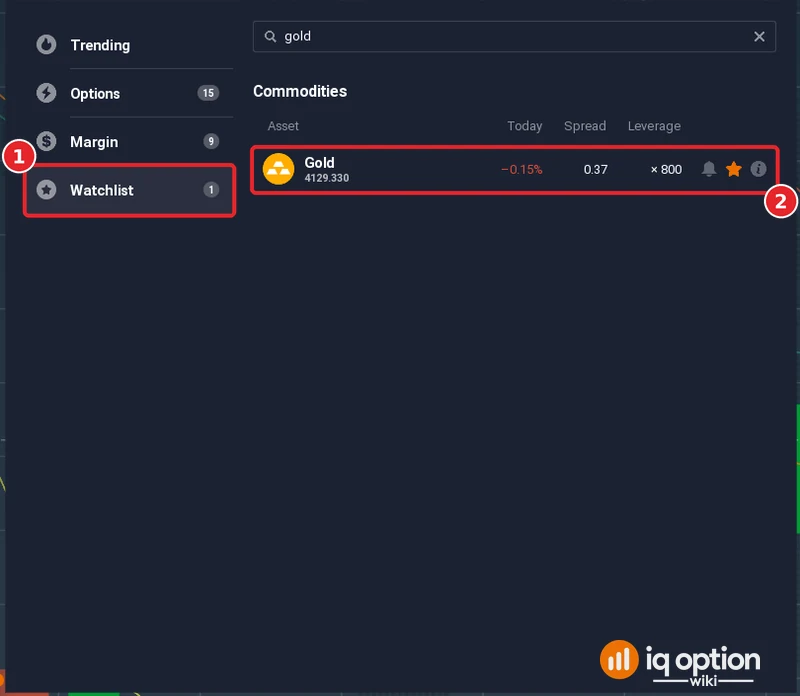
Open Watchlist (1) to see your starred assets together. Ours held Gold (2), with its change, spread and leverage of ×800.
How many assets are there?
The counts changed between the two days we looked, so treat them as snapshots of one account:
| List | Sunday 4 October 2026 | Monday 5 October 2026 |
|---|---|---|
| Blitz options | 169 | 122 |
| Binary options | 178 | 143 |
| Digital options | 173 | 119 |
| Options, total | 520 | 384 |
| Margin, total | 697 | 697 |
The Margin categories were the same on both days: Forex 44, Stocks 499, Crypto 80, Commodities 23, Indices 21 and ETFs 30. A Practice account registered in Mexico showed fewer option assets on 4 October (Blitz 129, Binary 135, Digital 132), so your own list may differ. Many forex pairs were closed on the Sunday and showed an “Opens in” countdown; see when each market is open.
How do you find assets with a profit above 80%?
Open Options and a type, and read the Profit column. Everything at the top of the lists we saw was 88% to 91%, but we did not check every asset, and the figure changes with the asset, the option type and the time. IQ Option’s Help says it may change the profitability percentage at any time. For margin assets there is no profit percentage: compare the spread and leverage columns instead.
Things to consider when choosing an asset
- Profit is only one number. A higher percentage does not make a trade more likely to win; it only changes what a win returns.
- Know the instrument. Options have an expiry and a fixed profit; margin assets have leverage, a spread and no expiry. See our expiration guide and time frames guide.
- Check that the market is open. Stocks and forex follow market hours, and OTC assets replace them when markets close.
- Follow fewer assets. Nobody can watch every chart. A short Watchlist is easier to learn from than the whole menu; this is a general tip, not an IQ Option rule. The chart grids guide shows how to watch several at once.
- Practise first. The Practice account has the same asset menu.
Frequently Asked Questions
Q: How do I open the asset list on IQ Option?
A: Click the + button at the right end of the tab bar at the top of the traderoom.
Q: How many assets does IQ Option have?
A: On our Brazil-registered Practice account the menu showed 520 option assets on Sunday 4 October 2026 and 384 on Monday 5 October, and 697 margin assets on both days. The counts differ between accounts and change over time.
Q: What do Popular and Volatility mean in the Options list?
A: They are columns in the list: Popular shows up to three flame icons and Volatility a small bar icon. We did not open IQ Option’s explanation, so we do not define them further.
Q: Is the profit percentage fixed?
A: No. IQ Option’s Help says it may change the profitability percentage at any time. Read it next to the asset when you trade.
Q: Do margin assets have a profit percentage?
A: No. They show Today, Spread and Leverage, and the result depends on the price movement and your position.
Q: How do I find a specific asset?
A: Type its name or ticker in the search box of the asset menu. The counts in the left column show how many matches each list has.
Q: What does the star do?
A: It adds the asset to your Watchlist, which has its own entry in the menu with a count. Click the star again to remove it.