Last updated: 8 October 2026. MoreLess
Every screenshot below was recorded on 8 October 2026, between 13:15 and 13:31 on the traderoom clock, on an IQ Option Practice account registered in Brazil, and we traded no news item. This guide has no tested box: we did not trade any news item. Nothing here is a promise of profit.
Trading the news means opening a position because of a release or a headline rather than because of a chart pattern. IQ Option has three places for news in the traderoom, the News feed, the Economic calendar and the Earnings calendar, all inside Market analysis. This guide shows the News feed and the Economic calendar on the day we recorded, and it gives no tested rule for trading the news.
Quick answer
- Kinds of news: economic releases, company financial results, political events and unforeseen events.
- Where: Market analysis in the left panel: News (feed of articles), Economic calendar (dollar sign) and Earnings calendar.
- An article: opens beside the feed with the assets it affects (each with a price and a percentage; the page does not say over what period) and the text; tags such as SELL are not explained by the platform.
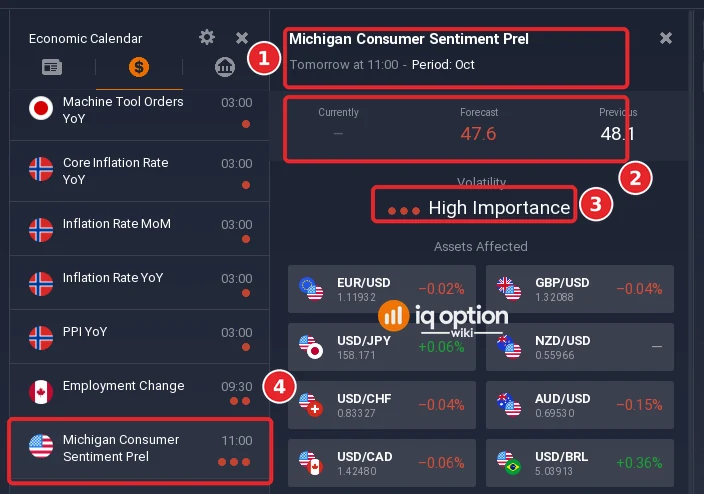
- A release still to come: shows Currently as a dash, a forecast, a previous value and its importance in words (Michigan Consumer Sentiment Prel, 11:00 the next day, Forecast 47.6, Previous 48.1, High Importance).
- Risk: IQ Option’s Help warns of slippage in volatile periods. We did not trade any release and give no tested rule.
What kinds of news move a market?
Economic releases are reports and statistics: gross domestic product, unemployment, inflation, interest rates, retail sales, industrial production and the trade balance. Financial news is the quarterly and annual reports of listed companies, where revenue, net income and earnings per share are compared with the forecast. Political news covers elections, revolutions, impeachments, the death of leaders and anything that makes a country less stable. Unforeseen events are attacks and natural disasters.
Where is the news in the IQ Option traderoom?
Step 1: The News feed
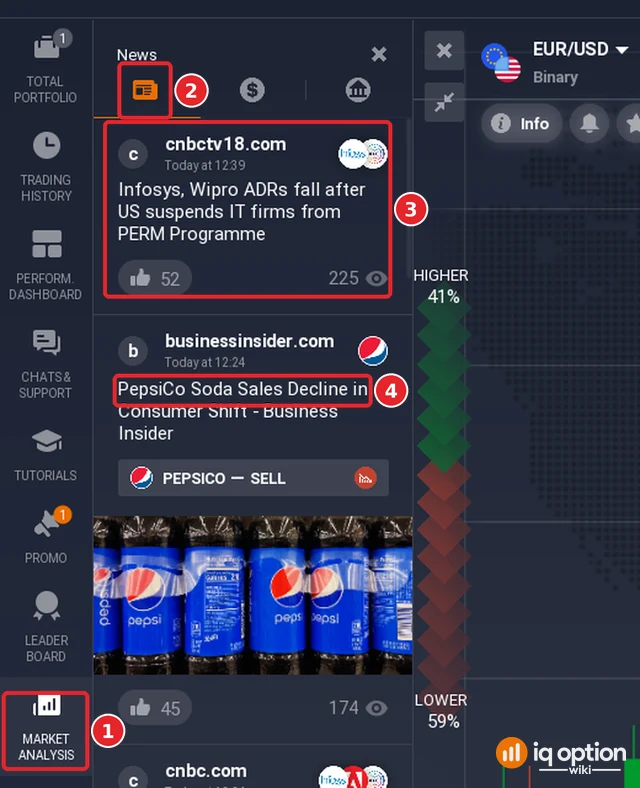
Click Market analysis (1) in the left panel. The panel opens on the News tab (2), a feed of articles. Each card (3) shows the source, the time, the headline, usually a picture, a count of likes and a count of views. Some cards carry a tag with the name of an asset and a direction, such as PEPSICO and SELL (4); the platform does not say what the tag is based on, and we do not treat it as a signal.
Step 2: Open an article
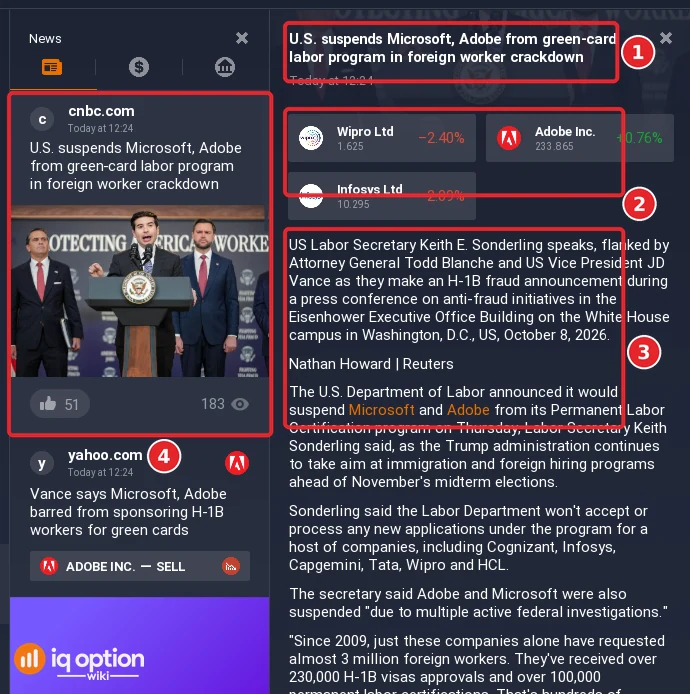
Click a card. The article opens beside the feed: its headline (1), under it the assets it affects (2) with their prices and a percentage (the page does not say over what period), and then the text (3), here a Reuters report with a link to the full article at the bottom. The card of the same article stays in the feed (4). The article we opened, marked Today at 12:24, reported that the US Labor Department had announced that it would suspend Microsoft and Adobe from its Permanent Labor Certification program, and the assets listed were Wipro (-2.40%), Adobe (+0.76%) and Infosys (-2.09%). The percentages are not dated, so they do not show what the news did.
Step 3: The calendar for scheduled releases
The dollar-sign tab is the Economic calendar, which lists today’s and the coming releases; those already released are greyed. An event that has not been released shows a dash under Currently, a forecast and a previous value, and its importance in words: the Michigan Consumer Sentiment Prel of the next day at 11:00 (1) had a forecast of 47.6 against a previous 48.1 (2) and was rated High Importance, three dots (3); its row in the list (4) carries the same three dots. Our guides on reading the economic calendar and on the market analysis filter show the list in detail, and the stock CFD guide shows where a company’s earnings appear.
How would you trade the news?
We did not trade any release, so there is no result here. IQ Option’s blog on timeframes lists a news trader’s chart stack as a one-hour chart for context, a 15-minute chart “after reaction” and a 5-minute chart for the trigger, and says that a trader of this kind needs “context before and after the release”. It gives that as a starting stack, not as a strategy that works. The binary order panel we recorded has only an amount and an expiry, no stop loss or take profit: you choose the direction and the expiry, and the position closes at expiry unless you sell it early; see expiry times on IQ Option. A CFD has a stop loss, but a stop loss can fill away from its price when the market jumps: IQ Option’s Help warns that slippage can occur, “the difference between the expected order price and the price at which the order is actually executed”, most likely “during periods of increased volatility”.
Pros and cons of trading the news
| Pros | Cons |
|---|---|
| Releases are scheduled: the calendar tells you the hour, the forecast and the rating in advance. | A release can move the price either way, and by more than the forecast suggests. |
| The News feed and the calendar are in the traderoom, next to the chart. | Prices can jump, so a stop loss can fill away from its level; the Help names slippage in volatile moments. |
| It gives a reason to look at the chart at a known time. | The feed is the platform’s own selection of headlines; tags such as SELL are not explained, and the percentages are not dated. |
| The News feed gives headlines together with the assets they may affect. | We have no test of any news rule, so none is recommended here. |
Common mistakes
- Treating a headline tag or a percentage as a signal. The platform does not explain them.
- Opening a trade in the minute of the release. The price can jump past a stop loss and a binary option cannot be stopped.
- Forgetting the time zone. Times in the calendar follow the traderoom clock, UTC minus three hours on our account.
- Using the forecast as the result. The result is Currently, which shows a dash until the release.
Related guides
- How to read the economic calendar on IQ Option
- The market analysis filter on IQ Option
- Trading stocks with CFDs on IQ Option
- Selling an option before expiration
- All strategy guides
Frequently Asked Questions
Q: Where is the news on IQ Option?
A: In Market analysis, in the left panel. The first tab is the News feed, the second the Economic calendar and the third the Earnings calendar.
Q: What kinds of news does this guide describe?
A: Economic releases, financial results of companies, political events and unforeseen events such as attacks and natural disasters.
Q: Is it safe to trade a news release?
A: No rule is safe, and we did not test one. The Help warns of slippage in volatile moments.
Q: What does the SELL tag on a headline mean?
A: The platform does not explain it. We saw tags such as ADOBE INC. – SELL under some headlines and do not use them as signals.
Q: Does the News feed show company results?
A: Company results are in the Earnings calendar, the third tab of Market analysis; see our guide on reading the calendars.