Last updated: 8 October 2026. MoreLess
Every screenshot below was recorded on 8 October 2026, between 13:15 and 13:30 on the traderoom clock, on an IQ Option Practice account registered in Brazil, and no order was placed. This guide has no tested box: the filter is a display setting, and we did not trade any release. Nothing here is a promise of profit.
The market analysis feature of IQ Option has a filter that decides which releases the calendar lists: by importance, by country and by category. This guide shows where the filter is, what each of its three lists contains on the traderoom we recorded and what the importance dots mean. On our account the filter opened with two importance levels chosen, Medium and High, all countries and all categories.
Quick answer
- Where: Market analysis in the left panel, the dollar-sign tab (Economic calendar), then the gear at the top.
- Filter window: three lists, Impacts, Countries and Categories, an orange Apply button and a By default link. On our account it opened with Medium and High importance, all countries and all categories.
- Dots: one dot Low, two dots Medium, three dots High importance.
- Not tested: we did not trade any release.
Where is the market analysis filter?
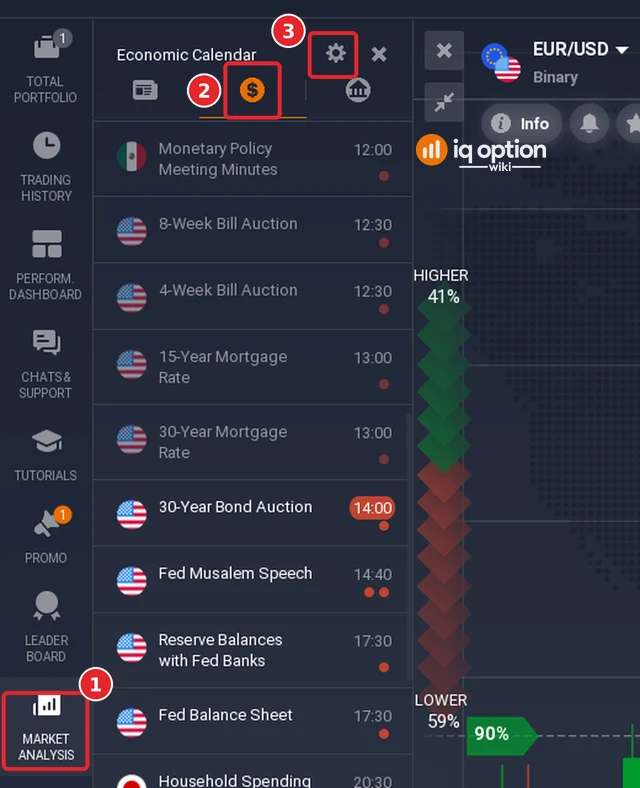
Click Market analysis (1) in the left panel, then the dollar-sign tab (2), the Economic calendar. The gear (3) at the top of the calendar opens the filter. In the picture the releases from 12:00 to 13:00 are greyed and those from 14:00 on are white: the traderoom clock read between 13:15 and 13:30, so the calendar greys what is already past. Our guide on reading the economic calendar covers the list itself.
How do you use the filter?
Step 2: Open the filter
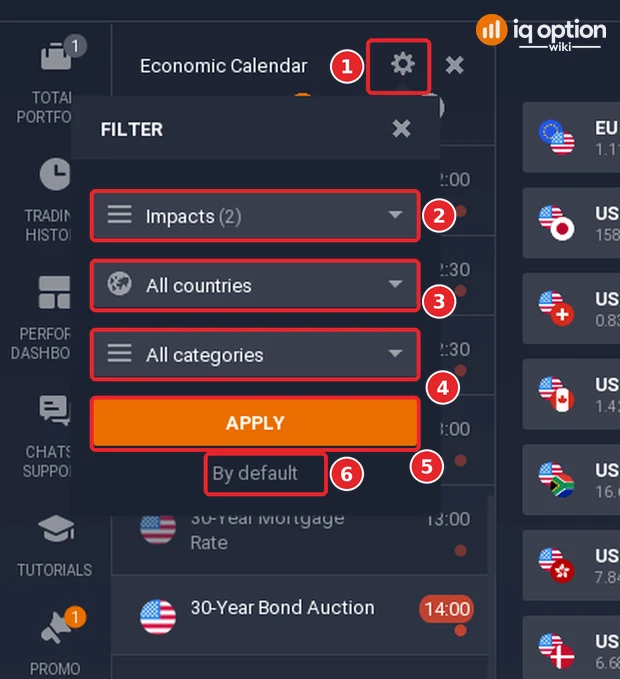
Click the gear (1). A window titled Filter opens over the list with three drop-down lists: Impacts (2), Countries (3) and Categories (4), an orange Apply button (5) and a By default link (6). On our account the first list read Impacts (2), which means two choices were ticked, and the other two read All countries and All categories.
Step 3: Choose what to show
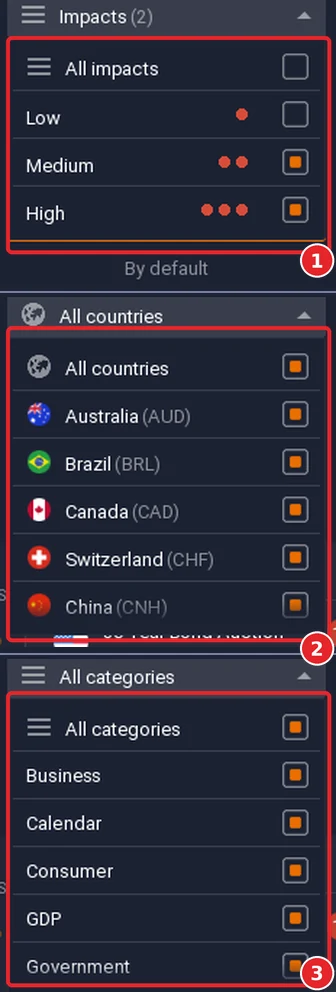
Each list opens as a set of tick boxes (1, 2, 3 in the picture below). The Impacts list (1) has All impacts, Low (one dot), Medium (two dots) and High (three dots); in ours Medium and High were ticked and Low was not. The Countries list (2) starts with All countries, then names each country with its currency code: we saw Australia (AUD), Brazil (BRL), Canada (CAD), Switzerland (CHF) and China (CNH) before the list ran on. The Categories list (3) has All categories, Business, Calendar, Consumer, GDP and Government before it runs on. Tick what you want and click Apply; the By default link under the button is, by its name, the way back to the original choice. We did not click either, so we did not see their effect.
What do the importance dots mean?
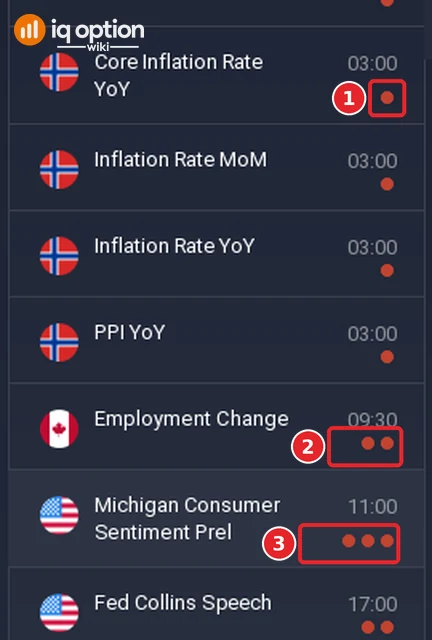
Each event in the list carries one to three dots at the right of its time. One dot is Low importance, two dots are Medium and three dots are High; these are the same three levels as in the Impacts list of the filter. The page of an event spells the rating out in words, for example Medium Importance for the two-dot Initial Jobless Claims. In the picture, Core Inflation Rate YoY has one dot (1), Employment Change two (2) and Michigan Consumer Sentiment Prel three (3).
The rating is a label from the platform, not a measurement we made: we did not trade or time any release, and the Assets Affected on an event page carry percentages with no stated period.
Should you trade when there is news?
We did not trade or time any release, so this guide cannot say whether you should. The calendar is most useful for knowing when a release is due, so that you can decide in advance whether to be in the market at that time.
Pros and cons of the market analysis filter
| Pros | Cons |
|---|---|
| You can keep only the releases that matter to you: by importance, country or category. | The importance rating tells you a release may move prices, not in which direction. |
| The filter window has an Apply button and a By default link. | A filter set too narrow hides releases that affect the pair you trade. |
| The settings are in the same window as the list, one click from the chart. | The lists are long and scroll: we saw only the first five or six countries and categories at a time. |
| Past releases are greyed, so the ones still to come stand out. | The calendar cannot list events nobody expected. |
Common mistakes
- Hiding the low-importance events and forgetting them. Our filter opened with Medium and High ticked; we expect the one-dot events to be hidden once it is applied, but we did not test it.
- Choosing countries that do not match your pair. A EUR/USD trader needs the euro area and the United States.
- Reading a three-dot rating as a direction. It says how much the release may matter, not up or down.
- Trading the release minute without a plan. The calendar shows when a release is due, so you can decide in advance whether to be in the market then.
Related guides
- How to read the economic calendar on IQ Option
- How to trade the news on IQ Option
- Five entry signals on IQ Option
- All strategy guides
Frequently Asked Questions
Q: How do I filter the economic calendar on IQ Option?
A: Open Market analysis, click the dollar-sign tab and then the gear. Choose impacts, countries and categories in the three lists and click Apply.
Q: What does By default do?
A: It is a link under the Apply button of the filter window. By its name it restores the original choice, which on our account was Medium and High importance, all countries and all categories; we did not click it.
Q: What do one, two and three dots mean?
A: Low, Medium and High importance of the release.
Q: Which countries should I choose?
A: Those of the pair you trade. For EUR/USD that is the euro area and the United States; the list shows each country with its currency code.
Q: Does the filter work on the other tabs of Market analysis?
A: We used the filter only on the Economic calendar tab, the one with the dollar sign. The panel has two more tabs, one on either side of it, and we did not try the filter there.