Last updated: 8 October 2026. MoreLess
Every screenshot below was recorded on 5 October 2026 on an IQ Option Practice account registered in Brazil, on EUR/USD. We placed no real-money trade, and we did not click a strike or buy a digital option for this guide. What a trader can choose, and which payouts and expiries are offered, depends on the asset, the time and the country, so read the figures as what that account showed on that day. The definitions come from IQ Option’s blog on digital options and from its published terms, saved on 5 October 2026.
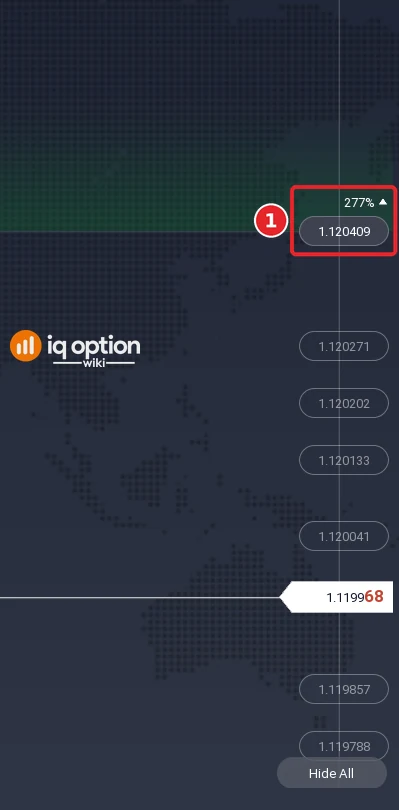
A digital option asks one question: will the price be above or below a strike price that you choose when the option expires? You pick an asset in the Digital list, an expiry of 1, 5 or 15 minutes, a strike price from the levels shown on the chart, and a direction, Higher or Lower. The payout depends on the strike: the lower the chance that the price reaches it, the higher the payout. On 5 October 2026 EUR/USD showed 90% in the Digital list, and one strike above the price showed 277% when we hovered over it.
Quick answer
- What it is: an option on whether the price will be above or below a strike you choose at the expiry. The payout depends on the strike.
- Steps: Options, Digital, an asset; an expiry of 1, 5 or 15 minutes; Show All to see the strike levels; hover a strike to see its percentage; Invest; Higher or Lower.
- Payouts we saw on 5 October 2026: EUR/USD 90% in the Digital list, 93% in the Binary list, and 277% on one strike above the price.
- Expiries: 1 to 15 minutes for digital options; binary options run from 1 minute to 1 month (IQ Option’s blog).
- Risk: no stop loss, and IQ Option’s blog says a digital loss can exceed the initial investment; we did not check it on the panel.
- Not tested: we did not buy or sell a digital option for this guide.
How do you trade digital options?
The premise is simple. You decide the amount, the expiry, the direction and, for a digital option, the strike. When the option expires there are two outcomes: your direction was right, and you receive the payout shown for your strike; or it was wrong, and you lose the amount. IQ Option’s terms define a digital option contract as a derivative in which you earn a payout if you correctly predict the price movement of the underlying asset at the time of expiry, and they say that if the option expires at the strike price, the investment is returned. The percentage on the platform depends on the strike, as the steps below show.
These steps use the web traderoom on a Practice balance, which starts at $10,000 and has a Refill to $10,000 button. The numbers in each screenshot match the numbers in the text.
Step 1: Choosing an asset for a digital option
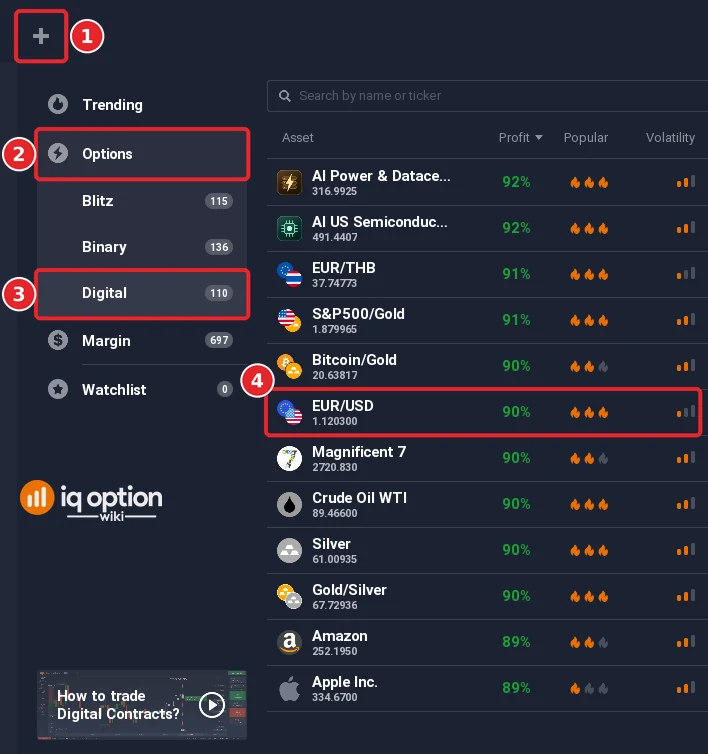
Click + in the top bar (1), open Options (2) and choose Digital (3), then pick the asset (4). The payouts in the Digital list differ from the Binary list: on 5 October 2026 EUR/USD showed 93% under Binary and 90% under Digital. IQ Option’s blog says that the Digital category includes currency pairs, indices, ETFs, commodities and, for weekends, OTC assets.
Step 2: Choose the expiry
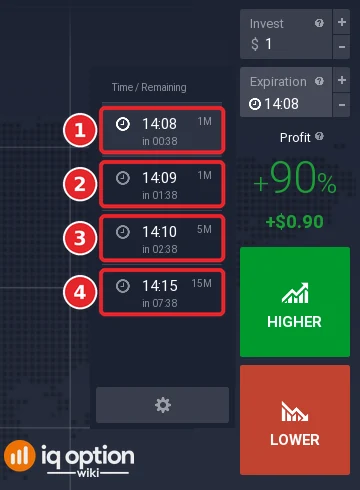
The digital expiry list is short. It lists times with the time remaining and a label: 1M (1), 1M (2), 5M (3) and 15M (4) on the recording. Click the entry you want; the chosen time appears in the Expiration box on the right. IQ Option’s blog says that digital options last from 1 to 15 minutes, and that the expiry is marked on the chart by a red line.
Step 3: What are strikes in a digital option? Show the strike levels
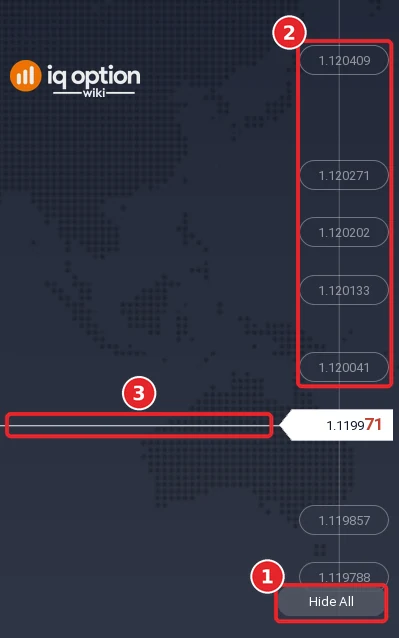
Click Show All at the bottom right of the chart; the button then reads Hide All (1). On the 1-minute chart, boxes with prices appear at the right edge: the five above the current price are framed (2), two more lie below it, and the lowest is partly covered by the button; IQ Option’s blog calls them strike price levels and says they are drawn as white boxes on the right side of the screen. The current price is the line across the chart (3). On the 5-minute chart in our recording the button also read Hide All, but no strike boxes were drawn, so switch to a shorter candle if they do not appear.
Step 4: Profit potential with digital options: hover over a strike
Move the pointer over a strike box (1). The expected profit percentage changes as you hover: a tag above the box shows it. In our recording the strike 1.120409, above the price of 1.119968, showed 277% with an upward arrow, and the chart shaded the area above that strike in green; the panel on the right still read +90%. IQ Option’s blog says that the lower the probability of the price hitting the strike, the higher the potential profitability, and that digital payouts can reach 900%. The blog’s claim is about the offered payout for an unlikely strike, not a result. The blog also gives the choice of strike as one of the settings of the Expiration section: manual, or auto-selection of the nearest strike. We did not click a strike, so we cannot show what the panel displays afterwards.
Step 5: Enter the amount and choose a direction
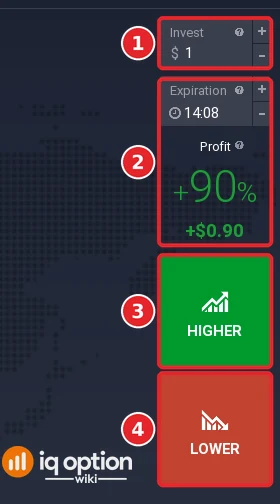
Enter the amount in the Invest box (1), check the expiry and the profit on the panel (2), then click Higher (3) or Lower (4). Before the purchase deadline, a dotted white line on the chart, you can open more than one option on the same asset, in either direction and at any strike, according to IQ Option’s blog; your open options are under Show Positions at the bottom right. Several options on the same asset can win or lose together, so this is not a way to lower the risk.
Selling digital option before expiration
IQ Option’s blog says that an option can be closed before expiry with the Sell button, which is in the upper right of the chart or in Show Positions, and its help article on expirations says that assets with an expiration have this buyback feature, and the profit after the sale. We did not test it. The guide selling options before expiration covers it.
Pros and Cons of Digital Options Trading
| Pros | Cons |
|---|---|
| You choose the strike, and a strike far from the price pays more. | The payout changes with the strike, so there is no single break-even rate: a payout of 277% needs a win rate above 26.5%, a payout of 90% above 52.6%. |
| Expiries of 1, 5 and 15 minutes, with the expiry line shown on the chart. | The expiry list stops at 15 minutes; a longer expiry needs a binary option. |
| An option can be sold before expiry, according to IQ Option’s blog. | IQ Option’s blog says that digital losses can exceed the initial investment, which we did not check; read the loss shown on the panel before you buy. |
Binary Options vs Digital Options Comparison
| | Binary option | Digital option | |
|---|---|---|
| Strike price | None: the entry price is the reference | Chosen from the levels on the chart |
| Payout | A fixed percentage shown before you buy (93% on EUR/USD on 5 October 2026) | Changes with the strike (90% on the panel, 277% on one strike above the price) |
| Expiries | One-minute steps, 15-minute marks, then the end of the day, week and month | 1, 5 and 15 minutes |
| Stop loss | None | None |
The full comparison, with the break-even arithmetic, is in binary options and digital options compared.
Common mistakes
- Expecting a fixed payout. It changes with the strike. Check the percentage on the panel before you click.
- Looking for a 30-minute expiry. The Digital list stops at 15 minutes; use the Binary list for longer.
- Expecting strike boxes on every chart. Click Show All, and use a 1-minute chart; they were not drawn on the 5-minute chart in our recording.
- Looking for a stop loss. An option closes at its expiry time, or earlier if you sell it.
Related guides
- Binary options and digital options compared and selling options before expiration
- What is options trading and expiry times on IQ Option
- Choosing a trading asset
- All indicator guides and all strategy guides
Frequently Asked Questions
Q: What is a strike price in a digital option?
A: The target level that the closing price has to exceed for a Higher option or fall below for a Lower option. On the chart the strike levels appear as boxes at the right edge, and hovering over one shows the expected profit percentage.
Q: What expiries do digital options have on IQ Option?
A: 1, 5 and 15 minutes. The expiry list showed the labels 1M, 1M, 5M and 15M on 5 October 2026.
Q: How much can a digital option pay?
A: IQ Option’s blog says up to 900%. The payout depends on the strike: on 5 October 2026 the panel showed +90% for EUR/USD, and one strike above the price showed 277% when hovered.
Q: Can I sell a digital option before it expires?
A: IQ Option’s blog and help say that an option can be sold before expiry with the Sell button. We did not test it.
Q: What happens if the price closes exactly on the strike?
A: IQ Option’s terms say that the investment is returned.
Q: Is a digital option riskier than a binary option?
A: IQ Option’s blog says that a binary loss cannot exceed the amount invested and that a digital loss can. We did not check what the trade panel shows for a digital loss, so read it before you buy.