Last updated: 8 October 2026. MoreLess
Every screenshot below was recorded on 5 October 2026 on an IQ Option Practice account registered in Brazil, with Practice money only. We opened and closed a $1 EUR/USD position: nothing was deposited or paid. Definitions come from IQ Option’s Help and blog pages, which we read on 5 October.
Forex trading on IQ Option means trading CFDs on currency pairs such as EUR/USD. You pick a pair, decide how much to invest and with what leverage, and click Buy if you expect the first currency to rise against the second or Sell if you expect it to fall. There is no expiry time: the position stays open until you close it or a take profit or stop loss does. This guide explains the terms first, then follows one Practice trade on the platform. It does not repeat how to register, fund or withdraw; those have their own guides, linked below.
Quick answer
- What it is: on IQ Option forex is traded as CFDs on currency pairs: you speculate on a price move without owning the currency (IQ Option’s blog).
- No expiry: unlike Blitz, Binary and Digital options, a forex position stays open until you close it or a take profit or stop loss does.
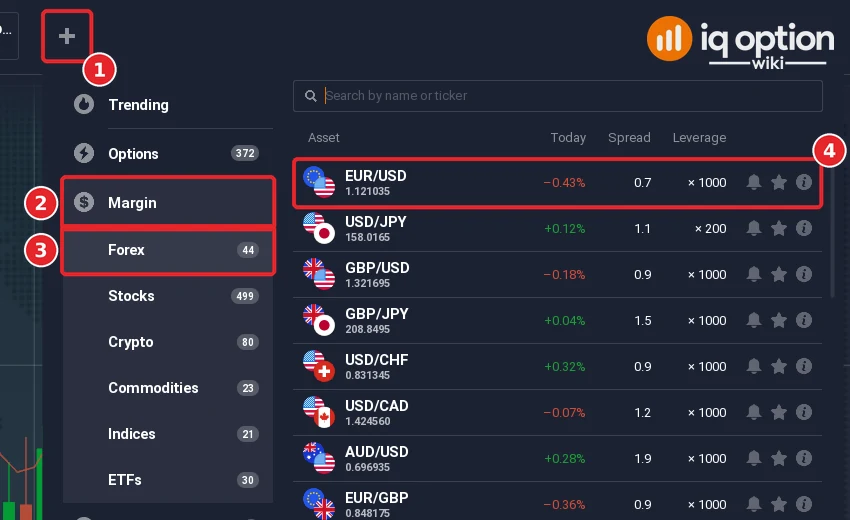
- Where: + in the top bar, Margin, Forex. We saw 44 pairs on 5 October 2026, each with a spread and a leverage such as x1000 or x200.
- You choose: the amount, the leverage, optional take profit and stop loss, and Buy or Sell.
- Cost and risk: the spread, a swap for positions held overnight, and leverage that magnifies losses as well as gains.
- Start on Practice: our test was a $1 EUR/USD position at x1000 on the Practice balance; it closed at -$0.15.
What is forex trading?
Forex, short for foreign exchange, is the exchange of one currency for another. Currencies are quoted in pairs. In EUR/USD the euro is the base currency and the US dollar is the quote currency; the price says how many dollars one euro costs. IQ Option’s blog says that if you expect the euro to strengthen against the dollar you open a buy (long) position, and if you expect it to weaken you sell (short). The same blog describes the market as running 24 hours a day, five days a week.
IQ Option’s blog also explains that the platform uses the CFD model: you speculate on the price difference of the pair without owning the currency. IQ Option’s Help says that in CFD trading there is no expiration time, and that you can use a multiplier and set stop loss and take profit levels.
Forex terms you will meet on the platform
| Term | Meaning | Source |
|---|---|---|
| Pip | The smallest usual price step; for EUR/USD, a move from 1.1000 to 1.1001 is one pip | IQ Option blog, forex for beginners |
| Spread | The difference between the buy and sell price; the cost of entering a trade | IQ Option blog |
| Leverage (multiplier) | “A coefficient that allows you to increase by several times both the potential profit from the investment and the level of risk” | Help icon of the Leverage field |
| Volume | “The total trade volume calculated as the investment multiplied by the leverage” | Help icon of the Volume field |
| Take profit and stop loss | Orders that close a position at a profit or loss limit you set | IQ Option Help; see auto closing |
| Swap | A cost or credit for keeping a leveraged position open after the daily rollover time | IQ Option blog, swap calculator |
| Margin | Capital set aside to open and keep a leveraged position open | IQ Option blog |
How to trade forex on IQ Option, step by step
Use a Practice account first. IQ Option’s Help says you can practice on your practice balance and continue with real funds later. For a real account, see the deposit guide and how to withdraw money. The numbers in each screenshot show the click order.
Step 1: Open the forex list and pick a pair
Click + in the top bar (1), then Margin (2) and Forex (3). We saw 44 forex pairs. Click a pair (4); we used EUR/USD.
The list has a Spread column (2) and a Leverage column (3) for every pair. EUR/USD (1) showed a spread of 0.7 and x1000; USD/JPY showed x200 (4). Leverage differs by pair.
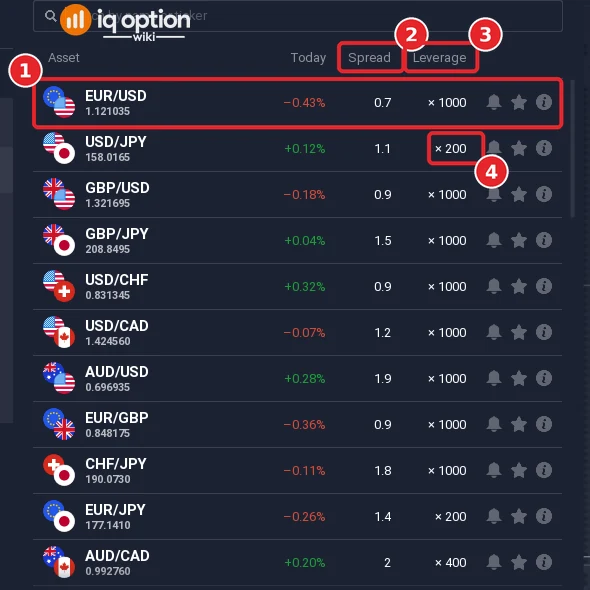
These were the first eleven pairs on Monday 5 October 2026, around 12:55 (UTC-3), as the list showed them. Spreads and leverage can change, so read the list when you trade.
| Pair | Spread | Leverage |
|---|---|---|
| EUR/USD | 0.7 | x1000 |
| USD/JPY | 1.1 | x200 |
| GBP/USD | 0.9 | x1000 |
| GBP/JPY | 1.5 | x1000 |
| USD/CHF | 0.9 | x1000 |
| USD/CAD | 1.2 | x1000 |
| AUD/USD | 1.9 | x1000 |
| EUR/GBP | 0.9 | x1000 |
| CHF/JPY | 1.8 | x1000 |
| EUR/JPY | 1.4 | x200 |
| AUD/CAD | 2 | x400 |
Step 2: Read the order panel
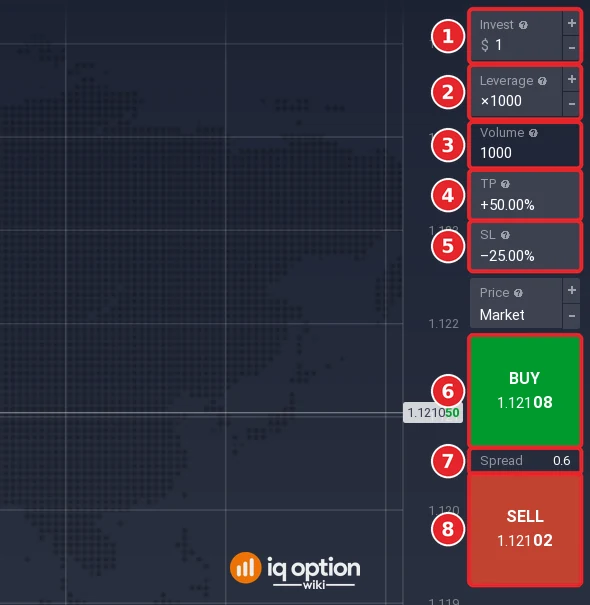
The panel on the right has Invest (1), Leverage (2), Volume (3), TP (4), SL (5), the Buy button (6), the Spread (7) and the Sell button (8). We invested $1 at x1000, so the volume was 1000. Buy showed 1.12108 and Sell showed 1.12102: the 0.6 spread is that difference of 0.00006, or 0.6 pips. You buy at the higher price and sell at the lower one, so a new position starts slightly below break-even. TP and SL showed +50.00% and -25.00% from an earlier try on the same account.
Step 3: Buy or Sell
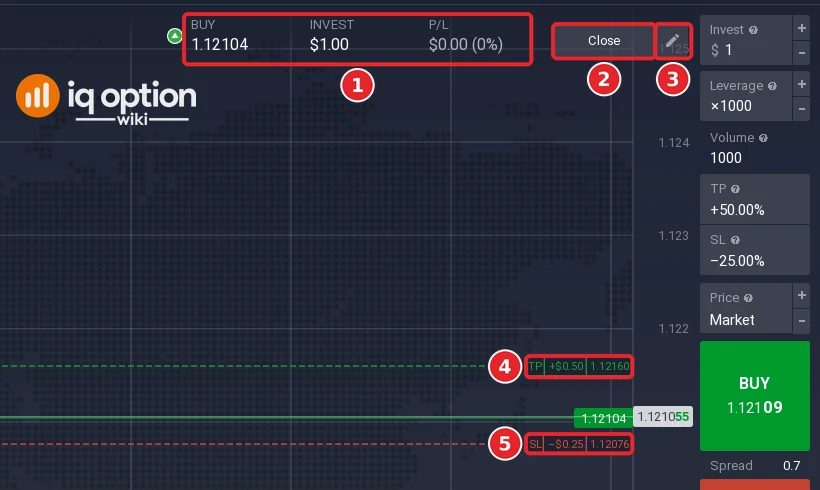
Click Buy if you expect the pair to rise or Sell if you expect it to fall. We clicked Buy. A bar appears at the top of the chart with the direction and entry price (1), the invested amount and the profit or loss. Its Close button is (2) and the edit pencil is (3); the TP (4) and SL (5) labels mark the take profit and stop loss on the chart.
Step 4: Close the position
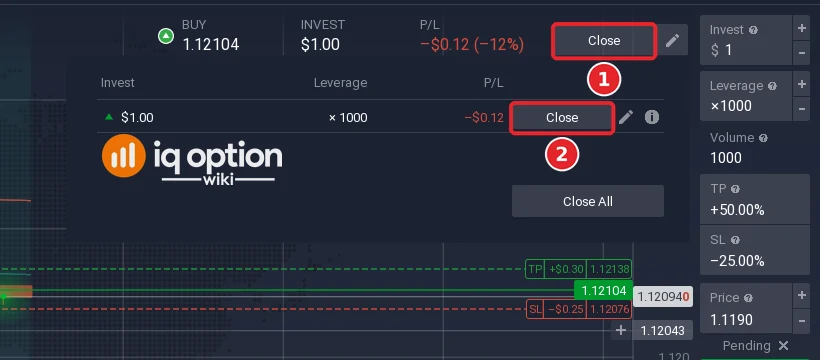
You can wait for the take profit or stop loss, or close it yourself: click Close on the bar (1), then Close in the small list (2). Our position closed at -$0.15.
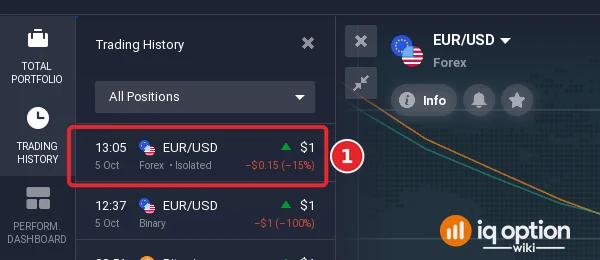
The closed position is listed in Trading History in the left sidebar: EUR/USD, Forex, Isolated, $1, -$0.15 (-15%) (1).
Forex or options?
IQ Option’s blog says there is no stop loss for instruments with an expiration time: the deal closes at expiry. Forex and CFDs on crypto, stocks, commodities, indices and ETFs have no expiration time; you set the amount, the leverage and the stop loss and take profit levels. The panels differ too: the options panel we saw had Invest, Expiration, Profit, Higher and Lower. For the comparison in detail, see forex vs options on IQ Option.
What forex costs and what can go wrong
- Spread. You pay it on every position, as Step 2 showed.
- Swap. A position kept open after the daily rollover can carry an overnight cost. A pending order we placed showed Swap -$0.02 in its Details card; read the swap before you hold a position overnight.
- Leverage. IQ Option’s Help says a multiplier increases potential returns “as well as risks”. On our $1 position at x1000 a price move of 0.05% was worth $0.50.
- Close-out. IQ Option’s margin terms say it closes open positions at the market price if the account equity falls below 50% of the maintenance margin requirement.
- Slippage. IQ Option’s Help says an order can execute at a different price than expected, most likely when prices move quickly.
When can you trade forex?
Regular forex pairs close at the weekend. IQ Option’s Help says that every Friday at 21:00 GMT it switches from market trading to OTC quotes and back on Monday at 00:00 GMT. On Sunday 4 October 2026 the margin forex list showed “Opens in” countdowns. See the best time to trade on IQ Option for sessions and time zones.
What to read next
- Take profit and stop loss, step by step.
- Pending orders and opening a position automatically.
- What is leverage and money management.
- Forex pairs to trade.
Frequently Asked Questions
Q: Is forex on IQ Option real currency trading?
A: IQ Option’s blog says it offers CFDs on currency pairs: you speculate on price differences without owning the currency.
Q: How many forex pairs does IQ Option have?
A: The Forex list showed 44 on 5 October 2026. The number can change.
Q: Is there an expiry time on forex?
A: No. IQ Option’s Help says there is no expiration time in CFD trading. The position stays open until you or a take profit or stop loss closes it.
Q: What is the spread?
A: The difference between the buy and sell price. On EUR/USD it showed 0.7 in the list, and the order panel showed Buy 1.12108 and Sell 1.12102 with a spread of 0.6.
Q: Can I practice forex without risking money?
A: Yes. All our screenshots are from a Practice account with virtual money.
Q: What leverage can I use?
A: It depends on the pair. On 5 October 2026 EUR/USD showed x1000, USD/JPY x200 and AUD/CAD x400. The Leverage field of the order panel sets it for a position.
Q: Does IQ Option have a trailing stop?
A: We did not see one. The TP and SL windows had a value box, a unit selector and, for the stop loss, the “Use Balance to Keep Position Open” checkbox.