Disclaimer: “This material is not intended for viewers from EEA countries. Binary options are not promoted or sold to retail EEA traders.” (aka the binary options are not available for traders from Europe)
Last updated: 8 October 2026. The screenshots were recorded on 4 and 5 October 2026 on an IQ Option Practice account registered in Brazil (the tool column, candle time period and timeframe menus on 5 October, with a Forex chart; the expiration menus on 5 October on option charts). Nothing was paid, and no setting shown here is a signal or a promise of profit.
“Time frame” means three different settings on IQ Option, and mixing them up is the most common source of confusion: the candle time period (how long one candle is), the timeframe (how much history the chart shows) and the expiration (when an option trade ends). This guide shows where each one is on the platform and what it changes. IQ Option does not name a best time frame, and neither do we: pick the combination you can read and test it on the Practice account.
Quick answer
- Three settings, three meanings: candle time period (how long one candle is), timeframe (how much history the chart shows) and expiration (when an option trade ends).
- Candle time period: 5 seconds up to 1 month, second button in the tool column.
- Timeframe: “The time period for which the chart is shown”, the bottom button of the tool column.
- Expiration: a field in the right-hand panel of option trades; Blitz showed 1 to 15 minutes, Binary a list of clock times.
- Best one: IQ Option’s own blog says there is no universal best timeframe, and no setting guarantees a profit.
How to set the time frames on the IQ Option platform
The numbers in each screenshot match the numbers in the text.
Step 1: Find the chart tool column
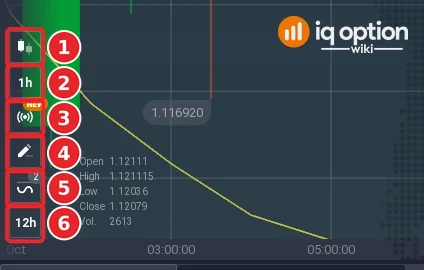
At the bottom left of the chart is a column of six buttons. From top to bottom: chart type (1), candle time period (2, it shows the current size, here “1h”), signals (3, marked “new”), drawing tools (4), indicators (5) and timeframe (6, here “12h”). The first two and the last one are the time settings; the chart type is covered in our chart types guide.
Step 2: Set the candle time period
Click the second button (1). The menu is called CANDLE TIME PERIOD and says: “Price range for a specific time interval, used for both candlesticks and bars”. The list (2) offers 5, 10, 15 and 30 seconds; 1, 2, 5, 10, 15 and 30 minutes; 1, 2, 4, 8 and 12 hours; and 1 day, 1 week and 1 month. Click a size and every candle on the chart now covers that period. Under the list is a checkbox, “Change interval automatically” (3), which was unticked on our account.
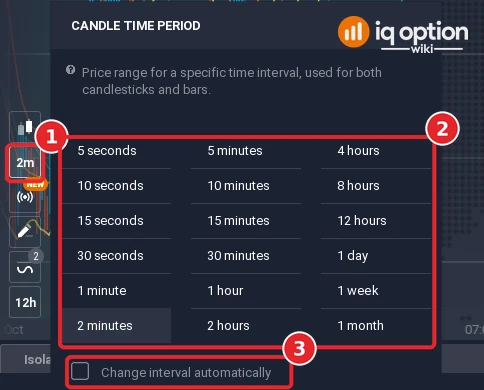
A shorter candle shows more detail and more candles for the same stretch of time; a longer one shows fewer, larger candles. Candle size does not change when your trade ends.
Step 3: Set the timeframe
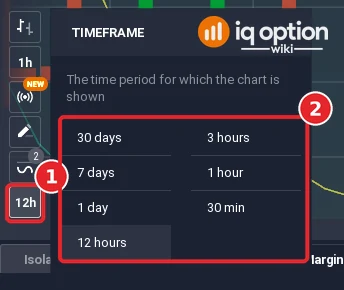
Click the bottom button (1). The TIMEFRAME menu says “The time period for which the chart is shown”, and the list (2) sets how much history fits on the screen. On a Forex chart with 1-hour candles we saw 30 days, 7 days, 1 day, 12 hours, 3 hours, 1 hour and 30 min. On 4 October, on a Blitz option chart, the list was 30 days, 1 day, 3 hours, 15 min, 5 min and 2 min. The choices differ between charts, so open the menu on the chart you are using.
Step 4: Check the expiration of an option trade
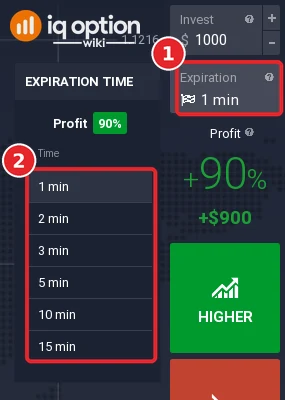
Expiration is not a chart setting at all. It is a field in the right-hand panel of option trades, between Invest and the profit percentage (1). It sets when the trade ends. On the EUR/USD Blitz option the menu offered 1, 2, 3, 5, 10 and 15 minutes (2), with a profit of 90% at that moment; an OTC Blitz chart showed 30 sec in the field. According to IQ Option’s blog, Blitz options start at 30 seconds, or 5 seconds for VIP clients.
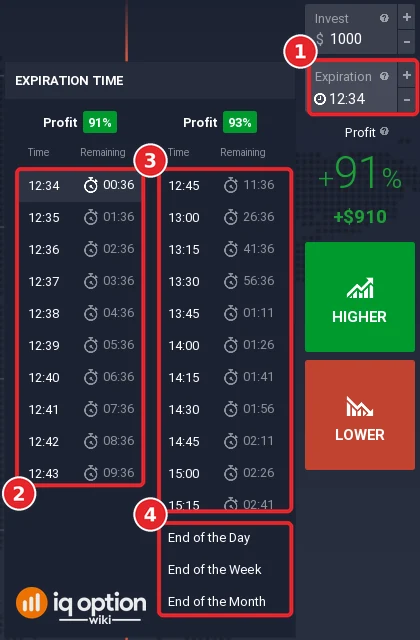
A Binary option works differently: the menu lists clock times. The first column (2) counted in one-minute steps from 12:34, each with the time remaining; the second (3), with a different profit percentage (91% and 93% in our screenshot), counted in 15-minute steps. Below them are End of the Day, End of the Week and End of the Month (4). Our expiration guide goes through all three option types.
How the three settings work together
| Setting | Where | What it controls | Example from our test |
|---|---|---|---|
| Candle time period | Second button, tool column | Length of each candle or bar | 1h, 2m, 5s |
| Timeframe | Bottom button, tool column | How much history the chart shows | 12h, 30m |
| Expiration | Right-hand panel of an option | When the trade ends | 1 min, 30 sec, 12:34 |
A “1-minute chart with a 5-minute trade” therefore means 1-minute candles (candle time period) and a trade that expires five minutes after you open it (expiration). You can change each on its own.
What is the best time frame?
There is no setting that wins. IQ Option’s own educational blog (“Best Timeframes for Day Trading”, updated 13 September 2026) says the same: “There is no universal best timeframe for day trading.” It describes the 1-minute chart as useful for experienced scalpers but “usually too noisy for beginners”, suggests the 5-minute or 15-minute chart for most day traders with the 1-hour chart for context, and notes that a shorter timeframe gives more candles, more signals and more noise, while a longer one gives fewer signals and more time to think. That article is about charts for day trading in general, not about option expiry, and it is the broker’s own view rather than a rule.
For expiry, IQ Option’s blog on expirations says that “the more time there is left until expiration, the more time there is for the asset to reach the strike price and go beyond it”. A longer expiry therefore gives the price more time to move, in either direction; it does not make a trade safer or more likely to win. The Practice account lets you test any combination of candle size, timeframe and expiration without risking money.
Binary options are not promoted or sold to retail traders in the European Economic Area (see the note at the top). Availability depends on your country, so check what your account shows.
Frequently Asked Questions
Q: What is the difference between candle time period and timeframe on IQ Option?
A: The candle time period sets how long each candle is (5 seconds to 1 month). The timeframe sets how much history the chart displays (for example 30 min to 30 days).
Q: Where do I set the expiration of a trade?
A: In the Expiration field of the right-hand panel of an option trade. It is not part of the chart tool column.
Q: What is the shortest expiration on IQ Option?
A: IQ Option’s blog says Blitz options start at 30 seconds, and from 5 seconds for VIP clients. We saw 30 sec in the Expiration field on 5 October 2026.
Q: Which time frame is best for beginners?
A: IQ Option does not give one answer. Its blog calls the 1-minute chart usually too noisy for beginners and suggests the 5-minute or 15-minute chart with the 1-hour chart for context, for day trading. Test on a Practice account first.
Q: Does a longer expiry guarantee a profit?
A: No. A longer expiry gives the price more time to move, but it can move against you. No time frame guarantees a profit.
Q: What does “Change interval automatically” do?
A: It is a checkbox in the candle time period menu. It was unticked on our account and we did not test it, so we cannot say how it behaves.
Q: Can European traders use binary options on IQ Option?
A: IQ Option does not promote or sell binary options to retail traders in the EEA. See the disclaimer at the top of this guide.