Last updated: 8 October 2026. MoreLess
The screenshots were recorded on 5 October 2026 on an IQ Option Practice account registered in Brazil, on EUR/USD. We placed no real-money trade and did not buy or sell an option for this guide. The description of FX options comes from IQ Option’s blog on trading with and without expirations (updated 14 September 2026) and its blog on digital options, and the contract wording from IQ Option’s terms, all saved on 5 October 2026.
On IQ Option, “FX options” are options on currency pairs that have an expiry and a strike price: you choose the amount, the strike price and the direction, Higher or Lower, and the deal closes by itself at its expiration time. The Options menu of the 5 October 2026 platform has no item with that name. It lists Blitz, Binary and Digital, and the mechanism the blog describes for FX options, an expiry plus a strike price, is the one of the Digital list, which includes EUR/USD and other currency pairs. They are not forex trades: a forex trade on IQ Option is a margin CFD that has no expiry.
Quick answer
- What they are: options on currency pairs with an expiry and a strike price. You choose the amount, the strike and Higher or Lower; the deal closes at its expiration time.
- Where in the menu: Options, Digital. The 5 October 2026 menu has no item named FX options; it lists Blitz, Binary and Digital.
- Expiries and payouts we saw: 1, 5 and 15 minutes; EUR/USD 90% in the Digital list, and 277% on one strike above the price.
- Not forex: a forex trade on IQ Option is a margin CFD with leverage and no expiry.
- Risk: no stop loss; IQ Option’s blog says a digital loss can exceed the investment. We placed no trade.
What are FX options and how to trade foreign exchange options at IQ Option?
In the traditional market, an FX option is a contract that gives the buyer the right, but not the obligation, to exchange one currency for another at a preset rate at a set time. The options on IQ Option are not the same thing. IQ Option’s terms define its digital option contract as a derivative in which the client earns a payout if the client correctly predicts the price movement of the underlying asset at the time of expiry; if the option expires at the strike price, the investment is returned. You never exchange the currencies and you do not exercise anything.
IQ Option’s blog on expirations says that FX options have an expiration time, “the period between buying the option contract (opening a deal) until it closes”, and a strike price that “determines the outcome of the deal”; to trade them you choose the investment amount, the strike price and the direction, Higher or Lower. It also says that there is no stop loss for instruments with an expiration: the deal closes at the expiration time. Its example of an expiration was 1 hour; the digital expiry list we saw offered 1, 5 and 15 minutes.
How to trade FX options at IQ Option?
These steps use the web traderoom on a Practice balance, which starts at $10,000 and has a Refill to $10,000 button. The numbers in each screenshot match the numbers in the text.
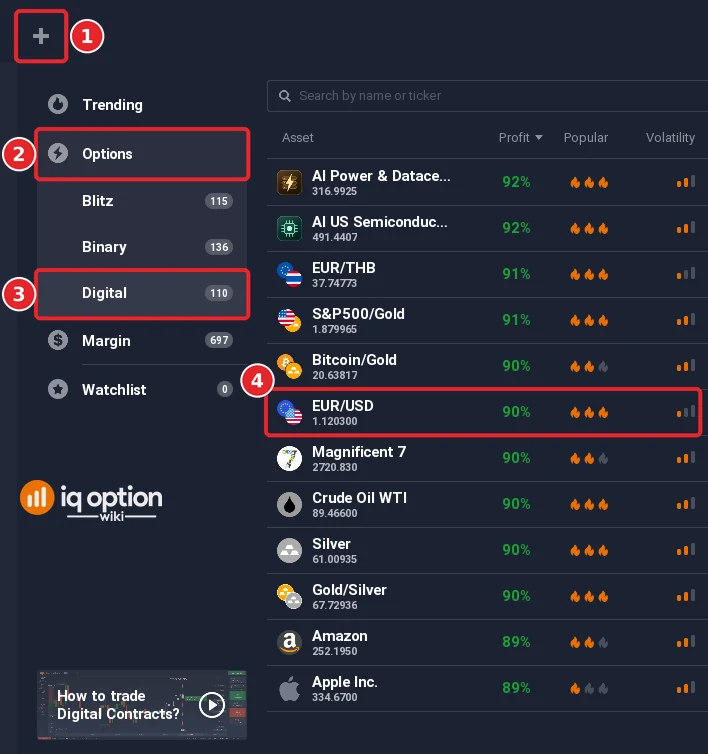
Step 1: Choose a currency pair in the Digital list
Click + in the top bar (1), open Options (2) and choose Digital (3), then pick the pair (4). On 5 October 2026 EUR/USD showed 90% in the Digital list. IQ Option’s blog lists these currency pairs among its digital options: EUR/USD, EUR/JPY, GBP/USD, GBP/JPY, EUR/GBP, USD/CAD, AUD/USD, AUD/CAD, AUD/JPY and USD/CHF.
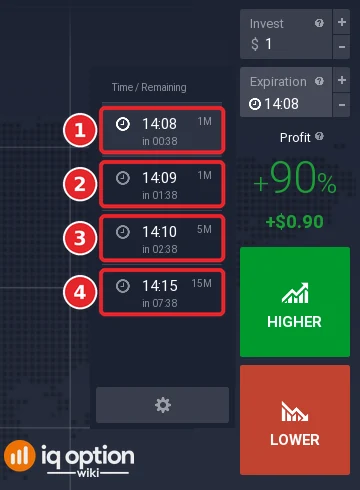
Step 2: Choose the expiry
In the Expiration box on the right, pick a time from the list: 1M (1), 1M (2), 5M (3) or 15M (4) on the recording. The expiration time is drawn on the chart as a red line. Click the entry you want, and the chosen time appears in the Expiration box.
Selecting strike price for FX options
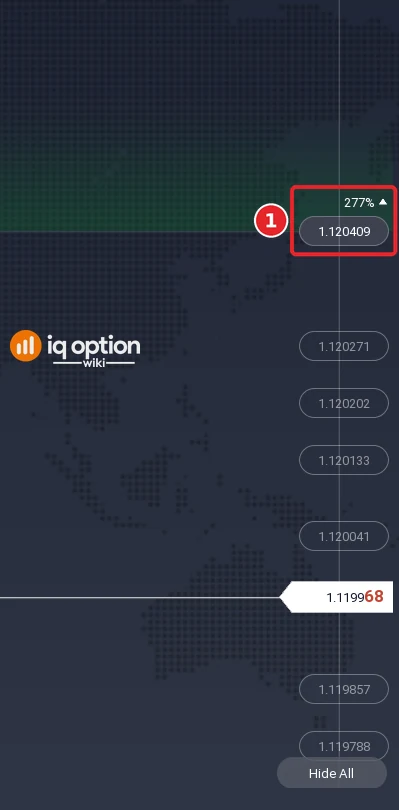
Step 3: Choose a strike and read its percentage
The strike prices are the boxes at the right edge of the chart. Move the pointer over a strike box (1): the percentage changes with the level, and a tag above the box shows it. On the recording the strike 1.120409, above the price of 1.119968, showed 277%. No profitability scale is drawn next to the strikes; the box with its percentage is what the platform shows. If the strike boxes are not drawn, click Show All at the bottom right of the chart and use a 1-minute chart. The step-by-step version, with the amount and the buttons, is in how to start with digital options.
How to fix profit/loss before expiration time?
IQ Option’s blog says that assets with an expiration time have a buyback feature: you can close the deal before the expiration time, and you will see a Sell button and two profit numbers next to it. The expected profit is the outcome if the deal closes at the expiration time, and the profit after sale is the outcome if you close it with the Sell button. Once you click Sell the deal closes and cannot be reopened. We did not test it; the guide selling options before expiration covers it.
Pros and Cons of Trading FX Options at IQ Option
| Pros | Cons |
|---|---|
| A fixed expiry, and a strike you choose: a strike far from the price pays more. | No stop loss; the deal closes at the expiration time, or earlier if you sell it. |
| Currency pairs such as EUR/USD, GBP/USD and USD/JPY in the same list as other assets. | The payout changes with the strike, and IQ Option’s blog says a digital loss can exceed the initial investment. |
| IQ Option’s order execution policy says that no commissions or financing fees are charged for digital option contracts. | The policy reserves the right to apply charges in future with notice; check the current policy. |
Key Components of FX Options Trading at IQ Option
| Component | Description |
|---|---|
| Investment amount | The amount you invest in one deal, entered in the Invest box. |
| Expiration time | The time at which the option closes by itself, marked by a red line on the chart. |
| Strike price | The level that the closing price has to exceed (Higher) or fall below (Lower). If the option expires at the strike, the investment is returned. |
| Direction | Higher or Lower; in traditional options they are called call and put. |
| Payout | Shown on the panel and changing with the strike. |
Related guides
- How to start with digital options and binary options and digital options compared
- What is options trading and trade forex on IQ Option
- Selling options before expiration
- All indicator guides and all strategy guides
Frequently Asked Questions
Q: What is the minimum investment amount for trading FX options at IQ Option?
A: IQ Option’s Help says that the minimum investment amount can be found on the trading platform, subject to current trading conditions. The Invest box took $1 on the Practice account.
Q: Can I practise trading FX options without risking real money?
A: Yes. The Practice balance starts at $10,000 and has a Refill to $10,000 button.
Q: Are there fees for trading FX options at IQ Option?
A: A spread applies to margin (CFD) trades, not to options. IQ Option’s order execution policy says that no commissions or financing fees are charged for digital option contracts, and that it reserves the right to apply charges in future with notice.
Q: Is an FX option on IQ Option the same as a forex trade?
A: No. A forex trade on IQ Option is a margin CFD with leverage and no expiry. An FX option has an expiry, a strike price and a payout, and no leverage.
Q: How do I manage risk when trading FX options?
A: There is no stop loss. You can choose the amount, the expiry and the strike, you can sell before expiry according to IQ Option’s blog, and you can practise first. Each trade can lose its whole amount.
Q: Are FX options available in every country?
A: We cannot say. The screenshots are from an account registered in Brazil, and what is offered depends on your country, so check the Options menu on your own account.