Last updated: 8 October 2026. MoreLess
Every screenshot below was recorded on 8 October 2026 on an IQ Option Practice account registered in Brazil, on EUR/USD binary options of $1, and no real-money order was placed. Times are the traderoom clock, which is UTC minus three hours. The readings in the table come from one short test of two options and say nothing about other assets, other expiries or other hours. Nothing here is a promise of profit.
Selling an option early means closing it before its expiry, at the price the platform offers at that moment. On IQ Option the Sell button sits at the top right of the chart, and the figure that matters is “Profit after sell”. In our test that figure was far below the expected profit: right after we bought a $1 option it read -$0.56, and with 17 seconds left on an option that was winning, selling would have paid +$0.25 against an expected profit of +$0.90. The button was greyed out 13 seconds before expiry.
Quick answer
- Where: the Sell button at the top right of the chart, next to the order panel, once an option is open. A bar shows Total investment, Expected profit and Profit after sell.
- Several options: the button becomes Sell All with the number of options; its arrow opens a list with a Sell link for each option.
- What it pays: the Profit after sell on screen at the click. Our readings on a $1 option: -$0.56 right after buying, +$0.25 with 17 seconds left (expected profit +$0.90).
- When it stops: Sell was active with 17 seconds left and greyed out with 13 seconds left. We did not look for the exact second.
- Use: to cut a loss or close a mistake at a price you can see, not to keep the profit of a winning option.
What does it mean to sell an option before expiration?
A binary option pays a fixed amount if it ends on the right side of the entry price and nothing if it does not. Selling early replaces that outcome with a price you see on screen. IQ Option’s Help explains the two figures next to the Sell button: “Expected Profit shows the possible outcome of the trade if the chart remains at the current level by the time the trade expires”, and “Profit after Sale: If it is red, it shows how much of your investment you will lose after the trade expires. If it is green, it shows how much profit you will make after the sale.” It adds that “The Expected Profit and Profit after Sale figures are dynamic” and that they depend on “the current market situation, the proximity of the expiration time, and the current price of the asset”, and that “Many traders sell when they are not sure if the trade will make them a profit. The selling system gives you the opportunity to minimize your losses.”
How do you sell an option before expiration on IQ Option?
These steps use the web traderoom on a Practice balance. The numbers in each picture match the numbers in the text.
Step 1: Choose the expiration time
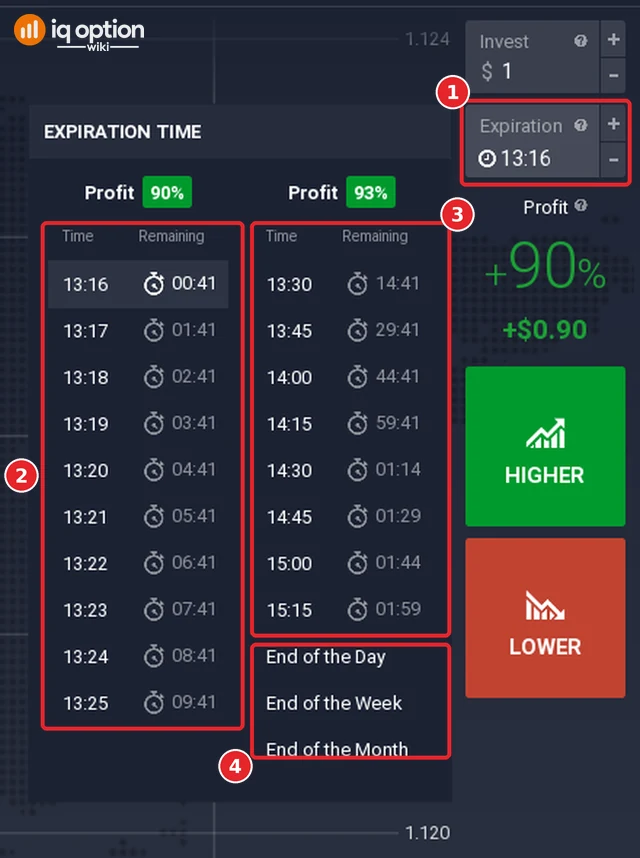
Click the Expiration box of the order panel (1). The list that opens has two columns of times. The first column (2) carries a payout of 90% and holds one expiry per minute: at 13:15 it ran from 13:16 to 13:25, with the time remaining beside each (00:41 to 09:41). The second column (3) carries 93% and holds quarter-hour marks, from 13:30 (14 minutes 41 seconds remaining) to 15:15 (shown as 01:59, which is hours and minutes: 1 hour 59 minutes). Below it come End of the Day, End of the Week and End of the Month (4). We chose 13:20.
Step 2: Open the option and read the figures
Click Higher or Lower. After the purchase a bar appears at the top of the chart with the Sell button at its right (1) and four readings (2): a countdown, Total investment, Expected profit and Profit after sell. The countdown carries the label Purchase time at first and Expiration time later (it read 03:45 Purchase time right after the purchase, 00:01 Purchase time at 13:19:29 and 00:23 Expiration time at 13:19:37); we did not find where the platform defines the two labels. At 13:15:45, seconds after we bought a $1 Higher option, the bar read Total investment $1.00, Expected profit +$0.90 and Profit after sell -$0.56.

Step 3: Click Sell
Click the Sell button. The option is sold at the price of that moment and a notification appears at the bottom left of the chart. When we sold one of two options at 13:16 from the list, the list had shown -$0.77 (-77.20%) for it a few seconds earlier, and the notification read -$0.87 (-87%): the price kept moving between reading and clicking.
How do you sell several options at once?
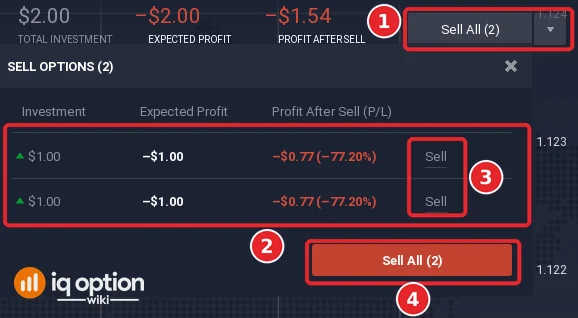
With more than one option open on the same asset, the Sell button turns into Sell All, with the number of options in brackets and a small arrow beside it (1). The arrow opens the list Sell options: a row per option (2) with its investment, its expected profit and its profit after sell, a Sell link at the end of each row (3) and a red Sell All button under the rows (4). We clicked the Sell link of one row; we did not click Sell All.
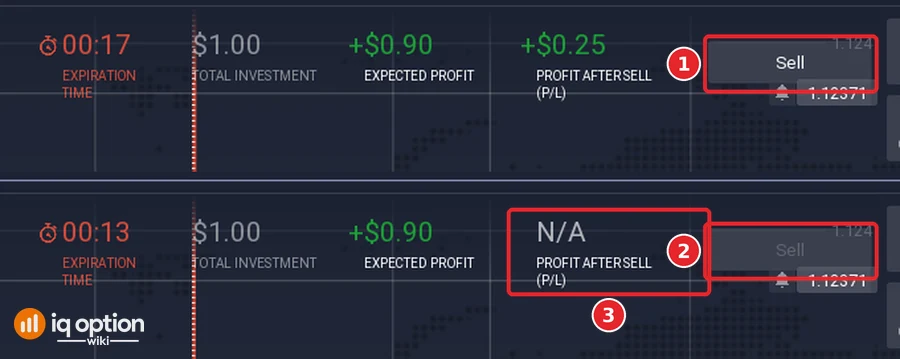
The Sell button is not always active. On the remaining option, at 13:19:43, with 17 seconds left, Sell was active and Profit after sell read +$0.25 (1). At 13:19:47, with 13 seconds left, Sell was greyed out (2) and Profit after sell read N/A (3). We did not look for the exact second. The data that the traderoom loads when it starts fits this: it lists a buyback dead time of 15 for EUR/USD in the group of short options (called turbo in the data), 120 for the longer group (called binary in the data) and 0 for Blitz, and 10 for the OTC version of EUR/USD. Our option expired at 13:20, less than five minutes after the purchase; we take it to belong to the short group, although the data does not say so, and then the 15 would explain the grey-out at 13 seconds. We read these fields in a log of that data, the platform does not label them for traders, and we did not test the 120 seconds.
What the readings were in our test
The table lists what the bar showed in the stills of the recording, with the traderoom clock at the moment of each still.
| Clock | What was on screen | Expected profit | Profit after sell |
|---|---|---|---|
| 13:15:45 | One Higher option of $1, expiry 13:20, just bought | +$0.90 | -$0.56 |
| 13:16:04 | The same option, 19 seconds later, with the price below the entry | -$1.00 | -$0.64 |
| 13:16:12 | A second $1 option on the same expiry (total $2.00), both above the entry | +$1.80 | -$1.13 |
| 13:16:26 | The Sell options list with the two options (price below the entry again) | -$2.00 | -$1.54 (each -$0.77, -77.20%) |
| 13:16:41 | After selling one option (notification -$0.87, -87%): the other one | -$1.00 | -$0.73 (-73.40%) |
| 13:19:43 | The remaining option, 17 seconds to expiry, above the entry | +$0.90 | +$0.25 |
| 13:19:47 | The same, 13 seconds to expiry, Sell greyed out | +$0.90 | N/A |
Three things stand out. First, an option that was winning at the moment of reading (+$0.90 expected) was worth -$0.56 if sold seconds after the purchase, and +$0.25 if sold 17 seconds before expiry: the sale price stayed well below the expected profit. Second, when the price was against the option, the sale price was better than the expected result: -$0.64 against -$1.00 at 13:16:04. Third, right after buying, the figure was -$0.56 and not zero, and we sold only one option, at a loss, so we cannot say how often a quick sale comes out near zero.
Pros and cons of selling an option early
| Pros | Cons |
|---|---|
| You see the amount before you click: Profit after sell is on screen. | The amount can be far below the expected profit: -$0.56 against +$0.90 right after buying, +$0.25 against +$0.90 with 17 seconds left. |
| The list has a Sell link for each option, so one can be sold while the other stays open (we sold one of two), and a Sell All button (we did not click it). | The price moves while you read it: the list said -$0.77 and the sale closed at -$0.87. |
| It limits a loss when the price has moved against the option, as the Help says: in our test -$0.64 against -$1.00 expected. | The button is not available in the last seconds: greyed out at 13 seconds in our test. |
| It can close an option you opened by mistake. | A sale made seconds after the purchase cost more than half of the stake in our test. |
Common mistakes
- Expecting to get the stake back when you sell at once. The Profit after sell was negative right after the purchase, -$0.56 on a $1 option.
- Waiting for the last seconds to sell. The button stopped working 13 seconds before expiry in our test.
- Treating Expected profit as what a sale pays. They are different figures: +$0.90 against +$0.25 at 17 seconds.
- Selling every option out of fear. A sale of a winning option pays less than its expected profit: +$0.25 against +$0.90 with 17 seconds left in our test.
- Selling without reading the list. With several options open, read the row of the option you mean before you click its Sell link or Sell All.
Related guides
- Expiry times on IQ Option
- Binary options and digital options on IQ Option
- Money management on IQ Option
- Five entry signals on IQ Option
- All strategy guides
Frequently Asked Questions
Q: Can I sell an option before it expires on IQ Option?
A: Yes, with the Sell button at the top right of the chart, as long as the button is active. In our test it was active with 17 seconds left and greyed out with 13 seconds left.
Q: How much do I get if I sell early?
A: The price of that moment, which you can read as Profit after sell just before you click. It changes with the price and with the time left. In our readings on a $1 option it ranged from -$0.87 (the price at which one sale closed) to +$0.25.
Q: How do I sell all my options at once?
A: The button shows Sell All with the number of options. We did not click it, so we cannot say which options it sells. The small arrow next to it opens a list in which each option has its own Sell link, which we did use.
Q: Why is the Sell button greyed out?
A: The traderoom does not say why. In our test it was greyed out with 13 seconds left and active with 17 seconds left, and we did not look for the exact second. The data the traderoom loads lists a buyback dead time of 15 seconds for EUR/USD in the short group (see the section above), which fits.
Q: Does selling early work on digital options and Blitz options?
A: We tested a binary option on EUR/USD only. IQ Option’s Help describes Expected Profit and Profit after Sale for trades in general, but we did not open the other types.
Q: Is it a good idea to sell early?
A: It depends on what you want to limit. On a winning option the sale price was lower than the expected profit (+$0.25 against +$0.90 in our test), so selling is a way of cutting a loss or closing a mistake at a known price, not a way of keeping the profit of a winning option.