Last updated: 5 October 2026. Every screenshot below was recorded that day on an IQ Option Practice account registered in Brazil. Traders’ names and pictures, and the name of the account itself, are blurred. The list changes all the time, so the figures quoted here are the ones shown on 5 October.
IQ Option Leaderboard: the Leaders of the Week list ranks traders by gross profit, which IQ Option defines as the total amount of all profitable trades closed during the week. A losing trade does not reduce a trader’s figure, and only real account trades are counted, so a Practice account never appears on the list. Open it from Leader Board in the left sidebar of the traderoom, filter it by region and by instrument, or click a trader to see their country, registration date and the asset they are trading.
Quick answer
- Where: Leader Board in the left sidebar of the traderoom. The panel is called Leaders of the Week.
- What ranks: gross profit, the total of all profitable trades closed during the week. Losing trades do not affect the ranking.
- Who is counted: real account trades only. A Practice account can open the panel but never appears on it.
- Filters: Worldwide, In Your Country or one country; All instruments, Forex, CFD, Crypto or Options.
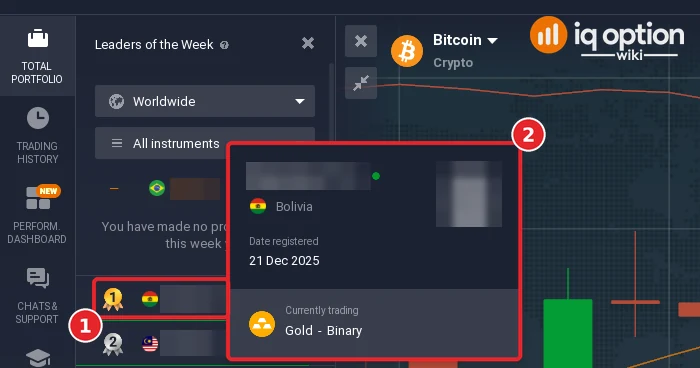
- Trader popup: country, date registered and the asset and instrument being traded now. No balance, strategy or trades.
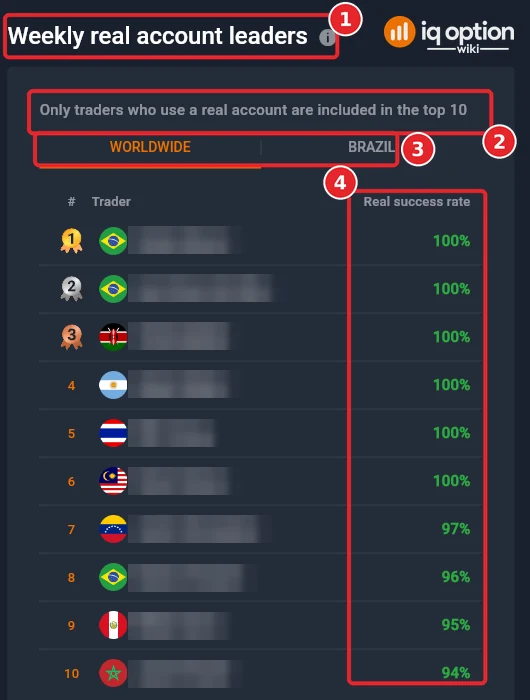
- A different ranking: the Performance dashboard has Weekly real account leaders, a top 10 ranked by real success rate.
Unveiling the IQ Option Leaderboard
Who earns the most on IQ Option in a week? The Leaders of the Week panel is IQ Option’s own answer: one list, one dollar figure per trader, with the region and the instrument you choose. It is a quick way to see where traders in your country are active. It is not a record of net results, and it says nothing about how a figure was earned.
Why the IQ Option Leaderboard Matters
Many new traders want to know whether people really make money on a platform. The leaderboard shows that some real accounts closed large profitable trades in a week. It does not show how many of their trades lost, how much they deposited or whether they ended the week ahead. Read it as a ranking of gross profit, as IQ Option labels it, and nothing more.
Key Features of the IQ Option Leaderboard
- Compare your position: your own row sits above the list. On our Practice account it showed a dash, $0.00 and the line “You have made no profitable trades this week yet”.
- Filter the list: by Worldwide, In Your Country or one country, and by All instruments, Forex, CFD, Crypto or Options.
- See what a ranked trader is trading: the popup of a trader names the asset and the instrument they are trading at that moment, for example “Gold – Binary”.
- Look at a second ranking: the Performance dashboard has its own top 10 of real accounts, ranked by success rate instead of profit.
What Is the IQ Option Leaderboard?
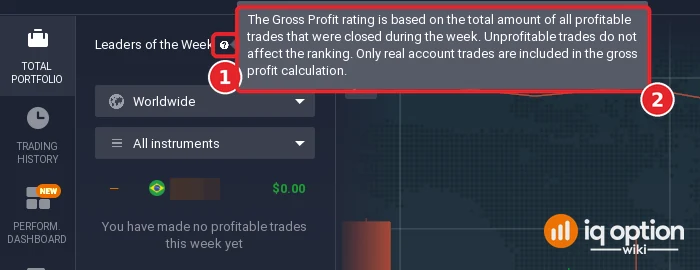
The panel is called Leaders of the Week. A question-mark icon next to the title explains how it ranks. The text on 5 October 2026 read: “The Gross Profit rating is based on the total amount of all profitable trades that were closed during the week. Unprofitable trades do not affect the ranking. Only real account trades are included in the gross profit calculation.”
That gives a short list of what the figure includes and leaves out:
| Counted in the ranking | Not counted |
|---|---|
| Profitable trades that were closed during the week | Losing trades: they do not reduce the figure |
| Trades on a real account | Trades on a Practice account |
| The total amount of all those profitable trades | Net profit, deposits, withdrawals and open positions |
IQ Option does not say on the panel when the week starts or ends. The Performance dashboard, opened on Monday 5 October, headed its own weekly statistics “October 5 – October 11”. We cannot tell whether the leaderboard uses the same dates.
How to Use the IQ Option Leaderboard Effectively
The steps follow the panel from top to bottom. The numbers in each screenshot match the numbers in the text.
Step 1: Open Leader Board
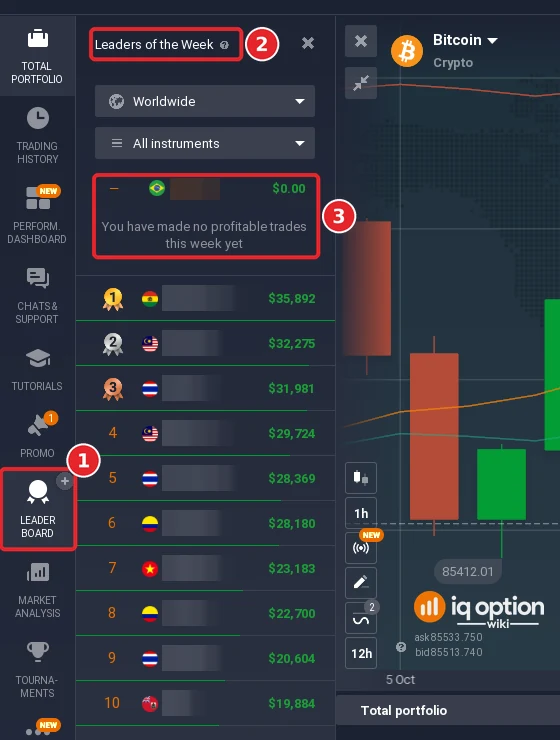
Click Leader Board in the left sidebar (1). The Leaders of the Week panel opens (2). Under the two filters your own position is shown (3), and below it the list: rank (gold, silver and bronze medals for the first three), country flag, shortened name and the weekly gross profit in dollars. On 5 October the worldwide list started at $35,892 for first place and showed $19,884 for tenth.
Step 2: Read the rule behind the ranking
Point at the question mark next to the title (1). A tooltip (2) explains the rating: only profitable trades closed during the week count, losing trades do not affect the ranking, and only real account trades are included. Because losses are left out, a trader who closed $10,000 of winning trades and $9,000 of losing ones would be listed with $10,000.
Step 3: Check Your Ranking Globally and Locally
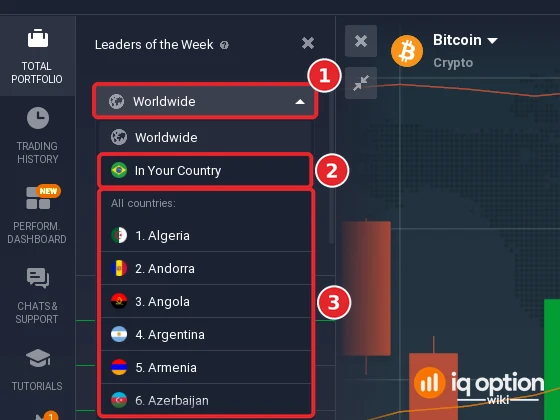
Open the first filter (1). Worldwide lists traders from every country. In Your Country (2) lists traders from the country of your account: our account is registered in Brazil, so it showed Brazilian flags. Below them, All countries (3) lists the countries with a number. The first six entries are Algeria, Andorra, Angola, Argentina, Armenia and Azerbaijan, in alphabetical order, so the numbers are positions in the list, not a ranking of countries.
Step 4: Filter by instrument
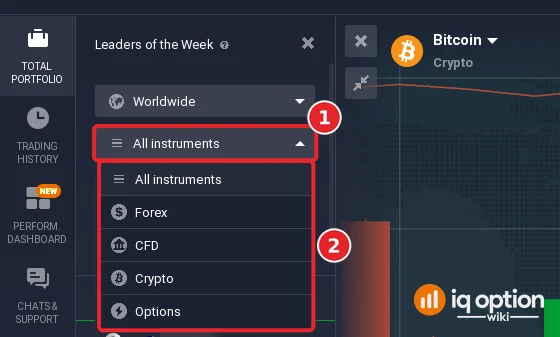
Open the second filter (1). The choices (2) are All instruments, Forex, CFD, Crypto and Options. The list then shows the traders ranked by their gross profit in that group only.
Step 5: Click a trader to see what the popup shows
Click a trader in the list (1). A popup opens next to the list (2). It shows the trader’s name and picture, the country, the date the trader registered and, under “Currently trading”, the asset and the instrument, here “Gold – Binary”. It shows no balance, no strategy and no list of trades, so the leaderboard cannot teach you how a figure was earned. The popup in our screenshot has the name and the picture blurred.
Step 6: Combine the filters
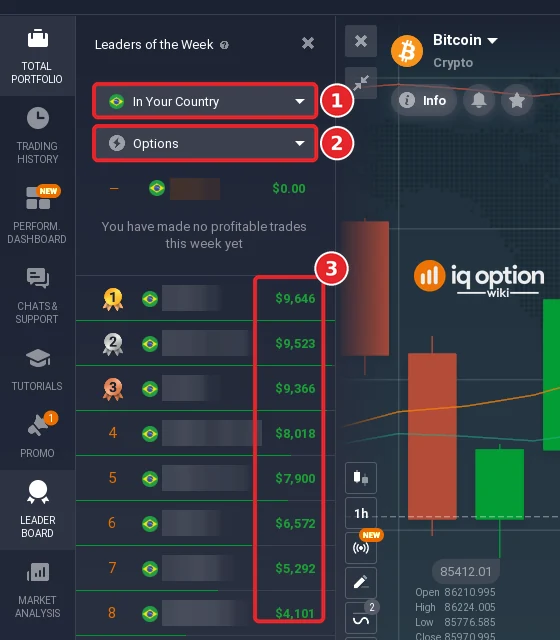
The two filters work together. With In Your Country (1) and Options (2) set, the list showed only Brazilian traders ranked by their gross profit in options, with the amounts in the right-hand column (3). If you change a filter, the list and its ranks change with it. Scroll down for more places; a Back to Top button appears when you do.
Step 7: Compare with the Performance dashboard
The Performance dashboard in the left sidebar has a second, different ranking. Weekly real account leaders (1) is a top 10, and the note under it says “Only traders who use a real account are included in the top 10” (2). It has Worldwide and country tabs (3) and ranks by Real success rate (4), not by profit. IQ Option’s blog describes this column as the traders’ win rates. The panel next to it is titled “Options success rate” with a “CFD soon” tag. On 5 October the first six places all showed 100%, so a high rate in a short week says little about how much a trader earned.
Leaderboard vs. IQ Option Tournaments
The leaderboard and the tournaments are separate features:
| Point | Leaders of the Week | Tournament |
|---|---|---|
| How you take part | You do not join: any real account trade counts | You pay an entry fee and receive a tournament account |
| What is ranked | Gross profit of the week on real accounts | The money in each tournament account at the end |
| Prizes | None listed on the panel | A prize pool shared among the traders who finish highest, which IQ Option pays into their real accounts |
The tournament rules come from IQ Option’s Help and its tournament terms; see our IQ Option tournaments guide for the entry fee, rebuys and the prize table of a tournament we opened.
Pros and Cons of the IQ Option Leaderboard
Pros:
- It is free to open, on a Practice account too.
- It shows the weekly gross profit figures by country and by instrument in one place.
- A trader’s popup names the asset and the instrument they are trading now.
Cons:
- It ranks gross profit only. Losing trades are not shown, so a high figure can sit next to a large net loss.
- Practice trades are not counted, so you cannot rank by practising.
- It shows no strategy, no entry prices and no list of trades.
- The figures are IQ Option’s own data. We could not check them, and the names are shortened.
Tips for Success with the IQ Option Leaderboard
- Do not copy what you see: a popup names the asset and the instrument, not the direction, the size or the exit. It cannot be a signal.
- Remember what is missing: losses do not appear, so judge your own trading by your net result and your risk limits, not by a gross figure.
- Use the success rate with care: the Performance dashboard ranks by win rate, which ignores how large the wins and losses were.
- Practise first if you are new: a Practice account uses virtual money; see how to open one. Trading real money can lose all of the money you put in.
Frequently Asked Questions
Q: How do I improve my leaderboard ranking?
A: IQ Option publishes only how the rating is calculated: the total of all profitable trades closed during the week on a real account. To appear at all you need a real account and at least one profitable closed trade that week; until then the panel shows “You have made no profitable trades this week yet”. A higher place means a larger total of winning trades, which means risking more real money, and losses do not show on the list. IQ Option gives no advice on climbing it and we promise no result.
Q: Can I view net profits on the leaderboard?
A: No. The panel shows one dollar figure per trader, the gross profit, and its tooltip says unprofitable trades do not affect the ranking.
Q: What’s the difference between the leaderboard and tournaments?
A: The leaderboard ranks gross profit on real accounts for the week and you do not join it. A tournament is a competition you enter for a fee, with its own tournament account and a prize pool.
Q: Is the leaderboard available on all account types?
A: You can open it on a Practice account, as we did, but only real account trades are counted. IQ Option’s blog says the same for the Leaders of the Week section of the Performance dashboard: results on a “demo account” are not counted.
Q: What can I see about another trader?
A: A shortened name, a country flag and, in the popup, the country, the date registered and the asset and instrument they are trading now. We blurred names and pictures in the screenshots.
Q: What is “Weekly real account leaders” on the Performance dashboard?
A: A separate top 10 of traders on real accounts, with Worldwide and country tabs, ranked by real success rate instead of gross profit.
Continue Learning
Conclusion
The IQ Option leaderboard is a list of weekly gross profit on real accounts, with filters for region and instrument and a popup that names the asset a trader is using. It is useful for seeing what other traders in your country are active in, and it is a poor measure of skill or of net results because losses are not counted. Open it from Leader Board in the traderoom, read the tooltip, and treat the figures as IQ Option’s own data, which we could not check. For the rest of the traderoom, see the IQ Option interface guide.