Contents
- 1 How to Open IQ Option Demo Account
- 2 The Practice account in October 2026
- 3 Why Open a Demo Account First?
- 4 Demo Account Features
- 5 Who Should Use the Demo Account?
- 6 How to Register an IQ Option Demo Account
- 7 How to Reset Your Demo Account Balance
- 8 How to Switch Between Demo and Real Accounts
- 9 Available Trading Devices
- 10 Available Assets
- 11 Technical Analysis Tools
- 12 Why Choose IQ Option
- 13 Pros and Cons of Demo Accounts
- 14 Demo Account Features Summary
- 15 Conclusion
- 16 Frequently Asked Questions
- 17 GENERAL RISK WARNING
Last updated: 4 October 2026. The process was re-recorded on the platform on that date.
How to Open IQ Option Demo Account
Key Takeaways
| –The IQ Option demo account provides $10,000 in virtual funds for risk-free practice. |
| –The practice balance can be topped up or set to a custom amount at any time. |
| –The Practice account uses the same platform, assets and indicators as the real account. |
| –Switch between demo and real accounts instantly with one click. |
IQ Option is one of the leading trading platforms with over 12 years of operation since 2013. One of its biggest advantages is the free demo account that allows you to learn the platform and practice trading strategies without risking real money.
If you have been thinking about trading financial markets, the demo account is where you should start. Many new traders rush into real trading without proper practice and end up losing money. The demo account helps you avoid this mistake.

A free IQ Option demo account is a complete copy of the live trading account. It uses the same interface, tools, and market data. The only difference is that you trade with virtual money instead of real funds.
Access IQ Option Demo AccountThe Practice account in October 2026
- After registration the platform opens on the Practice account with $10,000. A first-login window asks about your experience: Teach me how to trade or I know how it works (interface tour only).
- The balance menu at the top right shows the Practice account and your real account (in your local currency; Mexican pesos for our account).
- Top Up restores the practice balance, and the pencil icon lets you set a custom practice balance.
- Practice trades show the same payout per asset as the platform; in our recorded Practice trades of 2 October 2026 wins paid 82–88%.
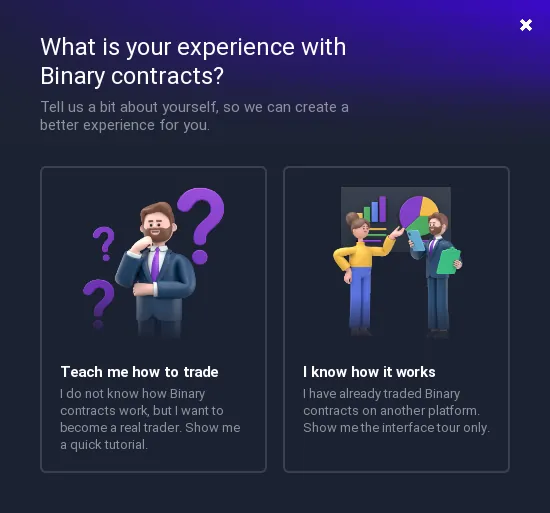
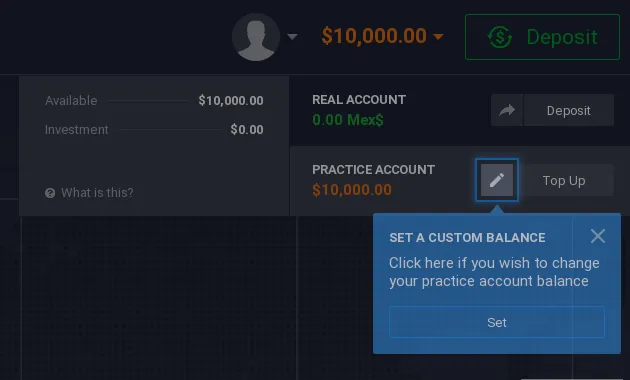
Recorded by IQ Option Wiki on 4 October 2026 on a Practice account registered in Mexico, so payment pages show Mexican methods. Options, payouts and fees depend on your country and can change; personal data in the screenshots is hidden.
Why Open a Demo Account First?
The demo account is essential for several reasons:
- Risk-free learning: Make mistakes without losing real money
- Platform familiarity: Learn the interface before trading live
- Strategy testing: Test trading strategies before risking capital
- Evaluation: Assess how the platform executes orders
- Skill development: Build money management skills
Demo Account Features
The demo account includes everything available on real accounts:
- $10,000 in virtual funds (refillable unlimited times)
- The same assets as the real account (697 margin instruments and about 130 assets per option type in October 2026)
- 100+ technical indicators
- 4 chart types (candlesticks, bars, lines, Heikin-Ashi)
- Multiple timeframes from 5 seconds to monthly
- Drawing and graphical analysis tools
- Up to 9 charts simultaneously
- Market news and economic calendar
- 24/7 customer support access
- Video tutorials and educational resources
 View up to 9 charts simultaneously
Who Should Use the Demo Account?
Beginners: Learn platform basics, understand how orders work, and practice without risk.
Experienced traders: Test new strategies, evaluate different assets, and try new indicators before using real money.
The demo account is not a toy – treat it seriously. Practice with the same discipline you would use with real money, and the skills will transfer to live trading.
How to Register an IQ Option Demo Account
Step 1: Visit the IQ Option website and click “Sign Up”
Step 2: Enter your email address and create a password
Step 3: Your account is created with access to both demo and real accounts
 Register using the form on the website
After registration the platform opens on the Practice account with $10,000. A first-login window asks whether you want a tutorial or only the interface tour.
How to Reset Your Demo Account Balance
If you spend all your virtual funds, you can refill them instantly:
- Click on your account balance
- Click the “Deposit” button on the demo account
- Your balance resets to $10,000
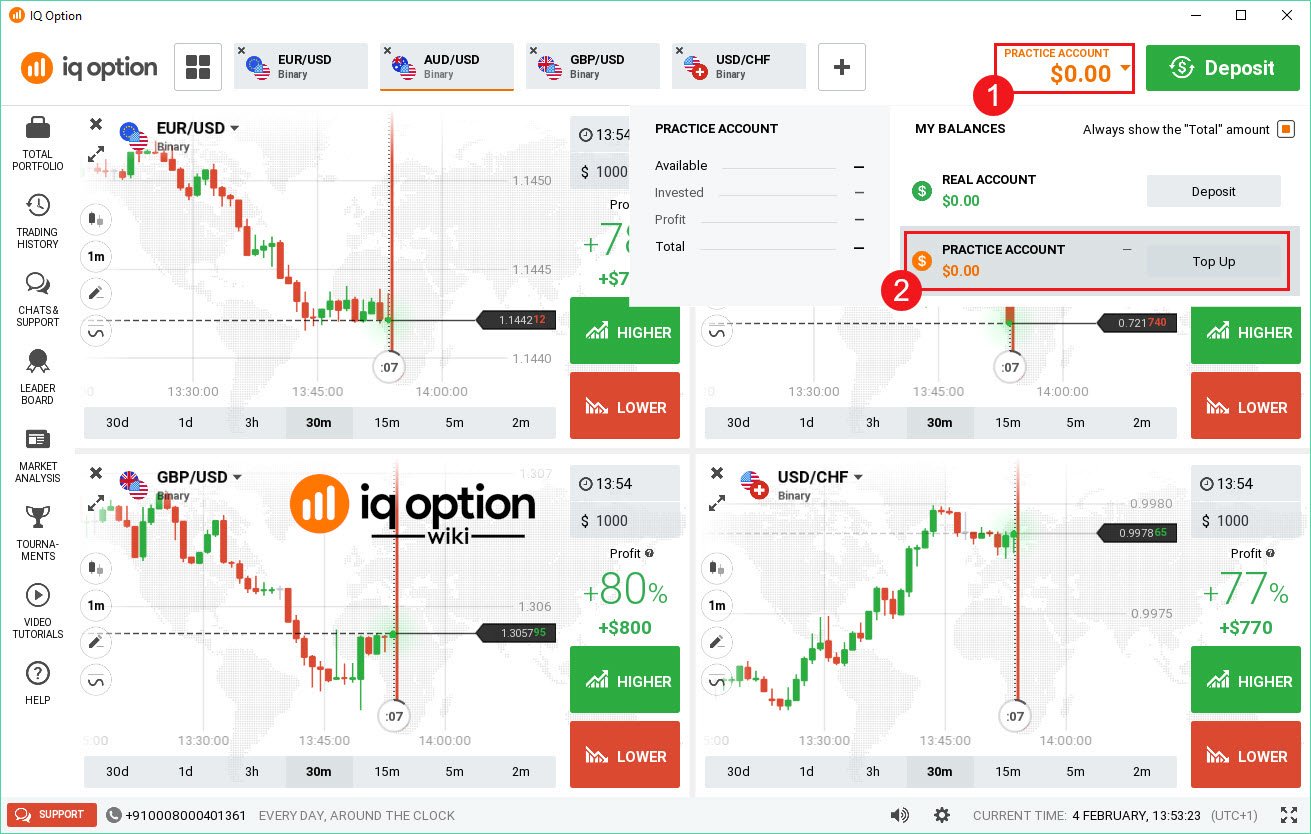
You can reset unlimited times – there is no limit on demo account usage.
How to Switch Between Demo and Real Accounts
Switching is simple:
- Click on your balance at the top of the screen
- Select “Demo Account” or “Real Account”
 Switch between accounts with one click
This allows you to test a strategy on demo, then immediately switch to real trading to implement it.
Available Trading Devices
Trade on any device:
- Desktop: Windows and macOS applications
- Web: Browser-based trading (no download needed)
- Mobile: iOS and Android apps

The desktop app works well even with slower internet connections. All platforms sync automatically – open a trade on mobile and manage it on desktop.
Available Assets
IQ Option offers 300+ tradable assets:
- Forex currency pairs
- Stock CFDs from global companies
- Cryptocurrency CFDs (Bitcoin, Ethereum, etc.)
- Commodities (gold, oil, silver)
- ETFs
- Indices
- Options (where available)
 300+ financial instruments available
Technical Analysis Tools
The platform provides professional analysis tools:
Chart Types:
- Japanese candlesticks
- Bar charts
- Line charts
- Heikin-Ashi charts
Indicators (100+):
- Trend indicators
- Momentum indicators
- Volatility indicators
- Volume indicators
- Moving averages
 100+ technical indicators available
 Graphical analysis tools
Why Choose IQ Option
 Reasons to choose IQ Option
- 12+ years operation: Established platform since 2013
- Free unlimited demo: No time limits, refillable virtual funds
- Low minimum deposit: Only $10 to start real trading
- Multiple devices: Trade on web, desktop, and mobile
- Security: Encrypted platform with secure fund handling
- 24/7 support: Help available whenever you need it
Pros and Cons of Demo Accounts
Pros:
| Cons:
|
Demo Account Features Summary
| Feature | Details |
|---|---|
| Virtual Funds | $10,000 (refillable unlimited times) |
| Time Limit | None – use indefinitely |
| Tradable Assets | 300+ (same as real account) |
| Technical Indicators | 100+ (same as real account) |
| Platform Access | Web, desktop, and mobile |
Conclusion
The IQ Option demo account is an essential tool for learning to trade. Whether you are a complete beginner or an experienced trader testing new strategies, the demo account provides a risk-free environment with full platform functionality.
Recommended approach:
- Register for a free account
- Practice on demo until you are consistently profitable
- Only then consider trading with real money
- Start with small positions when you go live
Sign up today and start practicing with the demo account.
Good luck!
📚 Continue Your Trading Education
Build your trading knowledge with our comprehensive guides:
Frequently Asked Questions
Q: Can I lose real money on the demo account?
A: No, you trade with virtual funds only. There is no risk of losing real money.
Q: How long can I use the demo account?
A: There is no time limit. Use it as long as you need to practice.
Q: Are trading conditions the same as real accounts?
A: Yes, the demo replicates real market conditions with the same tools and features.
Q: Can I switch between demo and real accounts?
A: Yes, switch instantly by clicking on your balance at the top of the screen.
Q: Is the demo account available on mobile?
A: Yes, the demo account works on all devices including iOS and Android.
Q: What happens when my demo balance runs out?
A: Click the deposit button on your demo account to reset it to $10,000. You can do this unlimited times.